
Zoom LiveTrak L-8 Review: Podcast Console Worth It in 2026?
Zoom LiveTrak L-8 Review: Is This Podcasting Console Worth It in 2026?
There's a moment every podcaster hits eventually. You've been recording into a laptop with a USB mic, juggling Zoom calls and Audacity, and something goes wrong — a guest's audio clips, the phone caller echoes back on themselves, or you realise all four voices got bounced into a single unfixable stereo file. That's usually the moment someone starts searching for a dedicated podcast console.
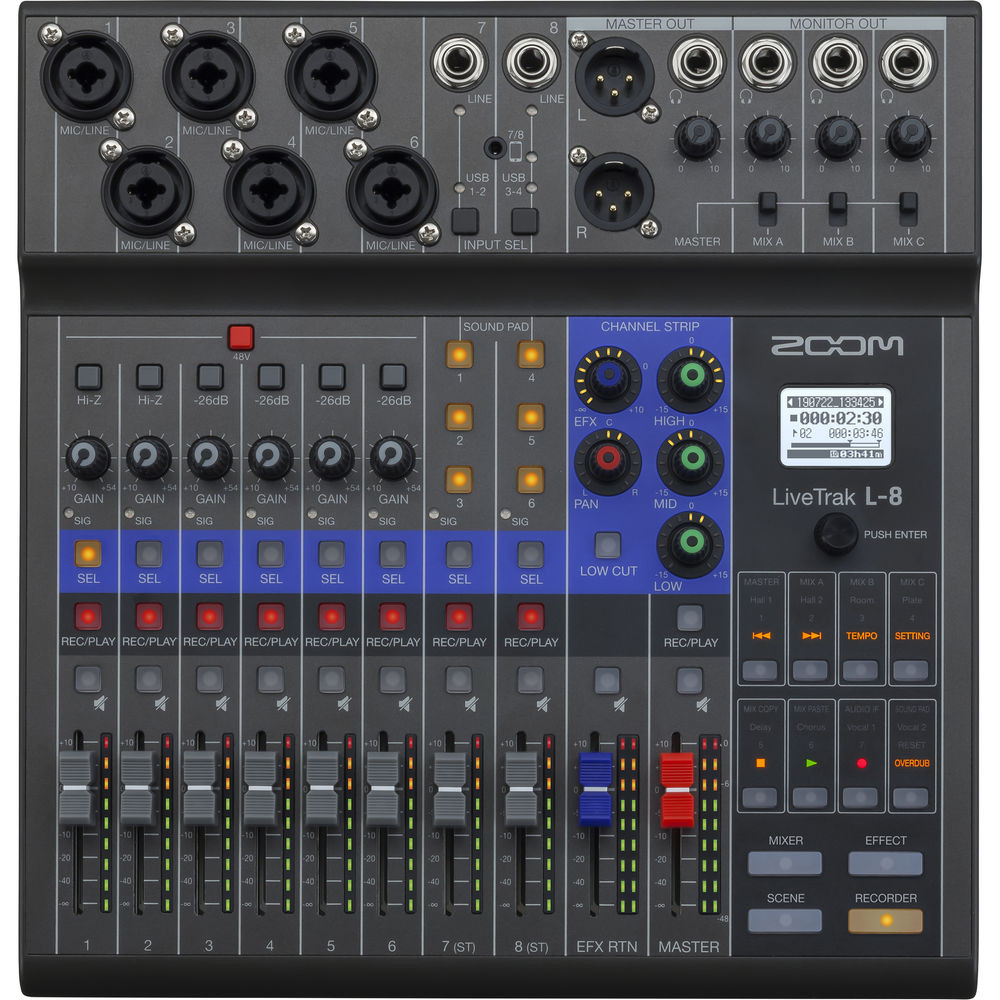
The Zoom LiveTrak L-8 sits right at the centre of that search. It's a compact eight-channel mixer, a 12-track multitrack recorder, a USB audio interface, and a sound-effects board all in one box roughly the size of a laptop. It was designed almost explicitly for podcast production, and it solves a specific set of problems very well. It also has some real limitations that nobody mentions in the product blurb.
This guide covers what the L-8 actually does, who it genuinely suits, where it falls short, and how it compares to the alternatives available in Australia — so you can work out whether it's the right piece of kit for your setup or whether your money is better spent elsewhere.
What the LiveTrak L-8 Actually Is
Zoom's LiveTrak line started with the L-12, a larger desk aimed at recording bands. The L-8 is the podcast-focused sibling: fewer channels, but a feature set specifically shaped around the way spoken-word content gets made.
At its core you get six mono XLR/TRS combo inputs with Zoom's mic preamps, plus a stereo pair (channels 7/8) that can accept line-level sources, a smartphone via TRRS, or Bluetooth. Every channel gets its own fader, and every channel — plus the master mix — records to an SD card simultaneously. That's the headline feature: 12-track simultaneous recording at 44.1kHz/16-bit or 24-bit, giving you a separate file per voice so you can fix one person's levels in post without touching anyone else's.
Around that sit the podcast-specific extras: four assignable sound pads with three banks each (nine playable sounds total per bank set), individual headphone outputs for four people with independent mix control, and a genuinely clever mix-minus implementation on the phone channel.
Key Specifications
| Specification | Detail |
|---|---|
| Input channels | 6 × mono XLR/TRS combo, 1 × stereo (ch 7/8) |
| Mic preamps | 6, with 48V phantom power (switchable in pairs) |
| Preamp gain | Up to +50 dB (mic input) |
| Recording | 12 tracks simultaneous to SD/SDHC/SDXC (up to 512GB) |
| Sample rate | 44.1 kHz, 16-bit or 24-bit WAV |
| USB audio interface | 12-in / 4-out, class compliant (Mac/iOS), driver required for Windows |
| Headphone outputs | 4 independent, each with its own mix |
| Sound pads | 4 pads × 3 banks, 13 preset sounds, WAV import supported |
| Smartphone connection | TRRS jack with automatic mix-minus |
| Bluetooth | Optional BTA-2 adapter (sold separately) |
| Effects | Compressor and limiter per channel, low-cut filter |
| Power | USB bus power, AC adapter, or 4 × AA batteries |
| Dimensions | Approx. 260 × 175 × 47 mm |
| Weight | Approx. 1.0 kg (without batteries) |
Considering one? View current Zoom LiveTrak L-8 pricing and availability with delivery across Australia.
The Four Features That Actually Matter
Spec sheets flatten everything into equal-weight bullet points. In practice, four things on the L-8 change how you work. The rest is nice-to-have.
1. Mix-Minus That You Don't Have to Think About
This is the big one, and it's worth understanding properly because it's the single most common technical failure in remote podcast interviews.
When you connect a phone to a mixer and send the mixer's output back to the phone, the caller hears their own voice returned with a delay. It's disorienting enough that most people can't speak coherently through it. The fix is a "mix-minus" — a feed containing everything except the caller's own signal.
On a traditional analogue mixer, you build this manually using aux sends, which means understanding pre-fader routing and getting every channel's aux level right. It's fiddly and easy to get wrong under pressure. The L-8 handles it automatically on channels 7/8: plug a phone into the TRRS jack, and the console sends the caller a mix of everything but themselves. No configuration, no aux maths.
If you regularly bring in remote guests by phone, WhatsApp, or a mobile call, this alone can justify the purchase. It removes an entire category of technical anxiety from your recording sessions.
2. Genuine Multitrack Recording, No Computer Required
Recording each mic to its own file is the difference between salvageable audio and wasted sessions. If your co-host leans into the mic and clips while your guest mumbles at half volume, separate tracks let you fix both independently. A single stereo mix does not.
The L-8 records all 12 tracks to SD card with nothing plugged into it but power. That matters more than it sounds. It means you can record in a café, a hotel room, a car park, or a client's office without carrying a laptop. It also means a computer crash mid-session doesn't cost you the recording — the SD card keeps rolling regardless.
Belt-and-braces operators run both at once: SD card recording as the primary capture, USB into a DAW as a simultaneous backup. The L-8 does this without complaint.
3. Four Independent Headphone Mixes
Four separate headphone outputs, each with its own mix, sounds like a minor convenience. It isn't. In a four-person conversation, the person who talks loudest usually needs less of themselves in the cans, and the quiet guest needs more of everyone else. Being able to hand each participant a mix that suits them makes the conversation flow better, which shows up directly in the finished audio.
It also means the person operating the console can monitor the sound pads and the phone caller at a level that helps them run the show, without forcing that same balance on everyone else.
4. Sound Pads You Can Actually Load Yourself
The four pads across three banks give you nine assignable slots (plus presets). Zoom includes 13 built-in sounds — applause, drum rolls, the usual — but the useful part is loading your own WAV files from the SD card. Your intro sting, your ad reads, your sponsor tag, your outro bed. Firing these live means less editing later, and it gives a live-to-air feel that's hard to fake in post.
One practical note: the pads have three colour-coded banks, and under pressure it's easy to hit the wrong one. Most people settle on a fixed layout and stop moving things around after the first few episodes.
Honest Limitations You Should Know About
The L-8 is a well-designed tool with a clear purpose, but it makes specific trade-offs. Being clear-eyed about them saves disappointment.
44.1kHz Only — No 48kHz
This is the limitation most likely to catch people out. The L-8 records at 44.1kHz only. For pure audio podcasts that's completely fine — 44.1kHz is the CD-standard rate and every podcast platform handles it without issue.
But video production standard is 48kHz. If you're recording a video podcast and syncing audio to camera footage, you'll need to convert, and mismatched sample rates are a well-known source of gradual audio drift over long recordings. Modern editors handle the conversion competently, but it's an extra step and an extra place for something to go wrong. If video is central to what you're making, this is a genuine consideration — and it's worth noting that the newer LiveTrak L-8's sibling models and several competitors do support 48kHz.
No EQ Beyond a Low-Cut Filter
Each channel has a compressor, a limiter and a low-cut filter — but no tone controls. There's no way to dial out a boxy room resonance or add presence to a dull-sounding mic at the desk. Everything tonal happens in post.
For a multitrack workflow this is arguably the right call. You capture clean, uncoloured signal and shape it later with better tools than any onboard three-band EQ would offer. But if you're recording live-to-stream with no post-production stage, the absence is real.
Six Mic Inputs, Not Eight
The name says L-8, and there are eight channels — but only six of them take microphones. Channels 7 and 8 are a stereo line/phone/Bluetooth pair. If you're planning a six-person round table plus a phone guest, you're already at capacity. Seven mics is not possible.
For most podcasts this is plenty. Two to four voices covers the overwhelming majority of shows. But check your realistic maximum guest count before buying, because there's no expansion path.
Preamps Are Good, Not Exceptional
Zoom's preamps here are clean and quiet at sensible gain settings, and they'll happily drive most condenser and dynamic podcast mics. Where they show their limits is with notoriously gain-hungry dynamics — the Shure SM7B being the classic example, which wants somewhere north of 60 dB to sit comfortably. At +50 dB maximum, the L-8 can run an SM7B but you'll be pushing the preamp near the top of its range, where noise becomes more noticeable on quiet speakers.
The standard fix is an inline gain booster (a Cloudlifter, FetHead or similar), which adds around 25 dB of clean gain ahead of the preamp. Budget for one if an SM7B or Electro-Voice RE20 is in your plan. Pair the L-8 with a moderately sensitive dynamic like an SM58 or a decent large-diaphragm condenser and the issue disappears entirely.
Windows Requires a Driver
On Mac and iOS the L-8 is class-compliant — plug it in and it works. On Windows you need Zoom's ASIO driver for full multichannel USB operation. It's a free download and it installs fine, but it's a step, and driver updates occasionally lag behind major Windows releases. Worth knowing if you're a Windows user who expects plug-and-play.
Who the L-8 Is Right For
After weighing all of that, the picture is fairly clear.
It's an excellent fit if you:
- Record two to four people in the same room on a regular basis
- Bring in remote guests by phone and want mix-minus handled automatically
- Want to record without a computer, or want SD backup alongside your DAW
- Fire intros, stings and ad reads live rather than editing them in
- Record in varying locations and value battery operation
- Want a hardware desk with real faders instead of clicking around in software
Look elsewhere if you:
- Produce video podcasts where 48kHz audio is essential to your workflow
- Need more than six microphone inputs
- Record solo and never have in-person guests — a good USB interface costs far less
- Rely on SM7Bs without inline gain boosters
- Need onboard EQ for live-to-stream broadcast with no post stage
- Want built-in Bluetooth (the BTA-2 adapter is a separate purchase)
How It Compares in the Australian Market
The podcast hardware category has become genuinely competitive. Here's how the main options stack up on the things that actually differ.
| Feature | Zoom LiveTrak L-8 | Zoom PodTrak P4 | Rode RODECaster Pro II | Zoom LiveTrak L-12 |
|---|---|---|---|---|
| Mic inputs | 6 | 4 | 4 | 8 |
| Headphone mixes | 4 independent | 4 (shared mix) | 4 independent | 5 independent |
| Multitrack to SD | 12 tracks | Yes | Yes (microSD) | 14 tracks |
| Sample rate | 44.1 kHz | 44.1 kHz | 48 kHz | 44.1/48/96 kHz |
| Onboard EQ | Low-cut only | Limiter only | Full parametric + APHEX processing | 3-band per channel |
| Faders | Yes, physical | No (knobs) | Yes, physical | Yes, physical |
| Sound pads | 4 × 3 banks | 4 pads | 8 × multiple banks, touchscreen | No |
| Mix-minus | Automatic (TRRS) | Automatic (TRRS) | Automatic (multiple sources) | Manual via aux |
| Battery power | 4 × AA | 2 × AA | No | No |
| Relative price | Mid | Entry | Premium | Mid-high |
Reading That Table Honestly
Against the Zoom PodTrak P4: The P4 is substantially cheaper, smaller and lighter, and covers four mics with automatic mix-minus. If you're a two-person show on a budget who records in one place, the P4 does the core job for meaningfully less money. What you give up is faders (the P4 uses knobs, which is slower to operate live), two mic inputs, and per-person headphone mixes. The L-8 is the upgrade when you outgrow those.
Against the Rode RODECaster Pro II: This is the real decision for most buyers. The RODECaster is more expensive but records at 48kHz, includes serious onboard processing (parametric EQ, de-esser, noise gate, APHEX enhancement), and has a touchscreen that makes sound-pad management far easier. It's the better choice for video podcasts and for anyone who wants processed audio straight out of the box. The L-8's advantages are six mic inputs versus four, battery operation, and a lower price. If you never leave the studio and video is part of your output, the RODECaster earns its premium. If you record in the field and need more mics, the L-8 wins.
Against the Zoom LiveTrak L-12: The L-12 is the band-recording tool that happens to work for podcasts — eight mic inputs, three-band EQ per channel, and 48/96kHz support. It's bigger, heavier and lacks the L-8's automatic mix-minus and sound pads. If you're recording music as well as talk, look at the L-12. If it's talk-focused, the L-8's podcast features are worth more than the L-12's extra channels.
Ready to move? Shop the Zoom LiveTrak L-8 — genuine Australian stock with local warranty support.
Practical Setup Advice
A few things that make the difference between a console that works and one that frustrates you.
Get the SD Card Right
Writing 12 simultaneous WAV streams is a real sustained-write load. Use a Class 10 or UHS-I card from a reputable brand and format it in the L-8 itself rather than on your computer — Zoom's format routine sets up the card the way the recorder expects. A 32GB card holds several hours of 12-track 24-bit audio, which is more than enough for typical episodes. Keep a spare in the bag.
Set Gain Before Anything Else
Get each speaker talking at their natural volume and set input gain so peaks land around −12 dB on the meters. That leaves headroom for the moment someone laughs loudly or leans in. Only then bring in the channel compressor — it's there to catch transients, not to rescue a badly set gain stage.
Use the Low-Cut on Every Voice Channel
Room rumble, desk bumps, air conditioning and traffic noise all live below about 80 Hz, and none of it contributes anything to speech intelligibility. Engaging the low-cut on every mic channel cleans up the recording noticeably before you've done any editing at all.
Record the Backup Even When You Don't Need It
Run SD and USB simultaneously as standard practice. It costs nothing and it's saved plenty of interviews. Guests who travel to you rarely agree to come back.
Powering It in the Field
The L-8 runs on four AAs, but phantom power drains batteries quickly — if you're using condenser mics, expect noticeably shorter runtime than with dynamics. For location work with condensers, a USB power bank is more reliable than batteries. For dynamic mics with no phantom power, AAs will get you through a session comfortably.
Buying in Australia: What to Consider
A few AU-specific points worth factoring in.
Warranty and support. Buying from an authorised Australian dealer means local warranty service and Australian Consumer Law protections. Grey-import units sourced from overseas may be cheaper up front, but warranty claims typically mean shipping the unit back to the country of purchase at your own cost — which erases the saving on the first fault.
Power supply. Imported units sometimes ship with US or EU plugs. Australian stock comes with the right adapter, or you'll be running USB power. Worth checking before you buy from anywhere unusual.
Budget for the extras. The console alone doesn't make a podcast. Realistically you'll also need microphones, XLR cables (one per mic), headphones for each participant, boom arms or stands, and an SD card. If you're using an SM7B, add an inline gain booster. Factoring the whole chain into your budget from the start avoids the common trap of buying a good console and pairing it with mics that undermine it.
The BTA-2 is separate. Bluetooth isn't built in. If you want to take calls or play audio wirelessly, the BTA-2 adapter is an additional purchase. Many people never need it — a wired TRRS connection to a phone is more reliable anyway — but it's worth knowing rather than discovering after delivery.
Common Questions
Can I use the L-8 as a plain USB audio interface?
Yes. It presents as a 12-in/4-out interface, so every channel arrives in your DAW as a separate track. It's class-compliant on Mac and iOS; Windows needs Zoom's ASIO driver. You can record to the SD card and stream over USB at the same time.
Does it work for live streaming?
It does. Send the master mix over USB into OBS, Streamlabs or similar and you've got a clean multi-mic feed with sound effects on tap. The caveat is the lack of onboard EQ — for live streaming with no post-production, you're committing to whatever tone your mics and room give you. Some streamers run a software EQ plugin on the incoming feed to compensate.
Will it handle music recording?
For simple acoustic sessions, demos and songwriting captures, yes — six mic inputs and clean multitrack recording go a long way. For serious music work the 44.1kHz ceiling and lack of channel EQ start to bite, and the LiveTrak L-12 or a dedicated audio interface makes more sense.
How many people can it realistically handle?
Six microphones is the hard ceiling, plus one phone or line source on channels 7/8. In practice, four voices plus a remote guest is the sweet spot — that's where the four headphone mixes and the automatic mix-minus are doing their best work.
Can I import my own sound effects?
Yes. Copy WAV files onto the SD card and assign them to pads. This is how most people use it — intro music, sponsor reads, transition stings and outros loaded and ready to fire.
Is the L-8 still current in 2026?
It's been in the range for several years now, which in this category means the design is mature and well-supported rather than outdated. The core capabilities — multitrack recording, automatic mix-minus, per-person headphone mixes — haven't been superseded at this price point. The 44.1kHz limit is the one place where its age genuinely shows relative to newer competitors.
The Verdict
The Zoom LiveTrak L-8 is a focused tool that does a specific job unusually well: recording multi-person spoken-word content, in a room, with the option of a remote caller, without a computer in the chain.
Its strengths are practical rather than glamorous. Automatic mix-minus removes the single most common technical failure in phone interviews. Twelve-track SD recording means one bad level doesn't ruin an episode. Four independent headphone mixes make conversations flow more naturally. Battery power means you can record wherever the story is. None of that is flashy, but all of it shows up in the finished product.
Its weaknesses are equally specific. The 44.1kHz sample rate makes it a compromise for video work. The absence of channel EQ means it assumes you'll be editing afterwards. Six mic inputs caps your room size. And gain-hungry dynamic mics want a booster in front of the preamp.
If you're producing an audio podcast with two to four regular voices, occasionally bringing in guests by phone, and you want reliable hardware that doesn't depend on a laptop staying alive — the L-8 is one of the most sensible purchases in the category. If your show is video-first, or you need onboard processing for live broadcast, the RODECaster Pro II is worth the extra spend. And if you're a solo host with no in-person guests, honestly, a good USB interface and a decent microphone will serve you better for far less money.
Buy it for what it does well, not for what the spec sheet implies it might do.
Browse the Zoom LiveTrak L-8 at MusiconStage — authorised Australian dealer, genuine stock, local warranty and expert advice on building the rest of your podcast setup.