
Zoom LiveTrak L-8 Podcasting Console: Full Technical Breakdown 2026
Zoom LiveTrak L-8 Podcasting Console: Full Technical Breakdown for Australian Creators
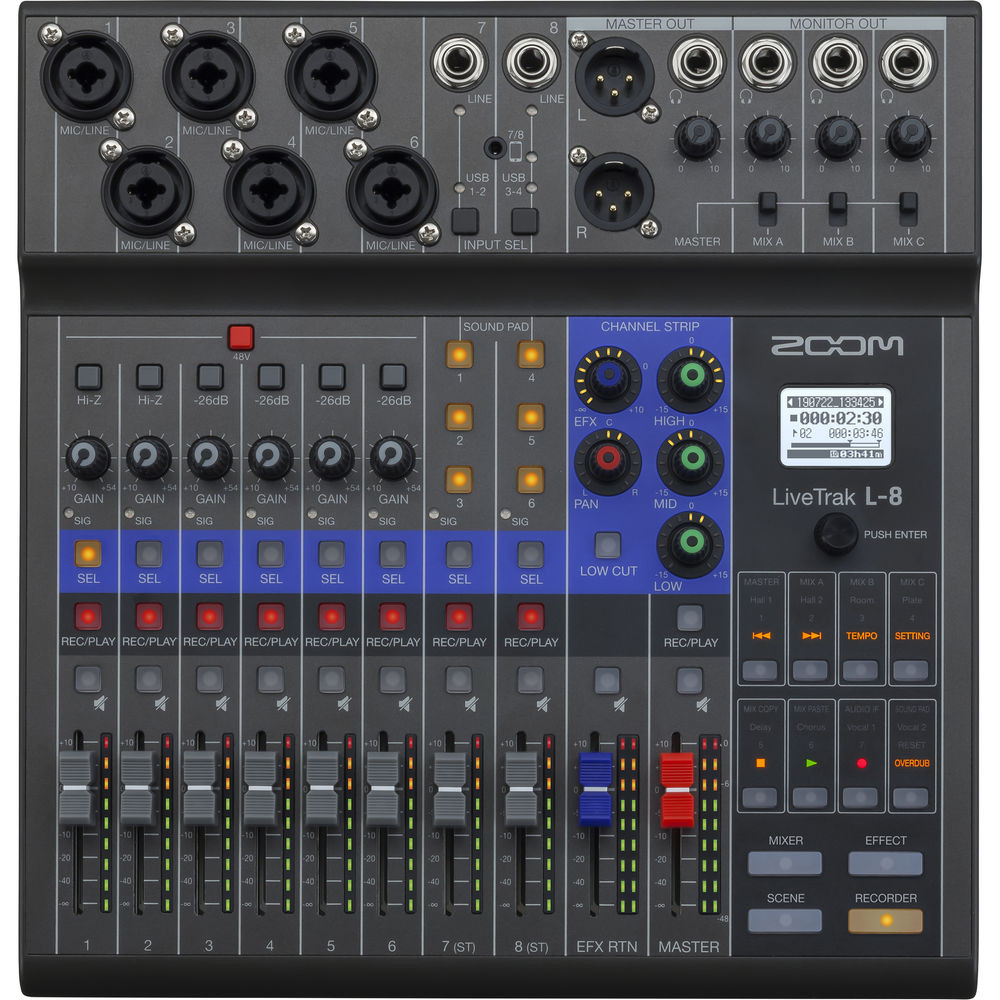
If you've spent any time researching podcasting gear in Australia, you've almost certainly come across the Zoom LiveTrak L-8. It occupies a genuinely unique space in the market — part mixer, part recorder, part sound effects trigger — and nothing else at this price point does quite the same thing. But the question isn't whether it's unique. The question is whether its technical capabilities actually match the way you work.
I've pulled apart the full specification sheet, dug into the signal path architecture, and compared it against the realistic demands of podcast production, live streaming, and small-venue music recording. Here's everything you need to know, with no fluff and no marketing spin.
What the L-8 Actually Is (And What It Isn't)
Let's get the positioning right first. The LiveTrak L-8 is a digital mixing console with an integrated multi-track SD card recorder and USB audio interface. It was designed from the ground up for podcasters and livestreamers, but its architecture makes it surprisingly capable for small music productions too.
What it is not: a purely analogue mixer with a USB bolt-on. Every signal path in the L-8 runs through Zoom's digital processing engine, which means you get consistent, repeatable results. That's a meaningful distinction from cheaper analogue mixers that happen to have a USB output tacked on — those typically only send a stereo mix to your computer, not individual channels.
Complete Technical Specifications
| Specification | Detail |
|---|---|
| Input Channels | 6 mono mic/line + 2 stereo (channels 7/8 phone inputs) |
| Mic Preamps | 6x high-impedance mic preamps (XLR/TRS combo jacks on Ch 1-6) |
| Phantom Power | +48V (switchable per channel pair: Ch 1-2, Ch 3-4, Ch 5-6) |
| Phone Inputs (Ch 7/8) | 2x TRRS 3.5mm for smartphone callers |
| Sound Pads | 6 assignable pads (13 preset sounds + custom WAV loading) |
| Sampling Rate | 44.1 kHz / 16-bit (SD recording) | 44.1 kHz / 16-bit or 24-bit (USB) |
| A/D, D/A Conversion | 24-bit 128x oversampling |
| Recording Tracks | Up to 12 tracks simultaneously to SD card (10 inputs + stereo master) |
| USB Audio Interface | 12-in / 4-out USB 2.0 (class compliant on macOS, driver on Windows) |
| SD Card Support | SD/SDHC/SDXC up to 512GB |
| Headphone Outputs | 4x stereo (3.5mm) with independent level control |
| Main Output | Stereo L/R (6.3mm TRS balanced) |
| EQ | 3-band EQ per channel (Hi, Mid, Lo) |
| Dynamics | Compressor/limiter per channel + master limiter |
| Effects | Send effects (reverb/delay types) |
| Power | AC adapter (DC 5V) or 4x AA batteries |
| Dimensions | 282mm (W) × 249mm (D) × 72mm (H) |
| Weight | Approx. 1.56 kg (without batteries) |
Now, those are the numbers. Let me explain what they actually mean for your workflow.
The Signal Path: Why the Architecture Matters
The L-8's real strength sits in its signal routing, which is far more sophisticated than the price and form factor suggest. Each of the six mic channels runs through its own preamp, then through the digital processing chain (EQ, compressor, effects send), and from there splits into multiple destinations simultaneously:
- The stereo master bus — what comes out of your main outputs and headphones
- Individual SD card tracks — each channel records independently, pre-fader or post-fader
- The USB interface — all 12 channels available as discrete inputs to your DAW or streaming software
This three-way split is critical. It means you can set your live monitoring mix one way, stream a different mix via USB, and still capture every single channel as a separate file on the SD card for post-production editing. For podcasters, this is genuinely transformative — if one host speaks too quietly during recording, you can fix it later without affecting everyone else's track.
The Headphone Mix System
Four dedicated headphone outputs with individual volume control doesn't sound revolutionary until you've tried running a four-person podcast on a mixer with one headphone bus. Every participant hearing themselves and each other at a comfortable level — without the host constantly fielding "can you turn me up?" requests — removes a massive friction point from production.
Each headphone output mirrors the main stereo mix but with independent level control. It's worth noting these are 3.5mm jacks, not 6.3mm, so you'll want a handful of adaptors if your headphones use the larger plug. Minor detail, but worth knowing before your first session.
Mic Preamp Performance: Setting Realistic Expectations
Zoom's mic preamps in the LiveTrak series sit in the "competent and clean" category. They're not going to compete with dedicated preamps from the likes of Focusrite's ISA range or Universal Audio — and at this price, they shouldn't have to. What they do offer is sufficient gain for most dynamic microphones (including the ubiquitous Shure SM58 and SM7B, though the SM7B will benefit from a Cloudlifter or similar inline booster), and clean enough noise performance for condenser mics that you won't hear preamp hiss in a treated room.
The phantom power switching in pairs rather than individually is a minor limitation. If you've got a dynamic mic on channel 1 and a condenser on channel 2, you'll need to make sure the dynamic can handle phantom power (most modern dynamics can, but vintage ribbon mics absolutely cannot). Plan your channel assignments accordingly.
Where the preamps genuinely impress is in their consistency. Because the gain staging is digitally controlled, you get repeatable results session after session. Dial in your levels once, note the settings, and you're sorted for every recording.
The Sound Pads: More Useful Than You'd Think
Six backlit pads that trigger audio files might seem gimmicky at first glance. In practice, they solve a genuine workflow problem. Here's why:
- Intro/outro jingles — trigger your podcast theme without fumbling with a separate playback device
- Transition stings — clean segment transitions without post-production editing
- Sound effects — comedy podcasts, radio-style shows, live streams with audience interaction
- Pre-recorded segments — interviews or sponsor reads that were recorded separately
Each pad can be set to one-shot mode (plays once through), pause mode (stops and resumes), or loop mode. You load your own WAV files via the SD card, which means complete flexibility. The 13 built-in sounds are decent enough for getting started, but most serious users will replace them with custom audio within the first week.
Critically, the sound pad audio gets its own dedicated channel in the mix and the multi-track recording. It doesn't just dump into the master bus with no way to adjust later — it's fully isolated and editable in post.
Phone-In Capability: The Channels 7 and 8 Deep Dive
The two TRRS smartphone inputs on channels 7 and 8 are purpose-built for phone-in guests. Zoom has implemented a mix-minus feed automatically on these channels — meaning the phone caller hears everything except their own voice fed back to them. If you've ever tried rigging up a mix-minus manually on a conventional mixer, you'll appreciate how much headache this eliminates.
The audio quality from phone calls is obviously limited by the phone connection itself (typically 8-16 kHz bandwidth depending on the carrier and whether you're on standard calls or VoIP). The L-8 handles this cleanly, but don't expect miracles — a phone call sounds like a phone call. For higher quality remote guests, you're better off having them record locally and sending the file, or using a high-quality VoIP solution routed through a computer into the USB return channels.
These inputs also work with tablets and other 3.5mm TRRS devices, making them useful as auxiliary stereo inputs for music playback or pre-recorded content if you're not using them for phone guests.
Check current Australian pricing for the Zoom LiveTrak L-8 at MusiconStage
SD Card Recording: The Standalone Safety Net
The integrated SD card recorder is arguably the L-8's most underrated feature. Here's the technical picture:
- Up to 12 simultaneous tracks — channels 1-6 individually, channels 7-8, sound pads as a stereo pair, plus the stereo master mix
- 44.1 kHz / 16-bit WAV files — standard CD quality, universally compatible
- Direct-to-folder recording — each project gets its own folder, automatically numbered
- No computer required — the L-8 functions as a completely standalone recording device
The 16-bit limitation on SD recording is worth discussing. For podcast speech content, 16-bit provides a theoretical dynamic range of 96 dB, which is more than adequate for spoken word and most music applications. The 24-bit option via USB gives you 144 dB of theoretical dynamic range — useful for music recording where you want maximum headroom, but honestly overkill for voice content.
Where the SD recording truly shines is as a redundant backup. Even if your computer crashes mid-session, your USB connection drops, or your streaming software glitches, the SD card keeps rolling. I cannot overstate how valuable this is. One crashed recording session will convince anyone that redundant recording is non-negotiable.
Supported cards go up to 512GB SDXC, which gives you roughly 150+ hours of 12-track recording at 44.1kHz/16-bit. You're not running out of space any time soon. Use a quality card rated at Class 10 or UHS-I minimum — the multi-track write speeds demand it, and a slow card will cause recording errors.
USB Audio Interface: DAW and Streaming Integration
Connected via USB 2.0, the L-8 presents itself as a 12-in, 4-out audio interface. On macOS, it's class compliant — plug in and go, no driver needed. Windows users will need to install the ASIO driver from Zoom's website, which is straightforward.
The 12 input channels over USB mirror what goes to the SD card: individual channels, sound pads, and master mix. The 4 return channels from your computer can be routed back into the mixer, which opens up some clever possibilities:
- Playing back music or pre-recorded content from your DAW into the live mix
- Running software effects processing and monitoring the result through the L-8's headphone outputs
- Routing Skype, Zoom (the software, not the brand), or Discord audio into the mix for remote guests with better quality than the phone inputs
Latency performance is respectable for a device at this price point. At a 256-sample buffer in most DAWs, you'll see round-trip latency around 12-15ms — perfectly workable for monitoring and certainly not an issue for recording and playback applications.
How It Compares: L-8 vs the Competition
The L-8 doesn't exist in a vacuum, so let's put it against the alternatives Australian podcasters and content creators are most likely considering.
| Feature | Zoom L-8 | RØDECaster Pro II | Tascam Mixcast 4 |
|---|---|---|---|
| Mic Inputs | 6 (XLR/TRS combo) | 4 (XLR, Neutrik) | 4 (XLR) |
| Phone Inputs | 2 (TRRS) | 0 (Bluetooth instead) | 1 (TRRS) |
| Sound Pads | 6 | 8 (4 banks = 32) | 8 |
| Multi-track Recording | 12 tracks to SD | 16 tracks to microSD | 14 tracks to SD |
| Headphone Outs | 4 | 4 | 4 |
| On-board Processing | 3-band EQ, comp, effects | Advanced APHEX, effects suite | Auto mixer, EQ, comp |
| Display | LCD segment display | 5.5" colour touchscreen | 5" colour touchscreen |
| Battery Operation | Yes (4x AA) | No | No |
| Approx. AU Price Range | $400-500 | $850-950 | $600-750 |
Where the L-8 Wins
Six mic inputs. If you regularly have more than four people around the table, this is the dealbreaker. Neither the RØDECaster Pro II nor the Tascam Mixcast 4 offers more than four XLR inputs. For panel-style podcasts, roundtable discussions, or small band recordings, the L-8 is in a class of its own at this price.
Battery operation. Four AA batteries give you several hours of portable recording. Take it to a field interview, a remote location, a conference hallway grab — no mains power required. No other serious podcasting console offers this.
Two phone inputs with automatic mix-minus. Running a call-in show or regularly having two remote guests via phone? The L-8 handles it natively without any routing gymnastics.
Price. At roughly half the cost of the RØDECaster Pro II, it's substantially more accessible. For podcasters on a budget — or those just starting out who aren't certain they'll stick with it — the financial risk is considerably lower.
Where It Falls Short
On-board processing. The RØDECaster Pro II's APHEX processing (exciter, big bottom, compressor, noise gate, de-esser, high-pass filter) is in a different league. The L-8's 3-band EQ and basic compressor get the job done, but they're tools, not magic. You'll be doing more work in post-production.
No touchscreen. The L-8's interface is entirely physical controls and a basic LCD. The RØDECaster Pro II and Mixcast 4 both offer colour touchscreens that make configuration, effects selection, and monitoring far more intuitive. The L-8 requires more menu diving through a small display.
16-bit SD recording. Both competitors offer 24-bit recording to their onboard storage. For speech, this rarely matters in practice. For music, it's a genuine limitation if you're using the L-8 as your primary recording device.
No Bluetooth. The RØDECaster Pro II's Bluetooth connectivity for phone calls and music playback is genuinely convenient. The L-8's wired-only approach works fine but feels a step behind in 2026.
Real-World Scenarios: Where the L-8 Excels
The Multi-Host Podcast
Four to six hosts, each with their own mic and headphones, recording weekly. This is the L-8's sweet spot. Everyone gets their own headphone mix volume, every voice records to a separate track, and the SD card backup means you never lose a session. Set it up once, press record, and focus on the conversation.
The Mobile Interviewer
Journalists, documentary makers, and field podcasters who need to record in unpredictable locations. Battery power, compact size (smaller than a laptop), and standalone SD recording mean you can capture broadcast-quality multi-track audio without a computer, a power outlet, or an internet connection.
The Small Venue Livestreamer
Church services, community events, small music venues wanting to livestream. Six mic inputs handle a reasonable band setup or multiple speakers, the USB interface feeds directly to OBS or similar streaming software, and the SD card captures a multi-track backup of the entire event.
The Music Sketchpad
Singer-songwriters and small ensembles who want to capture ideas quickly with multi-track flexibility. It's not a substitute for a proper studio interface and DAW for final production, but for demos, rehearsal recordings, and songwriting sessions, the L-8 is brilliantly efficient.
Technical Considerations Before You Buy
A few things worth knowing that the marketing materials tend to gloss over:
- Gain range. Low-output dynamic mics like the Shure SM7B or Electro-Voice RE20 will want an inline preamp booster (Cloudlifter CL-1, Triton Audio FetHead, or similar). The L-8's preamps have adequate but not exceptional gain range for these particularly hungry microphones.
- No individual channel muting. You can pull a fader down to zero, but there's no dedicated mute button per channel. Minor annoyance for live production where you want to quickly silence a channel between segments.
- Menu navigation. The small display means some settings require multiple button presses to access. Familiarise yourself with the menu structure before your first real session — don't try to learn it live.
- SD card formatting. Always format your SD card in the L-8 itself, not on your computer. The device creates the specific folder structure it needs, and computer-formatted cards can occasionally cause recording errors.
- Firmware updates. Zoom has been solid about firmware updates across the LiveTrak range. Check for the latest version when you first set up — there have been meaningful improvements to stability and features since launch.
View full product details and order the Zoom LiveTrak L-8 from MusiconStage
Build Quality and Portability
The L-8's chassis is predominantly plastic, which keeps the weight down to 1.56 kg but means it doesn't feel as premium as metal-bodied competitors. That said, the build quality is perfectly adequate for desktop and portable use. The faders feel smooth, the knobs have appropriate resistance, and the sound pads are responsive without being oversensitive.
At 282mm wide, it's smaller than most people expect from photos. It'll fit comfortably in a backpack alongside a couple of microphones for mobile recording. The flat, relatively low-profile design (72mm tall) makes it stable on a desk without needing a dedicated stand or mounting solution.
Who Should Buy It — And Who Shouldn't
Buy the L-8 if:
- You regularly record with more than four participants and need individual mic inputs
- You want a standalone recorder that doesn't require a computer
- You need portable, battery-powered podcast or field recording capability
- Your budget sits in the $400-500 AUD range and you want maximum versatility
- You regularly do phone-in interviews and want hassle-free mix-minus
- You value multi-track recording with redundant backup
Look elsewhere if:
- You have four or fewer participants and want superior on-board processing (RØDECaster Pro II)
- You need advanced effects processing without post-production work
- You want a touchscreen interface for faster, more intuitive workflow
- You're recording music primarily and need 24-bit onboard recording and higher sample rates
- You require Bluetooth connectivity for wireless phone calls or music playback
Frequently Asked Technical Questions
Can I use the L-8 as a USB interface and SD recorder simultaneously?
Yes. Both operate independently and simultaneously. This is one of the L-8's strongest features — you get multi-track USB streaming to your computer and multi-track SD card recording as a backup, all at the same time.
Does it work with the Shure SM7B without a preamp booster?
Technically yes, but you'll be running the gain close to maximum, which introduces noise floor issues. An inline booster like the Cloudlifter CL-1 is strongly recommended for gain-hungry dynamic mics. Budget an extra $150-200 AUD per channel for this.
Can I use it with GarageBand, Logic Pro, Audacity, or Reaper?
Yes to all. On macOS, it's class compliant — any DAW that supports Core Audio will recognise it immediately. On Windows, install the ASIO driver from Zoom's website, and it works with any ASIO-compatible application.
How long does battery life last?
Approximately 2.5 hours on alkaline batteries with phantom power off. With phantom power engaged, expect less. For extended field sessions, carry spare batteries or use a USB power bank rated at 5V/1A or higher.
Is the SD recording pre-fader or post-fader?
The individual channel tracks are recorded post-EQ but pre-fader by default, meaning your fader movements during recording don't affect the recorded files. The stereo master track records post-fader. This gives you clean individual tracks for post-production regardless of what you did with the faders during the session.
The Bottom Line: Technical Verdict
The Zoom LiveTrak L-8 occupies a unique and well-defended position in the Australian podcasting market. No other device at this price combines six mic inputs, standalone multi-track SD recording, a 12-channel USB interface, sound pads, phone inputs with automatic mix-minus, and battery operation in a single portable package.
Its limitations are real — the basic display, 16-bit SD recording, and modest on-board processing mean it doesn't match the polish of pricier alternatives in those specific areas. But when you look at the total feature set against the price, the value proposition is exceptionally strong.
For Australian podcasters, content creators, and small-venue operators who need more than four mic inputs, value portability, or simply want a bulletproof recording setup with multi-track redundancy, the L-8 delivers capability that would have required thousands of dollars in separate devices just a few years ago.
Get the Zoom LiveTrak L-8 delivered Australia-wide from MusiconStage — check stock and pricing here