
Zoom LiveTrak L-8: Beginner's Guide to Podcasting Consoles 2026
Zoom LiveTrak L-8: Your Complete Beginner's Guide to Podcasting Consoles 2026
So you want to start a podcast. Maybe you've got a brilliant idea for a show, or perhaps your business needs audio content, or you're just keen to share your thoughts with the world. But when you start researching equipment, you hit a wall of confusing terminology: mixers, interfaces, preamps, sound pads, multitrack recording... it's enough to make anyone's head spin.
Take a breath. This guide is specifically for you—the complete beginner who wants to understand what a podcasting console actually does and whether the Zoom LiveTrak L-8 is the right choice for your first setup. We'll explain everything in plain language, no prior audio knowledge required.
What Is a Podcasting Console? (And Why Do You Need One?)
Let's start with the basics. A podcasting console (sometimes called a podcast mixer or audio interface) is essentially the central hub that manages all the sound going into your recording. Think of it like a traffic controller for audio—it takes signals from multiple sources (like microphones and music players), lets you adjust each one individually, and combines them into a recording you can edit and publish.
Why Can't You Just Use Your Computer's Microphone?
You technically can, but here's the thing: built-in laptop microphones pick up everything—keyboard clicks, room echo, that truck driving past outside. They're designed for video calls, not quality audio content. A podcasting console connects professional microphones that reject background noise and capture your voice clearly.
More importantly, if you want to record multiple people (common for interview shows or co-hosted podcasts), you need a way to plug in multiple microphones and control each one separately. That's exactly what a console does.
The Key Components Explained Simply
Before we dive into the Zoom L-8 specifically, let's decode some terminology you'll encounter:
- Channels: Think of these as separate "lanes" for different audio sources. Each microphone or input gets its own channel.
- Preamp: This boosts the weak signal from a microphone to a usable level. Quality preamps = cleaner sound.
- Faders: The sliding controls that adjust volume. Push up for louder, pull down for quieter.
- Sound Pads: Buttons that play pre-recorded sounds—intro music, sound effects, jingles.
- Multitrack Recording: Recording each channel as a separate file, so you can edit them individually later.
- Phantom Power (+48V): Electrical power sent through the cable to certain types of microphones (condenser mics) that need it to work.
What Makes the Zoom LiveTrak L-8 Different?
The Zoom LiveTrak L-8 belongs to a specific category: all-in-one podcasting solutions. Unlike traditional audio equipment that requires you to buy separate pieces and figure out how to connect them, the L-8 is designed specifically for podcasters and puts everything you need in one compact unit.
The Core Features Beginners Actually Care About
Six Microphone Inputs: You can connect up to six microphones simultaneously—perfect for roundtable discussions, interview shows with multiple guests, or recording your entire podcast team. Each input has its own volume control, so if one person speaks quietly and another is louder, you can balance them easily.
Built-In Sound Pads: This is where the L-8 really shines for podcasters. Those six large buttons on the right side can store and play sounds instantly—your intro music, transition sounds, applause, or whatever audio clips you use regularly. No fumbling with your computer during recording.
Records Without a Computer: Pop in an SD card and the L-8 records directly to it. This is genuinely liberating—you're not dependent on laptop battery life, software crashes, or complex settings. Press record and go.
Also Works as a Computer Interface: When you do want to connect to your computer (for streaming, remote guests via Zoom/Skype, or using recording software), the L-8 connects via USB and works seamlessly.
Headphone Outputs for Everyone: Four separate headphone outputs mean up to four people can monitor what's being recorded. Each person can adjust their own headphone volume without affecting anyone else.
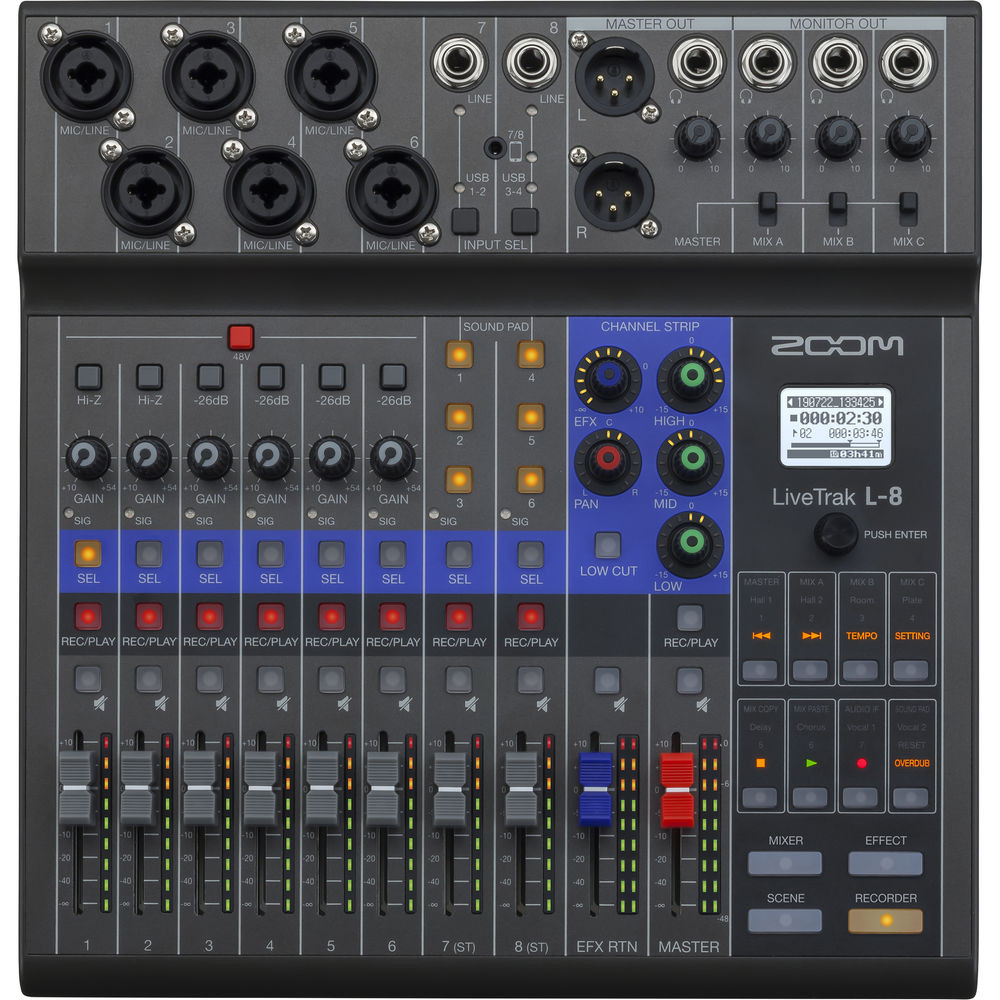
Understanding the L-8's Layout: A Visual Tour
When you first look at the L-8, it might seem like a lot of buttons and knobs. Let's break it down into sections:
The Left Side: Your Input Channels
The left portion contains your main audio inputs. Channels 1-6 are where you connect microphones. Each channel has:
- A volume fader (the sliding control)
- A gain knob (sets the initial input level)
- Pan control (positions the sound left or right in stereo)
- A mute button
Channels 7-8 are for line-level sources—things like smartphones, tablets, or music players. These use different input types and don't have preamps because they don't need them.
The Right Side: Sound Pads
Six large, satisfying buttons that trigger whatever sounds you've loaded onto them. A small screen shows you what's assigned to each pad. You can adjust how each pad behaves—play once and stop, loop continuously, or latch on/off.
The Centre: Master Controls
This is where you control overall recording levels, access the menu for settings, and monitor your output. The master fader controls the overall volume of your mix.
Why Beginners Choose the L-8 (Honest Assessment)
The Genuine Advantages
Purpose-Built for Podcasting: Unlike generic mixers that can do podcasting as one of many functions, the L-8 was designed specifically with podcasters in mind. The sound pads, the layout, the recording features—everything serves podcast production workflows.
Standalone Operation: The ability to record without a computer removes so many potential problems. Computer crashes, software conflicts, driver issues—none of these can ruin your recording session when you're recording to SD card.
Surprisingly Portable: At roughly 1.56kg, you can take this to remote recording locations. Battery operation is possible with AA batteries, making truly mobile podcasting feasible.
Quality Preamps: The built-in preamps are genuinely good for this price point. They're quiet (low self-noise) and provide clean gain for dynamic and condenser microphones.
Multitrack Recording: Even though you get a stereo mix, the L-8 simultaneously records each channel as a separate file. This is invaluable for editing—if one person coughs during another's sentence, you can fix it in post-production.
What Beginners Should Know (The Honest Bits)
Learning Curve Exists: While simpler than traditional mixing desks, there's still a learning period. Expect to spend a few hours getting comfortable with gain staging (setting proper input levels) and understanding the menu system.
Small Screen Limitations: The display is functional but compact. Navigating settings requires button presses and menu diving rather than touchscreen convenience.
No Built-In Effects Processing: Unlike some competitors, there's no compression or EQ built into each channel. You'll handle that in editing or use external processing if needed.
SD Card Quality Matters: For reliable recording, you need a decent quality SD card (Class 10 or better). Cheap cards can cause recording problems.
Is the L-8 Right for Your Podcast?
Ideal Scenarios for the L-8
Multi-Host Shows: If your podcast regularly features 2-4 people in the same room, the L-8 handles this brilliantly. Everyone gets their own mic channel, their own headphone output, and you can balance levels easily.
Live-to-Air Style Recording: If you want to record podcasts that feel live—complete with intro music, sound effects, and minimal post-editing—the sound pads make this workflow smooth.
Remote and Mobile Recording: Recording interviews in the field, covering events, or podcasting from locations without reliable power? The L-8's portability and battery option serve you well.
Hybrid Computer/Standalone Users: Maybe you record locally to SD card but also want to stream live or bring in remote guests via your computer. The L-8 does both.
When You Might Consider Alternatives
Solo Podcasters: If you're the only voice on your show and you don't use sound pads, simpler (and cheaper) USB microphones or basic audio interfaces might serve you adequately.
Heavy Post-Production Workflows: If you plan to edit extensively in software anyway, some of the L-8's live-production features may be unnecessary for your workflow.
Budget Constraints: The L-8 represents a genuine investment. If budget is tight, starting with simpler equipment and upgrading later is a valid path.
Setting Up Your L-8: What to Expect
What You'll Need Besides the L-8
Microphones: The L-8 works with both dynamic microphones (like the Shure SM58 or Rode PodMic) and condenser microphones (like the Audio-Technica AT2020). Dynamic mics are generally more forgiving of room acoustics—a solid choice for most podcasters.
XLR Cables: These are the standard cables connecting microphones to mixers. You'll need one per microphone.
Headphones: Closed-back headphones prevent sound leaking out and being picked up by microphones. One pair per person recording.
SD Card: For standalone recording. A 32GB Class 10 card handles many hours of recording.
Microphone Stands or Arms: Something to hold your microphones in position.
The Initial Setup Process
First-time setup typically involves:
- Connecting microphones to the XLR inputs
- Enabling phantom power if using condenser microphones (a switch on the back)
- Setting gain levels for each channel—speak normally and adjust until levels peak around -12dB to -6dB
- Formatting your SD card via the menu (the L-8 prefers freshly formatted cards)
- Loading sounds onto the sound pads if you're using them
- Testing recording with a short sample before your actual session
Zoom provides decent documentation, and there are numerous tutorial videos specifically for the L-8. Expect your first setup to take an hour or two as you learn the system.
Common Beginner Mistakes to Avoid
Setting Gain Too High: If your gain is too aggressive, your audio will distort (sound crunchy and unpleasant). It's better to record slightly quiet and boost in editing than to clip and ruin the recording.
Forgetting to Arm Channels for Recording: The L-8 lets you choose which channels get recorded. Make sure your channels are actually armed before important sessions.
Ignoring Headphone Monitoring: Always wear headphones while recording. You'll catch problems (background noise, mic technique issues, cable crackles) that you'd otherwise miss.
Not Doing Test Recordings: Before important recording sessions, always do a quick test. Record 30 seconds, play it back, confirm everything sounds right.
Using Cheap SD Cards: Saving a few dollars on storage can cost you entire recording sessions. Use reputable brands rated for continuous writing.
Growing With Your L-8
One advantage of the L-8 is its growth potential. As your podcast develops, you can:
- Add remote guests by routing computer audio (Zoom, Skype, Riverside) through channels 7-8
- Develop complex sound pad workflows with music beds, stingers, and effects
- Use it as a live streaming mixer for Twitch, YouTube Live, or other platforms
- Record music performances with up to 12 tracks simultaneously when connected to a computer
- Mix live events beyond podcasting—small presentations, panel discussions, or acoustic performances
Frequently Asked Questions From Beginners
Can I use the L-8 with USB microphones?
No. USB microphones have their own built-in audio interface and connect directly to computers. The L-8 uses XLR connections for microphones. You'd need traditional dynamic or condenser microphones with XLR outputs.
How many people can podcast with the L-8?
Up to six people can have their own microphone. Four people can have individual headphone monitoring (additional headphone amplifiers can extend this if needed).
Do I need a computer to use it?
No. The L-8 records directly to SD card independently. However, you can connect to a computer via USB when you want to.
What format does it record in?
WAV files at up to 24-bit/96kHz quality—broadcast-ready audio without any compression.
Is it good for music recording too?
It can record music, particularly acoustic performances or rehearsals. For serious music production, dedicated audio interfaces with more inputs and better specs might serve you better—but the L-8 is surprisingly capable.
How long can I record on battery power?
Approximately 2.5 hours on four AA batteries under typical use. For longer sessions, AC power is recommended.
Making Your Decision
The Zoom LiveTrak L-8 occupies a sweet spot for podcasters who want professional results without professional complexity. It's not the cheapest option—but it's considerably more affordable than assembling equivalent capabilities from separate components.
For Australian podcasters recording shows with multiple hosts, wanting sound pad functionality, or needing portable standalone recording, the L-8 is genuinely hard to beat at its price point. It's built to solve specific podcasting problems, and it solves them well.
The learning curve is real but manageable. Most users report feeling comfortable within a few recording sessions. And because it's a popular device, help is readily available through forums, YouTube tutorials, and Zoom's own documentation.
Ready to start your podcasting journey? Check out the Zoom LiveTrak L-8 at MusiconStage and take the first step toward professional-sounding podcast production.
Your Next Steps
If you decide the L-8 is right for you:
- Research microphones that suit your voice and recording environment. The Rode PodMic and Shure SM7B are popular choices among Australian podcasters.
- Plan your recording space. Even basic acoustic treatment (blankets, foam panels) dramatically improves audio quality.
- Choose editing software. Free options like Audacity or Reaper (inexpensive) handle podcast editing beautifully.
- Start simple. Don't try to use every feature immediately. Master basic recording first, then add sound pads and advanced features as you grow.
Podcasting equipment can seem intimidating at first, but the L-8 is designed to grow with you. Start with the basics, and you'll be producing quality content before you know it.
Browse the Zoom LiveTrak L-8 and get started with your podcast today.