
Zoom LiveTrak L-20 vs Rivals: Aussie Buyer's Guide 2026
Zoom LiveTrak L-20 vs Rivals: Aussie Buyer's Guide 2026
There's a specific kind of buyer who ends up staring at the Zoom LiveTrak L-20. You need to mix a live show, record every channel separately, and send five different headphone mixes to five different people who all want more of themselves — and you'd rather not carry three separate boxes to do it. Church sound teams, rehearsal rooms, school music departments, live-streaming setups and bands who record their own gigs all land on this product page for the same reason.
The tricky part is that the L-20 sits in an unusual spot. It isn't quite a modern digital mixer like an Allen & Heath Qu-16, and it isn't quite an analogue mixer with a recorder bolted on like a Tascam Model 24. It's its own thing, and whether that's brilliant or frustrating depends entirely on what you're using it for.
This guide compares the L-20 fairly against the alternatives Australians actually shop against, explains where it wins, where it genuinely loses, and gives you a framework for deciding. No cheerleading — just the trade-offs.
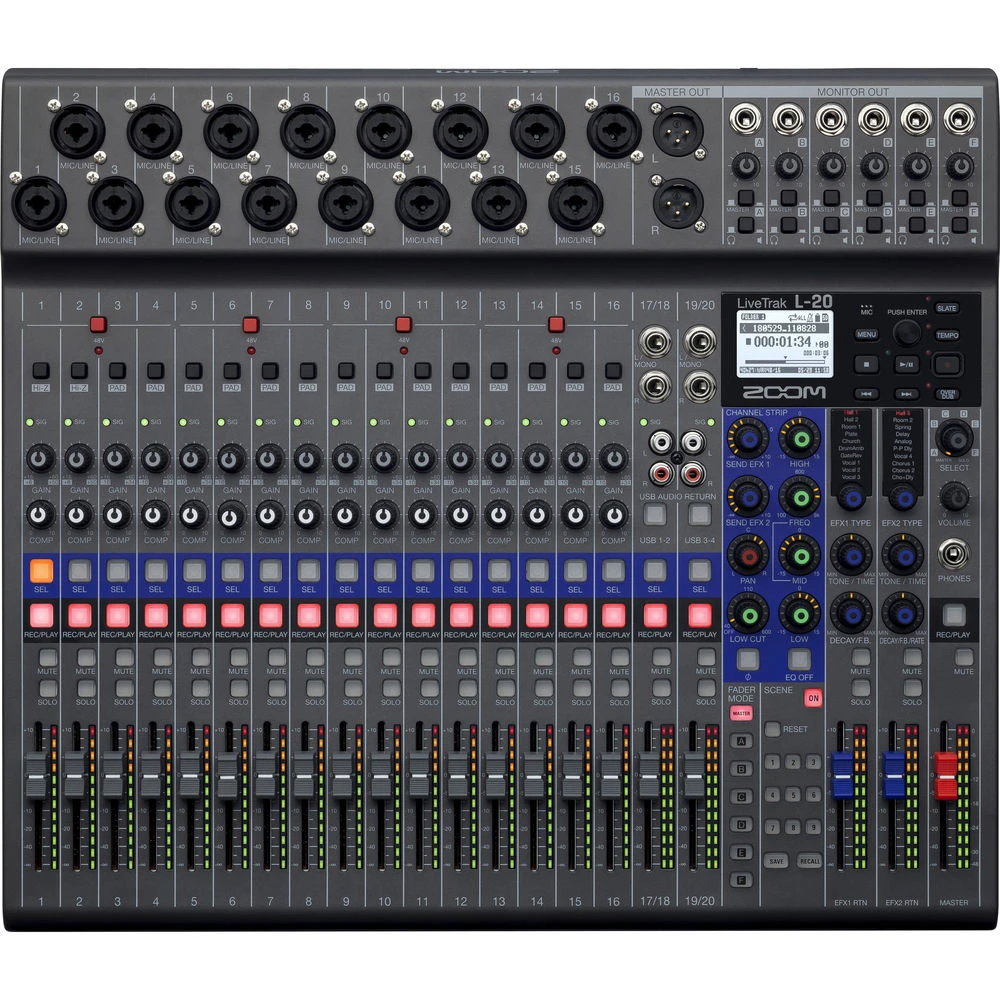
What the LiveTrak L-20 Actually Is
Strip away the marketing and the L-20 is three products sharing one chassis:
- A 20-channel digital mixer with a physical fader for every channel, 16 mono mic/line combo inputs and two stereo channels (17/18 and 19/20) that take TRS or RCA.
- A 22-track SD recorder — all 20 channels plus the stereo master mix, captured simultaneously at up to 24-bit/96kHz, with overdub, punch-in and in-unit mixdown.
- A 20-in/4-out USB audio interface, so the same desk feeds your DAW for streaming or studio work.
The headline feature — and the one that sells most units — is the six headphone outputs: MAIN plus five fully independent MONITOR mixes (A through E). Each performer gets their own balance, dialled in from the desk, without a separate monitor console or an IEM distribution rack.
Round it out with a compressor and 3-band EQ (sweepable mid on the mono channels) per channel, a bank of built-in reverbs, delays and modulation effects, nine scene memories, and eight assignable sound pads for intros, stings and backing beds.
The Australian Market Landscape: What You're Choosing Between
Before comparing spec sheets, it helps to understand the tiers. Prices below are indicative street ranges for Australian-delivered stock in 2026 — always confirm current pricing, as exchange rates and stock levels move these around.
| Tier | Indicative AUD | Typical Options | Who It Suits |
|---|---|---|---|
| Entry hybrid | $600 – $1,100 | Zoom LiveTrak L-8, L-12, Tascam Model 12 | Podcasts, duos, small rehearsal setups |
| Mid hybrid / recorder-mixer | $1,300 – $2,200 | Zoom L-20, Zoom L-20R, Tascam Model 24 | Bands, churches, schools, multitrack live capture |
| Rack digital / app-controlled | $1,100 – $2,000 | Behringer XR18, Soundcraft Ui24R | FOH engineers mixing from a tablet |
| Pro compact digital | $2,500 – $4,500 | Allen & Heath Qu-16, CQ-18T, SQ series | Venues, touring, install, pro engineers |
Notice that the L-20 doesn't compete cleanly within a single tier. It's priced against app-controlled rack mixers but built like a recorder-mixer. That's why comparisons get muddled — so let's do them one at a time.
Head-to-Head: The Comparisons That Matter
| Feature | Zoom L-20 | Tascam Model 24 | Behringer XR18 | Soundcraft Ui24R | A&H Qu-16 |
|---|---|---|---|---|---|
| Physical faders | 20 (non-motorised) | 22 analogue | None | None | 17 motorised |
| Mic preamps | 16 mono | 22 (12 XLR) | 16 | 20 | 16 |
| Multitrack recording | 22 tracks to SD, 96kHz | 24 tracks to SD, 48kHz | Via computer only | 22 tracks to USB drive | 18 tracks to USB drive |
| Independent headphone mixes | 6 (5 + main) | 1 + 2 aux sends | 6 aux (no headphone amps) | Aux sends only | 4 mixes + Qu-You app |
| Wireless/tablet control | Limited | No | Yes (core design) | Yes (core design) | Yes (iPad app) |
| USB interface | 20-in / 4-out | 22-in / 22-out | 18-in / 18-out | 22-in / 22-out | 32-in / 32-out |
| Onboard effects | Good | Basic reverb | Very good | Very good (Lexicon/dbx) | Excellent |
| Portability | Excellent (~4kg) | Heavy, large | Excellent (rack) | Excellent (rack) | Moderate |
| Best for | Monitor mixes + live capture | Analogue feel + tracking | Budget app mixing | App mixing + recording | Pro live sound |
L-20 vs Tascam Model 24: The Closest Fight
This is the comparison most buyers actually agonise over, and it's genuinely close.
The Model 24 gives you a real analogue signal path, more physical knobs, 24-track recording and a full 22-in/22-out USB interface. If you love the feel of an analogue desk and you want the recorder to be an afterthought that just captures what the desk is doing, it's superb. It's also the better choice as a permanent studio-cum-rehearsal-room centrepiece.
The L-20 wins on three counts. First, 96kHz recording versus 48kHz — marginal for live work, meaningful if tracks feed a serious mix later. Second, scene recall: nine saved snapshots means a school or church running multiple configurations doesn't rebuild the desk each week. Third, and decisively, five separate headphone mixes with real headphone amps on the desk. The Model 24 simply cannot do that without external gear.
The L-20 is also dramatically easier to move — a shade over 4kg versus a desk you plan a trip around.
Verdict: Model 24 if it lives in one room and you want analogue feel. L-20 if it travels, if multiple performers need custom monitoring, or if recall matters. Check current Zoom LiveTrak L-20 pricing and stock here.
L-20 vs Behringer XR18 and Soundcraft Ui24R: Faders vs Tablets
This is a philosophy choice, not a spec choice.
The XR18 and Ui24R are rack boxes controlled from a tablet or phone. They offer better processing depth — proper parametric EQ, gates, richer effects racks, and in the Ui24R's case Lexicon reverbs and dbx dynamics. They let you walk the room and tune from where the audience actually stands, which is a real engineering advantage. Both are also excellent value.
They also depend on Wi-Fi. In a crowded Australian pub or a school hall with sixty phones fighting for spectrum, that dependency is a genuine failure mode. And handing a tablet to a volunteer who just needs to turn the acoustic guitar down is not the same as pointing at a fader.
The L-20's tactile layout is its argument: anyone can walk up and use it. For rotating volunteer teams — the reality in most Australian churches and community venues — that's worth more than parametric EQ they'd never touch.
Verdict: XR18 or Ui24R if a trained engineer is mixing and you want processing depth. L-20 if non-specialists operate it, or if you refuse to make your show dependent on a wireless link.
L-20 vs Zoom L-12 and L-20R: Staying in the Family
The L-12 is roughly half the desk — 12 channels, fewer monitor mixes, and it runs on batteries or USB power, which the L-20 does not. If you're a duo, a solo act with backing, or a podcast that occasionally records a band, the L-12 saves real money and does the same job at smaller scale. Step up to the L-20 when you're consistently past 10 inputs or need more than three custom monitor mixes.
The L-20R is the same engine in a rack chassis with no faders, designed for app or remote control. Choose it when the mixer lives in a rack permanently and gets driven from an iPad. Choose the L-20 when you want hands on faders. Note the trade-off honestly: the L-20's own wireless control story is thinner than the L-20R's — if tablet mixing is central to your plan, verify current Bluetooth adapter and firmware support before committing, or look at the R.
L-20 vs Allen & Heath Qu-16 / CQ-18T: When You Should Spend More
Being fair means saying this plainly: the Qu-16 is a better mixer. Motorised faders that follow scene recall, full parametric EQ, gates on every channel, superior preamps and effects, and a control surface built for engineers who mix for a living. It costs substantially more and it earns it.
But the Qu-16's recording is a stereo-or-multitrack-to-USB-drive affair, and it gives you four monitor mixes rather than six discrete headphone feeds with amps built in. If your core problem is "five musicians each need their own headphone mix in a rehearsal room and I want the session multitracked," the L-20 solves it more directly and for less money.
Verdict: Qu-16 or CQ-18T if you're mixing paid live sound professionally in venues. L-20 if recording and monitoring are equal partners to mixing.
Where the L-20 Genuinely Falls Short
No product deserves an unqualified recommendation. Here's what buyers regret:
- Faders aren't motorised. Recall a scene and the physical faders sit wherever you last left them while the internal values jump. The display shows you the mismatch, but you're reconciling by eye. On a Qu-16, they simply move.
- EQ is shallow by digital standards. Three bands with a sweepable mid is fine for corrective work; it's not parametric, and there's no per-channel gate. Ringing out a difficult room is harder than it would be on a Qu or an XR18.
- No Dante or networked audio. If your venue is heading toward networked infrastructure, this isn't a stepping stone.
- SD card only. No recording direct to an SSD or USB drive. Buy a fast, name-brand high-capacity card and test it before a real session — cheap cards are the single most common cause of dropouts.
- Mains power only. Unlike the L-12, there's no battery option. Outdoor and remote Australian gigs need a reliable 240V supply or a decent inverter.
- USB is 20-in but only 4-out. Great for capture and streaming; limiting if you wanted extensive DAW-to-desk returns.
Best For: Situation-Specific Recommendations
| Your Situation | Best Choice | Why |
|---|---|---|
| Church with volunteer operators | Zoom L-20 | Physical faders anyone can use, scenes for different services, monitor mixes for the band |
| Band recording its own live gigs | Zoom L-20 | Mix the show and capture 22 tracks at 96kHz in one pass |
| Rehearsal room with silent-stage monitoring | Zoom L-20 | Five independent headphone mixes is the whole product |
| Permanent project studio | Tascam Model 24 | Analogue feel, more knobs, full-duplex USB I/O |
| Engineer mixing pubs and clubs | Ui24R or Qu-16 | Room-walking control, deeper processing |
| Duo, podcast or small acoustic act | Zoom L-12 or L-8 | Same workflow, right scale, battery power |
| Venue install heading to networked audio | Allen & Heath SQ/CQ | Dante and expansion paths the L-20 lacks |
Value Analysis: Is the L-20 Worth Its Price?
Price the alternative honestly. To replicate the L-20 with separate gear you'd need a 16-channel mixer, a multitrack recorder or audio interface with a laptop, and a five-way headphone distribution amp with independent mixes. That stack costs more, occupies more cases, needs more cabling, and gives you three more things to fail at 7pm on a Saturday.
Judged as a mixer alone, the L-20 is mid-tier and slightly expensive. Judged as a mixer plus recorder plus monitor system plus interface, it's strong value — provided you genuinely use at least three of those four functions. That's the honest test.
If you'd only ever use it as a mixer, an XR18 or a Ui24R gives you more mixing capability per dollar. If you'll use the recorder and the monitor mixes weekly, nothing near this price does the whole job as cleanly. View the Zoom LiveTrak L-20 product details.
A Decision Framework: Five Questions Before You Buy
- How many people need their own monitor mix? Three or more, and the L-20 leaps ahead of everything at this price. Zero or one, and its main advantage evaporates — shop the XR18 or Ui24R instead.
- Who is operating it? Trained engineer → app-controlled mixers are fine. Rotating volunteers or students → faders win, every time.
- Do you actually need multitrack recording, or do you just like the idea? Be brutal. Plenty of buyers pay for a recorder they use twice. If a stereo board mix is all you'll ever export, save the money.
- Does it move? Weekly transport strongly favours the L-20 over the Model 24.
- Where will you be in three years? Heading toward networked audio and larger venues → invest in the Allen & Heath path now rather than replacing later.
Common Mistakes Buyers Make
- Counting channels, not preamps. The L-20 has 20 channels but 16 mono mic inputs. A full band with a miked kit reaches 16 faster than you'd think — count your actual input list first.
- Assuming "digital mixer" means full parametric EQ. It doesn't here.
- Skimping on the SD card. The cheapest failure point in the whole rig.
- Buying grey-market stock to save a little. Australian-supplied units come with local warranty support and a correct 240V supply. Imported stock can leave you paying international freight on a repair — and a mixer out of action for six weeks costs more than you saved.
- Ignoring headphone amp requirements. The L-20's outputs drive typical studio headphones well; very high-impedance cans across five outs will test them.
Frequently Asked Questions
Can the L-20 record and act as a USB interface at the same time?
It operates in either recorder mode or audio-interface mode depending on configuration. Plan your workflow for a session rather than assuming both run simultaneously — decide up front whether the SD card or the DAW is your master capture.
Is 96kHz recording worth it?
For live capture destined for a stereo release, 48kHz is genuinely fine and halves your storage. The 96kHz option matters if tracks will face heavy processing or pitch manipulation later. It's a nice ceiling to have, not a reason to buy.
Can I use it for live streaming?
Yes — the USB interface feeds your streaming machine, the sound pads handle intros and stings, and you can multitrack the same performance to SD as a safety copy. It's one of the L-20's quietly strong use cases.
Will it handle a full band with a miked drum kit?
Comfortably. A typical setup — kick, snare, two overheads, bass DI, two guitars, keys in stereo, three vocals — lands around 13 to 14 inputs, leaving headroom.
How does it handle Australian conditions?
Like any digital desk, it dislikes humidity and heat. Case it, don't leave it in a hot vehicle, and let it acclimatise before powering on after a cold night. Standard practice, but worth stating.
The Honest Verdict
The Zoom LiveTrak L-20 is not the best-sounding mixer in its price bracket, and it isn't the most powerful. An Allen & Heath Qu-16 out-mixes it, a Soundcraft Ui24R out-processes it, and a Tascam Model 24 feels better under the hands.
What it does better than any of them is solve three problems at once, in one 4kg box, for one price — mixing, multitracking, and giving every performer their own headphone mix without a rack of extra gear. If that combination describes your Saturday, it's an easy recommendation and a rig that will earn its keep for years.
If it doesn't — if you're a solo operator mixing FOH and nobody needs custom monitoring — you'll get more mixer per dollar elsewhere, and you should. That's the fair answer.
Still weighing it up? See the Zoom LiveTrak L-20 at MusiconStage for current Australian pricing, stock and warranty details — or get in touch with your input list and intended use, and we'll tell you honestly whether this is the right desk or whether something else fits better.