
Zoom L20 LiveTrak Explained: A Beginner's Mixing Guide 2026
Zoom L20 LiveTrak Explained: A Beginner's Mixing Guide 2026
If you've started looking into recording your band, running sound for a small venue, or capturing a podcast with a few mates, you've probably run into the Zoom L20 LiveTrak. It looks like a serious bit of kit — lots of knobs, faders and ports — and that can be intimidating when you're just getting started. The good news is that the L20 is actually one of the friendlier ways into the world of mixing and multitrack recording, and this guide will walk you through it in plain English.
By the end, you'll understand what this device actually does, the jargon that gets thrown around it, what to look for as a beginner, and whether it's the right first investment for you. No prior audio knowledge required.
First, What Is a "Digital Mixer and Multitrack Recorder"?
Let's break the name down, because each part tells you what the device does.
A mixer is the central hub that takes in lots of separate sound sources — a microphone, a guitar, a keyboard, a backing track — and lets you control the volume and tone of each one independently before blending them together into a final sound. Think of it like a kitchen: each ingredient (instrument) comes in separately, and the mixer is where you decide how much of each goes into the dish (the final mix).
Digital simply means the L20 processes the sound using a computer chip rather than purely analogue electronics. In practice, this means it can do clever things an old-school mixer can't: store your settings as “scenes”, apply built-in effects, and — crucially — record.
Multitrack recorder is the part beginners often underestimate. A track is a single, separate recording — for example, just the vocal, or just the kick drum. “Multitrack” means the L20 records every input as its own independent file at the same time. Why does that matter? Because if your guitar was too quiet during the take, you can fix just the guitar afterwards without touching anything else. A simple stereo recorder bakes everything into one file you can't unscramble; a multitrack recorder keeps your options open.
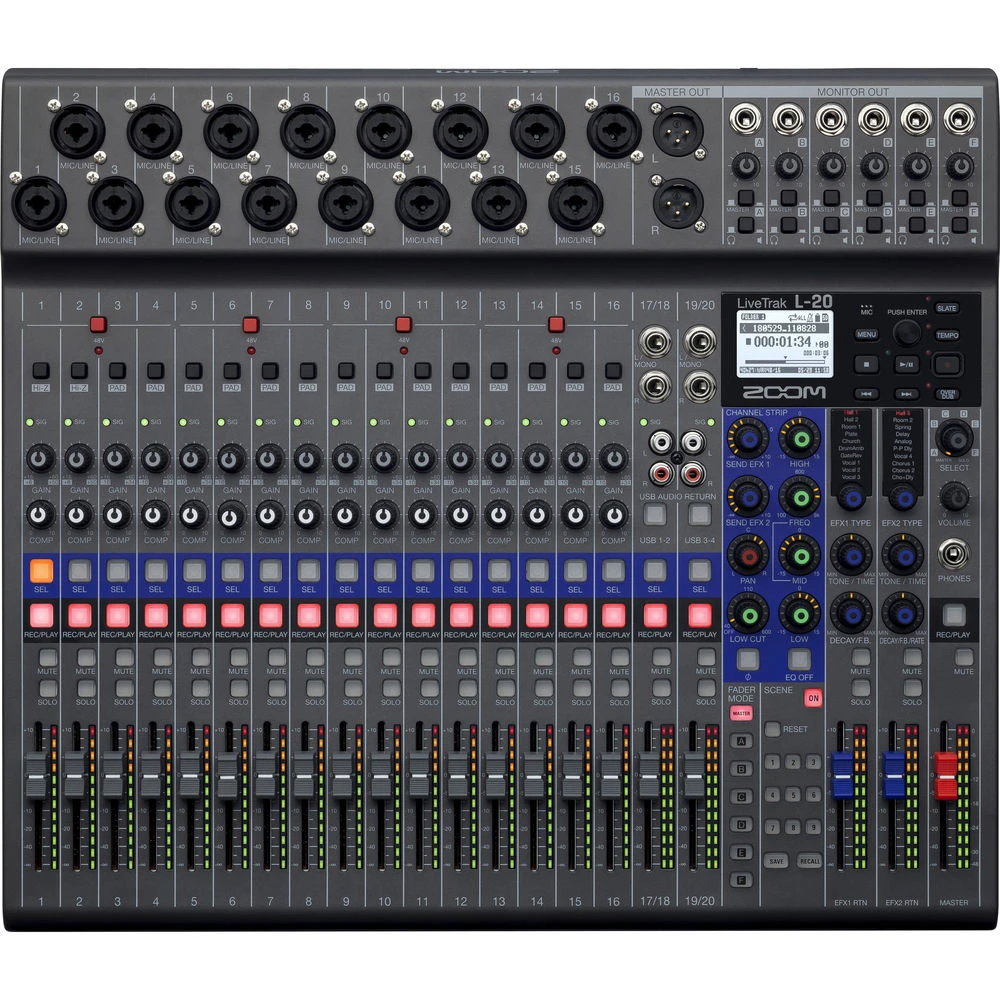
So the Zoom L20 LiveTrak is really three tools in one box: a 20-input mixer, a 22-track recorder, and (as we'll see) a USB audio interface for your computer.
Why Do People Use All-in-One Units Like This?
A few years ago, doing what the L20 does meant buying a mixer, a separate recorder and an audio interface, then wiring them all together — expensive, bulky and fiddly. All-in-one units like the LiveTrak series exist because they collapse that whole chain into a single device you can throw in a car boot and set up in minutes.
This makes them especially popular with:
- Bands wanting to record rehearsals and live gigs without hiring a studio
- Small venues, churches and community halls running their own sound
- Podcasters and content creators recording multiple people at once
- Singer-songwriters and home recordists learning the ropes
- Schools and youth music programs that need durable, simple gear
The appeal is simplicity without giving up control — you get genuine multitrack capability without needing to be a studio engineer.
Understanding the Key Features (Without the Jargon)
The 20 Inputs
The L20 has 16 mono input channels and two stereo channels, giving you up to 20 sources at once. Channels 1 to 12 use combo XLR/TRS sockets — a fancy way of saying they accept both microphone cables (XLR) and instrument/line cables (the 6.5mm jack you see on guitar leads). Channels 1 and 2 even have a high-impedance “Hi-Z” switch, which is the correct setting for plugging an electric guitar or bass in directly without an amp.
Phantom power is a term you'll see often. Condenser microphones (common for vocals and acoustic instruments) need a 48-volt power supply sent up the cable to work — that's phantom power. The L20 supplies it, switchable in groups, so don't panic if a mic seems “dead” until phantom power is on.
Channel Strips, EQ and Compression
Each channel has its own fader (the sliding volume control) plus a set of tone tools. The 3-band EQ lets you adjust low, mid and high frequencies — think of it as bass and treble controls with an extra adjustable middle band for taming boxy or harsh sounds. Each channel also has a one-knob compressor. Compression is one of the most misunderstood terms for beginners, so here's the simple version: it automatically smooths out the difference between the loudest and quietest parts of a sound, so a vocalist who whispers then belts doesn't disappear and then deafen the room.
Monitor Mixes (the Headphone Outputs)
This is one of the L20's standout features for bands. It offers six independent monitor mixes. A monitor mix is a custom blend of the band sent to one performer's headphones or in-ear monitors. The drummer might want lots of click track and bass; the singer might want mostly their own voice and a little guitar. Six separate outputs mean six musicians can each get their own personalised blend without arguments — a genuinely professional feature on an affordable unit.
Recording to SD Card
The L20 records up to 22 tracks (your 20 inputs plus a stereo master mix) straight to an SD card — no computer required. As a beginner, the key things to know: it supports SD, SDHC and SDXC cards, you'll want a reasonably fast, high-capacity card, and you should always test-record before an important session. The unit also supports overdubbing (recording new parts over existing ones) and punch-in (re-recording just a small mistake), which are the building blocks of home music production.
USB Audio Interface
An audio interface is the bridge between real-world sound and your computer. Plug the L20 into a laptop via USB and it becomes a 20-in/4-out interface, sending every channel into recording software (a DAW, or Digital Audio Workstation, such as Cubase, Reaper or GarageBand). This means you can mix on the device live, then later edit in detail on a computer — a great learning path.
Sound Pads
The L20 has eight assignable Sound Pads. You can load samples, jingles, intro music or backing tracks onto these and trigger them with a tap. Podcasters love them for stings and ad breaks; worship and theatre teams use them for cues; solo performers use them for backing tracks. It's a small touch that adds a lot of flexibility.
Power Options
The L20 can run from mains power, USB bus power, or eight AA batteries. Battery operation is unusual at this level and genuinely useful for outdoor gigs, field recording or venues with dodgy power — worth knowing if your situations are unpredictable.
A Beginner-Focused Buying Guide
What to Prioritise
When you're choosing your first mixer-recorder, focus on these in order:
- Channel count you'll actually use. Count your sources realistically — a five-piece band with vocals and a stereo keyboard fits comfortably within the L20's 20 inputs, with room to grow.
- Recording without a computer. If you want to capture rehearsals and gigs reliably, onboard SD recording (which the L20 has) removes a huge point of failure.
- Monitor outputs. If musicians need their own headphone mixes, this single feature can be the deciding factor.
- Build and portability. First gear gets moved around and knocked about. The L20's tank-like build is a real plus here.
Common Beginner Mistakes to Avoid
- Buying too few channels. Beginners almost always underestimate how many inputs they need once drum mics and extra vocals appear. A little headroom saves a costly upgrade later.
- Forgetting cards and cables. The mixer is only part of the kit — budget for a quality SD card, microphone cables, and headphones from day one.
- Setting levels too hot. Beginners tend to crank gain until the signal distorts. Aim for healthy but conservative levels; digital clipping is unrecoverable.
- Skipping the manual. Spend an evening with the documentation before your first real session. The L20 is logical, but a few features (like monitor sends and Sound Pads) make far more sense once explained.
Budgeting Beyond the Mixer
For a realistic first setup, plan for the L20 itself plus a fast 64GB+ SD card, a couple of decent microphones suited to your use, XLR cables, a set of closed-back headphones, and a sturdy case if you'll travel. None of these are huge costs individually, but it's better to know upfront than to be caught short on gig day.
Getting Started: What to Realistically Expect
Here's an honest assessment of the learning curve. The L20 is a hands-on, knob-per-function design, which is exactly what beginners should want — you learn faster when controls are visible rather than buried in menus. Within a day you can be capturing a clean basic recording. Reaching confident, balanced live mixes typically takes a few sessions of practice, which is normal for any mixer; the device isn't the bottleneck, the skill is.
A sensible first-week plan looks like this:
- Set up two or three inputs only and learn gain, fader and EQ on those.
- Do a short multitrack recording to the SD card and play it back.
- Transfer the files to a computer and open them in any free DAW to see how multitrack editing works.
- Add a monitor mix for one performer and learn how sends differ from the main mix.
- Gradually bring in more channels as you get comfortable.
Zoom provides documentation and firmware updates, and there is a large global community producing tutorials for the LiveTrak series, so help is rarely far away when you get stuck.
If you'd like to see current Australian pricing and full specifications while you plan, you can view the Zoom L20 LiveTrak at MusiconStage.
Common Questions From Beginners
Do I need a computer to use it? No. The L20 records and mixes completely standalone to an SD card. The computer connection is an optional bonus for later editing.
Is it good for podcasting, not just music? Yes. Multiple mic inputs, individual track recording, headphone mixes for guests and the Sound Pads make it well suited to multi-person podcasts and live streams.
What's the difference between this and a cheaper analogue mixer? An analogue mixer of similar size won't record multitrack, won't act as a 20-channel audio interface, and won't store settings or offer per-channel digital compression. You're paying for the recording and digital flexibility.
Will I outgrow it quickly? Most beginners and many semi-pros don't. Twenty inputs and six monitor mixes cover everything from solo recording to a full band for years. If anything, people grow into its features rather than out of them.
Is it hard to learn? It's approachable. The physical layout teaches you mixing fundamentals that transfer to every other console you'll ever touch — making it an excellent learning tool, not just a recorder.
Who Should Buy the Zoom L20 LiveTrak?
This unit is a strong first choice if you're a band wanting to self-record rehearsals and gigs, a small venue or church running its own sound, a podcaster recording several people, or a learner who wants real multitrack skills on durable, portable hardware. It is genuinely beginner-friendly without being a toy you'll abandon.
It may be more than you need if you only ever record one source at a time — a simple two-channel recorder or interface would do that more cheaply. But the moment you have multiple people, multiple instruments or a desire to mix and record properly, the L20's value becomes obvious.
Next Steps
If the Zoom L20 LiveTrak sounds like the right starting point for your music, venue or podcast, the smartest next move is to confirm the channel and feature set against your specific list of sources, then check current availability. You can explore the full Zoom L20 LiveTrak details and pricing here, and the MusiconStage team can help you match it with the cards, mics and cables you'll need to get recording on day one.
Starting out in mixing and recording can feel daunting, but the L20 is one of those rare tools that grows your skills as you grow with it. Take it one channel at a time — you'll be surprised how quickly it clicks.