
Zoom L20 Livetrak: 20-Channel Mixer & Recorder That Actually Delivers
Zoom L20 Livetrak: 20-Channel Mixer & Recorder That Actually Delivers
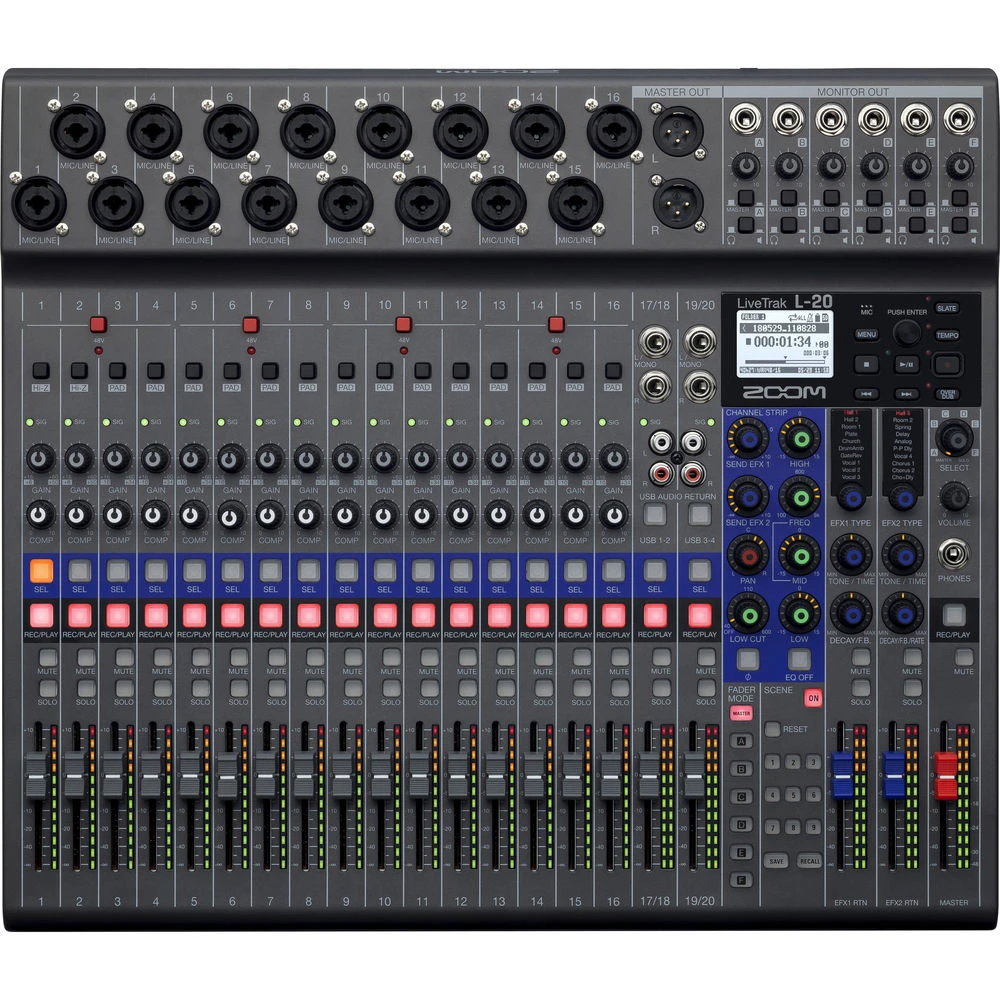
Here's the thing about live sound—you've got heaps going on. Mixing front-of-house, keeping performers happy with their monitors, and (if you're smart) recording the whole thing for later. Most setups? They need separate gear for each job. The Zoom L20 Livetrak says nah, let's do it all in one box.
And honestly? It works. Really well.
What Makes the L20 Different from Everything Else?
So you've probably seen digital mixers before. Plenty of 'em. But here's where Zoom went a bit mental (in the best way)—they built a full 22-track recorder right into the console. We're not talking about some dodgy 2-track stereo capture. Every single channel gets its own dedicated track on the SD card. Live.
Why does that matter? Because you can properly mix the show later. Bad vocal balance during verse two? Fix it. Drummer went nuts on that fill? Sort it in post. You've essentially got unlimited do-overs without carting around a laptop and audio interface.
Ready to upgrade your live rig? Check out the Zoom L20 Livetrak with fast Aussie shipping.
Key Specs That Actually Matter
- 20 discrete channels – 16 mono plus 2 stereo, which is heaps for most gigs
- 6 monitor outputs – each performer gets their own mix (no more complaints!)
- 22-track simultaneous recording – direct to SD card, no computer needed
- 8 XLR/TRS combo inputs with proper phantom power
- Built-in effects – reverb, delay, chorus that don't sound rubbish
- USB audio interface – 22-in/4-out when you do want computer integration
The build quality's solid too. Not tank-level heavy, but definitely road-worthy. Faders feel smooth, knobs have good resistance. You can tell Zoom spent time on the physical design, not just the features list.
Who Should Actually Buy This Thing?
Look, it's not for everyone. And that's fine. But if you tick any of these boxes, pay attention:
Churches and worship venues – This is kind of the L20's sweet spot, honestly. You've got your band, vocalists, maybe a speaker, and you want to record services without hiring a sound engineer every week. The scene memory saves your entire setup, so volunteers can recall last week's settings in seconds.
Podcasters and content creators – Running a multi-host show? The L20 handles it beautifully. Each person gets their own track, making editing way less painful.
Small venues and function bands – When you're the sound guy AND the bass player, simplicity matters. And having that multitrack recording means you can actually create decent live albums without extra gear.
The Good, The Bad, and the In-Between
What's Genuinely Impressive
The standalone recording is the hero feature. Full stop. No laptop crashing mid-set, no driver issues, no "sorry, ProTools froze." Pop in an SD card, hit record, done. I've seen way too many live recordings ruined by computer problems—this eliminates that entirely.
Monitor mixing is also heaps easier than expected. Six aux sends means six different monitor mixes. Your drummer wants more kick? Sorted. Vocalist needs less guitar? Easy. And you're not fumbling through menu screens—it's all right there on the surface.
What Could Be Better
No motorized faders. So when you recall a scene, you'll need to manually move faders to match the saved positions. It's a cost-saving thing, and at this price point, I get it. But worth knowing.
The onboard effects are decent, not amazing. They'll absolutely do for live work, but if you're after studio-quality reverbs, you might want outboard gear. For 90% of applications though? Perfectly fine.
Want those six independent monitor mixes and bulletproof recording? Order your Zoom L20 today with our hassle-free returns policy.
How Does It Stack Up Against Alternatives?
Compared to separate mixer-plus-interface setups, the L20's value proposition is pretty clear. You're saving money AND reducing complexity. Against the PreSonus StudioLive series? The Zoom's more portable and the SD recording is more reliable than laptop-based capture. The Allen & Heath Qu series offers more pro-level features, but at significantly higher prices.
For the money? The L20 punches way above its weight.
Buying in Australia: What You Need to Know
Zoom's well-supported down under, so warranty claims and repairs aren't a drama. The L20 comes with Australian-approved power supply (obviously), and most music retailers stock it or can get it quickly.
Shipping's usually pretty reasonable for something this size—it's not light, but it's not a fridge either. Expect around 7-10kg boxed.
Common Questions Answered
Can it record without a computer? Absolutely. That's the whole point. SD card recording is completely standalone.
What SD card size do I need? Bigger is better, obviously. A 128GB card gives you roughly 30+ hours of 22-track recording. Grab a fast one (Class 10 minimum).
Is it good for streaming? Yep! The USB interface works brilliantly with OBS, Streamlabs, whatever you're using.
Final Verdict: Should You Buy It?
If you need a reliable all-in-one solution for live mixing AND multitrack recording, the Zoom L20 Livetrak is genuinely hard to beat at this price. It's not trying to compete with $10k digital consoles—and it shouldn't. What it does is solve real problems for real people running small-to-medium live sound setups.
Churches love it. Podcasters love it. Gigging musicians who are sick of laptop dramas love it.
Don't wait for your current setup to fail mid-gig. Get your Zoom L20 Livetrak now from Music on Stage—authorised Australian dealer with fast shipping to Sydney, Melbourne, Brisbane, Perth, and everywhere in between.