
Zoom L20 LiveTrak: 20-Channel Mixer & Recorder for Aussie Sound Pros
Zoom L20 LiveTrak: The 20-Channel Digital Mixer and Multitrack Recorder That Does Both Jobs Properly
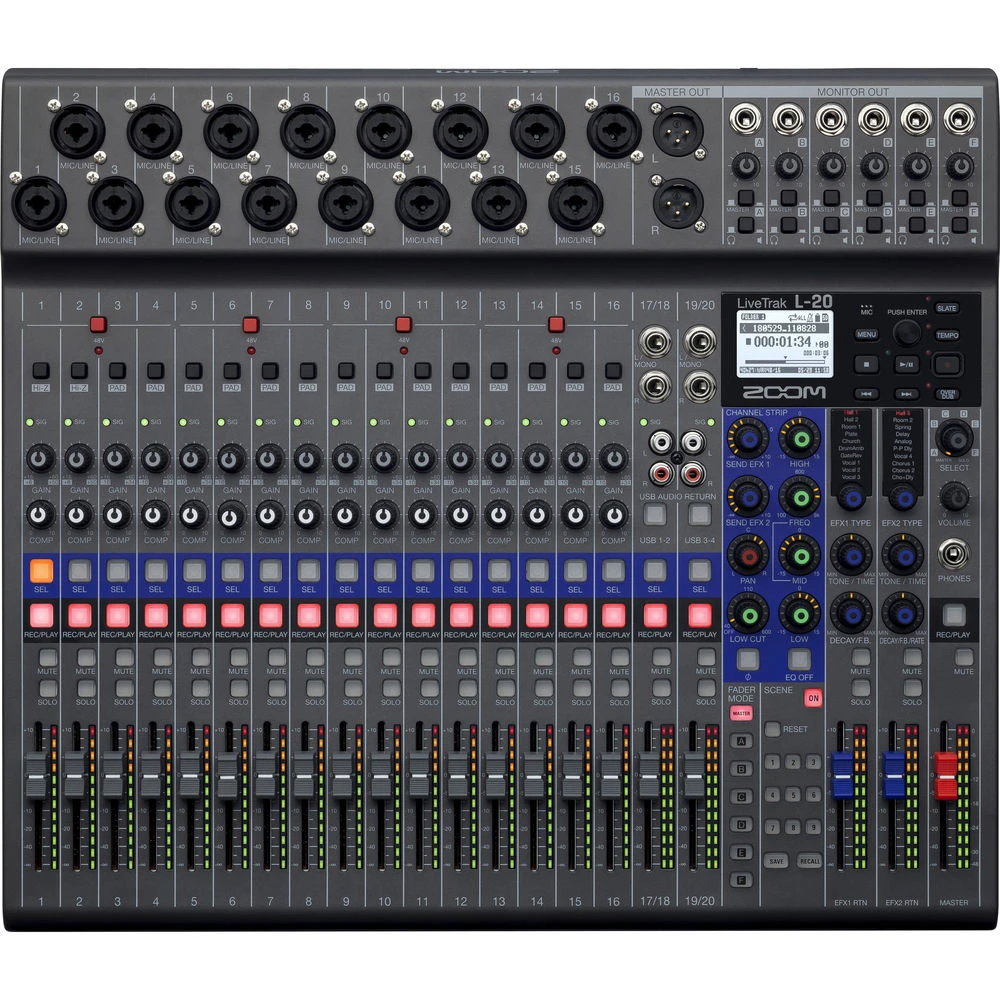
Here's the problem most gigging musicians and small venue operators face: you need a decent mixer for live sound and you want to record every show or rehearsal. Traditionally, that meant buying a mixer and a separate multitrack recorder, running a snake of cables between them, and hoping everything stayed in sync. The Zoom L20 LiveTrak takes a different approach — it's a fully featured 20-channel digital mixer with a built-in 22-track SD card recorder, all in one unit that you can actually carry to a gig by yourself.
But does it actually deliver on both fronts, or does the "jack of all trades" compromise mean you're getting a mediocre mixer and a mediocre recorder? That's exactly what we're going to dig into. If you're an Australian musician, podcaster, church tech volunteer, or small venue operator looking at the L20, this guide covers everything you need to know before pulling the trigger.
Ready to check it out? View the Zoom L20 LiveTrak specifications and pricing at MusiconStage with shipping across Australia.
What Exactly Is the Zoom L20 LiveTrak?
The Zoom L20 LiveTrak sits in a category that's grown significantly over the past few years: hybrid mixer-recorders designed for people who need professional-grade live mixing and multitrack recording without the complexity (or cost) of separate systems. It's the bigger sibling of the Zoom L12 LiveTrak, stepping up from 12 to 20 input channels and expanding the recording capabilities to match.
At its core, the L20 is a 20-channel digital mixer with 16 mono channels and 2 stereo channels, built-in effects, 6 monitor sends, and a master output section. What makes it genuinely different from a standard digital mixer is the onboard 22-track recorder that writes directly to an SD card at up to 24-bit/96kHz resolution. You can record every single input channel individually plus a stereo mix — all simultaneously, without a computer, without an audio interface, without any additional gear.
That last point is worth emphasising. No computer required. You press record, play your gig, and walk away with a complete multitrack recording on an SD card. For bands wanting to capture live performances, churches recording services, or podcasters running multi-mic setups, that simplicity is genuinely transformative.
Full Specifications Breakdown
Let's get into the details that actually matter when you're comparing mixers at this level.
Inputs and Channels
- 16 mono input channels — each with a combo XLR/TRS jack, accommodating microphones and line-level sources
- 2 stereo input channels (channels 17/18 and 19/20) — for keyboards, backing tracks, DJ gear, or any stereo source
- Phantom power (+48V) — available on channels 1–16, switchable in groups so you don't have to send phantom to every channel
- Hi-Z input — channels 1 and 2 feature high-impedance inputs for plugging guitars and basses directly in without a DI box
Preamps and Audio Quality
- High-quality mic preamps with low noise floor and up to 60dB of gain
- 24-bit/96kHz maximum recording resolution
- Audio performance: Signal-to-noise ratio and dynamic range are solid for this price tier — you're not going to mistake these for Neve preamps, but they're clean, quiet, and perfectly adequate for live recording and most studio applications
Outputs
- Master stereo output (XLR)
- 6 individual monitor sends (TRS) — this is a big deal for live bands, and we'll talk about why below
- Headphone outputs — 5 independent headphone outputs with individual level controls, each assignable to monitor different mixes
- USB audio interface — 22-in/4-out USB connectivity for use with a DAW
Recording
- 22-track simultaneous recording to SD/SDHC/SDXC card (20 individual channels + stereo master mix)
- WAV format recording
- Overdub capability — record additional takes on top of existing recordings
- Playback — load and play back recordings through the mixer for virtual soundcheck
Built-in Effects
- 16 send effects including reverb, delay, and chorus
- EQ on every channel — 3-band EQ with sweepable mid on each mono channel
- Compressor/limiter available on each channel
- High-pass filter on each channel for rolling off low-end rumble
Physical Details
- Dimensions: Approximately 470 × 338 × 73mm
- Weight: Around 3.6kg — light enough to carry under one arm
- Power: AC adapter included; can also run on 8x AA batteries for truly portable operation
- Build: Solid plastic chassis with metal fader section — not quite tank-like, but robust enough for regular gigging
Six Monitor Sends: Why This Changes Everything for Live Bands
If you've ever mixed monitors for a live band, you know the pain. The vocalist wants more vocals and less guitar. The drummer wants more kick and bass. The guitarist wants... well, more guitar (always more guitar). With only one or two aux sends, you end up compromising on everyone's monitor mix, and nobody's truly happy.
The L20 gives you six independent monitor sends, each with its own dedicated output. That means you can create six completely separate monitor mixes — one for each band member if you're a five-piece, with one spare. Each musician hears exactly what they need, mixed independently from the front-of-house sound.
But here's where the L20 gets genuinely clever. Those five built-in headphone outputs? Each one can be assigned to a different monitor mix. For rehearsals, recording sessions, or in-ear monitoring situations, every musician can plug in, adjust their own headphone level, and hear their personalised mix. No external headphone amplifier needed. No additional gear. It just works.
For small venue operators and worship teams, this feature alone might justify choosing the L20 over a cheaper mixer. The time and frustration you save on monitor mixing is enormous.
The Recording Side: More Than Just a Gimmick
Some mixer-recorders treat recording as an afterthought — a checkbox feature that technically works but isn't really usable for serious production. The L20 is different. The multitrack recording here is genuinely capable, and it's designed to be the centrepiece of your workflow, not an add-on.
How the Recording Actually Works
Every input channel records its own individual track to the SD card, pre-fader and pre-EQ. This is critical — it means your recordings capture the raw, unprocessed signal from each microphone or instrument. If you make a mixing mistake during a live performance (and let's be honest, we all do), it doesn't matter. You've got the raw tracks, and you can remix the entire show afterwards in your DAW of choice.
On top of those 20 individual channel recordings, the L20 also captures a stereo mix track — so you've got 22 tracks total recording simultaneously. The stereo mix gives you a quick-and-dirty mixdown you can share immediately, while the individual tracks let you do a proper studio mix later.
Virtual Soundcheck
This is one of the features that separates serious mixer-recorders from toys. The L20 can play back previously recorded tracks through the mixer channels, allowing you to do a virtual soundcheck without the band being present. Record a few minutes of the band during a real soundcheck, then play it back and fine-tune your mix at your own pace. For volunteer-run churches and community venues where soundcheck time is limited, this is invaluable.
Overdubbing
The L20 supports overdubbing — recording new tracks on top of existing recordings. You can lay down a basic backing track, then add vocals, guitar solos, or additional parts one at a time. It's not going to replace a full DAW for complex production work, but for capturing ideas, building demos, or adding overdubs to live recordings, it's surprisingly capable.
USB Audio Interface Mode
When you connect the L20 to a computer via USB, it functions as a 22-in/4-out audio interface. You get all 20 input channels plus the stereo mix sent digitally to your DAW, with 4 return channels from the computer back to the mixer. This means you can use the L20 as your studio recording interface, taking advantage of those built-in preamps and the familiar hardware controls, while tracking directly into Logic Pro, Ableton Live, Pro Tools, Reaper, or whatever DAW you prefer.
The dual functionality here is worth noting: you can record to the SD card and to your computer simultaneously. Belt and braces — always have a backup.
Who Is the Zoom L20 Actually Built For?
Not every product suits every user, and being honest about who the L20 serves best (and who might be better served elsewhere) is more helpful than blanket recommendations.
Ideal Users
Live bands wanting to record every show: This is arguably the L20's sweet spot. Set up your mixer, press record, play your set, and walk away with a complete multitrack recording. No laptop balanced precariously on the side of the stage, no USB audio interface daisy-chained with cables, no worrying about buffer underruns or driver crashes mid-set. The simplicity is its greatest strength.
Churches and houses of worship: The combination of straightforward operation, six monitor sends, five headphone outputs, and automatic multitrack recording makes the L20 almost purpose-built for worship teams. Volunteer operators can learn the basics quickly, monitor mixes keep musicians happy, and every service gets recorded for online streaming or archive purposes.
Podcasters and content creators with multi-mic setups: If you're running a podcast with four or more microphones, the L20 gives you individual control over each channel with proper EQ and compression, records every mic independently, and doesn't require a computer to be running during the session.
Small venue operators: Pubs, community halls, school auditoriums — anywhere you need a reliable mixer that can handle up to 20 inputs with proper monitor sends and also capture every event for posterity.
Rehearsal spaces: The combination of mixing, monitoring, and recording makes the L20 excellent for band rehearsal spaces. Everyone gets their own headphone mix, every rehearsal gets recorded, and you can review and improve your sound over time.
Users Who Might Look Elsewhere
Large venue operators needing 32+ channels: The L20 tops out at 20 input channels. If you regularly need more than that, you'll want to look at larger format digital mixers from brands like Allen & Heath, Yamaha, or Behringer.
Touring professionals needing advanced digital mixing: While the L20 is very capable, it doesn't offer the deep processing, scene recall sophistication, or digital networking (Dante, AVB) that touring-grade consoles provide. For professional tours, you'll likely need something more robust.
Studio producers wanting a primary DAW controller: The L20 works as an audio interface, but it's not designed as a DAW control surface. If tight DAW integration is your priority, a dedicated interface and control surface might serve you better.
Ready to see if the L20 fits your needs? Check current pricing and availability at MusiconStage — authorised Australian Zoom dealer with genuine warranty.
Honest Pros and Cons
No product is perfect, and pretending otherwise doesn't help you make a good decision. Here's the balanced picture.
What the L20 Gets Right
- All-in-one simplicity: Mixer + multitrack recorder + audio interface + headphone amplifier in one unit. Less gear to buy, carry, and set up
- Pre-fader recording: Raw tracks are captured before any mixing, giving you maximum flexibility in post-production
- Six monitor sends with five headphone outs: Exceptional monitor flexibility for a mixer at this price point
- No computer required for recording: SD card recording means one less thing to go wrong at a live gig
- Battery operation: 8x AA batteries for truly portable recording — fantastic for outdoor gigs, field recording, or locations without reliable power
- Lightweight and portable: At around 3.6kg, it's remarkably easy to transport
- Virtual soundcheck: A genuinely useful feature that saves time and improves results
- Clean preamps: Quiet, usable mic preamps with plenty of gain for dynamic microphones
- Intuitive layout: Physical faders and dedicated knobs for each channel make operation straightforward, even for less experienced operators
Where It Falls Short
- Plastic construction: While sturdy enough for regular use, the chassis doesn't feel as robust as all-metal mixers. If you're rough on gear, a padded case is essential
- Effects are functional, not exceptional: The built-in reverbs and delays get the job done for live use, but they won't replace dedicated effects processors or plugins for studio work
- No motorised faders: Scene recall remembers your settings, but faders don't move — you'll need to manually match positions when loading scenes
- Limited USB return channels: Only 4 channels return from the computer, which can be limiting for complex playback scenarios
- 3-band EQ only: Some competitors offer 4-band parametric EQ at this price level. The L20's 3-band with sweepable mid is functional but less flexible
- No wireless app control: Unlike some digital mixers in this range, the L20 doesn't offer tablet or smartphone control. All mixing is done on the hardware itself
- SD card speed requirements: You need a fast, high-quality SD card (Class 10 or better, ideally UHS-I or above) to handle 22 tracks of simultaneous recording. Cheap cards can cause dropouts
How the L20 Compares to the Competition
Understanding where the L20 sits in the market helps you decide whether it's the right choice or whether an alternative might serve you better.
Zoom L20 vs Zoom L12
The L12 is the L20's smaller sibling, offering 12 channels instead of 20, with fewer monitor sends and headphone outputs. If you're a smaller band (4–5 members max) or a podcaster with fewer microphones, the L12 gives you the same core recording functionality at a lower price. If you regularly need more than 12 inputs, the L20 is the obvious step up. The L20 also adds additional monitor sends, which matters significantly for larger ensembles.
Zoom L20 vs Allen & Heath Qu-16
The Qu-16 is a more powerful digital mixer with deeper processing, motorised faders, scene recall with fader matching, and iPad control via the Qu-You app. However, it doesn't have built-in multitrack SD card recording — you need to record via USB to a computer. If your priority is live mixing with advanced processing, the Qu-16 wins. If integrated recording without a computer is essential, the L20 has the edge.
Zoom L20 vs PreSonus StudioLive Series
PreSonus StudioLive mixers offer excellent integration with Studio One DAW software, wireless control, and more processing options. They also support multitrack recording via USB. The trade-off is complexity and cost — StudioLive mixers generally require more technical knowledge to operate and come at a higher price point. The L20 wins on simplicity and the ability to record without a computer.
Zoom L20 vs Tascam Model Series
Tascam's Model 16 and Model 24 are the closest direct competitors, also offering integrated mixer-recorder functionality. The Tascam models bring an analogue mixer topology with separate multitrack recording, and the Model 24 adds more channels. Sound character differs — some users prefer the Tascam's slightly warmer analogue signal path, while others prefer the L20's digital precision and lighter weight. It's worth trying both if you can.
Practical Tips for Getting the Most from Your L20
If you do decide the L20 is right for you, here are some practical considerations that'll help you hit the ground running.
SD Card Selection Matters
Don't cheap out on your SD card. Recording 22 tracks of 24-bit audio simultaneously demands sustained write speeds that budget cards can't deliver. Go for a reputable brand (SanDisk, Samsung, Lexar) with a UHS-I speed rating or better, and format the card in the L20 itself before your first recording. A 64GB SDXC card will give you several hours of recording time at 48kHz — enough for most gigs with room to spare. For longer sessions or higher sample rates, step up to 128GB or 256GB.
Gain Staging Is Critical
Because the L20 records pre-fader and pre-EQ, your gain settings directly determine recording quality. Set your input gains carefully during soundcheck — aim for peaks around -12dB to -6dB on the channel meters. Too low and you'll get noisy recordings; too hot and you'll clip the input and ruin the track. The L20's metering is adequate for this, but take your time getting it right.
Create Templates
If you regularly mix the same band or setup, save your channel settings as a scene. Name your channels, set your EQ, compression, and monitor send levels, then save the scene to recall instantly at your next gig. This saves enormous setup time and ensures consistency from show to show.
Use Virtual Soundcheck
Seriously — if you're not using this feature, you're missing out. Record a few minutes of each song during your first soundcheck, then use those recordings to refine your mix before the audience arrives. It's one of the most underutilised features on mixer-recorders, and it'll genuinely improve your live sound.
Battery Backup
Even if you normally run on AC power, keep a set of fresh AA batteries in the L20 as a backup. If you lose power during a recording, battery backup can save your session. It's cheap insurance against losing an important recording to a dodgy power outlet or a tripped circuit breaker.
Australian Buying Considerations
A few things worth knowing if you're purchasing the L20 in Australia.
Warranty: Buying from an authorised Australian dealer like MusiconStage ensures you get a genuine manufacturer's warranty valid in Australia, plus consumer rights under Australian Consumer Law. Grey imports might save you a few dollars upfront, but warranty claims can become a nightmare — especially for electronic equipment that might need service down the track.
Power supply: Make sure you're getting an Australian-spec power adapter (Type I plug, 240V). Units sourced from authorised Australian dealers will come with the correct adapter. If you see suspiciously cheap units online, check whether the power supply is included and whether it's Australian-rated.
Shipping: At 3.6kg, the L20 isn't prohibitively heavy to ship, but it does need proper packaging to protect those faders and knobs during transit. Established music retailers know how to pack mixers for shipping — buying from a dedicated music store rather than a general marketplace reduces the risk of transit damage.
Frequently Asked Questions
Can I use the L20 as a standalone audio interface without the mixer features?
Yes. When connected via USB, the L20 functions as a 22-in/4-out audio interface. Your DAW sees all 20 input channels plus a stereo mix as individual audio inputs. You can use it purely as an interface if you prefer to mix entirely in software, though you'd be underutilising the hardware.
What sample rates does the L20 support?
The L20 supports recording at 44.1kHz, 48kHz, and 96kHz at 16-bit or 24-bit depth. At 96kHz, you'll use more SD card space and the track count may be reduced, so most users record at 48kHz/24-bit as the best balance of quality and practicality.
Can I record to the SD card and USB simultaneously?
Yes. You can record multitrack audio to the SD card while simultaneously sending audio to your DAW via USB. This gives you a hardware backup of your recording independent of your computer.
How long can I record on a single SD card?
It depends on the card capacity and your recording settings. As a rough guide, a 64GB card at 48kHz/24-bit recording all 22 tracks simultaneously gives you approximately 3–4 hours of recording time. A 128GB card doubles that. For most live events, 64GB is plenty.
Do I need a DI box for guitars and basses?
Not necessarily. Channels 1 and 2 have Hi-Z inputs designed for plugging in guitars and basses directly. The impedance matching is handled internally. For more than two direct instruments, you would need external DI boxes for the remaining channels.
Is the L20 suitable for outdoor events?
The battery operation capability makes it genuinely useful for outdoor events where power access is limited or unreliable. However, like any electronic equipment, it needs protection from rain, dust, and extreme temperatures. A weather cover or protective tent is advisable for outdoor use in Australian conditions.
Can I mix the recorded tracks later in a DAW?
Absolutely. The L20 records each channel as an individual WAV file on the SD card. You can import these directly into any DAW — Logic Pro, Ableton Live, Pro Tools, Reaper, GarageBand, Audacity — and mix them with full flexibility. This is one of the L20's greatest strengths: capture everything live, then mix at your leisure with the full power of studio software.
The Bottom Line: Is the Zoom L20 LiveTrak Worth It?
The Zoom L20 LiveTrak occupies a genuinely useful niche in the audio market. It's not trying to be the most advanced digital mixer available, and it's not trying to replace a full recording studio. What it does — and does well — is combine practical live mixing with effortless multitrack recording in a portable, affordable, intuitive package.
For bands wanting to record every gig without the hassle of a laptop setup, for churches needing a straightforward mixer with excellent monitoring and automatic recording, for podcasters running multi-microphone sessions, and for small venue operators wanting an all-in-one solution — the L20 makes a compelling case.
Its limitations are real but well-defined. The effects aren't studio-grade. The EQ is functional rather than surgical. The build quality is good but not indestructible. And if you need more than 20 channels or advanced digital networking, you'll need to step up to a different class of mixer. But within its intended use case, the L20 delivers genuine value and solves real problems that other products either can't address or address far less elegantly.
The recording capability alone — 22 tracks of clean, pre-fader audio direct to SD card with zero setup complexity — makes this one of the most practical tools available for anyone who wants to capture live audio without complexity. When you factor in the six monitor sends, five headphone outputs, USB audio interface functionality, and battery operation, the L20 starts to look less like a compromise and more like a genuinely smart solution.
Want to get your hands on one? Order the Zoom L20 LiveTrak from MusiconStage — authorised Australian dealer with genuine warranty, free shipping, and hassle-free returns.