
Zoom L20 LiveTrak: 20-Channel Mixer & Recorder for Aussie Musicians 2026
Zoom L20 LiveTrak: The All-In-One Mixer and Recorder That Actually Does Both Jobs Well
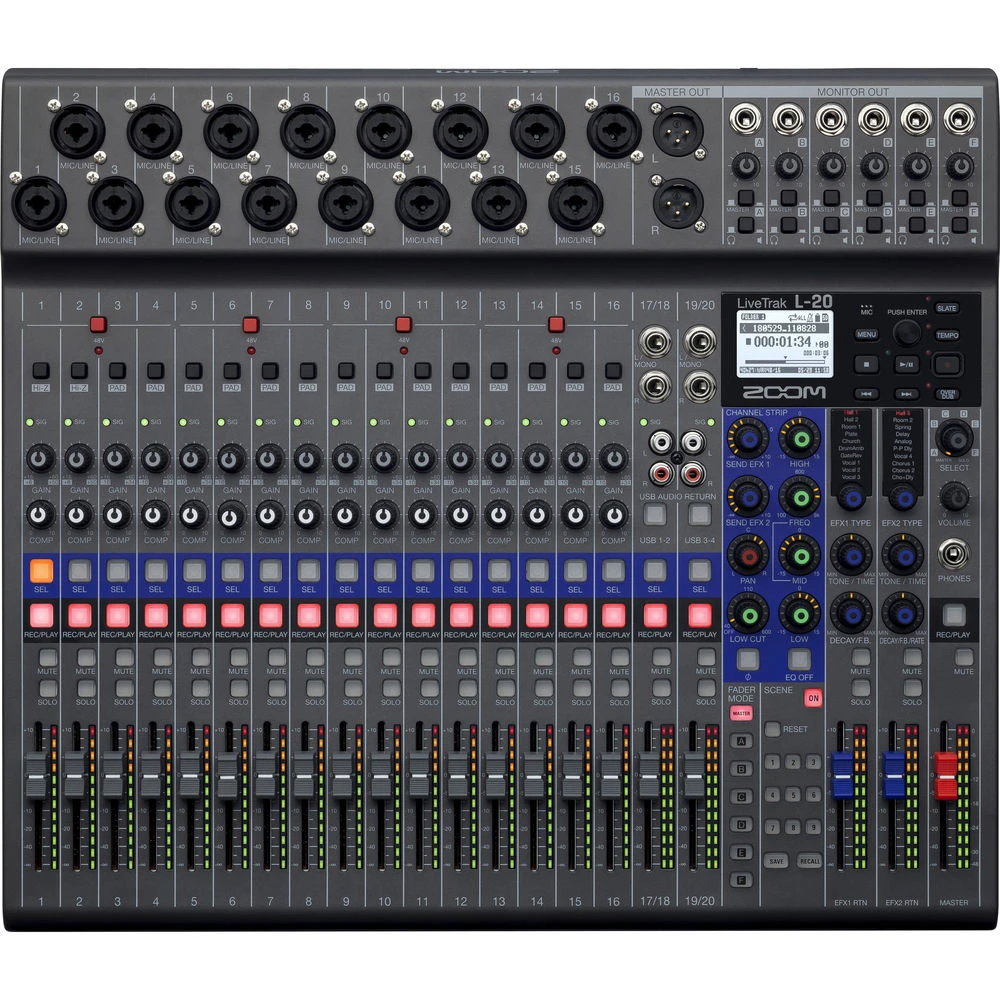
Here's the problem most Australian bands and sound engineers know all too well: you want a decent live mix and a proper multi-track recording of the gig. Traditionally, that meant hauling a mixer, a separate recording interface, a laptop, and hoping the whole setup didn't fall apart mid-set. The Zoom L20 LiveTrak was built to solve exactly that headache — and it does it in a way that's genuinely practical rather than just technically impressive on paper.
Whether you're running sound for a five-piece rock band at an RSL club, capturing worship services at your local church, or recording rehearsals with your mates, the L20 sits in a sweet spot that very few competitors actually occupy. Let's dig into what this thing does in the real world and whether it's the right fit for your setup.
What the Zoom L20 Actually Is (And Why It Matters)
At its core, the L20 is a 20-channel digital mixer with a built-in 22-track recorder that writes directly to an SD card. No laptop required. No DAW running in the background. No driver issues. You mix your live sound through the front-of-house outputs while simultaneously capturing every single channel as an individual track onto the card.
That last point is the real game-changer. You're not just recording a stereo mix of what comes out the speakers — you're recording every channel independently. That kick drum, that vocal, that guitar amp — each one gets its own track. After the gig, you pull the SD card, drop the files into your DAW, and mix the whole performance from scratch as if you'd been in a proper studio.
The L20 gives you:
- 20 input channels — 16 mono mic/line inputs plus 2 stereo channels
- 6 customisable monitor mixes — each musician can have their own mix
- 22-track simultaneous recording to SD card (up to 512GB)
- Built-in effects including reverb, delay, and compression on every channel
- USB audio interface functionality for studio recording
- Scene memory for saving and recalling complete mixer setups
Use Case 1: Live Bands Playing Pubs, Clubs, and Small Venues
This is where the L20 absolutely shines, and it's probably the most common scenario for Australian users. Picture this: your five-piece cover band has a regular Friday night gig at a pub in Parramatta or a wine bar in the Barossa Valley. You need enough channels for drums (kick, snare, two overheads), bass DI, two guitars, keys, and three vocals. That's 11 channels — well within the L20's capacity, with room to spare for backing tracks or extra inputs.
Here's what makes the L20 brilliant for this scenario:
- Quick setup. The physical layout is logical, with proper faders for every channel. You're not menu-diving through a touchscreen to set gain — it's right there on the top panel. For a band that does their own sound, this matters enormously.
- Six monitor mixes. Your singer wants more vocals, your drummer wants more click, your guitarist wants... well, more guitar. The L20 handles six independent monitor sends, so everyone can have what they need without compromising the front-of-house mix.
- Recording every gig automatically. Hit record at the start of the night and forget about it. At the end of the set, you've got a full multi-track recording. Use it to improve your live sound, create content for socials, or just settle the argument about whether the bass player was actually in time.
The practical limitation here? No motorised faders and no remote control app. Unlike some competitors in this space, the L20 requires you to be physically at the mixer to make adjustments. If you're a band doing your own sound from the stage, you'll want to get your mix dialled in during soundcheck and leave it. For most pub gigs, that's totally workable.
Use Case 2: Churches and Houses of Worship
Australian churches — from small community congregations to mid-sized worship centres — are one of the biggest markets for mixers like the L20, and for good reason. The typical church audio setup involves a worship band (keys, acoustic guitar, electric guitar, bass, drums), multiple vocalists, a pastor's lapel mic, and possibly a media feed for video playback.
The L20 handles this beautifully:
- Volunteer-friendly operation. Church sound is often run by volunteers with varying levels of experience. The L20's straightforward physical controls mean a new volunteer can learn the basics in a single rehearsal. There's no complex routing menu to get lost in — faders go up, faders go down, and the channel strip controls are clearly labelled.
- Scene recall. Save your Sunday morning setup as a scene. Next week, the volunteer loads the scene and you're 90% of the way there before anyone's even plugged in. This is a massive time-saver for churches where setup happens an hour before the service.
- Multi-track recording for livestreams and podcasts. Many Australian churches now livestream services or upload sermon recordings. The L20's multi-track capability means you can record the raw tracks, then create a polished mix for the online audience that's completely separate from what the room heard. The sermon mic can be properly levelled, the music balanced, and any room noise dealt with in post.
- Monitor mixes for the band. Foldback has historically been a nightmare for church sound volunteers. The L20's six monitor outputs mean the worship leader, drummer, and vocalists can each have a tailored mix without the sound operator needing to manage a separate monitor console.
One thing to keep in mind for churches: the L20 doesn't have Dante or AVB networking. If your church is moving towards a networked audio infrastructure with stage boxes and CAT6 runs, you'll need to look at something from Allen & Heath or Behringer. But for a straightforward setup where all your inputs are within cable reach of the mixer, the L20 is hard to beat at its price point.
Use Case 3: Rehearsal and Demo Recording
This might actually be the L20's secret weapon. Plenty of Australian bands spend good money on studio time to record demos, when they could be capturing perfectly usable multi-track recordings at every rehearsal.
Think about it: you set up the L20 in your rehearsal space, mic everything up properly once, save the scene, and from that point on, every single rehearsal is automatically multi-tracked. Over the course of a month, you might capture dozens of takes of new songs, jam sessions that spark ideas, and arrangements that you'd otherwise forget by the next practice.
The audio quality is genuinely solid for this purpose. The L20's preamps won't compete with a Neve or an API, but they're clean, quiet, and more than adequate for demos and pre-production. Recording at 24-bit/96kHz to the SD card gives you plenty of resolution to work with in post-production.
A practical tip: invest in a decent 256GB or 512GB SDXC card. At 24-bit/48kHz with 22 tracks recording simultaneously, you'll use roughly 6-8GB per hour. A 512GB card gives you well over 60 hours of recording before you need to offload — that's months of weekly rehearsals.
Use Case 4: Small-Scale Studio and Podcast Production
The L20 doubles as a 20-in/4-out USB audio interface, which opens up studio recording possibilities. Connect it to your Mac or PC and you've got a fully functional multi-channel interface for tracking in your DAW of choice.
For podcasters running multi-host setups or interview-style shows, the L20 is frankly overkill in terms of channel count — but the quality of the preamps and the ability to apply compression and EQ at the hardware level before hitting your recording software can simplify your workflow significantly. If you're running a podcast and doing live sound for a band, the L20 lets you use one piece of gear for both.
For small studios focused on tracking live performances — say, recording a jazz trio or an acoustic duo — the L20 offers a genuinely capable solution. Mic up the room, set your levels, and record straight to the SD card or via USB into your DAW. The built-in effects aren't going to replace dedicated outboard gear, but the reverbs are usable for monitoring purposes during tracking.
How the L20 Compares to Alternatives
Zoom L20 vs Zoom L12
The L12 is the L20's smaller sibling — same concept, fewer channels (12 inputs, 14-track recording). If you're a smaller band or duo, the L12 saves you money and desk space. But if there's any chance you'll need more than 12 inputs in the future, spend the extra and get the L20. Running out of channels mid-gig is a uniquely frustrating experience.
Zoom L20 vs Behringer X32 Rack
The X32 Rack is a more powerful digital mixer with better effects, more routing flexibility, and full remote control via tablet app. But it doesn't have built-in multi-track recording to SD card — you need a laptop running the X32's recording software, or you need to add a separate recorder. If the standalone recording capability is important to you (and for most L20 buyers, it is), the Zoom wins on simplicity.
Zoom L20 vs Allen & Heath Qu-16
The Qu-16 is a step up in terms of audio quality, effects processing, and mixing flexibility. It also records multi-track via USB to a DAW. But it's significantly more expensive, physically larger, and requires a laptop for recording. The L20 appeals to users who want a self-contained solution without the complexity of a full digital console.
Zoom L20 vs PreSonus StudioLive 24
Similar concept — mixer with built-in recording — but the StudioLive is a larger, more feature-rich console aimed at more demanding applications. If you need AVB networking, advanced DSP, or deep DAW integration, the StudioLive makes sense. If you want something you can throw in the boot of your car and set up in ten minutes, the L20 is the more practical choice.
What the L20 Does Brilliantly
- Self-contained recording. No laptop, no drivers, no crashes. Press record, play the gig, pull the card. It genuinely is that simple, and in a live environment, simplicity is everything.
- Channel count for the size. Twenty inputs in a relatively compact form factor means you can handle a full band setup without hauling a massive console.
- Multiple monitor mixes. Six independent mixes is generous for a mixer in this category. Most bands and churches will find this more than sufficient.
- Scene memory. Being able to recall a complete setup in seconds is a genuine workflow improvement, especially for regular gigs or weekly services.
- Build quality. Zoom's built this thing to handle life on the road. The metal chassis feels solid, and the faders — while not premium — are smooth and reliable.
Where the L20 Has Limitations
No product is perfect, and being upfront about limitations helps you make a better decision:
- No wireless remote control. You can't mix from a tablet. For bands doing their own sound from the stage, this means walking to the mixer to make adjustments. Some competitors offer full tablet control, which is a significant advantage in certain setups.
- Effects are basic. The built-in reverbs and delays are functional but won't wow anyone. They're fine for live use where the room acoustics dominate anyway, but for studio work, you'll want to use plugins in your DAW instead.
- No parametric EQ. The channel EQ is a three-band semi-parametric design. It's adequate for most live work, but if you're used to the deep EQ control of a full digital console, you'll find it limiting.
- USB recording is limited to stereo. While the SD card captures all 22 tracks, the USB interface only sends a stereo mix to your computer. If you want multi-track recording via USB, you'll need the L20R (rack-mount version), which offers full multi-track USB capability.
- Display is small. The LCD screen handles basic information, but it's not a touchscreen and navigating deeper settings can be a bit fiddly. This is a trade-off for the compact size.
Practical Tips for Getting the Most From Your L20
- Use high-quality SD cards. Don't cheap out here. Use a Class 10 or UHS-I SDXC card from a reputable brand. A dodgy card corrupting your recording mid-gig is not a mistake you want to make twice.
- Save scenes for every regular gig. If you play at three different venues, save a scene for each one. Include your gain structure, EQ, monitor mixes, and effects settings. Setup time drops dramatically.
- Use the headphone cue system. The L20 lets you solo channels in headphones while the main mix continues unaffected. During soundcheck, this is invaluable for isolating problems without disrupting the rest of the band.
- Back up your SD card recordings regularly. After every gig or session, copy the files to a hard drive. SD cards do fail, and losing months of recordings because you kept everything on one card is heartbreaking.
- Label your channels clearly. The L20 lets you assign names to channels via the screen. Take five minutes to label everything — future you will thank present you when you're trying to find the hi-hat track in a DAW session with 22 unlabelled tracks.
Who Should Buy the Zoom L20?
The L20 is ideal for:
- Bands who want multi-track recordings of gigs and rehearsals without the hassle of a separate recording rig
- Churches and community organisations that need reliable, volunteer-friendly mixing with recording capability
- Solo operators and small production companies handling events where simplicity and speed matter more than deep DSP
- Home studio owners who also do live sound and want one versatile piece of gear
The L20 is not ideal for:
- Large venue installations requiring networked audio, extensive routing, or remote control
- Professional mixing engineers who need advanced effects processing and deep parametric EQ
- Users who need tablet/phone remote mixing — the L20 requires hands-on operation at the console
Frequently Asked Questions
Can the Zoom L20 record and mix live at the same time?
Yes — that's its core feature. You mix through the main outputs for your PA while simultaneously recording all 22 tracks (20 inputs plus the stereo master) to an SD card. The recording is completely independent of your live mix.
What format does the L20 record in?
WAV files at up to 24-bit/96kHz. These are standard uncompressed audio files that every DAW can import directly — Logic Pro, Ableton, Pro Tools, Reaper, you name it.
How many hours can I record on a single SD card?
With a 512GB card recording 22 tracks at 24-bit/48kHz, expect roughly 60-70 hours of continuous recording. At 96kHz, that halves to around 30-35 hours. For most users, even a 128GB card will handle several full gigs before needing to be offloaded.
Does it work as an audio interface for my computer?
Yes, via USB. However, the desktop version sends only a stereo mix to your computer over USB. If you need full multi-track USB recording, consider the L20R rack-mount version, which supports 22-channel USB audio.
Is the Zoom L20 suitable for outdoor gigs?
It handles outdoor use just fine — many Australian users run it at markets, outdoor festivals, and community events. Just keep it out of direct sun and rain (as you would with any piece of electronic gear), and consider a dust cover if you're playing in particularly dusty conditions.
The Bottom Line
The Zoom L20 LiveTrak doesn't try to be everything to everyone, and that's exactly why it works so well for the people it's built for. If you need a straightforward, reliable mixer that also captures multi-track recordings without any fuss, it's one of the best options available in Australia at this price point.
The lack of remote control and the basic effects processing mean it won't satisfy engineers who need deep digital mixing capabilities. But for bands, churches, small venues, and anyone who's ever wished they could hit record at a gig without lugging a laptop and interface along, the L20 is a genuinely practical solution that does exactly what it promises.
Ready to simplify your live sound and recording setup? Check out the Zoom L20 LiveTrak at MusiconStage — Australia's trusted source for pro audio gear.
Got questions about whether the L20 is right for your specific setup? Get in touch with the MusiconStage team for expert advice tailored to your needs.