
Soundcraft Ui24R Explained: Beginner's Guide to Rack Mixers 2026
Soundcraft Ui24R Explained: A Beginner's Guide to Rack-Mount Digital Mixers in 2026
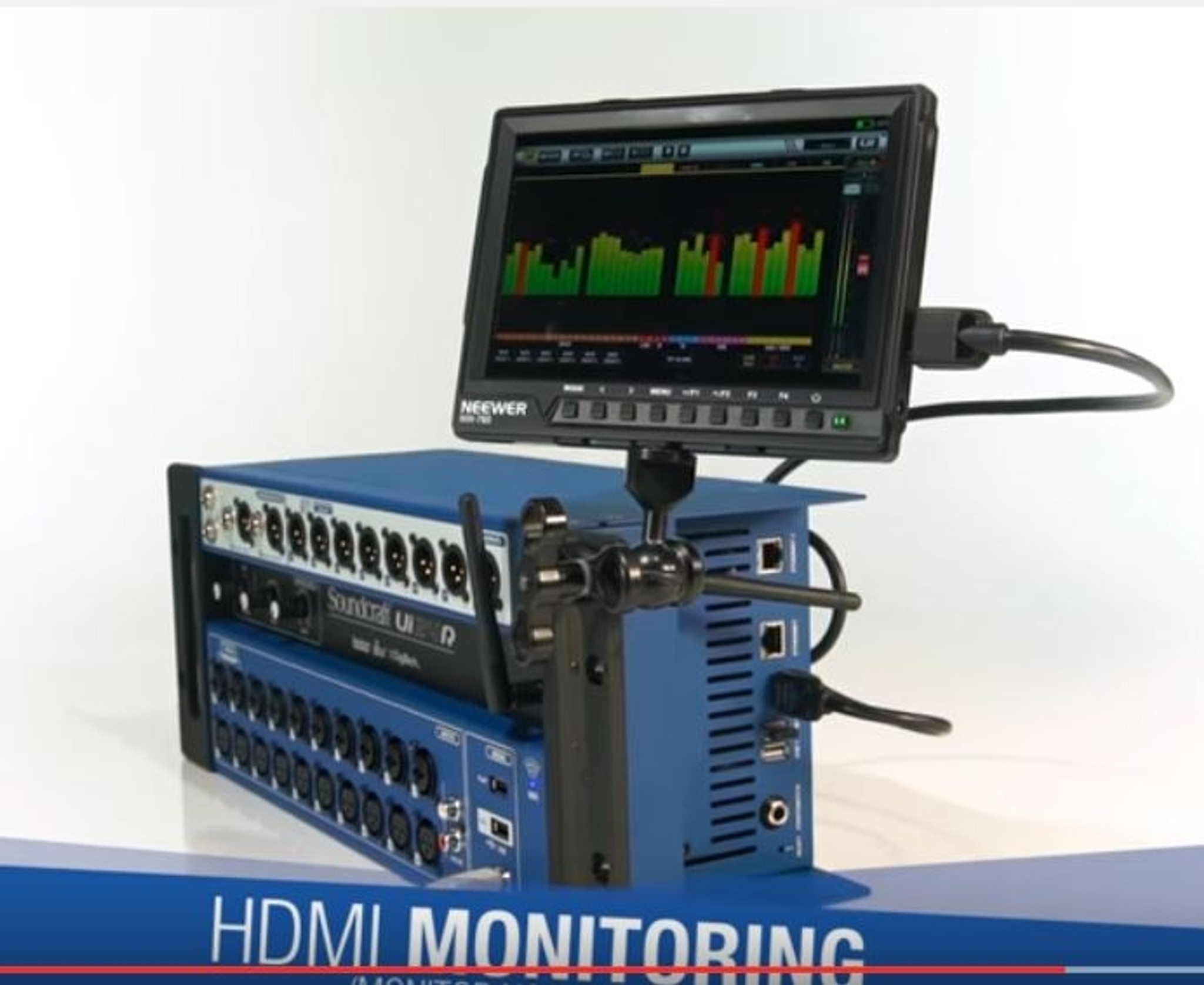
If you've been looking into digital mixers and stumbled across the Soundcraft Ui24R, you might be wondering: where are all the knobs and faders? That's a perfectly reasonable question — and it gets right to the heart of what makes this mixer genuinely different from most audio gear you've probably seen.
The Ui24R is what's known as a rack-mount digital mixer, which means it's designed to sit in an equipment rack (that tall metal cabinet you see backstage at gigs) and be controlled entirely from a tablet, phone, or laptop. No physical faders. No knobs to turn. Everything happens on a screen, over Wi-Fi or a wired network connection.
Sound intimidating? It's actually one of the most approachable digital mixers available — and this guide will walk you through exactly what it does, who it's for, and whether it makes sense for your situation here in Australia.
What Exactly Is a Rack-Mount Mixer?
Before we dive into the Ui24R specifically, let's clear up some basics that trip up newcomers.
A traditional mixer (sometimes called an analogue desk or mixing console) is that big board with rows of knobs and sliding faders you've seen at concerts. You plug microphones and instruments into it, adjust levels and tone, and send the mixed sound out to speakers.
A rack-mount mixer does exactly the same job, but the entire brain of the mixer lives in a compact box designed to fit into a standard 19-inch equipment rack. Think of it like this: imagine taking all the intelligence of a full mixing desk, shrinking it down, and controlling it with your iPad instead of physical knobs.
The Soundcraft Ui24R takes up just 3 rack units (about 13cm of vertical space in a rack) — yet it handles 24 channels of audio. A traditional 24-channel analogue mixer would typically be a large, heavy desk that dominates an entire table.
Why Would Anyone Want This?
- Space savings — Fits in a rack case instead of needing a dedicated mixing position
- Portability — Dramatically lighter and more compact than an equivalent analogue desk
- Flexibility — Mix from anywhere in the venue, not just the sound desk position
- Multi-user control — Multiple people can adjust their own monitor mixes simultaneously
- Recording built in — Many rack mixers (including the Ui24R) can record every channel directly
The Soundcraft Ui24R: What's Inside the Box
Soundcraft is owned by Harman (which is part of Samsung), and they've been making professional audio gear since 1973. The Ui24R sits in their "Ui" range — the "U" stands for "universal" and the "i" references the browser-based interface. Here's what you actually get:
Inputs — What You Can Plug In
The Ui24R gives you 24 input channels, broken down as follows:
- 10 combo XLR/TRS inputs (channels 1–10) — These accept both microphones (via XLR) and line-level instruments or devices (via 6.35mm jack). All 10 have Studer-designed preamps with phantom power, which is important if you're using condenser microphones.
- 10 XLR-only inputs (channels 11–20) — Additional microphone inputs, also with phantom power capability.
- 2 stereo line inputs (channels 21–24) — For connecting keyboards, backing track players, DJ gear, or other stereo sources via 6.35mm jacks.
- 2-track USB playback — You can play background music or backing tracks directly from a USB stick.
New to audio terminology? "XLR" is the round, three-pin connector used for most professional microphones. "TRS" is the standard 6.35mm (quarter-inch) jack plug. "Phantom power" is a small electrical current sent down the cable that certain microphones (condenser types) need to operate.
Outputs — Where the Sound Goes
- Main left/right stereo output (XLR) — Feeds your front-of-house speakers
- 10 auxiliary outputs (XLR) — For stage monitor speakers or in-ear monitor systems. This is a generous number — many mixers in this price range offer fewer aux sends.
- Headphone output — For the sound engineer to monitor privately
- 2-track USB recording output — Records the main stereo mix to a USB drive
Built-In Effects — The Extras That Matter
This is where the Ui24R punches well above what you might expect. Soundcraft has packed in effects processors from three of Harman's professional audio brands:
- Lexicon reverbs and delays — Lexicon is legendary in professional audio for their reverb quality. You get four dedicated effects engines with multiple reverb types, delays, chorus, and more.
- dbx dynamics processing — Every channel gets its own compressor, gate, and de-esser. dbx invented the modern compressor, so this isn't token processing — it's genuinely useful.
- DigiTech guitar amp modelling — If a guitarist plugs directly into the mixer, they can use amp simulations rather than needing a separate amp. Handy for keeping stage volume down.
- 31-band graphic EQ on outputs — For tuning your speaker system to the room, which makes a massive difference in live sound quality.
In practical terms, this means you likely won't need to buy separate effects units or processing gear, which is a significant cost saving.
How the Wireless Control Actually Works
This is the part that confuses — and then delights — most beginners. Here's how it works, step by step:
- The Ui24R has a built-in Wi-Fi access point (dual-band, supporting both 2.4GHz and 5GHz). You don't need an external router, though you can use one for larger setups.
- You connect your tablet, phone, or laptop to the Ui24R's Wi-Fi network, just like connecting to any other Wi-Fi.
- You open a web browser (Chrome, Safari, Firefox — whatever you use) and type in the mixer's IP address.
- The full mixing interface loads in your browser. It looks and works like a traditional mixing desk, with faders, knobs, meters — the lot.
Important distinction: There's no app to install. The interface runs entirely in your web browser. This means it works on virtually any device — iPad, Android tablet, Windows laptop, Mac, Chromebook, even a phone in a pinch (though the screen is a bit small for comfortable mixing).
Can Multiple People Control It at Once?
Yes, and this is genuinely one of the Ui24R's best features for bands. Up to 10 devices can connect simultaneously, and you can set different access levels:
- Admin access — Full control over everything (for the sound engineer)
- Monitor mix access — Each musician can adjust only their own monitor mix without affecting anything else
Picture this: your vocalist wants more of their voice in their monitor, your drummer wants more kick drum, and your guitarist wants less keyboards. Instead of everyone asking the sound engineer to make adjustments (the classic "more me" problem), each person opens the mixer on their phone and dials in exactly what they want. For bands, this alone can be worth the price of admission.
Multi-Track Recording: Your Built-In Studio
The Ui24R can record all 24 input channels simultaneously to a connected USB hard drive or thumb drive. Each channel records as a separate audio file (WAV format), which means you can take those recordings home, import them into recording software (like GarageBand, Reaper, Logic Pro, or any DAW), and mix them properly after the gig.
This is genuinely powerful. Many bands use this to:
- Create live albums without hiring a separate recording engineer
- Review performances for rehearsal purposes
- Capture songwriting sessions or jam nights
- Build a portfolio of live recordings for promotion
You can also play back multi-track recordings through the mixer, which is brilliant for virtual soundchecks. Record the band during soundcheck, send the musicians off for dinner, then spend time refining the mix using the playback — without needing anyone on stage.
Who Is the Ui24R Actually For?
Let's be straight about who benefits most from this mixer and who might want to look elsewhere.
Ideal For:
- Small to mid-sized live venues — Pubs, clubs, community halls, and houses of worship with up to roughly 20 channels of input
- Bands who mix themselves — The wireless monitor mixing is transformative when you don't have a dedicated sound engineer
- Mobile DJs and event operators — Compact, powerful, and easy to transport
- Schools and community groups — The browser-based control means no expensive proprietary software to maintain
- Installed systems — Conference rooms, function centres, and small theatres where the mixer can live in a rack cupboard
- Home studios needing live recording capability — 24 channels of simultaneous recording is serious studio functionality
Maybe Not Ideal For:
- Engineers who need physical faders — Some experienced mixers strongly prefer the tactile feedback of real faders, especially for fast-paced live work. If that's you, consider a traditional-format digital mixer instead.
- Very large events — With 24 input channels, you'll hit the limit at bigger productions. A large band with individually miked drums, multiple vocalists, and a full backline can chew through 24 channels quickly.
- Situations where Wi-Fi is unreliable — While you can use a wired Ethernet connection as backup, the Ui24R's core appeal is wireless control. In venues with heavy Wi-Fi interference, you may need to invest in proper network infrastructure.
Common Beginner Questions About the Ui24R
"What if the Wi-Fi drops out during a show?"
Good news: the mixer continues running its last settings even if every control device disconnects. The audio doesn't stop or change — you just temporarily lose the ability to make adjustments. Reconnecting picks up right where you left off. For added reliability, you can connect via Ethernet cable instead of (or in addition to) Wi-Fi.
"Do I need an iPad specifically?"
No. Any device with a modern web browser works. That said, a 10-inch tablet (iPad or Android) provides the best experience because the screen is large enough to see the full mixer layout comfortably. Many Aussie users run it on an iPad, but plenty use Android tablets or laptops perfectly happily.
"Is it hard to learn if I've never used a digital mixer?"
The learning curve is moderate. If you understand basic mixing concepts (gain, EQ, faders, aux sends), you'll find the interface logical and well-organised. Soundcraft provides helpful tutorial resources, and the interface is more intuitive than many competing products. Budget a few hours of experimenting at home before your first gig with it.
"Can I use it for recording at home?"
Absolutely. Connect it to your computer via USB, and it functions as a 24-in/24-out USB audio interface. This gives you professional-quality multi-channel recording capability with your preferred DAW software. Plenty of home studio owners use the Ui24R as their primary recording interface.
"What about latency — is there a delay?"
The audio processing happens inside the Ui24R itself, not on your tablet or phone. Your control device is just a remote control — it's not processing audio. This means there's no perceptible latency in the audio path, regardless of what device you're controlling from.
What to Consider Before Buying
If you're seriously thinking about the Ui24R, here are the practical things to sort out:
1. You'll Need a Tablet or Laptop
The Ui24R has no physical controls beyond a power switch. You must have a control device. Budget for a decent tablet if you don't already own one — a basic iPad or Samsung Galaxy Tab works perfectly. Don't forget a sturdy tablet stand or mount for live use.
2. Think About Your Rack Setup
The Ui24R fits in a standard 19-inch rack and takes up 3 rack units of space. If you don't already own a rack case, you'll need one. A basic 4U or 6U rack case gives you room for the mixer plus a power conditioner or wireless receiver. Many Australian suppliers stock affordable portable rack cases.
3. Consider Your Cable Runs
Because the mixer sits in a rack (often on stage or near the stage), your cable runs to front-of-house speakers may be longer than with a traditional desk positioned in the audience area. Plan your XLR cable lengths accordingly.
4. USB Drive for Recording
If you want to use the multi-track recording feature, invest in a reliable USB hard drive or high-speed USB thumb drive. Recording 24 channels simultaneously generates large files — a 256GB drive is a sensible minimum.
5. Network Planning for Larger Venues
The built-in Wi-Fi works well for smaller spaces, but in larger venues or those with lots of competing wireless signals, consider adding an external Wi-Fi access point connected via Ethernet for more reliable control. This is standard practice in professional installations.
How Does It Compare? A Quick Perspective
Without getting into an exhaustive comparison, it helps to understand where the Ui24R sits in the market:
- Compared to analogue mixers — Far more features, much more compact, but no physical controls. The built-in effects alone would cost hundreds extra with an analogue desk.
- Compared to other digital rack mixers — The Ui24R's browser-based approach (no proprietary app) is a genuine advantage. Some competitors require specific apps that may not be updated for newer devices.
- Compared to traditional-format digital mixers — You trade physical faders for dramatically reduced size and weight. The features and sound quality are comparable at this price point.
Getting Started: Your First Steps with the Ui24R
If you decide the Ui24R is right for you, here's a realistic getting-started path:
- Unbox and rack-mount it — Or simply set it on a flat surface for initial exploration. It works fine outside a rack.
- Power it up and connect your tablet via Wi-Fi — The default network name and password are in the quick-start guide.
- Open the browser interface and explore — Spend time clicking through menus and adjusting settings with no audio connected. Get comfortable with the layout.
- Connect a single microphone and learn the signal path — Adjust gain, EQ, compression, and effects on one channel before adding complexity.
- Gradually add channels — Once comfortable with one channel, start building up a full mix.
- Experiment with recording — Connect a USB drive and try the multi-track recording. It's straightforward once you've used the basic mixing functions.
- Set up monitor mixes — Practice creating different aux mixes for stage monitors.
- Save your settings as scenes — The Ui24R lets you save and recall complete mixer configurations, which is invaluable for venues or bands with regular setups.
Realistic timeline: Most beginners feel comfortable with basic operation within a weekend of casual exploration. Feeling confident enough to run a live show typically takes 2–4 weeks of regular practice, depending on your prior experience with audio.
Ready to Explore the Soundcraft Ui24R?
The Soundcraft Ui24R represents a genuinely smart approach to live sound mixing — particularly for Australian musicians, venues, and houses of worship who need professional-grade audio in a compact, flexible package. The combination of wireless control, multi-track recording, and premium built-in effects makes it remarkably capable for its size and price point.
If you're new to digital mixing, the Ui24R's browser-based control is actually an advantage — there's no complex proprietary software to learn, and you're controlling everything from a device you already know how to use.
View the Soundcraft Ui24R at MusiconStage to check current Australian pricing and availability. If you have questions about whether it's right for your setup, the MusiconStage team can help you work through the details.
Whether you're a band looking to take control of your own sound, a venue owner upgrading from an ageing analogue desk, or a budding sound engineer building your first serious rig — the Ui24R is well worth a closer look.