
Soundcraft Ui24R Digital Mixer: Australian Pro Audio Guide 2026
Soundcraft Ui24R Digital Mixer: Australian Pro Audio Guide 2026
If you're an Australian sound engineer, musician, or venue operator looking for a digital mixer that punches well above its price tag, the Soundcraft Ui24R deserves serious attention. This 24-input remote-controlled rack mixer has quietly become one of the most pragmatic choices for working pros who need professional results without lugging a control surface to every gig.
What makes the Ui24R genuinely interesting isn't a single headline feature — it's the combination of Studer-grade preamps, dbx and Lexicon processing, dual-engine multitrack recording, and full wireless control through any device with a browser. For touring engineers, house-of-worship techs, school AV departments, and DJs across Australia, this mixer solves a lot of real-world problems in a single 4U rack box.
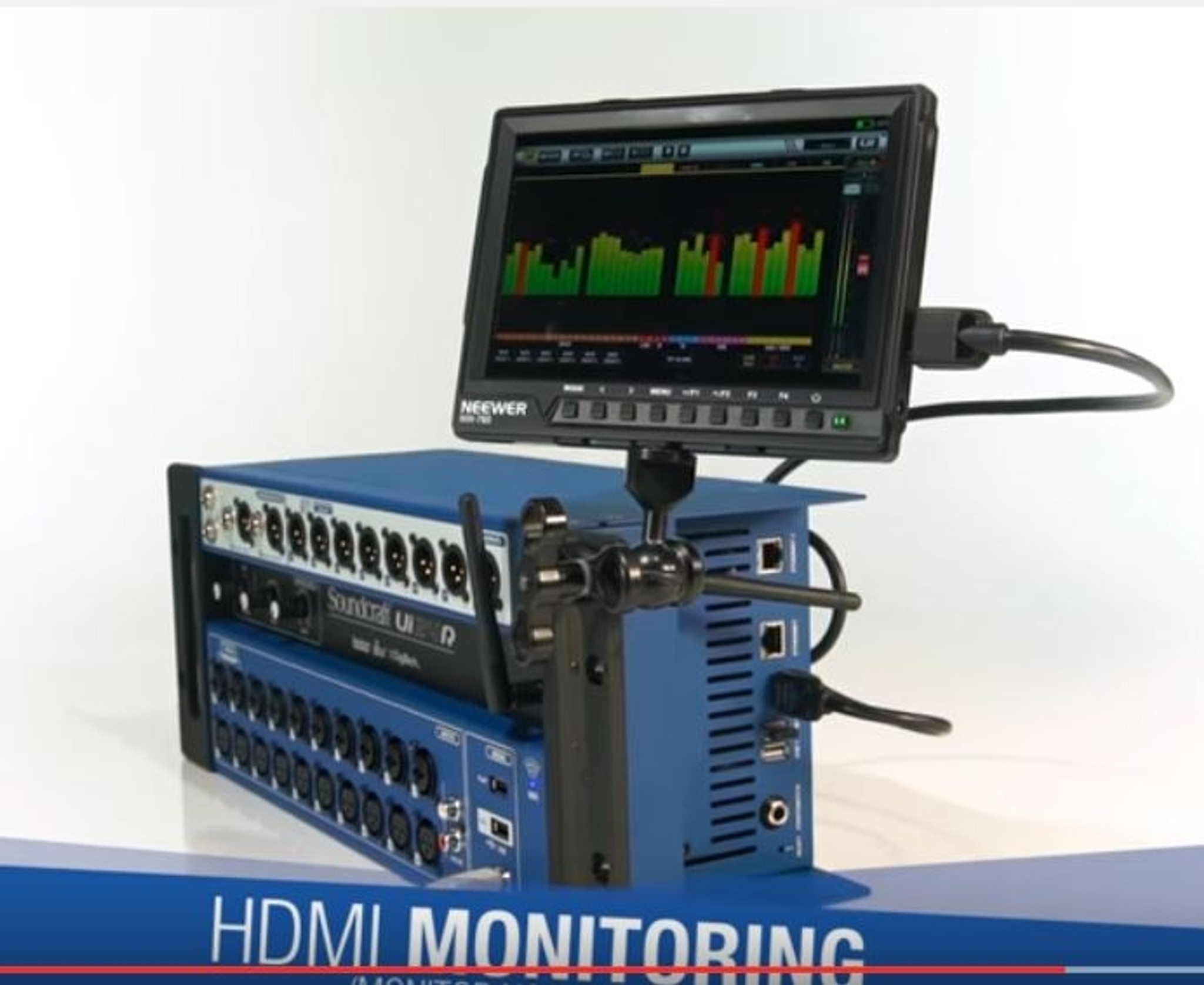
This guide covers what the Ui24R actually is, where it shines, where it struggles, and whether it's the right call for your setup in 2026. We'll go beyond the spec sheet to the realities of using it night after night.
Ready to skip ahead? View Soundcraft Ui24R pricing and availability with free shipping across Australia.
What Is the Soundcraft Ui24R?
The Soundcraft Ui24R is a 24-input, 10-output digital mixer designed to be operated entirely through a web browser. There's no built-in screen or fader bank — instead, you connect via Wi-Fi (it has a built-in dual-band access point) or Ethernet, and control everything from a phone, tablet, laptop, or any combination of up to 10 devices simultaneously.
It mounts in a standard 4U rack space, weighs around 5.6 kg, and provides 20 combo XLR/TRS inputs with Studer-designed mic preamps, two RCA stereo line inputs, and HARMAN Connected PA compatibility. Outputs include 8 balanced XLR aux sends, two main XLR outs, and a stereo headphone output. It also handles 22-in/22-out USB multitrack recording and 2-track recording direct to USB stick.
Who It's Made For
Soundcraft positioned the Ui24R squarely at engineers who want pro features without paying console prices. In practice, the Australian market has embraced it for:
- Mid-sized live venues, pubs and clubs (50–500 capacity)
- Houses of worship needing volunteer-friendly operation
- Touring bands managing their own front-of-house
- Corporate AV companies running multiple events
- Schools, universities and community theatres
- Recording sessions where multitrack capture matters
- Mobile DJs and entertainers wanting tablet control
Inside the Hardware: What You're Actually Buying
Spec sheets only tell part of the story, but a few things on the Ui24R genuinely matter once you start mixing on it.
Studer-Designed Microphone Preamps
The 20 mic preamps are derived from Studer's pro broadcast designs. They're clean, quiet (around -127 dBu EIN), and handle hot inputs without breaking up. For drums, brass, and acoustic instruments, they hold up against mixers costing significantly more. This is the single most important quality differentiator at this price point.
Effects: Real dbx, Lexicon and DigiTech
Every channel includes dbx limiter and de-esser processing alongside 4-band parametric EQ, gate, and compressor. Four stereo Lexicon effects engines provide reverb, delay, chorus and modulation that genuinely sound like Lexicon — not generic algorithm knock-offs. There's also DigiTech amp modelling for guitar inputs, which is handy for stripped-back venues without backline.
Built-in Wi-Fi Access Point and Ethernet
The dual-band 2.4 GHz / 5 GHz Wi-Fi means you don't need a separate router for tablet control in most situations. For larger venues or when RF is congested, plug in an Ethernet cable and use your own access point. Up to 10 devices can connect simultaneously, which is brilliant for personal monitor mixing — every musician on stage can adjust their own wedge or in-ear mix from their phone.
Recording: Multitrack and Direct-to-USB
Two USB ports handle different jobs. One does 22-in/22-out USB audio interface duties to a Mac or PC for full multitrack capture in your DAW. The other records a stereo mix straight to a USB stick or hard drive — no computer needed. For bands wanting board recordings of every gig, this is genuinely useful.
Want the full spec breakdown? View detailed Soundcraft Ui24R specifications from MusiconStage Australia.
Real-World Strengths in Australian Venues
Reading reviews is one thing. Here's what the Ui24R actually delivers when you put it to work in typical Australian gig conditions.
The Roaming Engineer Workflow
The Ui24R's killer feature is mobility. You can mix from the front bar, walk to the back of a function room to check coverage, fine-tune the mix from on stage during soundcheck, then sit at front-of-house for the show — all from a single tablet. For pubs and clubs where the only available mix position is a corner that doesn't represent what punters are hearing, this changes everything.
Multi-User Personal Monitoring
Hand each musician an old smartphone connected to the Ui24R's Wi-Fi, and they each control their own monitor mix. The Ui Mix app shows only the channels and aux sends they're permitted to touch. For house-of-worship setups where volunteer musicians rotate weekly, this dramatically reduces soundcheck friction.
Quick Setup for Pickup Gigs
Power on, connect tablet, recall a saved show file, and you're mixing in under three minutes. There's no console to position, no surface to weatherproof, no faders to break in transit. Save a show file per band or venue, and recall it instantly. For corporate AV companies running back-to-back events, this efficiency adds up fast.
Outdoor and Australian Climate Considerations
Because the brain lives in the rack and you control via tablet, the Ui24R handles dust, heat and humidity better than a control-surface mixer with exposed faders. For outdoor festivals, beach gigs, and the realities of Australian summer touring, this matters. Just keep the rack out of direct sun and you're fine.
Honest Limitations You Should Know About
No mixer is perfect, and being upfront about the Ui24R's weak points helps you decide whether they affect your specific use case.
No Tactile Control Surface
This is the obvious trade-off. Some engineers genuinely miss physical faders for fast multi-channel adjustments during dynamic shows. If you're mixing a band that needs constant level rides across many channels simultaneously, a touchscreen-on-a-tablet workflow can feel slower than dedicated faders. Many users add a small MIDI controller for this, though native MIDI control mapping is limited.
Wi-Fi Reliability in Crowded RF Environments
The internal access point is fine for small venues with clear RF, but in busy CBD locations, festivals with heavy wireless traffic, or events with many phones, you'll want to use Ethernet to a quality external access point. Plan your network rather than relying on the built-in Wi-Fi for critical gigs.
HTML5 Browser Interface Quirks
Because the control interface runs in a browser, performance varies with your device. Older tablets and budget phones can feel sluggish. A modern iPad or Android tablet (released within the last 3–4 years) is what you want. Occasionally a browser tab needs refreshing — usually after sleep/wake cycles. Not a deal-breaker, but worth knowing.
Limited Scene Automation
Snapshots and show recall work well, but the Ui24R doesn't offer the deep scene automation, MIDI scene triggering, and DCA capabilities of higher-tier digital consoles. For complex theatre productions with constant scene changes, you'll outgrow it. For most live music applications, you won't.
Effects Routing Constraints
The four FX engines are good quality but you can't endlessly route effects-of-effects or build complex parallel processing chains like you might on a larger system. For 95% of bands, the included reverb, delay, chorus and modulation is more than enough.
How the Ui24R Compares to Alternatives
Context helps. Here's how the Ui24R stacks up against the mixers Australian buyers most commonly cross-shop it with.
| Feature | Soundcraft Ui24R | Behringer X Air XR18 | Allen & Heath Qu-SB | PreSonus StudioLive 24R |
|---|---|---|---|---|
| Mic Inputs | 20 | 16 | 16 | 24 |
| Total Inputs | 24 | 18 | 16 | 24 |
| Aux Outputs | 8 | 6 | 10 | 10 |
| Built-in Wi-Fi | Yes (dual-band) | Yes (single-band) | No (USB dongle) | No |
| Multitrack Recording | 22x22 USB | 18x18 USB | 32x32 (with USB) | 32x32 USB |
| Direct USB Stick Recording | Stereo | Stereo | No | No |
| Effects Engines | 4 Lexicon stereo | 4 stereo | 4 stereo | 4 stereo |
| Rack Size | 4U | 1U | 3U | 3U |
Versus the Behringer XR18
The XR18 is cheaper and more compact, and it's earned a loyal following. The Ui24R wins on input count (20 mic pres vs 16), Studer preamp quality, dual-band Wi-Fi, direct USB stick recording, and arguably the Lexicon effects. The XR18 wins on price and rack space efficiency. If you're frequently maxing out 16 channels or care about preamp quality for recording, the Ui24R is the better long-term call.
Versus the Allen & Heath Qu-SB
The Qu-SB is from a respected family of mixers but skips built-in Wi-Fi (you add a USB dongle), has fewer mic inputs, and lacks direct-to-USB stereo recording. Its iPad app is mature and polished. The Ui24R offers broader device compatibility — control from any browser, not just iPad — and more inputs.
Versus the PreSonus StudioLive 24R
The StudioLive 24R is closest on paper but expects you to use Universal Control software on a computer for full functionality. The Ui24R is genuinely standalone with browser control. For solo operators who want true wireless freedom without a laptop in the chain, Soundcraft has the edge.
Use Case Scenarios: Is the Ui24R Right for You?
Pubs, Clubs and Live Music Venues
Strong fit. The roaming-engineer workflow is perfect for venues where the FOH position is compromised. The 20 mic inputs handle most band configurations (drum kit, bass DI, two guitars, keys, three or four vocals, a spare or two). Save show files per band and recall instantly between sets.
Houses of Worship
Excellent fit. Volunteer-friendly tablet operation, multi-user permissions for musicians' personal monitoring, recallable show files for different service formats. The lack of a physical surface actually helps because volunteers can't accidentally bump faders. Hide the rack in a tech cupboard and run everything from a tablet at the back of the auditorium.
Touring Bands Doing Their Own Sound
Strong fit. Compact 4U rack travels well, no fragile control surface to babysit, you can mix from anywhere in the room during soundcheck. Multitrack record every show to a USB stick for later mixing or content creation. Just plan for venues with bad RF and bring an Ethernet cable plus a small access point.
Corporate AV and Event Production
Strong fit, especially for medium-complexity events. Multiple operators can manage different aspects (one running mics for panellists, another handling music playback) from separate tablets. Quick setup and teardown. For very large or complex shows with many scene changes, you'll want a larger console.
Recording Studios and Project Studios
Good supplementary fit. The 22-in/22-out USB interface and Studer preamps make it credible as a tracking front-end for bands. It's not replacing a dedicated interface and dedicated preamps in a serious commercial studio, but for a home or project studio that also needs live mixing capability, it's an excellent dual-purpose tool.
Mobile DJs and Solo Entertainers
Reasonable fit if you need more than two channels. Probably overkill for a basic two-deck DJ rig, but if you're a one-person band with backing tracks, vocal mics, instruments and need processing, the Ui24R gives you serious control from a tablet at your performance position.
When to Choose Something Else
If you need a tactile control surface, look at the Soundcraft Si Impact, Allen & Heath SQ-5, or PreSonus StudioLive Series III. If you only need 8–12 inputs and want to save money, the Behringer XR12/XR16 or Mackie DL16S are valid. If you need extensive scene automation for theatre, look at Yamaha CL/QL series or Allen & Heath dLive.
Australian Pricing, Warranty and Support
Buying audio gear in Australia from authorised dealers matters more than most people realise. Grey-market imports often have no local warranty support, voided manufacturer coverage, and zero local technical assistance when something goes wrong before a Saturday-night gig.
HARMAN Professional (Soundcraft's parent) provides Australian warranty support through authorised channels. MusiconStage is an authorised Soundcraft dealer, which means:
- Full Australian manufacturer warranty
- Local technical support and service network access
- Genuine product (not grey-market)
- Free shipping across Australia
- Hassle-free returns within the standard return window
- Access to firmware updates and HARMAN registration
The Ui24R has been on the market long enough that firmware is mature and stable. Soundcraft has continued to issue updates that add features and fix issues, which is reassuring for a long-term investment.
Setup Tips From Experience
A few things that will make your Ui24R life much easier from day one:
- Update firmware first. Before your first gig, check Soundcraft's site for the latest firmware. Updates have improved stability and added features.
- Change the default Wi-Fi password. The default access point credentials are public knowledge. Lock down your network so randoms can't connect during your gig.
- Save show files obsessively. Save before changes, save after changes, save with date stamps. Storage is cheap and recovery from a corrupted recall is priceless.
- Use Ethernet for critical shows. Internal Wi-Fi is fine for most situations, but for any high-stakes gig, run Ethernet to a quality access point you trust.
- Test multi-device connection in advance. If musicians will use phones for personal monitoring, get them connected and trained at rehearsal, not during soundcheck.
- Carry a backup tablet. If your primary control device fails or runs out of battery mid-show, you need a plan B already powered up and connected.
Frequently Asked Questions
Does the Ui24R need a computer to operate?
No. It's fully standalone with built-in Wi-Fi. You only need a device with a web browser — phone, tablet, laptop, anything modern. A computer is only needed if you want to use it as a 22x22 USB audio interface for DAW recording.
Can multiple people control it at once?
Yes — up to 10 devices simultaneously. You can assign permission levels so musicians only see and adjust their own monitor mixes while the engineer keeps full control of FOH.
How does it compare to the original Ui16?
The Ui24R is the larger sibling. More inputs (20 mic vs 8 mic + line), more aux outputs, dual-band Wi-Fi, larger and more robust rack-mount construction, and the multitrack USB interface. If you outgrew the Ui16 or anticipate needing more inputs, the Ui24R is the natural step up.
Does it work with iPads, Android tablets and Windows laptops?
Yes — the browser-based control works on any device with a current web browser. iOS, Android, Windows, macOS, even Linux. Performance is best on modern devices with good processors.
What's included in the box?
The Ui24R itself, IEC power cable, and documentation. Rack ears are integrated. You'll need to supply your own tablet/phone, network cables if going wired, and any USB storage for direct recording.
Is the Wi-Fi range good enough for large venues?
The internal Wi-Fi is rated for typical small-to-medium venue coverage. For larger spaces or RF-busy environments, plug in an external access point via the rear Ethernet port. This is the recommended approach for any professional gig.
The Verdict: Who Should Buy the Soundcraft Ui24R?
The Soundcraft Ui24R is one of the smartest digital mixer purchases an Australian sound professional can make in 2026 — provided you're comfortable with the wireless tablet workflow. The combination of Studer preamps, dbx and Lexicon processing, dual-engine recording, and multi-user remote control is genuinely hard to beat at this price point.
It's the right call if you mix mid-sized live events, run a house of worship, tour as a self-mixing band, or operate corporate AV where setup speed matters. It's not the right call if you genuinely need a tactile control surface for fast dynamic mixing, or if you require deep scene automation for theatre productions.
For everyone else — and that's a big group — the Ui24R does more, sounds better, and works more flexibly than most engineers expect from a unit you can sling under your arm. Several years into its product lifecycle, it remains a benchmark for what a remote-controlled rack mixer should deliver.
Browse the Soundcraft Ui24R at MusiconStage — authorised Australian dealer with genuine product, full manufacturer warranty, free shipping nationwide, and hassle-free returns.