
Soundcraft Ui24R: Complete Guide for Australian Sound Engineers 2026
Soundcraft Ui24R: The Rack-Mount Digital Mixer That Ditches the Physical Console
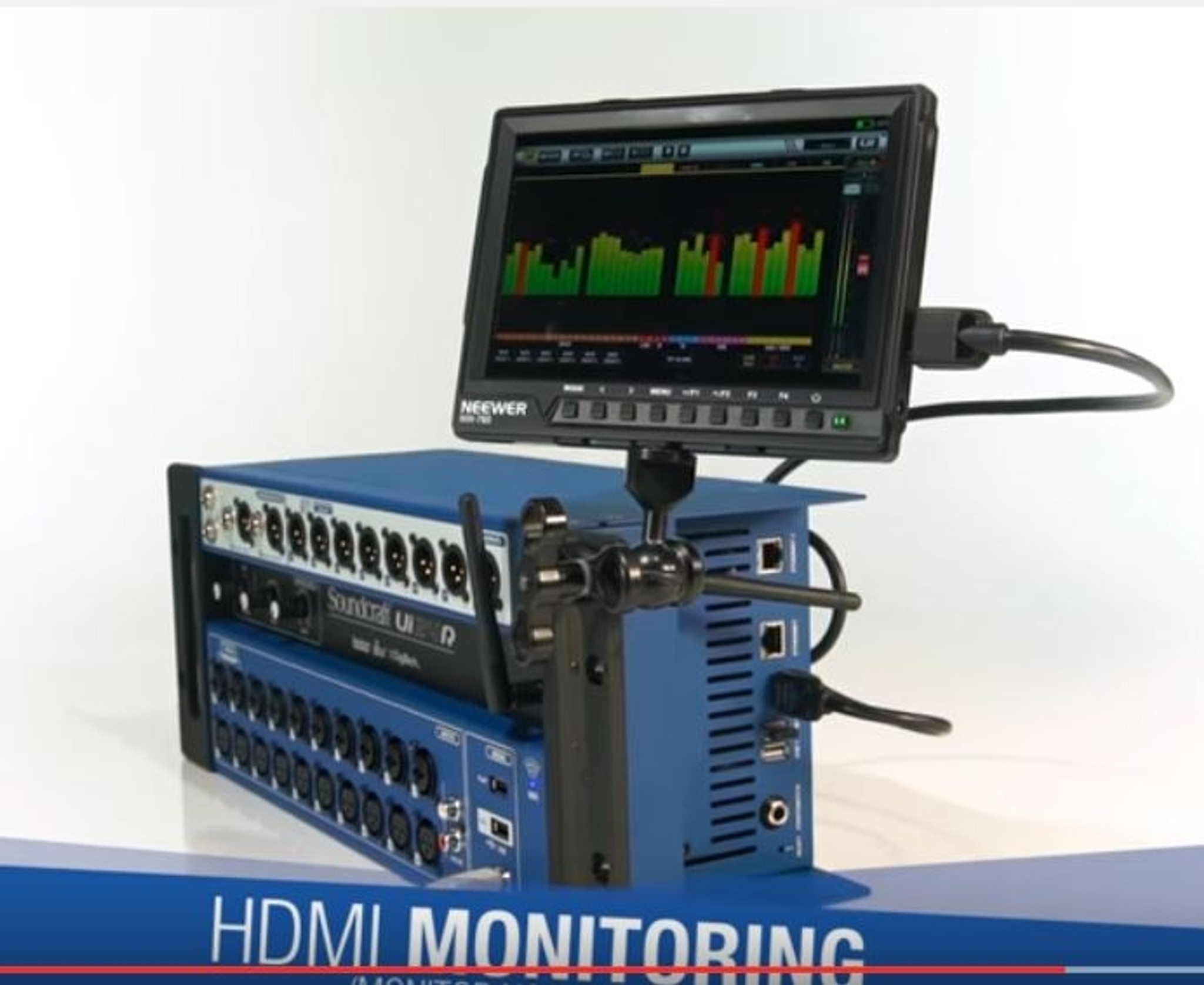
Here's the thing about the Soundcraft Ui24R — it's a fully-featured 24-channel digital mixer crammed into a 4U rack-mount unit with no physical faders, no knobs, and no buttons beyond a power switch. Everything runs through a web browser on your tablet, phone, or laptop. That's either the most liberating thing you've ever heard, or it makes you slightly nervous. Both reactions are completely valid.
The Ui24R sits in a genuinely unique position in the pro audio market. It's not just another rack mixer — it's Soundcraft's vision of what mixing looks like when you strip away the traditional console entirely and replace it with software control. And it comes loaded with Harman's heavyweight effects brands: Lexicon reverbs, dbx dynamics, DigiTech guitar processing, and AKG automatic feedback suppression. That's a staggering amount of processing power for a single rack unit.
Whether you're running live sound for a venue, managing audio at a house of worship, recording a live set, or installing a permanent system in a conference space, the Ui24R has earned serious attention since its release. But is it the right choice for your specific needs? Let's dig into everything you need to know.
Want to see the full specs? Check out the Soundcraft Ui24R at MusiconStage with free shipping across Australia.
What Exactly Is the Soundcraft Ui24R?
The Ui24R is a 24-channel rack-mount digital mixer from Soundcraft, part of Harman Professional's portfolio. It's the bigger sibling of the Ui12 and Ui16, and it represents the top of the Ui series lineup. The "R" in the name stands for rack-mount, though the entire Ui series is designed around the same browser-based control philosophy.
At its core, the Ui24R provides 24 input channels: 20 XLR/TRS combo inputs with Studer-designed preamps, 2 dedicated line-level channels, and 2 USB media playback channels. The preamps deserve special mention here — Studer is one of the most respected names in console design, and having their preamp circuitry in a mixer at this price point is genuinely significant. These aren't marketing preamps; they're clean, transparent, and handle high SPL sources without breaking a sweat.
Instead of a traditional control surface, the Ui24R creates its own Wi-Fi hotspot (or connects to an existing network via Ethernet). You open a web browser on any device — iPad, Android tablet, laptop, even your phone in a pinch — and the entire mixing interface loads right there. No apps to install, no proprietary software to maintain, no compatibility headaches. If it runs a modern web browser, it can control the Ui24R.
The Channel Breakdown
Understanding the Ui24R's channel structure is important because it's more flexible than the headline number suggests:
- Channels 1-10: XLR/TRS combo inputs with full gain control, 48V phantom power (switchable in groups), and Studer preamps. These handle your primary microphones and DI boxes.
- Channels 11-20: Additional XLR/TRS combo inputs, identical quality to channels 1-10. Gives you plenty of room for larger bands or multi-mic drum setups.
- Channels 21-22: Dedicated line-level inputs on TRS jacks. Perfect for keyboards, backing tracks from a laptop, or DJ decks.
- Channels 23-24: USB media playback channels. These stream audio directly from a USB drive plugged into the unit — walk-in music, backing tracks, or intermission audio without needing an external device.
On the output side, you get the stereo main output (XLR), plus 10 auxiliary outputs (XLR) that can be configured as monitor sends, effects sends, or sub-groups. There are also 4 sub-groups, 6 dedicated aux buses, 4 effects buses, and 2 dedicated headphone outputs for monitoring. The flexibility here is substantial — you can run complex monitor mixes for a full band while maintaining separate front-of-house control.
Built-In Effects: Where the Ui24R Truly Shines
This is where Soundcraft's parent company Harman really flexes its muscle. The Ui24R doesn't ship with generic, afterthought effects. It comes loaded with processing from four iconic brands, all running simultaneously:
Lexicon Reverbs and Delays
Lexicon has been the gold standard in studio reverb for decades. The algorithms in the Ui24R include halls, plates, rooms, chambers, and various delay types. These aren't simplified "lite" versions — they're proper Lexicon algorithms that sound genuinely excellent. For live sound work, having quality reverb built in means one less rack unit to carry, one less thing to cable up, and one less potential point of failure.
The Ui24R provides 4 dedicated effects processors, each assignable to its own bus. You can run different Lexicon effects simultaneously — a plate reverb on vocals, a room reverb on drums, a delay on guitar, and a hall on the overall mix, all at once without external hardware.
dbx Dynamics Processing
Every input channel and output bus gets dbx compression, limiting, gating, and de-essing. This is per-channel processing — you don't have to share a limited pool of dynamics across your channels. The dbx compressor models include the classic dbx 160 emulation, which is particularly useful on drums and bass guitar. The gate is clean and musical, with proper attack, hold, release, and range controls rather than simplified "one-knob" versions.
Having proper dynamics on every channel is something that was previously the domain of much more expensive consoles. It means you can gate your toms without sacrificing compression on your vocal bus — basic stuff for studio engineers, but genuinely valuable in a live setting where channel count matters.
DigiTech Guitar Processing
This is an unusual inclusion that's worth highlighting. The Ui24R includes DigiTech amp modelling and effects processing that can be applied to any input channel. For smaller gigs where a guitarist might not bring their own amp, or for acoustic performers who want some colour on their signal, this is remarkably handy. It includes amp models, cabinet simulations, and standard guitar effects like chorus, flanger, and distortion.
Is it going to replace a guitarist's carefully curated pedalboard? No. But for churches, corporate events, and small venue gigs where simplicity matters, it's a genuinely useful feature that saves space and complexity.
AKG Feedback Suppression
Automatic feedback detection and suppression using AKG's algorithms. This analyses the audio signal, identifies feedback frequencies, and applies narrow notch filters to suppress them. It works in both automatic and manual modes. For installations where non-technical operators might be running sound — think conference rooms, houses of worship, or community halls — this is potentially the most valuable feature in the entire unit.
In automatic mode, it continuously monitors for feedback and addresses it in real-time. In manual mode, you can walk a microphone around the room during soundcheck and let the system ring out the room, setting fixed notch filters at problem frequencies. Smart, practical, and it works well.
The Browser-Based Interface: How It Actually Works
Let's address the elephant in the room — mixing on a touchscreen through a web browser. This is the defining characteristic of the Ui24R, and it's fair to say it divides opinion.
The Setup
The Ui24R has a built-in dual-band Wi-Fi access point (2.4GHz and 5GHz) and a hardwired Ethernet port. Out of the box, you power it on, connect to its Wi-Fi network, open a browser, and navigate to a local IP address. The mixing interface loads in your browser — it's essentially a web application running on the mixer itself.
The interface is responsive and adapts to different screen sizes. On a tablet, you get a layout that resembles a traditional console with faders, channel strips, and effects controls. On a phone, you get a simplified but still functional view. On a laptop, you get the full experience with the ability to see more channels and parameters simultaneously.
What Works Brilliantly
- Multi-device access: Multiple devices can connect simultaneously. The sound engineer can mix front-of-house on a tablet while band members adjust their own monitor mixes on their phones. Each connection can be given different access levels — full control, monitor-only, or view-only.
- Walk-around mixing: Take your tablet to any position in the venue. Stand where the audience sits and actually hear what you're mixing. This alone is worth the price of admission for many engineers who've spent years stuck behind a console at the back of the room.
- No proprietary software: Any device with a modern web browser works. No downloading apps, no software updates to manage, no compatibility issues between iOS versions or Android flavours.
- Scene recall: Save and recall complete mixer scenes. Set up a venue once, save it, and recall it next time. Different presets for different bands, different room configurations, or different events.
What Takes Adjustment
- No physical faders: There's no substitute for reaching out and grabbing a fader in the middle of a chaotic mix. Touchscreen mixing requires a mental shift, and some engineers never fully warm to it. If you're mixing a complex, dynamic live show with lots of cue-to-cue changes, the lack of tactile feedback can slow you down.
- Wi-Fi reliability: In RF-heavy environments (large venues with lots of wireless microphones, in-ear monitors, and audience phones), the built-in Wi-Fi can occasionally struggle. The solution is simple — use the Ethernet connection and your own dedicated Wi-Fi router — but it's worth knowing upfront.
- Screen latency: There's a slight visual lag between touching a fader and seeing it respond on screen. The audio processing itself is real-time with negligible latency, but the visual feedback is fractionally behind. Most operators adapt quickly, but it's noticeable if you're used to physical faders.
Ready to experience wireless mixing? Order the Soundcraft Ui24R from MusiconStage with free delivery and genuine warranty across Australia.
Multitrack Recording: A Hidden Powerhouse Feature
The Ui24R includes built-in multitrack recording to a USB drive — all 22 input channels plus the stereo mix, simultaneously. This is a genuinely powerful capability that turns the Ui24R into a recording interface as well as a live mixer.
For live recordings, you can capture every channel as a separate WAV file at up to 24-bit/48kHz resolution. After the gig, pull the USB drive, load the tracks into your DAW of choice, and do a proper studio mix of the live performance. This is invaluable for bands who want quality live recordings without hiring a separate recording engineer with a separate rig.
The recording is completely independent of the live mix. You can push the kick drum harder in the live mix for the room while the recording captures a clean, unprocessed signal. In post-production, you have complete freedom to remix the entire show.
There are some practical considerations. USB drive speed matters — you need a reliable, fast USB drive to handle 24 simultaneous tracks without dropouts. Cheap USB sticks can cause problems. A quality USB 3.0 drive from a reputable brand is a worthwhile investment alongside the mixer itself.
Real-World Use Cases: Where the Ui24R Excels
Houses of Worship
The Ui24R has found a massive following in churches and places of worship across Australia, and it's easy to understand why. Many churches rely on volunteer operators who aren't trained sound engineers. The combination of browser-based control (easy to learn), automatic feedback suppression (prevents embarrassing moments), built-in effects (no separate gear to manage), and scene recall (one button to load the Sunday morning preset) makes it extraordinarily practical.
The multi-user access is particularly valuable here. The worship leader can control their own monitor mix from a phone on stage while the front-of-house volunteer manages the main mix from a tablet. Combine that with the 20 mic inputs, and you can comfortably handle a full band, multiple vocalists, a pastor's lapel mic, and a lectern mic with room to spare.
Small to Medium Live Venues
Pubs, clubs, and mid-size venues across Australia have adopted the Ui24R for its compact footprint and professional output. A 4U rack unit replaces what would traditionally be a large-format console, a separate effects rack, and a dynamics rack. For venues where space behind the bar or in the tech booth is at a premium, this consolidation is hugely appealing.
The walk-around mixing capability is transformative for small venues. Instead of guessing what the room sounds like from behind a console in the corner, the engineer can stand in the middle of the dance floor, in the beer garden, or at the back of the room and mix what they actually hear.
Corporate Events and Conferences
For AV companies and event technicians, the Ui24R is a workhorse. It's compact, travels well in a road case, sets up quickly, and handles the typical corporate event channel count (lectern mics, lapels, presentation playback, background music) with plenty of headroom. The built-in feedback suppression is especially valuable in conference settings where you're dealing with unfamiliar rooms and limited soundcheck time.
Mobile DJs and Solo Performers
Solo acoustic performers and mobile DJs who need a quality mixer but don't want to haul a console appreciate the Ui24R's form factor. Mount it in a rack with your amplifier and power conditioner, control everything from a tablet mounted on a mic stand, and you've got a professional setup that fits in the back of a car.
Soundcraft Ui24R vs the Competition
Let's be honest about how the Ui24R stacks up against its main competitors. Each has genuine strengths, and the right choice depends on your priorities.
| Feature | Soundcraft Ui24R | Behringer X32 Rack | Allen & Heath Qu-SB | Midas MR18 |
|---|---|---|---|---|
| Input Channels | 24 (20 mic/line + 2 line + 2 USB) | 32 (16 mic + 16 via AES50) | 32 (16 mic + 3 stereo line + USB) | 18 (16 mic/line + USB) |
| Physical Control | None (browser only) | None (app/software) | None (app/software) | None (app/software) |
| Built-in Wi-Fi | Yes (dual-band) | No (requires router) | No (requires router) | Yes |
| Effects Brands | Lexicon, dbx, DigiTech, AKG | Generic (decent quality) | Generic (good quality) | Generic (decent quality) |
| Multitrack Recording | Yes (to USB drive) | Yes (to USB/card) | Yes (to USB drive) | Yes (to USB drive) |
| Control Method | Any web browser | Proprietary app + software | Proprietary app | Proprietary app + software |
| Rack Size | 4U | 3U | 5U | 3U |
| Preamp Quality | Studer-designed | Midas-designed | Allen & Heath proprietary | Midas-designed |
Against the Behringer X32 Rack
The X32 Rack is the Ui24R's most direct competitor in terms of price. The X32 ecosystem is massive — it integrates with personal monitor mixers, stage boxes, and the full X32 family. If you're building a larger system that might grow over time, the X32's expandability via AES50 is a genuine advantage. However, the Ui24R's built-in Wi-Fi, Lexicon effects, and browser-based control (no app required) give it practical advantages for standalone use.
Against the Allen & Heath Qu-SB
The Qu-SB sits at a higher price point and delivers Allen & Heath's renowned build quality and sound. The Qu series' processing is excellent, and Allen & Heath's app is arguably the most polished mixing app available. If budget allows and you value the A&H ecosystem, the Qu-SB is a strong alternative. The Ui24R counters with its branded effects suite and the flexibility of browser-based control across any device.
Against the Midas MR18
The MR18 is more compact (18 channels vs 24) and shares the Midas preamp pedigree. It's excellent for smaller applications. If you need 24 channels, the choice is obvious. If 18 channels would suffice, the MR18's smaller form factor and Midas preamps make it worth considering, though you sacrifice the Lexicon/dbx effects package.
Honest Pros and Cons
Strengths
- Exceptional effects package: Lexicon, dbx, DigiTech, and AKG processing in a single rack unit is remarkable value. You'd spend thousands on standalone equivalents.
- Studer preamps: Clean, low-noise preamp design from one of audio's most respected names. These preamps punch well above this price bracket.
- True platform independence: No apps to install or maintain. Any modern browser on any operating system works. This is more significant than it sounds — it means no worrying about app updates breaking compatibility.
- Built-in dual-band Wi-Fi: Works out of the box without additional networking equipment. The 5GHz band provides low-latency, reliable control in most environments.
- Multi-user access with permissions: Multiple simultaneous operators with configurable access levels. Essential for bands managing their own monitors.
- Full multitrack recording: 22 channels plus stereo mix to USB. A proper recording interface built into your live mixer.
- Compact form factor: 4U rack mount replaces a console, effects rack, and dynamics processing.
- USB media playback: Play backing tracks or intermission music directly from a USB drive without additional equipment.
Limitations
- No physical controls at all: If your tablet dies, your Wi-Fi drops, or your battery runs out during a show, you cannot adjust anything on the unit itself. There's no emergency gain knob, no master fader, nothing. This is the single biggest risk factor, and it's worth having a contingency plan (backup tablet, wired Ethernet connection).
- Wi-Fi in challenging RF environments: Large concerts, festivals, and RF-dense environments can interfere with the built-in Wi-Fi. You'll want to use the Ethernet connection with a dedicated quality router for serious applications.
- Touchscreen mixing has limits: For fast, dynamic mixing — riding faders on a complex musical, for instance — physical faders are simply faster and more precise. The Ui24R is best suited to shows with a reasonable setup-and-leave workflow rather than constant active mixing.
- No Dante or AES50 networking: The Ui24R doesn't offer digital audio networking protocols. You can't expand it with remote stage boxes or integrate it into a larger digital audio network. What you see is what you get in terms of I/O.
- Learning curve for the interface: While browser-based control is accessible, the interface packs a lot of functionality into a touchscreen. It takes time to learn where everything lives and develop the muscle memory for quick adjustments.
- USB recording drive limitations: Recording 24 tracks simultaneously demands a fast, reliable USB drive. Not all USB drives are up to the task, and drive failures during recording can result in lost audio.
Technical Specifications at a Glance
| Specification | Detail |
|---|---|
| Mic/Line Inputs | 20 × XLR/TRS combo (Studer preamps) |
| Line Inputs | 2 × TRS |
| USB Playback Channels | 2 (stereo from USB drive) |
| Main Outputs | 2 × XLR (stereo L/R) |
| Aux Outputs | 10 × XLR |
| Headphone Outputs | 2 × 6.35mm TRS |
| Sample Rate | 48 kHz |
| Bit Depth | 24-bit |
| Dynamic Processing | dbx compressor, gate, de-esser on every channel |
| Effects Processors | 4 × Lexicon (reverb, delay, chorus, modulation) |
| Graphic EQ | 31-band GEQ on all outputs |
| Parametric EQ | 4-band PEQ on every input channel |
| Feedback Suppression | AKG (automatic and manual modes) |
| Connectivity | Dual-band Wi-Fi (2.4GHz/5GHz) + Ethernet |
| Recording | 22-track + stereo mix to USB (WAV, 24-bit/48kHz) |
| Rack Size | 4U (19-inch standard rack) |
| Phantom Power | +48V (switchable in groups) |
Setting Up the Ui24R: Practical Tips
If you're considering the Ui24R, here are some practical recommendations from real-world experience with the platform:
Networking Best Practices
- Use Ethernet for serious gigs: The built-in Wi-Fi is convenient for rehearsals and smaller events, but for any show where reliability is critical, connect via Ethernet and use a dedicated quality Wi-Fi router. A purpose-built router gives you control over channel selection, power output, and security that the built-in Wi-Fi can't match.
- Dedicate the network: Don't share your mixing network with venue internet or audience Wi-Fi. A dedicated, password-protected network for mixing eliminates interference and security concerns.
- Keep a backup device charged: Have a second tablet or laptop ready to go. If your primary device fails mid-show, you can connect the backup in under 30 seconds.
Recording Tips
- Invest in a quality USB drive: Use a USB 3.0 drive from a reputable manufacturer (Samsung, SanDisk, Kingston). Format it to exFAT for compatibility and performance. Test it thoroughly before any important recording.
- Do test recordings: Before relying on the multitrack recording for anything critical, do a full test recording at the same channel count you'll be using. Play it back in your DAW to verify all tracks are clean and complete.
- Monitor the recording: The interface shows recording status and drive usage. Keep an eye on it during the show — a full drive or a write error will stop recording without warning.
Scene Management
The scene recall system is one of the Ui24R's most practical features for regular users. Build a library of scenes for different applications — your regular Sunday service, the Friday night cover band, the corporate presentation setup — and recall them instantly. You can also selectively recall specific channels or parameters rather than the entire console state, which is incredibly useful when you want to load your effects settings without overwriting your gain structure.
Who Should Buy the Soundcraft Ui24R?
It's Ideal For:
- Houses of worship needing a reliable, full-featured mixer that volunteer operators can learn
- Small to medium venues wanting professional sound in a compact package
- Mobile sound engineers who value portability without sacrificing channel count
- Corporate AV companies needing a versatile, quick-deploy mixing solution
- Bands who want multitrack live recordings without a separate recording rig
- Installation projects (conference rooms, community halls) where simple operation is essential
It Might Not Be Right For:
- Engineers who need physical faders for fast, complex mixing (theatre, broadcast)
- Large-scale productions requiring Dante, AES50, or other digital networking
- Situations where more than 20 mic inputs are needed (no expansion options)
- Engineers who are uncomfortable with all-digital, no-fallback control
Australian Buying Considerations
For Australian buyers, there are a few specific things worth noting. The Ui24R uses an external power supply with an IEC connector, so make sure you're getting a unit with an Australian-compatible power cable or have an appropriate IEC lead on hand. The mixer operates on 100-240V, so there are no voltage compatibility concerns.
Australian consumer law provides strong protections for electronics purchases. When buying from an authorised Australian dealer like MusiconStage, you're covered by the manufacturer's warranty plus your statutory consumer guarantees under Australian Consumer Law. This matters — parallel imports and grey market units may not carry the same warranty support within Australia.
Soundcraft's Australian distributor (via Harman Professional) maintains a service network within Australia, so if you do encounter an issue, you won't be shipping the unit overseas for repair. For a piece of gear that might be the heart of your sound system, local warranty support is worth its weight in gold.
Frequently Asked Questions
Can I use the Ui24R without Wi-Fi?
Yes. You can connect directly via Ethernet cable to a laptop or use the Ethernet port with a dedicated router. The built-in Wi-Fi is convenient but not the only connection method.
How many devices can control the mixer simultaneously?
Multiple devices can connect at once. You can set up different access levels for each device — full control for the sound engineer, monitor-only access for musicians, and view-only for observers.
Does it work with any tablet or just iPads?
Any device with a modern web browser works — iPad, Android tablets, Windows laptops, MacBooks, Chromebooks, even smartphones. There's no proprietary app required.
Can I use it as a USB audio interface for recording into a DAW?
The Ui24R records multitrack audio to a USB drive, not directly to a computer via USB as a traditional audio interface. The recorded WAV files can then be imported into any DAW for post-production mixing.
Is the built-in Wi-Fi reliable enough for live shows?
For smaller venues and events with minimal RF interference, the built-in Wi-Fi works well, especially on the 5GHz band. For larger events or RF-heavy environments, the recommendation is to use the Ethernet connection with a dedicated external router for maximum reliability.
What happens if the controlling device loses connection during a show?
The mixer continues operating with its last settings — audio doesn't stop. You simply reconnect your device or connect a different one. However, you cannot make adjustments until a control device is connected, which is why a backup device is recommended for critical applications.
Can band members control their own monitor mixes?
Absolutely. This is one of the Ui24R's strongest features. Band members can download no app — just connect to the Wi-Fi and open a browser. You can restrict their access so they can only adjust their assigned monitor mix without affecting the main mix or other monitors.
The Verdict: Is the Soundcraft Ui24R Worth It?
The Soundcraft Ui24R occupies a genuinely compelling position in the digital mixer market. It's not trying to be everything to everyone — it's a focused product that does specific things exceptionally well. The combination of Studer preamps, Lexicon effects, dbx dynamics, and the flexibility of browser-based control from any device creates a package that's hard to match at this price point.
Its limitations are real and worth understanding before you buy. The complete absence of physical controls is either freeing or terrifying depending on your perspective and application. The lack of digital audio networking means it won't grow into a larger system. And touchscreen mixing, while adequate for most live sound applications, isn't ideal for every scenario.
But for its target applications — houses of worship, small to medium venues, mobile sound, corporate events, and installation projects — the Ui24R delivers professional results with a practical, modern workflow. The effects quality alone would cost more than the mixer if purchased as separate hardware units. The multitrack recording capability adds genuine long-term value. And the platform-agnostic control means you're never locked into a specific device ecosystem.
If you need 24 channels of clean input, professional effects and dynamics processing, flexible control from any device, and multitrack recording in a compact rack-mount format, the Soundcraft Ui24R deserves serious consideration. It's a smart piece of engineering that reflects how many sound engineers actually work in 2026.
Browse the Soundcraft Ui24R at MusiconStage — authorised Australian dealer with genuine Harman warranty, free shipping, and hassle-free returns.