
Shure PGADRUMKIT7 Drum Mic Kit: Beginner's Guide 2026
Shure PGADRUMKIT7 Drum Mic Kit: A Complete Beginner's Guide for 2026
If you've ever tried to record or amplify a drum kit using a single microphone propped up nearby, you'll know the result is usually disappointing. The kick disappears, the cymbals overpower everything, and the snare sounds thin. The good news? You don't need to be a studio engineer to fix this. A purpose-built drum microphone kit like the Shure PGADRUMKIT7 takes the guesswork out of capturing a full, balanced drum sound.
This guide is written for newcomers. Whether you're a drummer wanting to record at home, a worship team member setting up for live sound, or a band finally taking the plunge into proper mics, we'll walk you through what this kit is, why it's built the way it is, and how to get started with confidence.
What Is a Drum Microphone Kit, Exactly?
Let's start with the basics. A drum microphone kit is a bundled collection of microphones chosen specifically to capture the different parts of a drum set. A typical acoustic drum kit isn't one instrument — it's many. You've got a deep, punchy kick drum, a sharp snare, several tom-toms of different sizes, and bright metallic cymbals. Each of these produces sound in a very different frequency range and at very different volumes.
Trying to capture all of that with one microphone is a bit like trying to photograph a whole football team with a single close-up lens — something always gets left out. A drum mic kit solves this by giving you the right tool for each job: specialised mics for the kick and toms, and a pair of "overhead" mics to capture the cymbals and the overall feel of the kit.
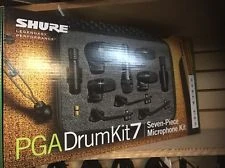
The Shure PGADRUMKIT7 is a seven-piece kit, meaning it includes seven microphones designed to cover a standard drum setup from top to bottom. Shure is one of the most trusted names in microphones worldwide, and the PGA (Performance Gear Alpha) range is their answer to musicians who want genuine Shure quality without a professional studio budget.
New to this? Quick terminology
- Kick drum mic: A microphone tuned to capture deep, low-frequency "boom" from the bass drum.
- Snare/tom mic: A close-up microphone clipped onto or placed near drums to capture their attack and tone.
- Overhead mic: A microphone positioned above the kit to capture cymbals and the kit as a whole.
- Condenser mic: A sensitive mic type great for detailed, bright sounds like cymbals.
- Dynamic mic: A rugged mic type that handles loud, punchy sounds like kicks and snares without distorting.
What's Inside the Shure PGADRUMKIT7?
Understanding what each piece does will help you see why this kit is so handy for beginners. Here's how the seven microphones break down:
- 1 x PGA52 Kick Drum Microphone — A dynamic mic built to handle the powerful low-end punch of a bass drum. It has a tailored frequency response that brings out both the deep "thump" and the "click" of the beater.
- 3 x PGA56 Snare/Tom Microphones — Compact dynamic mics designed to clip onto drum rims, perfect for the snare and your tom-toms. Their small size keeps them out of the way while you play.
- 2 x PGA57 Instrument Microphones — Versatile dynamic mics that work brilliantly on the snare or other instruments, giving you flexible placement options.
- 1 x PGA81 Overhead Condenser Microphone — A clear, detailed condenser mic for capturing cymbals and the overall shimmer of the kit from above.
The kit also includes drum mounting clips and rim mounts, plus a durable carrying case — small details that matter a lot when you're transporting gear to a gig or storing it safely at home. Note that XLR cables and microphone stands are generally purchased separately, which we'll cover in the buying section below.
Why Use a Dedicated Drum Mic Kit Instead of Buying Mics Separately?
This is one of the most common questions from beginners, and it's a fair one. You could piece together individual microphones, but here's why a matched kit makes life easier when you're starting out:
- Everything is chosen to work together. Shure has matched these mics so they complement each other tonally, so you're not left trying to balance wildly different sound characters.
- It's better value. Buying a bundle is almost always cheaper than buying each mic individually.
- Less decision fatigue. For a newcomer, choosing seven separate microphones is overwhelming. A kit removes that hurdle entirely.
- Mounting hardware is included. The clips and mounts are matched to the mics, so you're not hunting for adapters.
Think of it like buying a starter camera bundle versus assembling a body, lens, and accessories from scratch. The bundle gets you making music (or photos) sooner, with fewer mistakes.
View the Shure PGADRUMKIT7 at MusiconStage
Understanding Key Features (Without the Jargon)
Dynamic vs Condenser — and Why This Kit Uses Both
You'll notice the kit mixes two types of microphones, and there's a good reason for it. Dynamic mics (the PGA52, PGA56 and PGA57) are tough and handle very loud sounds without breaking up — exactly what you need for a kick drum being walloped or a cracking snare. Condenser mics (the PGA81) are more sensitive and detailed, which makes them ideal for the delicate, high-frequency shimmer of cymbals. By combining both, the kit captures the full character of a drum set: power down low, clarity up high.
Cardioid Pickup Pattern
All the mics in this kit use a cardioid pickup pattern. In plain terms, that means each mic mostly "listens" to what's directly in front of it and rejects sound coming from the sides and rear. Why does that matter? On a drum kit, you've got loud sounds happening just centimetres apart. Cardioid mics help keep the snare mic focused on the snare rather than picking up the hi-hat next to it. This reduces "bleed" and gives you cleaner, more controllable sound — a genuine help for beginners learning to mix.
Built-In Mounts and Road-Ready Build
The included rim-mount clips let you attach the tom and snare mics directly to your drums, saving you from buying extra stands and keeping your setup tidy. The mics themselves are built with Shure's reputation for durability in mind, so they're designed to survive the bumps of regular gigging — a reassuring quality if you're investing in your first proper kit.
A Beginner-Focused Buying Guide
Before you click "buy", here are the things newcomers most often overlook. Getting these sorted upfront will save you frustration on day one.
1. You'll Need an Audio Interface or Mixer with Enough Inputs
Seven microphones means seven separate signals. To use them all at once, you need a device with at least seven XLR microphone inputs — either an audio interface (for computer recording) or a mixing desk (for live sound). Critically, the PGA81 condenser overhead requires phantom power (often labelled "+48V"), a small electrical supply your interface or mixer provides. Most modern interfaces and mixers include this, but always check before buying.
2. Budget for Cables and Stands
You'll need an XLR cable for each microphone, plus one or two microphone stands for the kick and overhead (the tom and snare mics use the included clips). These are inexpensive but easy to forget. A common beginner mistake is buying the mic kit, then realising on recording day that nothing can actually be plugged in.
3. Match the Kit to Your Drum Setup
The PGADRUMKIT7 is ideal for a standard kit with a kick, snare, and up to three toms, plus cymbals. If you have a larger kit with extra toms, you may want additional mics down the track — but for the vast majority of players, seven mics is plenty.
Common Beginner Mistakes to Avoid
- Placing mics too far from the drums. Close miking is key — the rim clips are designed to position mics correctly, so use them.
- Forgetting phantom power for the condenser. If your overhead sounds silent, this is usually why.
- Setting input levels too high. Drums are loud; start with conservative gain to avoid distortion.
- Skipping the carry case. Use it. Microphones are precision tools and last far longer when stored properly.
Getting Started: What to Expect
One of the best things about a matched kit is how approachable the setup is. Here's a realistic walkthrough of your first session:
- Mount the close mics. Clip the PGA56 mics onto your toms and the snare, angling them toward the centre of each drumhead, around 2–3 cm above the rim.
- Position the kick mic. Place the PGA52 just inside (or just in front of) the kick drum's sound hole on a short stand.
- Set up the overhead. Mount the PGA81 condenser on a tall stand, centred above the kit pointing down at the cymbals.
- Connect everything. Run XLR cables from each mic to your interface or mixer. Switch on phantom power for the PGA81.
- Set levels and play. Have the drummer play at performance volume while you adjust input gain so the loudest hits don't distort.
How steep is the learning curve? Honestly, the physical setup takes most beginners under 30 minutes once they've done it a couple of times. The art of mixing those seven channels into a great-sounding whole takes longer to master — but that's the fun part, and there are countless free tutorials online to guide you. The kit gives you quality raw material to learn with, which is exactly what a newcomer needs.
Honest Pros and Cons
No product is perfect, and being upfront helps you make a confident choice.
What's great:
- Trusted Shure quality at an accessible, beginner-friendly price.
- Everything matched and ready — mics, clips, and case in one box.
- Durable build suited to both home recording and live gigging.
- Covers a full standard kit with no guesswork.
Things to keep in mind:
- You'll need a separate interface/mixer, cables, and a couple of stands.
- The single overhead is mono; serious stereo recording enthusiasts may eventually want a second overhead.
- It's a starter-to-intermediate kit — top-tier studios may step up to pricier mics over time, though many never feel the need.
Frequently Asked Questions from Beginners
Is the Shure PGADRUMKIT7 good for home recording?
Yes — it's one of the most popular choices for home drummers precisely because it offers professional Shure sound at an approachable price. Paired with a multi-input audio interface, it lets you record genuinely good-sounding drums at home.
Can I use it for live performances too?
Absolutely. The dynamic mics and rugged build are well suited to live use, and many small-to-mid venues, churches, and gigging bands rely on kits like this for stage sound.
Do I need any musical or technical experience to use it?
Not at all. While there's a learning curve to mixing, the setup is beginner-friendly, and the included clips make correct mic placement easy. It's a great kit to learn the fundamentals on.
What's the difference between this and a single vocal mic?
A vocal mic is designed for one source close to it. This kit is engineered to capture multiple drums and cymbals across very different volumes and frequencies simultaneously — a job a single mic simply can't do well.
Your Next Steps
If you're ready to take your drum sound seriously — whether for recording, streaming, worship, or live gigs — the Shure PGADRUMKIT7 is a smart, confidence-building first investment. It gives you trusted quality, everything in one box, and plenty of room to grow your skills.
Before purchasing, just confirm you have (or are ready to add) a multi-input interface or mixer with phantom power, XLR cables, and a couple of stands. With those sorted, you'll be capturing punchy kicks and crisp cymbals in no time.
Check current pricing and availability of the Shure PGADRUMKIT7 at MusiconStage
Have questions about pairing the kit with the right interface for your setup? The team at MusiconStage can help you get everything you need to start sounding great.