
Sennheiser EW 300 G3 IEM B-Band Beginner's Guide 2026
Sennheiser EW 300 G3 IEM B-Band: A Beginner's Complete Guide for 2026
If you've ever stood on a stage struggling to hear yourself over a loud band, or watched a vocalist tap their ear and signal the sound engineer, you've witnessed the exact problem that in-ear monitoring (IEM) systems were designed to solve. For Australian musicians, churches, theatres, and small venues stepping into the world of professional stage monitoring for the first time, the Sennheiser EW 300 G3 IEM B-Band (566-608 MHz) is one of the most respected entry points into this technology.
This guide is written for newcomers. We'll start from the very basics — what an IEM system actually is, why people use them, and what all those numbers and letters mean — before working our way up to whether this particular Sennheiser system is the right fit for your needs. No jargon dumps, no marketing fluff. Just clear, patient explanation.
What Is an In-Ear Monitor System? (Start Here)
Let's begin with the absolute basics. An in-ear monitor system is a way for a performer on stage to hear a custom mix of audio — their own voice, their instrument, the click track, the band — privately, through earphones, without needing a loud floor wedge speaker pointed at them.
Think of it like this: imagine you're at a noisy party trying to have a conversation. A floor wedge is like shouting across the room. An IEM system is like your friend whispering directly in your ear. Same information, but cleaner, clearer, and without disturbing everyone else.
The Three Parts of Every IEM System
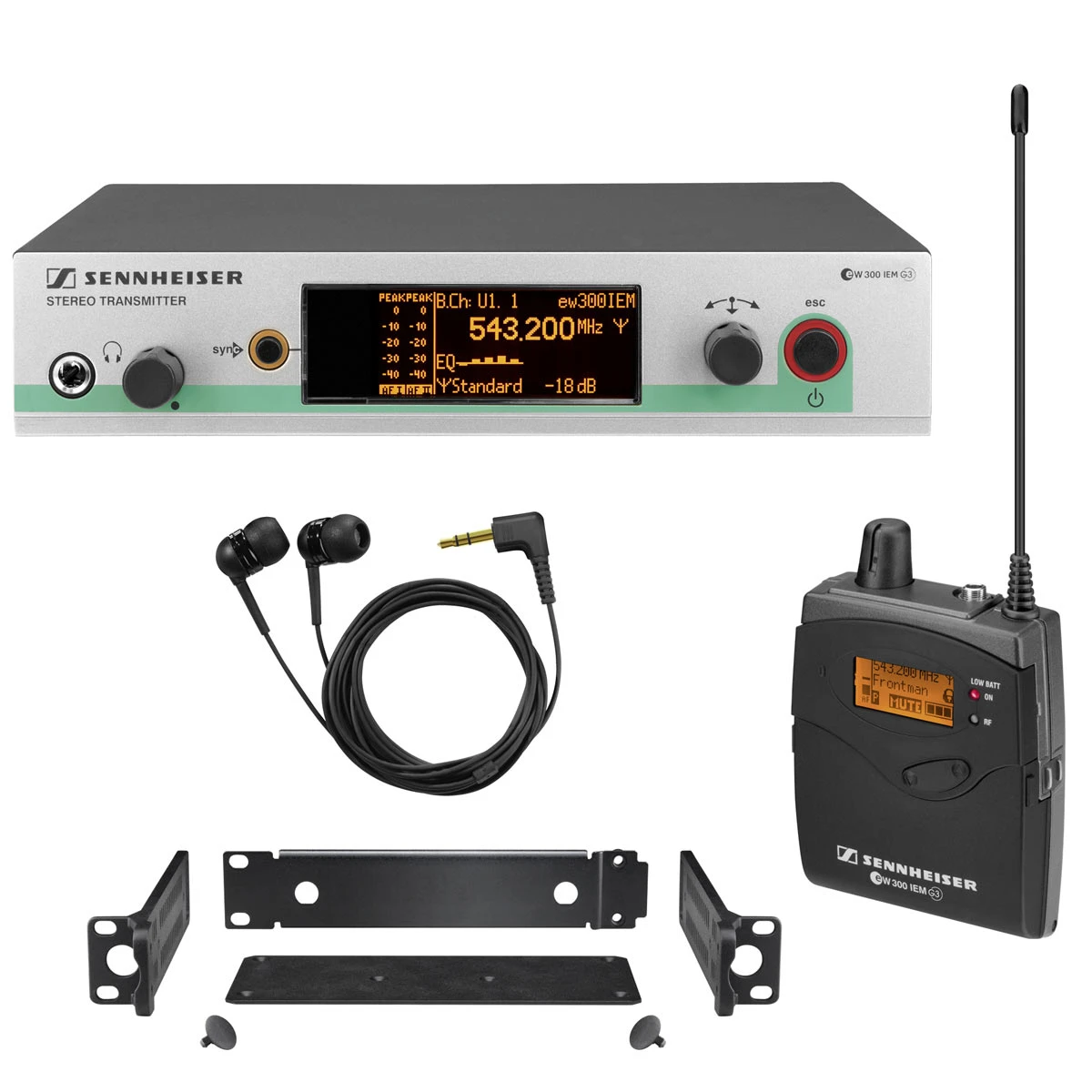
- The transmitter — A rack-mountable unit that sits next to the sound engineer. It receives an audio mix from the mixing desk and broadcasts it wirelessly.
- The bodypack receiver — A small belt-clip device the performer wears. It catches the wireless signal and sends it to the earphones.
- The earphones — Specialised in-ear earphones (sometimes called "buds") that block out external noise and deliver the personal mix.
The Sennheiser EW 300 G3 IEM B-Band is the wireless transmission system — the first two components plus accessories. It's the engine room. Earphones are typically purchased separately or come bundled depending on the package.
Why Performers Switch to In-Ear Monitors
If wedge monitors have worked for decades, why bother with IEMs? Here are the practical reasons performers across Australia have made the switch:
- Hearing protection — Loud stage volume causes permanent hearing loss over time. IEMs let you hear clearly at safer volumes.
- Consistent sound — Your monitor mix sounds the same whether you're in a tiny pub in Newtown or a 2000-seat theatre in Brisbane.
- Cleaner front-of-house — Less stage volume means the audience hears a tighter, more controlled mix.
- Movement freedom — Wireless means you can walk anywhere on stage and still hear perfectly.
- Click track and backing tracks — Modern productions rely on metronome clicks and backing tracks. IEMs deliver these privately to specific performers.
Decoding the Product Name: What Does "EW 300 G3 IEM B-Band" Even Mean?
This is where beginners often get lost. Let's break it down piece by piece.
EW
EW stands for "Evolution Wireless" — Sennheiser's family name for their professional wireless audio range. It's their middle-tier line: more capable than entry-level, more affordable than top-shelf broadcast gear.
300
The number indicates the tier within the Evolution Wireless family. Sennheiser's EW range typically runs 100, 300, 500 — with bigger numbers meaning more features, better components, and higher price points. The 300 series is widely considered the sweet spot for serious working musicians and houses of worship.
G3
This is the generation marker — Generation 3. Sennheiser has updated this platform over the years. G3 is a mature, well-understood generation with extensive support, accessories, and second-hand market availability across Australia.
IEM
Short for In-Ear Monitor, confirming this is a monitoring system rather than a microphone system. (The same EW 300 G3 family also includes vocal and instrument microphone systems — important not to confuse them.)
B-Band (566-608 MHz)
This is arguably the most important detail for Australian buyers. The B-Band refers to the radio frequency range the system transmits on — between 566 megahertz and 608 megahertz.
Different countries have different rules about which frequencies you're legally allowed to use for wireless audio. In Australia, the 566-608 MHz range falls within the licence-free spectrum available to most users, making it suitable for typical live music, conference, and worship applications. Always confirm current ACMA (Australian Communications and Media Authority) guidelines before purchase, as spectrum rules can change.
Key Features Explained Simply
Now that you understand the basics, let's look at the features that matter on the EW 300 G3 IEM and — crucially — why they matter.
True Diversity Reception
What it is: The bodypack receiver has two antennas and intelligently switches between them.
Why it matters: Wireless signals can drop out when an antenna is blocked by a body, a wall, or interference. Two antennas mean if one signal weakens, the other takes over instantly. Result: fewer dropouts during your performance.
Adaptive-Diversity Antenna System
What it is: A built-in feature in the bodypack that uses your headphone cable as part of the antenna.
Why it matters: Better reception without needing a giant external antenna sticking out of your belt pack. More reliable signal in cluttered RF environments (busy venues with lots of wireless gear).
Wide Switching Bandwidth
What it is: The B-band gives you 42 MHz of tunable spectrum (608 minus 566).
Why it matters: Different venues have different RF interference. A wide bandwidth means more channels to choose from to dodge problem frequencies. For beginners, the auto-scan feature makes this nearly automatic.
Auto Frequency Scan and Sync
What it is: The transmitter scans the air for clean frequencies, then beams the chosen frequency to the bodypack via infrared.
Why it matters: You don't need to be an RF engineer. Press a button, point the bodypack at the transmitter, and you're synced. This is one of the most beginner-friendly features in the whole system.
HDX Compander
What it is: A noise-reduction technology Sennheiser developed for clearer wireless audio.
Why it matters: Wireless audio can sound noisy or compressed compared to wired audio. HDX gives you a much cleaner signal that feels more like a wired connection — important when you're trying to nail vocal pitch or hear subtle dynamics.
Stereo or Focus Mode
What it is: Two ways to listen — full stereo, or "Focus" mode that lets you blend two mono channels (e.g., your vocal vs. the band) at any ratio.
Why it matters: Many singers prefer Focus mode to dial up their own voice when needed. It's a powerful feature most beginners don't realise they want until they try it.
Ready to explore the system in more depth? View the Sennheiser EW 300 G3 IEM B-Band on MusiconStage.
Beginner Buying Considerations
Before pulling the trigger on any IEM system, here's what newcomers should genuinely think about.
1. Frequency Band Compatibility
This is non-negotiable. You must buy a system in a frequency band that's legal and clear in your area. The B-band (566-608 MHz) is currently usable in most Australian regions, but always verify with current ACMA documentation. Buying the wrong band can mean an unusable system.
2. Earphones Are Often Sold Separately
Many beginners assume the system comes ready-to-go. The transmitter and bodypack are the wireless engine, but the actual earphones in your ears might be a separate purchase or upgrade. Budget accordingly. Cheap earphones will undermine an otherwise excellent system.
3. Battery Life and Spares
The bodypack runs on AA batteries (typically 6-8 hours per pair). Always carry spares. Better still, invest in good rechargeable AA batteries — they pay for themselves within a few gigs.
4. RF Coordination Becomes a Skill
If you're using just one IEM system, life is simple. But add wireless microphones, in-ear systems for the whole band, and other RF devices, and you'll need to coordinate frequencies so they don't clash. Start with one system, learn the basics, then expand. Don't try to deploy six wireless channels on day one.
5. Hearing Adjustment Period
IEMs sound dramatically different from wedge monitors. Your first few rehearsals will feel strange — voices and instruments are inside your head rather than coming from the room. Most performers adjust within a week or two. Don't judge the system based on the first hour.
Common Beginner Mistakes (And How to Avoid Them)
- Cranking the volume too high. IEMs deliver sound directly into your ears. Start low and creep up. Permanent hearing loss is real.
- Using cheap, ill-fitting earphones. Earphones that don't seal properly let outside noise leak in, prompting you to push volume higher. Get a proper fit.
- Skipping the squelch and frequency scan. Always run the auto-scan at every new venue. RF conditions change.
- Ignoring the audio mix. An IEM system reveals every flaw in your monitor mix. Spend time getting the mix right — it's now in your ear, not 3 metres away.
- Forgetting to bring spare batteries. The classic. AA batteries always die at the worst moment.
Who Is the EW 300 G3 IEM B-Band Actually For?
Being honest about who this system suits helps you decide if it's a good fit:
Great Fit
- Working musicians upgrading from floor wedges
- Houses of worship with permanent install needs
- Theatre and musical productions
- Schools and tertiary music programs
- Sound engineers building a hire stock
- Anyone wanting reliable, professional-grade wireless without breaking the bank on flagship gear
Probably Not the Right Fit
- Bedroom producers who never play live
- Hobbyists with very tight budgets (entry-level systems exist)
- Touring acts needing the absolute top-tier broadcast-grade RF performance (look at Sennheiser's higher-end ranges)
Getting Started: What to Expect After Purchase
The First Hour
Unbox, insert AA batteries, plug the transmitter into a stereo output from your mixer, run the auto-frequency scan, sync the bodypack via infrared, and put on your earphones. Sennheiser's setup is genuinely quick — most users have audio in their ears within 15 minutes of opening the box.
The First Rehearsal
Spend time with the sound engineer (or yourself, if you're DIY) crafting a monitor mix you actually like. The mix in your ears is now everything — you can't hear anything else. Take your time. Don't be afraid to ask for adjustments.
The First Few Gigs
Expect a learning curve. You'll discover preferences — more reverb on vocals, less kick drum, click track louder. Document your settings on the bodypack. Within 5-10 performances, you'll wonder how you ever played without IEMs.
Frequently Asked Beginner Questions
Can I use the EW 300 G3 IEM with any earphones?
Yes — the bodypack has a standard 3.5mm headphone jack. However, for stage use, you'll want proper in-ear monitor earphones with good isolation. Consumer earbuds will work but won't block enough stage noise.
Will it work with my mixer?
Yes — the transmitter accepts standard line-level audio from any mixer with auxiliary or monitor sends. Almost any modern mixer in your church, school, or rehearsal space will be compatible.
How many people can use one transmitter?
One transmitter sends one stereo mix to unlimited bodypacks tuned to the same frequency. So if everyone in the band wants the exact same mix, one transmitter and multiple bodypacks works. If each person needs a personal mix, you'll need multiple transmitters.
Is the B-band still legal in Australia?
At the time of writing, the 566-608 MHz range is broadly usable in Australia under licence-free conditions for professional audio. Always check the latest ACMA guidelines before purchase, as spectrum allocations are reviewed periodically.
Is this hard to learn?
The Sennheiser EW 300 G3 platform is renowned for being one of the most beginner-friendly professional wireless systems available. The auto-scan and infrared sync features remove most of the technical pain. If you can use a microwave oven, you can use this system.
Where the EW 300 G3 IEM Fits in Your Growth Path
One of the smartest questions a beginner can ask is: "What comes after this?"
The EW 300 G3 IEM is a system you can grow into for years. Many Australian working pros use this exact tier throughout their careers without ever needing to upgrade. If you eventually decide to move up:
- Stay with EW 300 G3 and add more channels — perfect for growing bands or churches.
- Move to higher Sennheiser tiers (EW 500, EW-D, or Digital 6000) for broadcast-grade performance.
- Add custom-moulded in-ear earphones — often a bigger sonic upgrade than changing the wireless system itself.
Most beginners find their first major upgrade is actually the earphones, not the wireless rig. Keep that in mind when budgeting.
Final Thoughts: Is This the Right First IEM System?
The Sennheiser EW 300 G3 IEM B-Band sits in a sweet spot that's genuinely hard to beat for Australian newcomers. It's professional enough that you won't outgrow it quickly, simple enough that beginners can set it up confidently, and built with Sennheiser's legendary German engineering quality. The B-band makes it suitable for most Australian use cases, the auto-scan and infrared sync make setup approachable, and the broader EW 300 ecosystem means you can expand into matching microphone systems down the track.
If you're an Australian musician, audio engineer, worship leader, or production manager looking for your first serious step into professional in-ear monitoring, this system deserves a spot at the top of your shortlist. Check current pricing and availability on the Sennheiser EW 300 G3 IEM B-Band at MusiconStage and start your journey toward cleaner, safer, more professional stage monitoring.
The leap from floor wedges to in-ear monitoring is one of the most transformative upgrades a performer can make. With the right system, the right earphones, and a bit of patience during the adjustment period, you'll wonder how you ever managed without it. Welcome to the next chapter of your audio journey. Explore the EW 300 G3 IEM B-Band system here and feel free to reach out to the MusiconStage team for personalised guidance.