
Pioneer DJ Opus Quad: Who Actually Needs This All-In-One System in 2026?
Pioneer DJ Opus Quad: Who Actually Needs This All-In-One System in 2026?
There's a certain moment every working DJ hits — you're lugging two CDJs, a mixer, cables, and a laptop through a venue doorway at 10pm on a Friday night, and you think: there has to be a better way. The Pioneer DJ Opus Quad is AlphaTheta's answer to that exact frustration, and it's a genuinely compelling one. But at this price point, you need to know whether it actually fits your workflow before you commit.
I've spent enough time with standalone all-in-one units to know they're not for everyone. Some DJs swear by them; others try one and go straight back to a modular setup. The Opus Quad sits at the very top of the standalone food chain, so let's break down exactly who this system is built for — and who should probably look elsewhere.
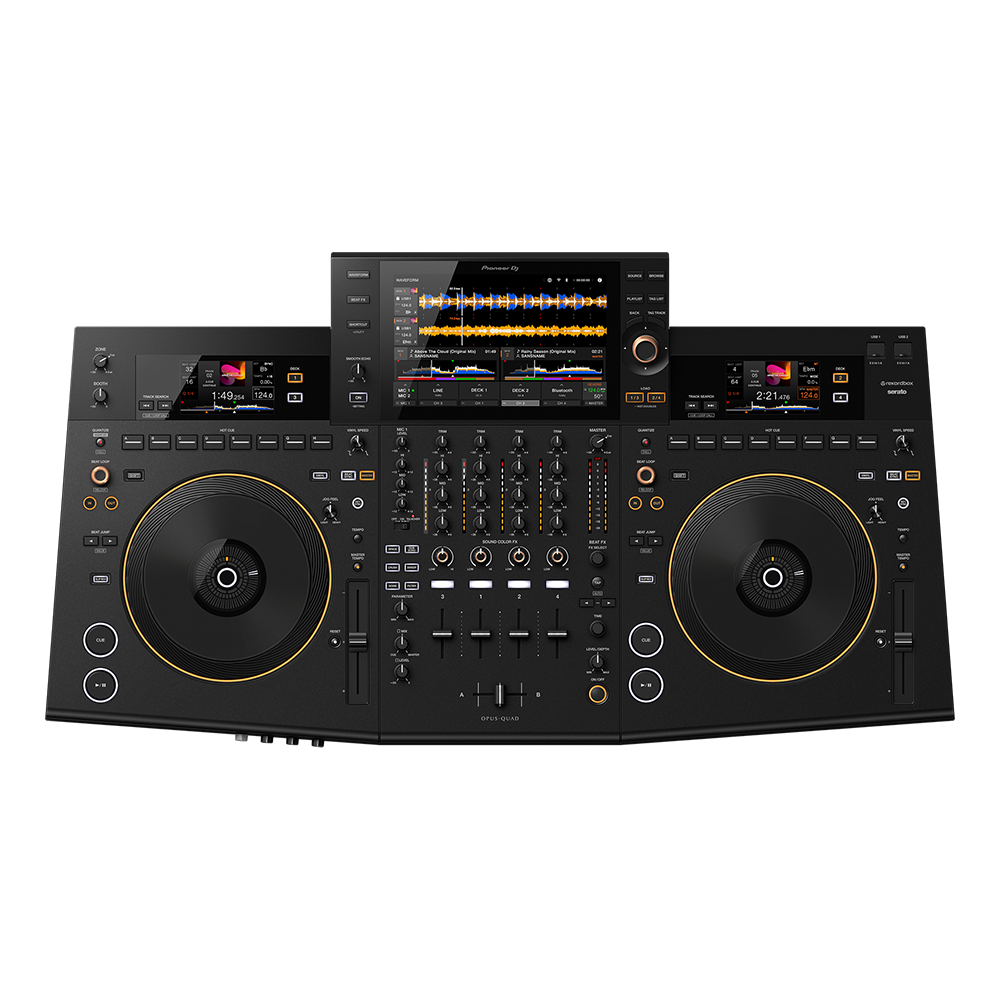
What Exactly Is the Opus Quad?
Before we get into use cases, let's be clear about what you're looking at. The Opus Quad is a four-deck standalone DJ system — no laptop required. It combines four media players, a full mixer section, and a 10.1-inch touchscreen into a single unit. It runs on AlphaTheta's Cloud technology, supports USB drives, streaming services, and Wi-Fi connectivity for library management.
The key word here is standalone. You can rock up to a gig with the Opus Quad and a USB stick, plug into the house PA, and you're done. No laptop crashes, no driver issues, no dodgy USB hubs. That simplicity is either exactly what you need or completely irrelevant to your setup — and that distinction matters enormously at this price.
Use Case 1: The Mobile DJ Who's Sick of Setup Time
This is where the Opus Quad absolutely shines. If you're running a mobile DJ business across Sydney, Melbourne, or regional Australia — doing weddings, corporate events, and private parties — setup time is money. Every minute you spend connecting gear is a minute you're not getting paid for.
How it performs in this scenario:
- One unit to carry instead of three or four separate pieces
- Setup drops from 20-30 minutes to under 10
- Fewer cables means fewer points of failure mid-event
- The touchscreen makes track browsing intuitive — no squinting at a laptop across a dark room
- Four decks let you layer tracks, run jingles, or keep background music flowing during transitions
For mobile DJs doing three or four gigs a week, the reduced wear and tear on your body and your gear genuinely adds up. I've spoken with working mobile DJs in Brisbane and Perth who switched to all-in-one units specifically because of back problems from lugging modular setups. The Opus Quad is heavier than something like the DDJ-FLX10, sure, but it's still one trip from the car instead of three.
The honest limitation: If your mobile rig already includes lighting controllers, video mixers, or other gear that requires a laptop anyway, you lose some of the standalone advantage. You'll still benefit from the simplified audio setup, but the "no laptop" selling point becomes less compelling.
Use Case 2: Resident DJs and Small Venue Installations
Here's a use case that doesn't get discussed enough. If you're a venue owner or manager looking to install a permanent DJ setup in a bar, club, or restaurant, the Opus Quad is worth serious consideration.
Why it works for venues:
- Single unit means a smaller DJ booth footprint
- Any DJ can walk in with a USB and start playing — no compatibility headaches
- The familiar Pioneer/AlphaTheta interface means most DJs already know how to use it
- Fewer components means less maintenance and fewer things for punters to spill drinks on
- Professional-grade outputs handle everything from intimate cocktail bars to mid-sized club rooms
For resident DJs, there's something genuinely liberating about walking into your venue and knowing the system is already set up, warmed up, and ready to go. You focus entirely on the music. No laptop to boot, no software to update, no rekordbox analysis running in the background eating your CPU.
The honest limitation: Club DJs who rely heavily on DVS (Digital Vinyl Systems) or specific software features — think Serato's Flip or Ableton Link integration — will find the standalone workflow limiting. The Opus Quad is designed to replace the laptop, not work alongside it. If your creative process depends on laptop software, this isn't the right tool.
Use Case 3: The Touring DJ Who Values Reliability
When you're playing a festival in the Barossa Valley on Saturday and a club in Melbourne on Sunday night, reliability isn't a nice-to-have — it's everything. One crashed laptop can tank a set in front of thousands.
The Opus Quad's reliability advantage:
- Dedicated hardware means no operating system updates mid-tour
- No Wi-Fi dependency for core playback functions
- USB media is as reliable as storage gets
- The unit runs cool and handles long sets without thermal throttling
- No software conflicts between DJ apps, antivirus, and system processes
I've seen too many sets go sideways because of laptop issues — Catalina breaking audio drivers, Windows forcing an update, a USB hub losing connection. The Opus Quad eliminates an entire category of failure modes. For touring professionals, that peace of mind has real dollar value.
The honest limitation: Touring internationally? The Opus Quad is a substantial piece of kit to fly with. It's not carry-on friendly, and checking it requires a proper flight case. Some touring DJs prefer the portability of a controller plus laptop precisely because it fits in overhead luggage. Domestically within Australia, though, it's perfectly manageable in a vehicle.
Use Case 4: The Bedroom Producer Turned DJ
This one's interesting, and it's where I'd pump the brakes a bit. If you're primarily a producer who occasionally DJs — maybe streaming on Twitch, playing house parties, or doing the odd support slot — the Opus Quad is almost certainly overkill for your needs.
Where it makes less sense:
- The price-to-use ratio doesn't stack up if you're gigging less than twice a month
- Bedroom DJs benefit from laptop integration for recording mixes, streaming, and content creation
- You're paying for road-ready build quality you might not need at home
- Controllers like the DDJ-1000 or DDJ-FLX10 offer similar creative features at a fraction of the cost
That said, if you're a bedroom DJ who's transitioning to regular paid work and wants a system that'll grow with you, the Opus Quad is a buy-once proposition. You won't outgrow it. There's something to be said for investing in gear that won't need upgrading in two years.
The 10.1-Inch Touchscreen: Game-Changer or Gimmick?
Let's talk about the elephant in the room. The Opus Quad's touchscreen is one of its headline features, and opinions are genuinely divided. Here's how it actually plays out in practice:
Where the touchscreen excels:
- Library browsing is fast and intuitive — like using a tablet
- Waveform display is large enough to be genuinely useful for phrase matching
- Cloud library integration works smoothly for pulling tracks on the fly
- Visual feedback during performances is immediate and clear
Where it falls short:
- Touchscreens and sweaty hands in a hot DJ booth aren't best mates
- Tactile controls will always be faster than on-screen buttons for muscle-memory moves
- In direct sunlight (outdoor gigs), visibility can be challenging
The good news is that the Opus Quad doesn't require you to use the touchscreen for critical performance functions. The physical jog wheels, faders, and knobs handle the heavy lifting. The screen is primarily for browsing and visual monitoring — exactly where a screen makes sense.
Sound Quality: What to Actually Expect
The Opus Quad uses high-quality 32-bit D/A converters and delivers clean, detailed audio across the frequency spectrum. For the technically minded, the signal-to-noise ratio and dynamic range are on par with what you'd expect from top-shelf Pioneer/AlphaTheta gear.
In practical terms, what does this mean?
Plugged into a quality PA system — say, a QSC or EV rig — the Opus Quad delivers audio that's indistinguishable from a CDJ-3000 plus DJM-A9 setup. Bass is tight and controlled, highs are crisp without being brittle, and the mixer section's EQ and filter sweeps feel musical rather than clinical.
For venue installations, the built-in sound quality means you don't need an external audio interface or additional processing. XLR master outputs go straight to your amplifier or powered speakers, and the signal is clean enough for even the most demanding sound engineers.
How the Opus Quad Compares: Practical Alternatives
Opus Quad vs CDJ-3000 + DJM-A9 Setup
The modular setup gives you industry-standard club gear that every DJ on the planet knows. If you're playing in clubs that already have CDJs installed, there's less reason to bring your own. But if you need a complete system — for mobile work, events, or your own venue — the Opus Quad delivers comparable performance in a single unit at a lower combined price than buying CDJs and a mixer separately.
Opus Quad vs Denon DJ Prime 4+
The Prime 4+ is the most direct competitor. It's more affordable, offers similar standalone functionality, and has its own loyal following. The Opus Quad pulls ahead with its larger touchscreen, superior build quality, and the Pioneer/AlphaTheta ecosystem familiarity. If budget matters more than brand preference, the Prime 4+ deserves a serious look. If you want the unit that feels closest to a club-standard CDJ setup, the Opus Quad wins.
Opus Quad vs DDJ-FLX10
The FLX10 is a laptop-dependent controller at roughly half the price. It's the better choice if you want software integration, Serato/rekordbox features, and a lighter unit. The Opus Quad is for DJs who specifically want to ditch the laptop entirely.
Setting Up the Opus Quad: What You'll Need
One thing I appreciate about the Opus Quad is how straightforward the setup is. Here's what a typical configuration looks like:
- Prepare your USB: Export your rekordbox library to a USB drive (or use the Cloud library feature)
- Connect to PA: XLR or RCA outputs to your powered speakers or amplifier
- Plug in and play: Insert USB, browse on the touchscreen, load tracks to any of the four decks
For mobile DJs, I'd recommend investing in a quality road case and a small folding table or stand. The Opus Quad's footprint is manageable — roughly the width of a CDJ-3000 pair plus mixer — but it does need a stable surface.
Australian-Specific Considerations
A few things worth noting for Aussie buyers:
- Climate: The Opus Quad handles Australian heat better than a laptop would. No thermal throttling concerns at outdoor summer events, though keeping it out of direct sun is always wise
- Warranty: AlphaTheta's Australian warranty and local service centres mean you're not shipping gear overseas for repairs
- Power: Standard Australian power supply — no voltage converters needed
- Resale: Pioneer/AlphaTheta gear holds its value exceptionally well in the Australian market. If you decide to sell down the track, you'll recoup a solid percentage
Frequently Asked Questions
Can I use the Opus Quad with a laptop if I want to?
Yes. While it's designed as a standalone unit, it can function as a MIDI controller for rekordbox. However, if laptop integration is your priority, you'd get better value from a dedicated controller.
Is the Opus Quad suitable for open-format DJs?
Absolutely. The four-deck capability and fast library browsing make it excellent for open-format work — weddings, corporate events, and multi-genre club nights. You can keep tracks loaded across all four decks and switch genres seamlessly.
How does the streaming integration work?
The Opus Quad supports streaming services via Wi-Fi, allowing you to access tracks you haven't downloaded. It works well as a backup or for last-minute requests, but I wouldn't rely on it as your primary source — venue Wi-Fi is never as reliable as a USB drive.
What's the learning curve like?
If you've used any Pioneer/AlphaTheta gear before, you'll feel at home within an hour. The layout follows familiar conventions, and the touchscreen is intuitive. Complete beginners will want a few weeks of practice before gigging with it, but it's not intimidating gear.
Does it replace the need for CDJs entirely?
For your own gigs, yes. For playing at clubs that provide gear, CDJs remain the standard. The Opus Quad is your portable, self-contained solution — it doesn't change what's installed in other venues.
The Bottom Line: Should You Buy the Opus Quad?
Buy it if: You're a working DJ doing regular mobile gigs, a venue owner wanting a complete install solution, or a touring pro who values reliability above all else. The Opus Quad pays for itself through reduced setup time, eliminated laptop headaches, and bulletproof performance.
Skip it if: You're a bedroom DJ, a producer who occasionally performs, or someone who relies heavily on laptop-based DJ software features. Your money would be better spent on a quality controller and investing the difference in tracks and training.
The Pioneer DJ Opus Quad isn't trying to be everything to everyone — it's a professional tool for DJs who know exactly what they need. If standalone reliability, simplified setup, and four-deck capability are on your requirements list, this is the benchmark system in 2026.
Check the current price of the Pioneer DJ Opus Quad at MusiconStage — Australia's trusted source for professional DJ equipment with local warranty support.
Got questions about whether the Opus Quad suits your specific setup? Get in touch with the MusiconStage team — they'll help you match the right gear to your workflow.