
Pioneer CDJ-3000 Hire in Australia: What You Get When You Rent the Best
Pioneer CDJ-3000 Hire in Australia: What You Actually Get When You Rent the Industry Standard
You've got a gig booked. Maybe it's a corporate event, a club night, a wedding, or a festival set. You need gear that won't let you down, and you need it without the five-figure price tag of buying outright. That's exactly where hiring a Pioneer CDJ-3000 makes perfect sense.
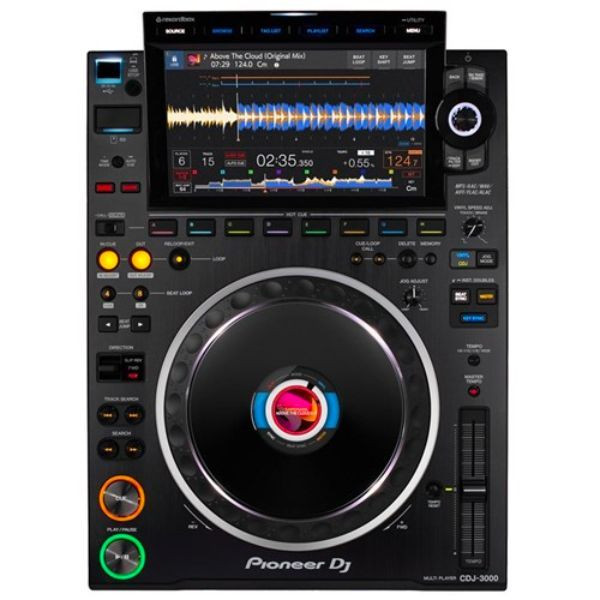
The CDJ-3000 is Pioneer DJ's flagship multi-media player, and it's the deck you'll find in virtually every professional DJ booth across Australia and the world. When riders specify "industry standard" equipment, this is what they mean. Hiring one (or a pair) gives you access to the absolute best without the commitment of ownership — and for a single event or a short run of shows, that's often the smartest move you can make.
Let's break down exactly what you're getting, who should hire rather than buy, and how to make the most of your rental.
Need a CDJ-3000 for your next event? Check availability and hire a Pioneer CDJ-3000 from MusiconStage with delivery across Australia.
What Makes the CDJ-3000 the Industry Standard
Pioneer DJ released the CDJ-3000 as the successor to the legendary CDJ-2000NXS2, and it wasn't a minor refresh. The jump between generations was substantial — a completely redesigned MPU (Micro Processing Unit), a new high-resolution touchscreen, a reimagined jog wheel, and a raft of performance features that genuinely changed how professional DJs interact with their music.
But here's the thing that matters most for hire: the CDJ-3000 is what professional DJs expect to find in the booth. Festival stages, premium clubs, touring riders — the CDJ-3000 is specified more than any other media player on the planet. When you hire one, you're not just renting a piece of kit. You're providing the experience that working DJs have built their sets around.
The 9-Inch Touchscreen Changes Everything
The CDJ-3000 features a 9-inch, full-colour HD touchscreen — a massive upgrade from the CDJ-2000NXS2's smaller display. This isn't just about looking impressive. The larger screen gives you genuinely useful real-time waveform views, lets you browse your music library with swipe gestures that feel intuitive, and provides clear visual feedback on everything from beat grids to hot cue positions.
For DJs who've never used a CDJ-3000, the screen alone is a revelation. You can see your waveforms in far more detail, making beatmatching and phrase mixing easier, particularly in loud environments where relying on headphones alone can be challenging. The touch response is smooth and responsive — Pioneer clearly invested heavily in the interface, and it shows.
The Jog Wheel: Mechanical Precision You Can Feel
Pioneer redesigned the jog wheel for the CDJ-3000 with a new mechanical construction that reduces touch latency to an impressive level. It feels tighter and more responsive than the NXS2, with less wobble and more precise control. The LCD screen built into the centre of the jog wheel displays the current playback position, which is handy for quick visual references during a mix.
For scratch DJs and turntablists, the improved jog response makes a noticeable difference. For mixing DJs, the reduced latency means nudge adjustments feel more natural and immediate. It's one of those improvements that's hard to appreciate on a spec sheet but unmistakable the moment you put your hands on the deck.
Key Performance Specifications
| Specification | CDJ-3000 Detail |
|---|---|
| Display | 9-inch full-colour HD touchscreen |
| Processor | High-performance MPU (dedicated unit) |
| Audio Outputs | Dual digital (coaxial), dual analogue (RCA), 1x headphone (6.3mm) |
| USB Ports | 2x USB-A, 1x USB-B (for HID/DVS) |
| LAN | 1x Ethernet (Pro DJ Link) |
| Supported Formats | MP3, AAC, WAV, AIFF, FLAC |
| FLAC Support | Up to 96kHz/24-bit |
| Hot Cues | 8 hot cues per track |
| Beat FX | Built-in with touch strip control |
| Key Sync | Yes — with advanced key analysis |
| Weight | Approximately 5.1 kg |
| Dimensions (WxDxH) | 329 x 458.5 x 118.2 mm |
Features That Actually Matter When You're Hiring for a Gig
Spec sheets are great, but when you're hiring a CDJ-3000 for a specific event, what actually matters is how those specs translate into real-world performance. Here's what you should know.
Pro DJ Link and Networked Setup
The CDJ-3000 supports Pro DJ Link, which means you can connect up to six units via Ethernet and share a single music source across all of them. In a hire scenario, this is incredibly useful. Plug one USB stick into any player on the network, and every linked CDJ can access that library. No more carrying multiple USBs or worrying about which stick is in which deck.
If you're hiring multiple CDJ-3000s for a multi-DJ event — say a club night with rotating acts — this networked capability means seamless DJ changeovers. The incoming DJ plugs their USB into any available player, and they're instantly browsing their library from any deck on the network.
FLAC and High-Resolution Audio Support
The CDJ-3000 natively supports FLAC files up to 96kHz/24-bit, alongside the usual MP3, AAC, WAV, and AIFF formats. For DJs who've moved to lossless libraries, this is essential. The audio quality difference between a 320kbps MP3 and a well-mastered FLAC file is audible on a quality PA system, and more DJs in Australia are making the switch to lossless formats every year.
When you're hiring gear for a premium event — a high-end corporate function, a festival main stage, or a club with a serious sound system — FLAC support means your audio quality is limited only by the source material, not the player.
MPE (Multicore Processing Engine)
Pioneer's MPE technology in the CDJ-3000 uses a dedicated processor to handle audio processing independently from the display and controls. The practical benefit? The CDJ-3000 doesn't stutter, lag, or hiccup, even when you're loading tracks, scrolling through a massive library, and applying effects simultaneously. It simply works, every time, without fail.
In a live performance scenario, this reliability is non-negotiable. Nobody wants a frozen screen or an audio dropout mid-set. The MPE architecture is one of the core reasons professionals trust the CDJ-3000 with their livelihood.
8 Hot Cues and Performance Features
The CDJ-3000 offers 8 hot cue buttons (up from 4 on the NXS2), which gives DJs significantly more creative flexibility. You can mark 8 different points in a track and trigger them instantly — ideal for remixing on the fly, creating custom edits during a live set, or simply having more precise control over your performance.
The performance features also include Beat Jump (for precisely jumping forward or backward in a track by set beat intervals), Slip Mode (which keeps the track playing silently in the background while you scratch or loop, snapping back to the correct position when you release), and Key Sync (which automatically matches the musical key of tracks for harmonically perfect mixes).
Touch Preview
One of the CDJ-3000's standout features is Touch Preview, which lets you preview any part of a track simply by touching the waveform on the screen. While browsing your library, you can audition tracks before loading them — without interrupting what's currently playing. It's like having a built-in preview player, and it makes track selection faster and more confident.
Why Hiring Makes More Sense Than Buying (For Most People)
A brand-new CDJ-3000 costs roughly $3,500 to $3,800 AUD per unit in Australia. A standard two-deck setup runs you $7,000 to $7,600 before you've even thought about a mixer, cables, cases, or transport. That's a significant investment, and it only makes financial sense if you're using the gear regularly enough to justify it.
Here's who genuinely benefits from hiring rather than buying:
- Event organisers and promoters — You need professional DJ gear for a one-off event, a festival, or a season of club nights. Hiring means you get the latest gear without capital expenditure, and the hire company handles maintenance and transport.
- Touring DJs who fly between cities — If your rider specifies CDJ-3000s but you don't want to check them as luggage (and risk damage), hiring locally in each city makes far more sense.
- DJs stepping up for a big gig — You've been offered a support slot at a major event and need to practise on the same gear you'll be using. Hiring a CDJ-3000 for a week lets you nail your set on the exact equipment you'll perform on.
- Corporate event companies — Your client wants a DJ at their end-of-year function. You need reliable, professional gear that looks the part and performs flawlessly, but you don't run DJ events often enough to justify owning CDJs.
- Production companies supplementing their inventory — You own two CDJ-3000s but need four for a festival stage. Hiring the extras is the obvious solution.
- DJs trying before buying — You're considering investing in CDJ-3000s but want to spend serious time with them in a real performance context before committing. A hire period is the perfect extended test drive.
Ready to hire? Book your Pioneer CDJ-3000 rental from MusiconStage — available for events across Australia.
CDJ-3000 vs CDJ-2000NXS2: What Changed and Why It Matters
If you've used the CDJ-2000NXS2 before — and most working DJs have — you'll want to know what's different. The honest answer: quite a lot.
| Feature | CDJ-2000NXS2 | CDJ-3000 |
|---|---|---|
| Display | 7-inch colour touchscreen | 9-inch HD touchscreen |
| Hot Cues | 4 | 8 |
| Jog Wheel | Standard mechanical | Redesigned with reduced latency and centre LCD |
| Processor | Shared processing | Dedicated MPE (Multicore Processing Engine) |
| FLAC Support | No | Yes (up to 96kHz/24-bit) |
| Key Sync | Basic key display | Advanced key analysis and sync |
| Touch Preview | No | Yes |
| Beat FX | No (mixer only) | Built-in with touch strip |
| USB Ports | 2x USB-A + 1x SD card | 2x USB-A + 1x USB-B (SD card slot removed) |
| Weight | ~5.8 kg | ~5.1 kg |
The most immediately noticeable difference is the screen — it's larger, sharper, and far more responsive. But the deeper improvements are in processing speed, audio quality, and the overall feel of the controls. The CDJ-3000 feels like a genuinely modern instrument, while the NXS2, despite being excellent, has started to show its age.
One thing worth noting: Pioneer removed the SD card slot on the CDJ-3000. If you're an older-school DJ who relies on SD cards, you'll need to migrate your library to USB drives before your hire. This isn't a dealbreaker for most, but it's worth knowing in advance.
Setting Up Your Hired CDJ-3000: A Quick Walkthrough
Whether you've used CDJs before or this is your first time with the 3000, here's how to get up and running quickly with your hired unit.
- Prepare your music library in rekordbox — The CDJ-3000 works best with tracks exported from Pioneer's rekordbox software. Analyse your tracks, set your hot cues, create playlists, and export everything to a USB drive (FAT32 or HFS+ formatted). This step is crucial — doing it properly before your hire saves you hours of frustration.
- Connect your audio — Run RCA cables from each CDJ's analogue output to your mixer channels, or use the coaxial digital outputs for higher-fidelity sound. If you're using a DJM mixer, the digital connection is worth the effort.
- Network your players — If you're hiring two or more CDJ-3000s, connect them via Ethernet through a switch or directly to a DJM mixer's Link ports. This enables Pro DJ Link for library sharing across decks.
- Insert your USB and browse — Plug your prepared USB into either USB port, wait a moment for it to load, and start browsing. The touchscreen makes library navigation intuitive — swipe through playlists, use the search function, or browse by artist, album, or genre.
- Configure your preferences — The CDJ-3000 stores utility settings per-player. Adjust jog wheel tension (there's a physical adjustment ring), set your preferred display mode, configure quantise settings, and set your output level.
Pro tip: If you're hiring for a gig and haven't used CDJ-3000s before, request the hire a day or two early. Spending a few hours getting comfortable with the layout, the touchscreen, and the jog wheel feel will make a noticeable difference to your confidence and performance on the night.
What to Check When Your Hired CDJ-3000 Arrives
When you pick up or receive your hired CDJ-3000, take five minutes to check the following before you sign off:
- Physical condition — Check for any existing damage, scratches, or dents. Document anything you find with photos so you're not held responsible later.
- Jog wheel — Spin it gently. It should rotate smoothly without catching, grinding, or wobbling excessively. Test both touch-sensitive and vinyl (pressing down) modes.
- Touchscreen — Power up the unit and test the touchscreen responsiveness across the entire display. Look for dead spots, unresponsive areas, or display artefacts.
- USB ports — Test both USB-A ports with your own USB drive. Make sure the unit reads your library correctly.
- Audio outputs — Connect headphones and test audio playback. Check both analogue and digital outputs if you'll be using them.
- Buttons and controls — Test hot cue buttons, play/pause, cue, loop controls, and all encoder knobs. Everything should respond cleanly without sticking.
- Included accessories — Confirm you've received the power cable, any audio cables included in the hire, and a protective case or bag if specified.
Common Scenarios: When DJs Hire CDJ-3000s in Australia
Club Nights and Residencies
Not every venue in Australia has CDJ-3000s installed. Plenty of smaller clubs and bars still run older CDJ-2000NXS2s, XDJ-1000MK2s, or even controller-based setups. If you're promoting a night at a venue that doesn't have current Pioneer gear, hiring CDJ-3000s ensures your DJs have the equipment they're comfortable with and that matches their rider requirements.
Festivals and Outdoor Events
Festival stages in Australia — from the main stages at major festivals down to boutique events — typically require CDJ-3000s on the rider. Event production companies regularly hire units to supplement their own inventory, particularly during peak festival season (October through March) when demand outstrips supply.
Corporate Events and Private Functions
Corporate clients don't just want great music — they want gear that looks professional. The CDJ-3000's sleek design, illuminated jog wheel, and large touchscreen look impressive as part of any DJ setup. Hiring premium equipment for these events signals professionalism and attention to detail.
Practice and Preparation
You've landed a gig at a venue that runs CDJ-3000s, and you normally practise on a controller at home. Hiring a pair for a week gives you the chance to rehearse your set on the same gear you'll perform on. You can fine-tune your hot cues, get comfortable with the jog wheel feel, and work out any issues before the pressure of a live audience.
Honest Pros and Cons of the CDJ-3000
What's Genuinely Excellent
- Industry standard — Every professional DJ knows how to use it. No learning curve for experienced DJs.
- Build quality — Pioneer's construction is robust and tour-ready. These units handle transport and heavy use without complaint.
- The touchscreen — The 9-inch display is a genuine game-changer for library browsing and waveform monitoring.
- Reliability — The MPE architecture means rock-solid performance with no crashes or audio dropouts.
- Sound quality — Clean, detailed audio output, particularly through the digital connections.
- FLAC support — Essential for DJs who've invested in lossless music libraries.
- 8 hot cues — Double the creative flexibility of the NXS2.
- Pro DJ Link — Networked library sharing across up to six players.
What Could Be Better (Being Honest)
- No SD card slot — If you've been using SD cards as a backup media source, you'll need to switch to USB only.
- rekordbox dependency — While you can play unanalysed tracks from a USB, the CDJ-3000 performs best with tracks prepared in rekordbox. If you use Serato, Traktor, or another platform, you'll need to either export via rekordbox or accept reduced functionality.
- Price when buying — At $3,500+ per unit, ownership is a significant investment. This is precisely why hiring makes sense for many users.
- No streaming integration standalone — Unlike some controllers, the CDJ-3000 can't natively stream from services like Beatport or SoundCloud without a laptop connection.
- USB-B replaces some legacy connections — The shift to USB-B for HID mode means some older setups may need adapter cables.
Preparing Your Music for a CDJ-3000 Hire
This is arguably the most important section if you're hiring a CDJ-3000 for the first time. Your performance is only as good as your preparation, and a well-organised library makes the difference between a smooth set and a stressful one.
rekordbox Export: The Gold Standard
Download and install rekordbox (it's free for library management and export). Import your tracks, let rekordbox analyse them for BPM, key, and waveform data, then organise playlists for your event. Set your hot cues, memory cues, and beat grids within rekordbox, then export everything to a USB drive.
When you plug that USB into the CDJ-3000, all your preparation — every hot cue, every playlist, every beat grid — will be there exactly as you set it. This is the single biggest advantage of the Pioneer ecosystem, and it's worth the preparation time.
USB Drive Best Practices
- Format — Use FAT32 for cross-platform compatibility or HFS+ if you're exclusively on Mac. exFAT is also supported on the CDJ-3000.
- Always carry a backup — Prepare two identical USB drives. If one fails or corrupts, you have a fallback. This isn't paranoia — it's professional practice.
- Use quality USB drives — Cheap USB sticks can cause slow loading times or read errors. Invest in a reliable brand (SanDisk, Samsung, Kingston) with USB 3.0 speeds.
- Don't fill your USB to capacity — Leave at least 10-15% free space for optimal performance and database writing.
Frequently Asked Questions About CDJ-3000 Hire
Do I need to hire two CDJ-3000s?
For standard DJ mixing, yes — you'll typically need two players and a mixer. However, there are scenarios where a single CDJ-3000 makes sense: if you're supplementing an existing setup, replacing a faulty unit at a venue, or using it as a third or fourth deck alongside existing players.
Can I use the CDJ-3000 with Serato or Traktor?
Yes, the CDJ-3000 supports HID mode via the USB-B connection on the rear panel. You can connect it to a laptop running Serato DJ Pro or Traktor and use the CDJ-3000 as a hardware controller. However, you'll need the laptop and the appropriate software licence.
What mixer should I hire alongside CDJ-3000s?
The natural companion is the Pioneer DJM-900NXS2 or the newer DJM-V10. These mixers integrate seamlessly with the CDJ-3000 via Pro DJ Link and provide the audio quality and effects that complement the players. MusiconStage can advise on the best mixer pairing for your specific event.
Is the CDJ-3000 suitable for outdoor events?
The CDJ-3000 is built for professional use, including outdoor stages. However, like all electronic equipment, it should be protected from rain, direct sunlight, and extreme heat. Ensure your outdoor setup includes a covered DJ booth or canopy, and consider the ambient temperature — Australian summers can push equipment beyond comfortable operating ranges.
What if something goes wrong during my hire?
Reputable hire companies like MusiconStage provide equipment in tested, working condition. If you experience an issue during your hire period, contact the hire company immediately. Most will arrange a replacement or provide remote troubleshooting support. This is one of the key advantages of hiring from a professional supplier rather than borrowing from a mate.
Can I hire a CDJ-3000 for home practice?
Absolutely. Many DJs hire CDJ-3000s for a week or two to practise for an upcoming gig, especially if they normally use a controller at home. It's a cost-effective way to ensure you're comfortable on the gear you'll be performing on.
Making the Most of Your CDJ-3000 Hire
A few final pieces of advice to ensure your hire goes smoothly:
- Prepare your library well in advance — Don't leave rekordbox export to the night before. Give yourself at least a few days to analyse, organise, and test your music.
- Test your USB drives on the actual CDJ — Once you receive your hired unit, plug in your prepared USB and verify everything loads correctly. Check your hot cues, playlists, and waveform data.
- Know your connections — Confirm what cables you need (RCA, digital coaxial, Ethernet) and whether they're included in your hire or if you need to supply your own.
- Handle with care — The CDJ-3000 is robust, but it's still precision electronics. Transport it in the provided case, avoid stacking heavy objects on top of it, and keep liquids well away.
- Return it on time and in the same condition — Document the condition when you receive it, and treat it as you'd want your own gear treated. This ensures a smooth return and protects your bond or deposit.
The Bottom Line: Is Hiring a CDJ-3000 Worth It?
If you need professional-grade DJ equipment for an event, a practice period, or any situation where you want the industry standard without the investment of ownership, hiring a CDJ-3000 is one of the smartest decisions you can make. You get access to the best media player in the DJ world, maintained and tested by professionals, delivered to your door, and returned when you're done.
The CDJ-3000 has earned its reputation as the industry standard not through marketing, but through genuine performance, reliability, and the trust of professional DJs worldwide. When you hire one, you're getting that same standard of excellence for exactly as long as you need it.
For Australian DJs, event organisers, and production companies, the hire model makes particular sense. Australia's events calendar is seasonal, travel distances between cities are significant, and the cost of ownership is high. Hiring CDJ-3000s from a reputable Australian supplier means you get current, well-maintained gear without the ongoing costs of ownership, insurance, maintenance, and storage.
Hire a Pioneer CDJ-3000 from MusiconStage — professional DJ equipment hire with delivery across Australia. Reliable gear, fair rates, and genuine support from people who understand the industry.