
Mackie ProFX6v3 Review: Compact 6-Channel Mixer for Aussie Creators
Mackie ProFX6v3 Review: Why This Compact 6-Channel Mixer Deserves Your Attention
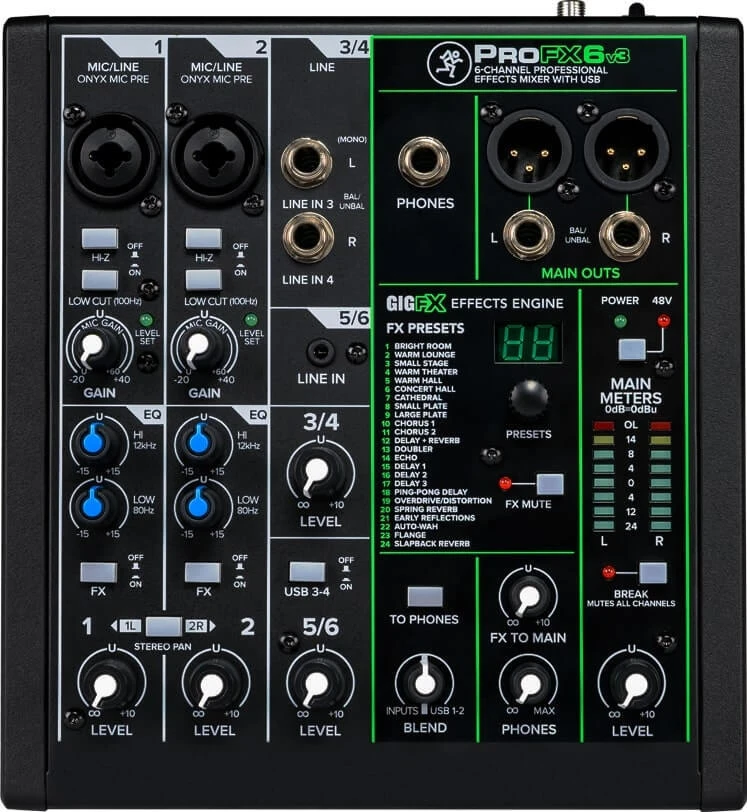
If you're a podcaster, streamer, solo musician, or small venue operator in Australia looking for a mixer that won't take up your entire desk, the Mackie ProFX6v3 is almost certainly on your shortlist. It's compact, it's affordable, and it packs in features — built-in effects, a USB audio interface, and Mackie's well-regarded Onyx preamps — that you'd normally expect from something twice its size and price.
But is it actually the right mixer for your setup? That depends on what you need, and there are genuine trade-offs worth understanding before you buy. In this guide, I'll walk you through everything that matters: the specs that count, real-world performance, who it's genuinely suited for, and where it falls short.
Want to skip straight to the details? View the Mackie ProFX6v3 specs and pricing at MusiconStage with free shipping across Australia.
What Exactly Is the Mackie ProFX6v3?
The ProFX6v3 is part of Mackie's third-generation ProFX series — a line that's been refined over years of feedback from working musicians and content creators. It's a 6-channel analogue mixer with a built-in 24-bit/192kHz USB audio interface, GigFX effects engine, and two Onyx microphone preamps. The "v3" designation tells you this is the latest revision, and Mackie has made meaningful improvements over the v2, particularly in the USB interface quality and effects processing.
At its core, this is a professional-quality compact mixer designed for people who need reliability and good sound without complexity. It sits in Mackie's lineup as the smallest ProFX model, below the ProFX10v3 and ProFX12v3, making it ideal for setups where channel count isn't the priority but audio quality absolutely is.
Channel Configuration: What You Actually Get
The "6-channel" label needs a bit of unpacking, because mixer channel counts can be misleading. Here's what the ProFX6v3 actually provides:
- 2 Onyx mic/line channels (Channels 1-2): Each has an XLR input with 48V phantom power and a 1/4" TRS line input. These share the same channel strip, so you can use one or the other per channel, not both simultaneously.
- 2 stereo line channels (Channels 3/4 and 5/6): These accept 1/4" TRS inputs and are configured as stereo pairs. Channel 5/6 doubles as a stereo RCA input, which is handy for connecting phones, laptops, or media players.
- USB return: The USB interface feeds audio from your computer back into the mixer, appearing on its own dedicated channel path.
So in practical terms, you can run two microphones simultaneously (with full preamp control and phantom power), plus two stereo sources, plus computer audio via USB. For a podcaster doing a two-person show, a solo musician tracking with a backing track, or a small café needing background music with a mic for announcements, that's a genuinely useful configuration.
Where it gets tight is if you need more than two discrete microphone inputs. There's no way around that — two Onyx preamps is the limit. If you need three or four mic channels, you'll need to step up to the ProFX10v3.
Onyx Microphone Preamps: The Heart of the Sound
This is where Mackie has always punched above its weight class, and the ProFX6v3 is no exception. The Onyx preamps have been a staple in Mackie's professional products for years, and including them in a mixer at this price point is genuinely impressive.
Here's what makes them matter:
- Low noise floor: The Onyx preamps deliver a clean, transparent signal with minimal self-noise. For podcasting and vocal recording, this translates directly to cleaner audio with less post-processing needed.
- 60dB of gain: That's plenty to drive dynamic microphones like the Shure SM58 or SM7B without needing an external preamp or cloudlifter. The SM7B in particular is notoriously gain-hungry, and the ProFX6v3 handles it respectably — though you'll be running the gain near maximum, which is worth knowing.
- 48V phantom power: A single switch activates phantom power across both mic channels simultaneously. It's worth noting there's no per-channel phantom power switching, so if you're running a condenser on Channel 1 and a ribbon mic on Channel 2, you'll need to be careful (though most modern ribbon mics handle phantom power fine, always check your specific model).
In practical use, the Onyx preamps sound noticeably better than what you'll find in competing mixers from Behringer or budget Yamaha units at the same price. There's a clarity and fullness to the signal that's hard to quantify but easy to hear, particularly on vocals.
Built-In Effects: The GigFX Engine
The ProFX6v3 includes Mackie's GigFX effects processor with 24 presets. These aren't the kind of studio-quality effects you'd get from a dedicated processor or plugin, but they're surprisingly usable for live applications.
The effects selection covers the essentials:
- Reverbs: Several room and hall variations, from subtle ambience to larger spaces. The medium hall reverb is particularly good for live vocal performances.
- Delays: Various delay types including tape-style and ping-pong effects.
- Chorus and modulation: Useful for thickening guitar or keyboard signals in a live setting.
Each channel has its own effects send control, so you can dial in exactly how much effect goes on each source. The effects are controlled via a single knob for preset selection and another for the overall effects level. It's simple, and that's actually the point — in a live setting, you don't want to be navigating menus.
One honest caveat: the effects quality is decent for live use but won't replace proper plugins for recording. If you're tracking audio via USB, you'll likely want to record dry signals and add effects in your DAW, which the ProFX6v3 handles perfectly well.
USB Audio Interface: 24-Bit/192kHz Recording
This is one of the biggest improvements in the v3 generation. The built-in USB interface operates at up to 24-bit/192kHz, which is a significant step up from the v2's specs. It's a 2x4 interface, meaning it sends a stereo mix to your computer and receives stereo audio back.
Key points about the USB interface:
- Class-compliant on macOS: Plug it into your Mac and it works immediately — no drivers needed. This is a genuine advantage for Australian creators who value simplicity.
- Driver required for Windows: You'll need to install Mackie's ASIO driver for Windows, which is straightforward but worth knowing.
- 2x4 routing: The main mix sends to your computer as a stereo pair. The 4-channel return means you get more flexible monitoring options from your DAW back into the mixer.
- Bundled software: Mackie includes a license for their Waveform OEM DAW software and a selection of plugin effects. It's not Pro Tools, but it's a genuinely capable recording application for beginners.
The USB interface quality matters enormously for content creators. The 24-bit depth gives you excellent dynamic range (important for capturing quiet speech and loud moments without distortion), and the conversion quality is clean and transparent. For podcasting, streaming via OBS, or basic music recording, it performs well above its price class.
That said, it's a stereo mix interface — not a multitrack interface. You can't record each channel to a separate track in your DAW. If multitrack recording is essential, you'll need a dedicated audio interface or a mixer with multitrack USB output (like some of the Allen & Heath Qu series models).
Build Quality and Design
Mackie has a well-earned reputation for building mixers that survive real-world abuse, and the ProFX6v3 continues that tradition. The chassis is a solid steel and polycarbonate construction that feels substantial without being excessively heavy. At roughly 1.2kg, it's genuinely portable — you can toss it in a backpack alongside cables and a laptop.
The knobs have a satisfying resistance and don't feel cheap or wobbly. The faders are 60mm, which is shorter than you'd get on larger mixers but perfectly adequate for this channel count. Connectivity is solid, with all jacks firmly mounted to the chassis rather than the PCB — a detail that matters for longevity, especially if you're frequently plugging and unplugging cables.
The layout is logical and uncluttered. Even if you've never used a mixer before, the signal flow is intuitive: inputs on top, EQ and effects in the middle, levels at the bottom, master section on the right. Mackie has colour-coded the knobs by function, which helps when you're adjusting settings in low-light conditions at a gig.
EQ Section: Simple but Effective
Each mic/line channel gets a 3-band EQ with fixed frequencies:
- High: 12kHz shelving
- Mid: 2.5kHz peaking
- Low: 80Hz shelving
Additionally, there's a low-cut filter (high-pass) at 100Hz on each mic channel, which is invaluable for cutting rumble, handling noise, and air conditioning hum. I'd recommend leaving this engaged for most vocal applications.
The stereo channels get a simpler 2-band EQ (high and low), which is adequate for line-level sources that are typically already well-balanced.
Is it as flexible as a parametric or semi-parametric EQ? No. But the frequencies are well-chosen for the most common problem-solving scenarios, and the fixed mid at 2.5kHz sits right in the vocal presence range, making it easy to add clarity or reduce harshness in speech and singing.
Who Is the ProFX6v3 Actually For?
After spending time with this mixer, here's my honest assessment of who benefits most:
Ideal For:
- Podcasters (1-2 hosts): Two quality mic preamps, USB interface for recording, built-in headphone monitoring, and the low-cut filter handles room noise beautifully. This is arguably the sweet spot for podcast setups.
- Streamers and content creators: The USB interface works seamlessly with OBS, Streamlabs, and similar software. You can mix your microphone with game audio or backing music and send a polished stereo mix to your stream.
- Solo musicians: Record guitar or vocals with professional preamp quality, add tasteful effects for live performance, and capture everything via USB. The bundled DAW software is a nice bonus for beginners.
- Small venues and cafés: Background music playback (via RCA or 1/4"), a mic for announcements, and simple operation that non-technical staff can manage.
- Buskers and small acoustic gigs: Compact, lightweight, battery-less (you'll need mains power or a portable power source), with enough quality for amplified acoustic performances.
Not Ideal For:
- Bands needing multiple mic channels: Two mic inputs won't cover drums, multiple vocals, and instruments. Look at the ProFX10v3 or ProFX12v3 instead.
- Multitrack recording: The stereo USB output means you can't record individual channels separately. If you need multitrack, consider a dedicated audio interface.
- Large venue PA mixing: No aux sends for monitor mixes, limited channel count, and no subgroups. This is a personal/small-scale mixer.
- DJ use: No dedicated DJ features like crossfaders, cue systems, or phono inputs.
ProFX6v3 vs the Competition
Let's be real about how the ProFX6v3 stacks up against its direct competitors in Australia:
| Feature | Mackie ProFX6v3 | Yamaha MG06X | Behringer Xenyx 802S |
|---|---|---|---|
| Mic Preamps | Onyx (excellent) | D-PRE (good) | Xenyx (decent) |
| USB Interface | 24-bit/192kHz | No USB | 24-bit/48kHz |
| Effects | 24 GigFX presets | SPX effects (6 presets) | None |
| EQ (mic channels) | 3-band + HPF | 3-band + HPF | 3-band |
| Build Quality | Steel/polycarbonate | Steel chassis | Plastic/steel |
| Bundled Software | Waveform OEM + plugins | None | Limited |
The ProFX6v3 wins on overall feature set, particularly the USB interface quality and bundled software. The Yamaha MG06X is a solid alternative if you don't need USB recording, and it arguably edges out the Mackie on raw build quality, though the difference is marginal. The Behringer Xenyx 802S undercuts both on price but can't match the preamp quality or feature set.
My honest take: if you need both a mixer and a USB interface, the ProFX6v3 is the best value proposition in its class. If you already have a dedicated audio interface and just need a mixer, the Yamaha MG06X is worth considering.
Specifications at a Glance
| Specification | Detail |
|---|---|
| Channels | 2 mic/line + 2 stereo line |
| Mic Preamps | 2x Onyx |
| Phantom Power | 48V (global switch) |
| EQ | 3-band (mic/line), 2-band (stereo) |
| Effects | 24 GigFX presets |
| USB Interface | 24-bit/192kHz, 2x4 |
| Main Output | XLR (balanced) |
| Headphone Output | 1/4" stereo |
| Frequency Response | 20Hz–40kHz (±1dB) |
| Weight | ~1.2 kg |
Setup Tips for Australian Users
A few practical notes if you're setting up the ProFX6v3 in Australia:
- Power supply: The unit ships with an external power supply that's compatible with Australian 240V mains. No adaptor needed when purchased from an Australian retailer.
- USB connectivity: It uses a standard USB-C connection (a welcome upgrade from the v2's USB-B). Make sure you have a USB-C cable or appropriate adaptor for your computer.
- macOS users: Truly plug-and-play. It appears as an audio device in System Preferences immediately.
- Windows users: Download the latest ASIO driver from Mackie's website before connecting. The generic Windows driver works but the ASIO driver gives you significantly better latency performance.
- Firmware updates: Check Mackie's support page for any firmware updates after purchase. They occasionally release improvements to the USB interface performance.
Common Questions About the ProFX6v3
Can I use this for live streaming on Twitch or YouTube?
Absolutely. The USB interface appears as a standard audio device, so OBS, Streamlabs, and similar streaming software recognise it immediately. You can mix your microphone, game audio, and music into a polished stereo stream. It's one of the most popular use cases for this mixer.
Will it power a condenser microphone?
Yes. The 48V phantom power will run any standard condenser microphone. Just remember the phantom power switch activates on both mic channels simultaneously, so check compatibility if you're mixing condenser and dynamic mics.
Can I use it as a standalone USB audio interface (without the mixer)?
Technically yes — the USB interface works independently. But you'll still be routing audio through the mixer's signal path, so you're benefiting from the preamps and EQ regardless. It's not as streamlined as a dedicated interface for pure recording, but it works perfectly well.
Is it suitable for recording music at home?
For recording one or two sources at a time (vocals, acoustic guitar, a single instrument), it's excellent. The limitation is the stereo USB output — you can't record multiple channels simultaneously to separate tracks. For demo recording and basic production, it's more than capable.
How does the headphone output perform?
The headphone amp is solid and drives most studio headphones comfortably. It has its own level control independent of the main output, which is essential for monitoring while recording.
Honest Pros and Cons
What's Genuinely Good:
- Onyx preamps deliver exceptional sound quality at this price point
- USB-C interface with high-resolution audio (24-bit/192kHz)
- Compact and lightweight — genuinely portable
- Built-in effects are usable and save you carrying extra gear
- Bundled DAW software is a real bonus for beginners
- Build quality inspires confidence in longevity
- Intuitive layout that beginners can learn quickly
- Low-cut filter on mic channels is genuinely useful
What Could Be Better:
- Only two mic preamps — limits expansion for growing setups
- Stereo USB output only (no multitrack recording)
- Phantom power is global, not per-channel
- No aux sends for separate monitor mixes
- 60mm faders are functional but short for precise mixing
- Effects, while decent, are basic compared to dedicated processors
- External power supply (no internal PSU or battery option)
Is the Mackie ProFX6v3 Worth Buying in Australia?
For the right application, the ProFX6v3 represents genuinely excellent value. The combination of Onyx preamps, a high-quality USB interface, and built-in effects in such a compact package is hard to beat at this price point. If your needs align with what it offers — two mic channels, basic mixing, USB recording, and portability — it's one of the best options available to Australian buyers in 2026.
Where it's not the right choice is when you're outgrowing its limitations. If you need more mic channels, multitrack recording, or advanced routing, you'll hit the ceiling quickly. In those cases, stepping up to the ProFX10v3 or looking at a dedicated audio interface paired with a DAW is the smarter move.
But here's what I genuinely appreciate about the ProFX6v3: it does what it does extremely well, without pretending to be something it's not. It's a compact, reliable, great-sounding mixer with a quality USB interface. For podcasters, streamers, solo musicians, and small venue operators across Australia, that's exactly the tool you need.
Ready to get started? Shop the Mackie ProFX6v3 at MusiconStage — authorised Australian dealer with free shipping, genuine warranty, and hassle-free returns.