
Mackie ProFX6v3 Mixer Review: Best 6-Channel USB Mixer 2026?
Mackie ProFX6v3 6-Channel Mixer With Effects and USB: The Honest 2026 Guide
If you've been hunting for a compact mixer that can handle a small live gig on Friday night and double as a recording interface on Sunday afternoon, the Mackie ProFX6v3 keeps showing up on shortlists for good reason. It's small, it's affordable, and it manages to pack genuine onboard effects and a USB connection into a chassis you can carry under one arm. But popularity isn't the same as being right for you, so let's work through what this mixer actually does well, where it falls short, and who should (and shouldn't) be buying one.
This guide is written for Australian buyers — solo performers, podcasters, small bands, content creators and home studio owners — who want a clear picture before spending their money. We'll keep the jargon honest and explain the bits that matter.
What Is the Mackie ProFX6v3, Exactly?
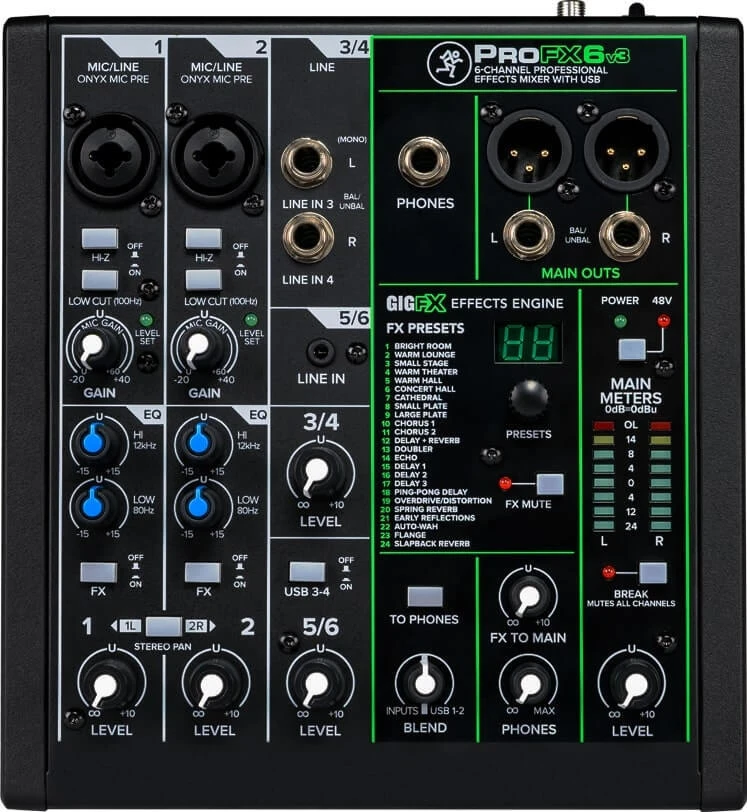
The ProFX6v3 is a small analogue mixing console with three useful tricks built in: high-quality Mackie preamps, a built-in effects engine, and a 2x2 USB audio interface so you can record straight into your computer or play backing tracks through the mixer. It sits at the entry point of Mackie's ProFXv3 series, which scales up to larger 10, 12, 16 and 22-channel models.
The "6 channel" name can be slightly misleading if you're new to mixers, so here's the practical breakdown: you get two combo XLR/line channels with mic preamps (channels 1 and 2), one of which is a Hi-Z input ready for a guitar or bass, plus a stereo line channel pair for keyboards, media players or other line-level gear. In real terms, you can comfortably run a vocalist and a guitarist, or a podcaster with two mics, or a solo musician with a vocal mic and a stereo backing source.
The Onflux Effects and Preamps — What Actually Matters
Two things genuinely set this mixer apart from the cheapest options on the shelf, and both deserve a proper look.
Mackie Onyx-Quality Preamps
Preamps are the part of the mixer that takes a quiet microphone signal and boosts it to a usable level. Cheap preamps add hiss and sound thin; good ones stay clean and let your microphone sound like itself. Mackie's preamps in this range carry a long-standing reputation for clean headroom, and on the ProFX6v3 they handle dynamic mics like a Shure SM58 with plenty of gain in reserve. There's also 48V phantom power, which means condenser microphones — the kind most podcasters and home recordists prefer — will work properly.
The Built-In GigFX Effects Engine
The onboard effects engine offers a bank of reverbs, delays and modulation effects. For a live vocalist, a touch of reverb is the difference between a dry, exposed sound and a polished, confident one. Having this built into the mixer means you don't need to carry a separate effects unit or run anything through your laptop during a performance. The presets are practical rather than studio-pristine, but for small rooms, rehearsals, buskers and house-of-worship use they do the job without fuss.
Keen to see current pricing? View the Mackie ProFX6v3 specifications and price with shipping right across Australia.
The USB Interface: Why It's a Big Deal at This Price
The USB connection turns the ProFX6v3 into a recording interface as well as a mixer. Plug it into a Mac or PC and it appears as a 2-in/2-out audio device, so you can record your mix into software like GarageBand, Audacity, Reaper or Ableton, and send audio back out through the mixer.
This matters because it removes the need to buy a separate USB audio interface. For a podcaster, that means recording two voices into your editing software with proper preamps. For a musician, it means laying down ideas without extra gear. The interface runs at 24-bit resolution, which is the standard you'd want for clean, editable recordings.
One honest caveat worth knowing up front: the USB sends a stereo mix, not separate tracks for each channel. If you want to record your vocal mic and guitar onto independent tracks for separate editing later, this mixer won't do that — you'd need a multi-track interface or a larger console. For most beginners and live-streamers capturing a finished mix, this is a non-issue. For serious multitrack studio work, it's a real limitation.
Key Features at a Glance
| Feature | Detail | Why It Matters |
|---|---|---|
| Channels | 2 mono mic/line + 1 stereo line pair | Enough for a duo, podcast or solo act |
| Mic Preamps | 2 x Mackie "Onyx" preamps | Clean, low-noise vocal and instrument sound |
| Phantom Power | 48V switchable | Supports condenser microphones |
| Effects | Built-in GigFX engine (reverb, delay, more) | Polished live sound, no extra gear |
| USB Interface | 2x2, 24-bit | Record to computer; play backing tracks |
| EQ | 3-band on mono channels | Shape tone for clarity and warmth |
| Hi-Z Input | Yes, on channel 1 | Plug guitar/bass in directly, no DI box |
| Headphone & Monitor | Dedicated outputs | Easy monitoring and foldback |
Who Is the ProFX6v3 Genuinely Right For?
This is where buying advice earns its keep. The ProFX6v3 is an excellent fit if you see yourself in one of these scenarios:
- Solo performers and buskers who need a vocal mic, an instrument, and a bit of reverb in a grab-and-go package.
- Podcasters and two-host shows who want clean mic preamps and a simple way to record into a computer.
- Small acoustic duos playing cafes, weddings and small functions.
- Home studio beginners who want a mixer and an audio interface in one affordable box.
- Houses of worship and community groups needing a tidy, reliable front-of-house solution for a small space.
Who Should Look Elsewhere?
Being honest about limitations builds trust, so here's where this mixer isn't the answer:
- Full bands with drums, multiple vocals and several instruments will run out of inputs quickly. Step up to the ProFX10v3+, ProFX12v3 or ProFX16v3.
- Serious multitrack recordists who need each source on its own track should look at a dedicated multi-channel interface — the stereo USB out is the dealbreaker here.
- Anyone needing motorised faders, scene recall or deep digital routing should be shopping for a digital mixer instead.
Think it's the right size for your setup? Shop the Mackie ProFX6v3 with fast Australian delivery and genuine warranty support.
Sound Quality and Build in Real Use
In practical terms, the ProFX6v3 punches above its price for sound. The preamps stay clean even when you push the gain for a quieter dynamic mic, and the 3-band EQ on the mono channels gives you enough control to cut boxiness or add presence to a vocal. The metal chassis feels reassuringly solid for something this compact — it's built to survive being thrown in a gig bag week after week, which is exactly what its target buyers will do to it.
The layout is logical and uncluttered. Newcomers often find their first mixer intimidating, but with only a handful of channels and clearly labelled controls, the ProFX6v3 is a friendly place to learn the fundamentals of gain, EQ and effects sends.
Australian Buying Considerations
When buying in Australia, a few local points are worth keeping in mind. Always buy from an authorised Mackie dealer so your warranty is valid and supported locally — grey-import gear can leave you stranded if something fails. The ProFX6v3 runs on an included power supply suited to Australian mains, so there's no fiddling with adaptors. And because it's a popular entry-level model, stock and support are generally easy to find through established Australian retailers, which makes returns and questions far less stressful than chasing an overseas seller.
Common Questions
Can I use the ProFX6v3 for live streaming?
Yes, and it's a popular choice for it. The USB output sends your full mix into streaming or recording software, so you can run mics, music and effects into your stream with one tidy device.
Do I need extra software to record?
No special software is required to make the interface work — it's class-compliant, meaning your computer recognises it automatically. You'll just need any recording program, many of which (like Audacity) are free.
Will it work with condenser microphones?
Yes. The switchable 48V phantom power supplies the voltage condenser mics need to operate, so studio-style mics are fully supported.
Is six channels really enough?
For solo acts, duos, podcasts and small setups, comfortably yes. If you're regularly mixing more than two microphones plus a stereo source, look at the larger models in the ProFXv3 range instead.
The Verdict
The Mackie ProFX6v3 is one of the smartest entry-level buys in compact mixing today because it solves three problems at once: clean preamps, usable live effects, and computer recording, all in a tough little box at an accessible price. It's not trying to be a studio multitrack console or a full-band mixer, and as long as your needs match its strengths, it delivers genuinely impressive value.
For solo performers, podcasters, content creators and home recordists in Australia, it's an easy mixer to recommend. Just go in clear-eyed about the stereo-only USB recording and the modest channel count, and you'll get a device that earns its place in your kit for years.
Browse the Mackie ProFX6v3 options here — authorised dealer with genuine stock, local warranty and hassle-free returns across Australia.