
Mackie ProFX12v3 Review: 12-Channel USB Mixer Built for Aussie Musicians
Mackie ProFX12v3 Review: 12-Channel USB Mixer Built for Aussie Musicians
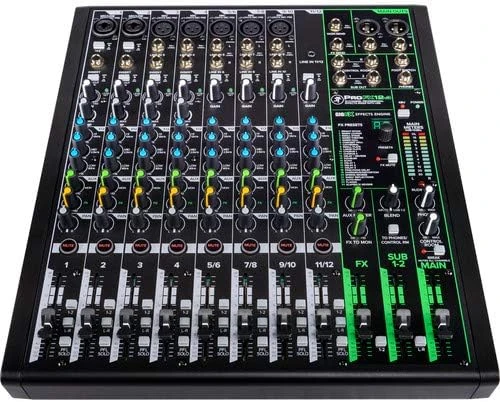
If you've been hunting for a mixer that handles live gigs, podcasting, streaming, and home recording without requiring a second mortgage, the Mackie ProFX12v3 deserves your attention. This 12-channel professional mixer sits in that sweet spot where serious capability meets practical pricing—and for Australian musicians juggling multiple audio needs, that's exactly where you want to be.
Mackie has been building mixers since 1988, and the ProFX series represents decades of refinement. The v3 iteration isn't just a cosmetic update; it's a genuine overhaul that addresses what working musicians actually need in 2026. Let's break down whether it's the right choice for your setup.
Ready to upgrade your audio setup? View the Mackie ProFX12v3 specifications and pricing with free shipping across Australia.
What Makes the ProFX12v3 Different from Previous Generations
The jump from v2 to v3 brought substantial improvements that matter for daily use. Mackie completely redesigned the preamps—their new Onyx preamps deliver a cleaner signal path with less noise, which you'll genuinely notice when recording vocals or acoustic instruments. The previous generation was good; this one's noticeably better.
USB connectivity got a major upgrade too. The ProFX12v3 now operates as a proper 2x4 USB audio interface, meaning you can record the main mix while simultaneously capturing a separate stereo track. For podcasters running multi-mic setups or musicians wanting to record both the full mix and individual channels, this flexibility changes your workflow considerably.
The built-in effects processor received an overhaul as well. You're getting 24 GigFX effects that actually sound usable in professional contexts—not the tinny, obviously-digital reverbs that plague budget mixers. The reverbs have genuine depth, and the delays track tempo reliably.
Channel Configuration and Input Options
Understanding the channel layout helps you figure out if this mixer fits your specific needs. The ProFX12v3 provides:
- 6 mono channels with Onyx mic preamps (XLR/TRS combo jacks)
- 4 dedicated line-level channels configured as 2 stereo pairs
- 2x4 USB interface for computer recording and playback
- 48V phantom power across all mic channels
For a typical small band setup, you could run three vocals on the first three channels, kick drum on channel four, and use the stereo channels for keyboards and backing tracks. The math works for most acoustic acts, small worship teams, or podcast setups with multiple hosts and guests.
Each mono channel includes a 3-band EQ with sweepable mids—that midrange control makes a genuine difference when you're trying to cut through a mix or eliminate feedback frequencies. Budget mixers typically give you fixed EQ points that may or may not hit the frequencies you need. The sweepable mid lets you dial in exactly where the problem (or the magic) lives.
Onyx Preamps: Why They Actually Matter
Mackie's Onyx preamps have been the company's flagship preamp technology for years, and including them in the ProFX series represents real value. These aren't just marketing speak—the specifications back up the quality claims.
The preamps deliver a low noise floor of around -128.5 dBV equivalent input noise, which in practical terms means you can push the gain without introducing audible hiss. For vocalists with quieter voices or acoustic guitarists playing fingerstyle, this headroom matters. You're not fighting the equipment to get a clean signal.
Dynamic range sits at a healthy level for this price point, and the preamps handle everything from ribbon microphones to high-output dynamics without breaking a sweat. If you're using condenser mics, the 48V phantom power provides clean, stable voltage across all channels simultaneously—some cheaper mixers struggle when you load up multiple phantom-powered mics.
USB Recording and Computer Integration
The 2x4 USB interface deserves detailed attention because it's where the ProFX12v3 really separates itself from basic mixers with USB connectivity.
Here's what that 2x4 configuration means practically:
- 2 channels out to computer: Your main stereo mix records directly to your DAW
- 4 channels back from computer: Stereo playback on one pair, plus a second stereo return for additional audio sources
For streamers and podcasters, this setup is genuinely useful. You can play backing music, sound effects, or take Skype calls through the computer while recording everything to separate tracks for post-production editing. The USB return channels have independent level control, so you're not fighting your playback audio against your live sources.
The mixer works class-compliant with macOS, meaning plug-and-play operation without drivers. Windows users will want to grab the Mackie drivers for optimal performance, though basic functionality works out of the box. Latency runs low enough for real-time monitoring without noticeable delay.
Mackie bundles their Musician Collection 2.0 software package, which includes Pro Tools First Mackie Edition (a capable DAW for recording and editing), Waveform OEM, and a selection of plugins. For someone just getting into recording, this bundle represents genuine value—you've got everything needed to start producing immediately.
Looking to streamline your recording setup? Shop the Mackie ProFX12v3 with free delivery and support from an authorised Australian dealer.
GigFX Effects: What's Actually Usable
Built-in effects on mixers range from "genuinely helpful" to "please turn that off immediately." The ProFX12v3's GigFX processor lands firmly in the former category, which isn't something you can take for granted at this price point.
The 24 effects break down into several categories:
- Reverbs: Hall, room, plate, and spring variations that sound dimensional rather than metallic
- Delays: Clean digital delays with tap tempo via the dedicated button
- Modulation: Chorus, flanger, and phaser effects that work well for instruments
- Combination effects: Reverb + delay presets for quick setup
The reverbs particularly impress. The large hall settings have genuine depth and decay, and they don't muddy up your mix the way cheap digital reverbs often do. For live vocal use, the medium room settings add professional polish without overwhelming the source.
Each channel has its own effects send, so you control exactly how much effect applies to each input. This is standard on professional mixers but sometimes missing on budget options—being able to drench your snare reverb while keeping vocals relatively dry matters for mix quality.
Build Quality and Physical Design
Mackie built their reputation partly on durability, and the ProFX12v3 maintains that standard. The steel chassis feels substantial without being unnecessarily heavy. Knobs have firm resistance—they stay where you put them rather than drifting during a gig.
The fader quality stands out at this price point. The 60mm faders move smoothly and provide accurate level control. You're not getting motorised or touch-sensitive faders (this isn't a digital console), but for hands-on mixing, the physical feel is genuinely good.
Colour-coded knobs make the mixer readable in low light conditions. Each channel section uses consistent colour coding: gain in one colour, EQ in another, aux sends in a third. When you're mixing a live show and need to grab the right control quickly, this visual organisation helps more than you might expect.
The mixer weighs approximately 3.6kg, making it genuinely portable for gigging musicians. Dimensions sit around 343 x 370 x 89mm—compact enough to fit in a backpack or small gear bag without dominating your luggage allowance.
Who Should Consider the ProFX12v3
This mixer suits several specific use cases particularly well:
Solo Artists and Small Acoustic Acts
If you're a singer-songwriter performing with guitar, maybe adding a second mic for the instrument, the ProFX12v3 gives you room to grow without being overkill. The quality preamps handle acoustic sources beautifully, and the USB output means you can record your performances for later review or release.
Podcasters and Content Creators
The 2x4 USB configuration makes podcast production straightforward. Run multiple hosts on separate channels, bring in computer audio for calls or music beds, and record the whole thing to your DAW. The built-in effects add professional polish to voice work, and the compact footprint fits on a desk without dominating your workspace.
Small Worship Teams and Community Groups
Churches and community organisations with modest audio needs find the ProFX12v3 hits the right balance. You've got enough channels for a small band plus vocals, quality that satisfies congregation expectations, and simplicity that volunteer operators can manage without extensive training.
Home Recording Musicians
If you're building a home studio and want a hardware mixer for hands-on control rather than mixing entirely in software, this unit delivers. The Onyx preamps compete with standalone interfaces costing similar amounts, and you get the tactile mixing experience that many musicians prefer.
Streamers and Gamers
The USB integration makes the ProFX12v3 viable for streaming setups. Route your microphone through proper preamps and EQ, bring in game audio and music from your computer, and send a polished mix to OBS or your streaming software. The effects processor adds production value without requiring additional plugins.
Honest Assessment: Limitations to Consider
No mixer suits every situation, and being upfront about limitations helps you make the right choice.
Channel count: Twelve channels seems like plenty until you start adding instruments. A four-piece band with drums immediately eats most of your inputs. If you anticipate needing more channels, consider the ProFX16v3 or ProFX22v3 from the same series.
No individual channel recording: While the USB interface is genuinely useful, you're recording the stereo mix—not individual channels to separate tracks. For multitrack recording of a live performance, you'd need a mixer with multi-channel USB output or a separate interface.
Effects are global: The GigFX processor applies to all channels via aux sends, meaning one effect type at a time. You can't run reverb on vocals and delay on guitar simultaneously unless you're using external processing.
No digital recall: This is an analogue mixer with digital effects. Your settings don't save automatically, so you'll need to document your preferred positions for consistent results between sessions.
No Bluetooth: If you need wireless audio input for background music, you'll need to add a Bluetooth receiver separately.
These aren't necessarily dealbreakers—they're just realities of what a mixer at this price point can offer. Understanding them upfront prevents disappointment later.
Comparing the ProFX12v3 to Alternatives
Context helps when evaluating any piece of gear. Here's how the ProFX12v3 stacks up against common alternatives Australian buyers consider:
Vs. Yamaha MG12XU
Yamaha's MG series competes directly at this price point. Both mixers offer similar channel counts and USB integration. The Mackie's Onyx preamps generally edge out the Yamaha for low-noise performance, and the GigFX effects sound more refined than Yamaha's SPX processing. However, the Yamaha offers comparable build quality and slightly different EQ voicing that some prefer. Both are solid choices—the decision often comes down to which brand's tonal character suits your sources.
Vs. Soundcraft Signature 12 MTK
The Soundcraft offers multitrack USB recording—every channel records to a separate track in your DAW. If that capability matters for your workflow, the Soundcraft wins that specific feature comparison. However, the Mackie typically offers better value for money and equally good preamp quality. For live mixing where you're only recording the final mix, the ProFX12v3 delivers comparable performance at a lower price.
Vs. Behringer X1622USB
Behringer undercuts Mackie on price significantly. However, the ProFX12v3's build quality, preamp performance, and effects processing justify the price difference for buyers who prioritise longevity and audio fidelity. The Mackie will likely outlast the Behringer through years of gigging, and the Onyx preamps provide audibly cleaner results.
Vs. Allen & Heath ZED-12FX
Allen & Heath positions the ZED series as a premium option with higher-end preamps and more refined EQ. The ZED-12FX costs more but delivers marginally better audio quality and exceptional build. For critical applications where every percentage of performance matters, the Allen & Heath justifies its premium. For most working musicians, the ProFX12v3 delivers 90% of the performance at a more accessible price.
Practical Tips for Getting the Most from Your ProFX12v3
If you decide the ProFX12v3 fits your needs, these practical suggestions will help you maximise its potential:
Gain Staging Matters
Use the PFL (Pre-Fader Listen) button and meters to set input gain properly. You want peaks hitting around -6dB to -3dB on the meters—enough level to stay above the noise floor without risking distortion. The Onyx preamps have clean headroom, but proper gain staging always produces better results.
Use the High-Pass Filters
Every mono channel includes a 100Hz high-pass filter. Engage it on vocal mics to eliminate handling noise and stage rumble. This simple step cleans up your mix more than most EQ adjustments.
Effects Level and Balance
Start with effects sends low and increase gradually. A common mistake is overwhelming the mix with reverb because it sounds impressive in isolation. In context, subtlety usually serves the music better.
USB Driver Installation
Even though the mixer works class-compliant, installing Mackie's drivers provides optimal buffer size options and better latency control. The drivers are free from Mackie's website and take minutes to install.
Keep Firmware Updated
Mackie occasionally releases firmware updates that address bugs or improve performance. Check their support site periodically to ensure you're running the latest version.
Australian Buying Considerations
For Australian buyers, a few practical points matter when purchasing the ProFX12v3:
Warranty coverage: Genuine Australian stock typically includes local warranty support. Grey imports might save money upfront but can complicate warranty claims if something goes wrong. Purchasing from authorised Australian dealers like MusiconStage ensures you're covered.
Power compatibility: The ProFX12v3 uses an external power supply that works with Australian power outlets. No voltage conversion required.
Shipping considerations: The mixer's compact size keeps shipping costs reasonable within Australia. Most retailers offer free shipping on orders over certain thresholds.
Local support: Mackie has Australian distribution, meaning parts availability and technical support are accessible domestically. This matters more than many buyers realise until they need a replacement component or troubleshooting help.
Frequently Asked Questions
Can the ProFX12v3 work as a standalone USB audio interface?
Yes. You can use it purely as a 2-in, 4-out USB interface for recording and playback. The mixer functions and effects still work, but you can also bypass them and use it simply to get audio in and out of your computer with quality preamps.
Does it work with iOS devices?
With Apple's Camera Connection Kit (USB-A to Lightning adapter), the ProFX12v3 can connect to iPad and iPhone for mobile recording and streaming applications. Performance varies by app, but core functionality works.
Is the phantom power switchable per channel?
No—the 48V phantom power is global, affecting all XLR inputs simultaneously. This is standard for mixers in this price range. It's generally safe for dynamic mics, though check your ribbon microphone specifications before connecting.
Can I connect monitors and headphones simultaneously?
Absolutely. The mixer includes separate outputs for main speakers, control room monitors, and headphones. Each has independent level control, so you can set comfortable headphone volume regardless of your main output level.
What's the difference between ProFX12v3 and ProFX12v3+?
The "plus" version (if available in your region) sometimes includes additional software bundles or minor feature additions. Core hardware specifications remain the same. Check current listings for specific inclusions.
Final Verdict: Is the ProFX12v3 Worth It?
The Mackie ProFX12v3 delivers genuine professional capability at a price point accessible to serious hobbyists and working musicians alike. The Onyx preamps provide noticeably clean audio, the GigFX effects are actually usable in professional contexts, and the USB integration enables recording without additional equipment.
It's not the right choice for everyone. If you need multitrack recording, extensive channel counts, or digital recall, other options serve those needs better. But for live sound, streaming, podcasting, and home recording applications where 12 channels suffice, the ProFX12v3 represents excellent value.
Mackie's build quality means this mixer will likely survive years of gigging and studio work. The company's reputation for durability isn't marketing—it's backed by decades of gear that's still working in venues around Australia.
For Aussie musicians looking for a versatile mixer that won't let them down when it matters, the ProFX12v3 earns a solid recommendation. It does what it promises, sounds better than its price suggests, and just works—which is ultimately what matters when you're focused on making music rather than troubleshooting gear.
Browse the Mackie ProFX12v3 – authorised Australian dealer with genuine products, free shipping, and hassle-free returns.