
Mackie ProFX12v3: Real-World Applications for Aussie Sound Engineers 2025
Mackie ProFX12v3: Real-World Applications for Aussie Sound Engineers 2025
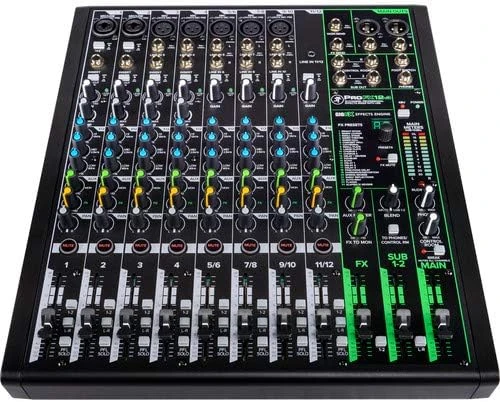
If you've spent any time around live sound, podcasting, or home recording in Australia, you've probably encountered a Mackie mixer at some point. They're absolutely everywhere—from community halls in rural Queensland to corporate AV setups in Sydney CBD. The ProFX12v3 sits right in the middle of their current analogue lineup, and there's a reason it keeps showing up on riders and in studio racks across the country.
But here's the thing: a 12-channel mixer with USB connectivity isn't exactly rare in 2025. Yamaha, Allen & Heath, Soundcraft, and half a dozen other brands all offer something similar. So what makes the ProFX12v3 worth your attention? More importantly, is it the right fit for your specific needs?
Let's dig into the real-world applications where this mixer genuinely shines—and be honest about where you might want to look elsewhere.
Who Actually Uses the ProFX12v3?
Before we get into specifications and features, let's talk about the people actually buying this mixer. Understanding the typical user helps you figure out if you're in the right ballpark.
The weekend warrior musician: You've got a covers band that plays pubs and clubs around your local area. You need something reliable that fits in your car boot and sounds decent without requiring an audio engineering degree to operate. The ProFX12v3 handles this beautifully—it's straightforward enough that anyone in the band can run sound when needed.
The content creator: Podcasters, streamers, and YouTubers who've outgrown their USB microphones but aren't ready for a full digital audio workstation setup. The built-in USB interface means you can plug directly into your computer and start recording immediately.
The small venue owner: Community centres, yoga studios, small churches, and cafés need something that handles background music, occasional speeches, and maybe a solo acoustic performer. The ProFX12v3 offers enough channels without overwhelming complexity.
The home studio hobbyist: You want to record your band's rehearsals, track demos, or just have a proper mixer for your home setup. The Onyx preamps and USB connectivity make this a legitimate recording tool, not just a live sound desk.
The Onyx Preamps: Why They Actually Matter
Mackie's been banging on about their Onyx preamps for years now, and I'll be honest—it used to feel like marketing speak. But the third-generation ProFX series genuinely improved on this front, and here's why it matters for practical applications.
The preamps offer 60dB of gain with low noise floor. In plain English: you can plug in quiet sources like ribbon microphones or low-output dynamics without cranking the gain so high that you introduce hiss. For podcasters recording in less-than-ideal acoustic environments (read: your spare bedroom), this cleaner signal path makes a noticeable difference in your final audio.
For live sound, the headroom means you're less likely to clip when someone unexpectedly screams into a microphone or a guitarist decides to crank their amp mid-song. The transient response handles dynamic sources well—acoustic drums, percussion, and brass instruments come through with natural punch.
Channel Configuration: What You're Actually Working With
The "12-channel" designation needs some unpacking because it's not twelve identical channels. Here's what you're getting:
- 6 mono mic/line channels with Onyx preamps and XLR/TRS combo jacks
- 2 stereo channels (channels 7/8 and 9/10) with line-level inputs
- 1 stereo aux return that can serve as channels 11/12
- Built-in USB playback for backing tracks or reference audio
For a typical covers band, this means: vocals on channels 1-3, acoustic guitar DI on channel 4, keyboard on stereo channel 7/8, and backing tracks via USB. That leaves channels 5, 6, and 9/10 for guest performers, additional instruments, or audience mics.
For podcasting with multiple hosts, you can comfortably run four microphones on dedicated channels with individual processing, use a stereo channel for sound effects or music beds, and record everything through USB. That's a proper multi-host setup without needing a larger board.
The GigFX Effects Engine: Practical Applications
Built-in effects on analogue mixers range from "barely usable" to "surprisingly good." The ProFX12v3's GigFX engine falls into the latter category, particularly for live sound applications.
You get 24 effects including various reverbs, delays, chorus, and combination effects. The reverbs are the standout—usable plate and hall algorithms that don't sound like you're singing in a tin can. For small venue work where you're not carrying a dedicated effects rack, these get the job done.
Practical tip: The effects send is post-EQ, which means your EQ decisions affect the signal going to the effects. This is actually preferable for most live applications—if you've cut low frequencies on a vocal to reduce handling noise, you don't want that muddy low-end going to your reverb anyway.
The dedicated effects return with level control and mute switch means you can kill the reverb tail between songs without affecting dry signals—something that sounds basic but isn't always implemented properly on mixers at this price point.
USB Audio Interface: The Recording Side
Here's where the ProFX12v3 earns its "v3" designation. The USB interface has been significantly improved over previous generations, and it's genuinely useful rather than an afterthought.
24-bit/192kHz capability: Yes, you'll probably record at 44.1kHz or 48kHz for most applications, but the higher sample rate support means you've got headroom for projects that require it. Film and video work often uses 48kHz, while some music producers prefer higher rates for acoustic recording.
2x4 I/O configuration: You can send your main mix (stereo) to your computer for recording, while simultaneously receiving playback audio (stereo) from your DAW. This allows for overdubbing, playing backing tracks, or monitoring computer audio through the mixer.
Zero-latency monitoring: The direct monitoring through the mixer means you're hearing yourself in real-time, not delayed through your computer's audio buffer. For vocalists and instrumentalists, this is essential—latency kills performances.
What you can't do: Multi-track recording of individual channels. The USB output is your main mix only. If you need to record all channels separately for post-production mixing, you'll need a dedicated multi-track interface or a digital mixer with multi-track USB.
Real-World Application: The Pub Gig
Let's walk through a typical weekend gig scenario that the ProFX12v3 handles exceptionally well.
You're a four-piece covers band playing the back room of a pub in suburban Melbourne. Load-in is two hours before showtime, and you're sharing the space with patrons who don't appreciate extended soundchecks.
Setup: Two vocal mics on channels 1 and 2, acoustic guitar DI on channel 3, bass DI on channel 4, keyboard stereo on 7/8, and backing tracks via USB from a laptop. Drums are unamplified—the room's small enough that the acoustic kit fills the space.
The three-band EQ with sweepable mids on the mono channels lets you dial out the 400Hz mud that plagues pub acoustics, while boosting presence around 3-4kHz keeps vocals cutting through. The high-pass filters (100Hz on mic channels) eliminate handling noise and stage rumble without requiring external processing.
Between sets, you're playing Spotify through the USB return, giving the venue a seamless transition without needing to swap cables or adjust levels dramatically.
Why the ProFX12v3 works here: It's compact enough to fit on a small table, intuitive enough that your singer can adjust their own monitor send, and sounds professional without requiring extensive outboard gear. The rugged steel chassis handles the inevitable beer spill better than plastic-cased alternatives.
Real-World Application: The Podcast Studio
Podcasting has exploded in Australia, and the ProFX12v3 has found a home in many content creation setups. Here's how it typically gets used.
The three-host interview show: Each host gets a dynamic microphone (SM58, Rode PodMic, or similar) on channels 1-3. A guest call comes through a mix-minus from your computer on channels 9/10, with the return audio going back via USB. Channel 4 holds a boundary mic for capturing room ambience or audience reaction during live recordings.
The one-knob compression on each channel is genuinely useful here—it helps even out volume differences between a soft-spoken guest and an enthusiastic host without aggressive pumping artifacts. Set it around 30-40% and forget it.
Why it works: The visual layout with colour-coded knobs means hosts can adjust their own levels without audio engineering knowledge. The headphone amp drives multiple headphone splitters without significant volume drop. And the mute buttons are satisfying to press—which sounds trivial until you're six months into production and have pressed them thousands of times.
The limitation: You're recording a stereo mix, not individual tracks. If a guest's microphone clips or someone coughs unexpectedly, you can't fix it in post the way you could with multi-track recording. For professional podcast production where editing flexibility is paramount, consider a digital mixer or dedicated audio interface with individual track recording.
Real-World Application: The Small Venue
Church halls, yoga studios, community centres, and small cafés have specific requirements that the ProFX12v3 addresses well.
The church setup: Pastor's lapel mic on channel 1, pulpit mic on channel 2, two congregation mics on channels 3-4 for responses and singing, keyboard on 7/8, and backing tracks for contemporary worship via USB. The effects processor adds appropriate reverb to vocals without external equipment.
The yoga studio: Instructor's headset mic on channel 1, relaxation playlist via USB or Bluetooth (if you've added an external receiver). The gentle background music needs to sit beneath the instructor's voice without pumping or artifacts—the smooth faders and quiet electronics handle this well.
Why it works: Volunteers and rotating staff can operate the mixer with minimal training. The logical layout means you can literally point at the channel strip and explain "this is volume, this is tone, this is effects." The rugged construction handles the abuse of semi-public spaces where equipment isn't always treated gently.
Comparing Alternatives: Where Does It Fit?
No mixer exists in isolation—you're always choosing between options. Here's honest guidance on when the ProFX12v3 makes sense versus alternatives.
Versus the Yamaha MG12XU
Yamaha's competing mixer offers similar channel counts and USB connectivity. The Yamaha has D-PRE preamps that some users prefer for their clarity, while others find them slightly clinical compared to Mackie's warmer Onyx sound. The MG12XU's effects are comparable—neither is dramatically better.
Choose Mackie if: You prefer the warmer analogue character, value the one-knob compression, and like the rugged steel construction.
Choose Yamaha if: You want slightly cleaner, more transparent preamps and prefer Yamaha's EQ voicing.
Versus the Allen & Heath ZED-12FX
The ZED-12FX costs slightly more and offers Allen & Heath's legendary build quality and DuoPre preamps. The EQ section is more musical—it's harder to make it sound bad. However, the USB implementation is less sophisticated, and the effects engine isn't quite as comprehensive.
Choose Mackie if: USB recording is a priority, you want more effects options, and budget matters.
Choose Allen & Heath if: Sound quality is paramount, you're primarily doing live sound, and you value the British EQ voicing.
Versus Going Digital
For similar money, you could look at entry-level digital mixers or audio interfaces with mixer software. These offer multi-track recording, recall of settings, and more processing options.
Choose analogue (ProFX12v3) if: You want immediate, intuitive control without menus or screens. You prefer the sound and feel of real faders and knobs. You don't need multi-track recording. You want something that "just works" without computer dependency.
Choose digital if: Multi-track recording is essential. You need scene recall for multiple regular setups. You're comfortable with touchscreens and menu navigation. Processing flexibility matters more than tactile control.
Practical Tips for Getting the Most from Your ProFX12v3
After seeing these mixers in various applications, here are insights that'll help you avoid common mistakes.
Gain staging matters: The most common issue I see is people setting input gain incorrectly. Use the PFL (pre-fader listen) button and set gain so your signal peaks around 0dB on the meter with typical input levels. This gives you headroom for peaks while maintaining a healthy signal-to-noise ratio.
Use the high-pass filters: Every mic channel has a 100Hz high-pass filter. Use it. Unless you're specifically trying to capture sub-bass (you're not, on most sources), engaging this filter cleans up your mix dramatically by removing rumble, air conditioning noise, and handling noise.
The compressor is subtle: The one-knob compressor won't save a wildly dynamic source, but it does help even out moderate variations. It's designed to be transparent—if you want aggressive compression, you'll need external processing.
USB driver consideration: On Windows, you'll likely want to install the Mackie USB driver for optimal performance. Mac users generally work fine with Core Audio. If you experience latency or dropouts, check your buffer settings in your DAW.
Power supply placement: The external power supply runs warm. Don't stack it under other equipment or in enclosed spaces—give it room to breathe and it'll last for years.
What the ProFX12v3 Won't Do
Being honest about limitations helps you avoid buyer's remorse. Here's where this mixer falls short.
No multi-track USB recording: You get a stereo mix, not individual tracks. If you need to record a band and mix later, look elsewhere.
Limited aux sends: One monitor send and one effects send. If you need multiple independent monitor mixes for different performers, you'll outgrow this quickly.
No scene recall: It's analogue—whatever position the knobs are in is your setting. No presets, no recall, no undo. Great for simplicity, limiting for complex applications.
No dynamics on stereo channels: The one-knob compressor is only on mono channels. Stereo sources (keyboards, backing tracks) bypass this processing.
Australian Buying Considerations
A few practical notes for Aussie buyers specifically.
The mixer runs on 100-240V, so you don't need a step-down transformer if purchasing from overseas, though warranty support through Australian retailers is obviously preferable. The external power supply uses a standard IEC cable—easy to replace if damaged.
For outdoor gigs (and we do love our outdoor events here), the mixer handles reasonable temperature variations well, but the steel chassis can get uncomfortably hot in direct summer sun. Consider shade or a mixer cover for festival and outdoor applications.
If you're in a regional area, the rugged construction and proven reliability mean fewer emergency trips to the city for repairs. Mackie's track record for longevity is solid—I've seen original ProFX mixers still working after a decade of gigging.
Should You Buy the Mackie ProFX12v3?
The ProFX12v3 occupies a specific sweet spot: more capable than basic mixers, less complex than digital alternatives, and priced for working musicians and content creators rather than well-funded studios.
Buy it if:
- You need 6+ microphone channels with quality preamps
- USB recording of your main mix is useful but multi-track isn't essential
- You value intuitive, tactile control over menu-driven operation
- Reliability and rugged construction matter for your applications
- You want built-in effects good enough to leave the rack gear at home
Look elsewhere if:
- Multi-track recording is a core requirement
- You need more than one monitor send
- Scene recall and presets are essential
- You want extensive onboard dynamics processing
For the gigging musician, podcaster, small venue operator, or home studio enthusiast who wants professional results without professional complexity, the ProFX12v3 delivers. It's the kind of mixer that earns its place in your rig by consistently doing its job without drama—and in live sound and content creation, that reliability is worth more than any spec sheet.
Check the current price on the Mackie ProFX12v3 at Music on Stage
Frequently Asked Questions
Can I use the ProFX12v3 as a standalone USB audio interface?
Yes, but with limitations. It provides 2-in/4-out USB audio, meaning you can record your stereo main mix and receive stereo playback. It won't replace a multi-input interface for recording individual channels separately, but for podcasting, streaming, or capturing live mixes, it works well.
Is the ProFX12v3 suitable for recording a full band?
For live recording where you want a finished stereo mix, yes—you can dial in a great-sounding mix at the board and record it directly. For multi-track recording where you want to mix individual instruments later in a DAW, no—you'll need a dedicated audio interface or digital mixer with multi-track USB capabilities.
How does it compare to the ProFX10v3 and ProFX16v3?
The ProFX10v3 drops two mono channels (4 instead of 6) and loses the sweepable mid EQ—a significant difference for live sound applications. The ProFX16v3 adds two more mono channels and has more routing flexibility. For most users, the 12v3 hits the practical sweet spot of enough channels without unnecessary complexity.
Can I connect powered speakers directly?
Absolutely. The main outputs (XLR balanced) connect directly to powered PA speakers. The output level is appropriate for professional powered speakers—no additional amplification required. Just run XLR cables from the main outputs to your speakers.
Does it work with iPad or iPhone?
With the appropriate Apple USB camera adapter and potentially a powered USB hub, yes. However, iOS compatibility can be finicky depending on your specific device and iOS version. For reliable iOS integration, check current compatibility before purchasing or consider mixers with dedicated iOS support.
Ready to upgrade your setup? Get the Mackie ProFX12v3 from Music on Stage