
Mackie ProFX12v3: Real-World Uses for Aussie Musicians & Creators 2026
Mackie ProFX12v3: How It Actually Performs Across Real-World Scenarios in 2026
If you're shopping for a mixer in the 12-channel range, you've probably already noticed the sheer number of options out there. The Mackie ProFX12v3 sits in a sweet spot that a lot of Australian musicians, content creators, and small venue operators keep coming back to — and for good reason. But the real question isn't whether it's a decent mixer on paper. It's whether it'll actually do the job you need it to do.
I've spent considerable time analysing how this mixer performs across the scenarios Aussie buyers most commonly throw at it. Whether you're running sound at a local pub, recording a podcast in your spare room, or mixing rehearsals for your weekend covers band, here's what you genuinely need to know.
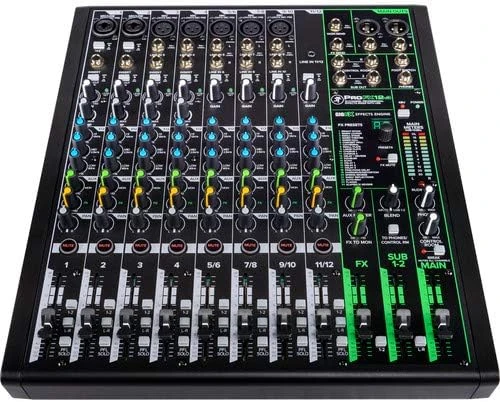
What You're Actually Getting With the ProFX12v3
Before diving into use cases, let's get the lay of the land. The ProFX12v3 gives you 12 channels — four mono mic/line inputs with Mackie's Onyx mic preamps, plus four stereo line channels. You get a built-in USB audio interface (2x4) for recording directly to your laptop, a 24-bit effects engine with GigFX, and Mackie's signature build quality that's genuinely hard to fault at this price point.
The Onyx preamps are the headline here. They're the same preamp design Mackie uses across their higher-end gear, offering a clean 60dB of gain with impressively low noise. For a mixer in this bracket, that's significant — and it's something you'll notice in practice, not just on a spec sheet.
Use Case 1: Small Venue & Pub Gigs Across Australia
This is arguably where the ProFX12v3 earns its stripes. If you're running sound for a solo artist, duo, or small band at pubs, clubs, and RSLs around Australia, this mixer is purpose-built for the job.
What Works Brilliantly
- Four Onyx mic preamps handle vocals, acoustic guitars, and instrument mics with surprising clarity. For a typical duo setup — two vocal mics, a DI for acoustic guitar, and maybe a kick drum mic — you've got exactly what you need without wasting channels.
- The built-in GigFX effects are genuinely usable live. The reverbs and delays aren't just "good for a built-in option" — they're actually solid enough that you won't feel the need to carry outboard effects to most small gigs.
- The physical build takes a beating. Mackie's steel chassis isn't marketing fluff. If you're loading in and out of venues every weekend, this mixer handles the bumps and scrapes that come with regular gigging far better than plastic-bodied alternatives.
- Single-knob compression on mic channels is a godsend for live work. When a vocalist goes from whispering verses to belting choruses, that compressor smooths things out without you needing to ride the fader constantly.
Where It Gets Tight
If your band grows beyond a four-piece, you'll start feeling the channel count. Four mic preamps means four microphones — full stop. A five-piece rock band with vocals, snare, kick, and two overheads already maxes you out with nothing left for instrument DIs. For that scenario, you'd want to look at the ProFX16v3 instead.
Also worth noting: there's no dedicated monitor bus beyond the single aux send. For pub gigs where musicians want their own foldback mix, you're working with one aux send for monitors and that's it. Manageable for duos and trios, but it becomes a juggling act with larger groups.
Use Case 2: Home Recording & Bedroom Studios
The USB interface capability makes the ProFX12v3 a genuinely attractive proposition for home recording — but it comes with caveats you need to understand before buying.
What Works Well
- The 2x4 USB interface lets you record the main stereo mix directly into your DAW. For singer-songwriters tracking demos, podcasters recording interviews, or anyone capturing rehearsals, this is plug-and-play simplicity.
- Onyx preamp quality means your recordings actually sound professional. The noise floor is low enough that you won't hear hiss on vocal tracks, even with condenser mics that need a fair bit of gain.
- Zero-latency monitoring through the mixer means you can hear yourself in real time while recording, which is a genuine workflow advantage over some budget audio interfaces.
- The mixer doubles as your monitoring controller — no need for a separate monitor controller if you've got studio monitors connected to the main outs.
The Important Limitation
Here's where honesty matters: the USB interface records a stereo mix, not individual channels. If you're after multitrack recording — where each microphone goes to its own separate track in your DAW — this isn't the mixer for you. You'd need something like the Mackie ProFX12v3+ (the plus model with multitrack USB) or a dedicated multitrack audio interface.
For demo recording, podcast capture, and live rehearsal documentation, the stereo USB recording is perfectly fine. But if you're planning to mix and master individual tracks after the fact, this is a dealbreaker you need to know about upfront.
Use Case 3: Podcasting & Content Creation
Podcasting is where a surprising number of Aussie buyers end up using the ProFX12v3, and it's genuinely well-suited to the task — arguably overqualified, even.
Why Podcasters Love It
- Four mic preamps means you can run a four-person podcast panel without any additional gear. Plug in four dynamic mics (SM58s or Rode PodMics, for instance), set your levels, and you're recording.
- Per-channel single-knob compression keeps everyone's levels consistent, which is especially useful when you've got one quiet guest and one host who projects like they're calling bingo.
- The USB output feeds directly into recording software — Audacity, GarageBand, Adobe Audition, whatever you prefer. No drivers to wrestle with on Mac; Windows requires a simple driver install.
- Headphone output with independent level control lets the host monitor the mix in real time.
Practical Podcasting Tips
If you're using this for podcasting, here's a tip that'll save you grief: use the low-cut filter (high-pass) on every mic channel. Australian homes — particularly older ones with wooden floors — transmit a lot of low-frequency rumble. Foot taps, air conditioning vibration, and traffic noise all live in that low-end range. Engaging the 100Hz low-cut cleans up your recordings dramatically.
Also, resist the temptation to use the built-in reverb for podcast recordings. It sounds great for music, but reverb on voice in a podcast context sounds amateurish. Keep it dry.
Use Case 4: Houses of Worship & Community Halls
Churches, community centres, and school halls across Australia are full of ProFX-series mixers, and the 12v3 fits a very specific niche here.
For a small worship team — a vocalist or two, an acoustic guitar, maybe a keyboard via DI — the channel count works perfectly. The built-in effects add a tasteful reverb to vocals without needing rack gear. And critically, the mixer is simple enough that volunteer operators can run it without a sound engineering degree.
The single-knob compression is particularly valuable in this context. Volunteer sound operators often struggle with gain staging and dynamic control. Having compression available as a simple knob rather than a multi-parameter setting means the person running sound on Sunday morning can actually use it effectively.
Where it falls short for worship applications: if you're live-streaming services (increasingly common post-2020), you'll want that USB output feeding your streaming computer. It works, but remember — it's a stereo mix. You can't separately control the stream mix versus the room mix unless you're creative with the aux sends.
Use Case 5: Rehearsal Spaces & Practice Rooms
Running a band rehearsal through the ProFX12v3 is straightforward and effective for smaller groups. Plug your vocal mics in, run keyboards or backing tracks through the stereo channels, and you've got a workable rehearsal setup.
The stereo channels are particularly handy here — connect a phone or laptop playing backing tracks to one stereo channel, a keyboard to another, and you've still got all four mic channels free for vocals and acoustic instruments.
Bonus: hit record via USB and you've got a stereo capture of every rehearsal. It's not multitrack perfection, but it's incredibly useful for reviewing arrangements, catching timing issues, and settling arguments about who was actually playing the wrong chord.
How It Stacks Up: Practical Alternatives
Mackie ProFX12v3 vs Yamaha MG12XU
The Yamaha MG12XU is the most direct competitor, and the choice often comes down to personal preference. The Yamaha's D-PRE preamps are slightly warmer in character, while Mackie's Onyx preamps lean towards transparency. For live work, the Mackie's built-in compression gives it a practical edge. For recording purists who want the cleanest possible signal, it's nearly a coin flip. Build quality is comparable — both are steel-chassis mixers built to last.
Mackie ProFX12v3 vs Allen & Heath ZED-12FX
The Allen & Heath commands a higher price but offers superior EQ flexibility and arguably better-sounding effects. If you're mixing live music where tone-shaping is critical — jazz, acoustic, classical — the ZED's EQ section gives you more finesse. For general-purpose use, the Mackie's compression and slightly more intuitive layout often wins out.
When to Step Up to the ProFX16v3
If you need more than four mic inputs — and be honest with yourself about this — jump to the 16-channel version. The price difference is modest, and running out of channels mid-gig is one of the most frustrating experiences in live sound. Better to have two spare channels than to be one short.
Who Should Buy the Mackie ProFX12v3
It's Perfect For:
- Solo artists and duos who gig regularly and want a reliable, great-sounding mixer they can set up in five minutes
- Podcasters running up to four microphones who want hardware simplicity over software complexity
- Small churches and community groups that need quality sound without requiring a trained engineer
- Home studio owners who want an analogue mixer feel with basic recording capability
- Buskers and street performers who need something compact, durable, and battery-powered-PA-friendly
Look Elsewhere If:
- You need multitrack USB recording — consider the ProFX12v3+ or a dedicated audio interface
- You're mixing a full band with drums — you need more mic inputs than four
- You want digital recall and scene saving — you're looking at digital mixers in a different price bracket
- You need multiple independent monitor mixes — one aux send won't cut it for larger ensembles
Getting the Most Out of Your ProFX12v3
A few practical tips that'll help you hit the ground running:
- Gain staging matters. Use the solo/PFL button on each channel and set your gain so the signal peaks around 0dB on the meter. This is the single most important thing you can do for sound quality, and most people skip it.
- Use the high-pass filter on every vocal mic. Unless you're recording a bass singer or a kick drum, that low-cut switch should be engaged. It cleans up rumble and handling noise dramatically.
- Don't overdo the EQ. Mackie's EQ is musical and effective, but the temptation to boost everything is real. Cut first, boost second. If a vocal sounds muddy, cut some low-mids rather than boosting highs.
- The compressor is your friend for live work. Start with the knob at about 9 o'clock and increase until you hear the dynamics evening out. You want to hear it working subtly, not squashing the life out of the signal.
- Keep the effects subtle for live sound. A touch of plate reverb on vocals adds polish. Drenching everything in reverb makes your mix sound like it's coming from inside a cathedral's bathroom.
Frequently Asked Questions
Can I use the ProFX12v3 as a standalone USB audio interface?
Yes, but with limitations. It functions as a 2-in, 4-out USB interface. You can record the stereo main mix to your computer and send audio back from your DAW through the mixer. It won't replace a dedicated multitrack interface, but for basic recording and playback, it works seamlessly.
Does it work with Mac and Windows without drivers?
On Mac, it's class-compliant — plug in and go. On Windows, you'll need to install Mackie's USB driver, which is a quick download from their website. Both platforms work reliably once set up.
Is the ProFX12v3 good enough for professional gigs?
Absolutely — within its channel count. The Onyx preamps and build quality are professional-grade. The limitation isn't quality; it's capacity. For small-format professional work (corporate presentations, acoustic acts, speaking events), it's more than capable.
Can I use it with powered speakers?
Yes, and this is actually the most common setup in Australia. Run the main outputs (XLR or TRS) directly into your powered speakers. The ProFX12v3 doesn't have a built-in power amplifier, so you'll always need either powered speakers or a separate power amp with passive speakers.
What's the difference between the ProFX12v3 and the ProFX12v3+?
The "+" model adds multitrack USB recording capability and Bluetooth connectivity. If recording individual channels is important to you, the price jump to the plus model is well worth it.
The Bottom Line
The Mackie ProFX12v3 isn't trying to be everything to everyone — and that's exactly why it works so well for the people it's designed for. It's a compact, beautifully-built analogue mixer with genuinely excellent preamps, practical built-in effects, and just enough USB recording capability to be useful without overcomplicating things.
For Australian musicians, podcasters, and small venue operators who need a reliable workhorse that sounds great and takes a beating, it's one of the strongest options in its class. Just be honest about your channel count needs before you buy, and you won't be disappointed.
Ready to get your hands on one? Check out the Mackie ProFX12v3 at MusiconStage — they ship Australia-wide and carry the full Mackie range if you decide you need a bigger (or smaller) model.
If you're still weighing up your options, grab the ProFX12v3 from MusiconStage and experience those Onyx preamps for yourself. For most small-format applications in Australia, this mixer genuinely punches above its weight.