
Mackie ProFX12v3 Mixer: Complete Australian Buyer's Guide 2026
Mackie ProFX12v3 Mixer: Complete Australian Buyer's Guide 2026
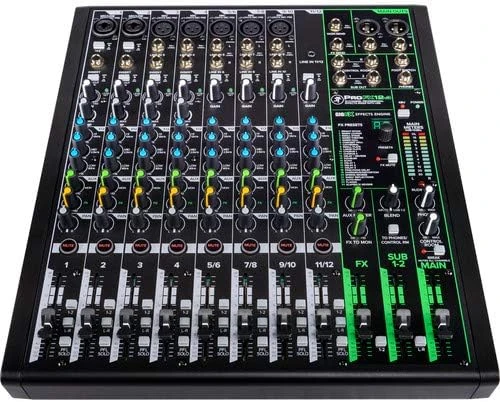
If you're shopping for a 12-channel analogue mixer in Australia, there's a decent chance the Mackie ProFX12v3 has landed on your shortlist. It sits in that sweet spot where bedroom producers, gigging musicians, podcasters, and small venue operators all overlap — and that's exactly what makes choosing the right mixer in this category so tricky.
This guide breaks down everything the ProFX12v3 offers, how it stacks up against the main competition, and — most importantly — whether it's actually the right mixer for your specific situation. No fluff, no filler. Just an honest look at what you're getting for your money.
What Exactly Is the Mackie ProFX12v3?
The ProFX12v3 is the third generation of Mackie's popular ProFX compact mixer line. It's a 12-channel analogue mixer with built-in USB audio interface capabilities, 24-bit/192kHz recording quality, and Mackie's proprietary GigFX effects engine. It uses Onyx mic preamps — the same preamp design found in Mackie's higher-end recording gear — which is a genuine selling point at this price bracket.
Here's the channel breakdown:
- 4 mono channels with Onyx mic preamps (XLR/TRS combo jacks), each with dedicated 3-band EQ featuring a sweepable mid
- 4 stereo line channels (2 with mic preamps on channels 5/6 and 7/8)
- 1 stereo aux return
- USB 2x4 audio interface for recording and playback
- GigFX effects processor with 24 effects including reverbs, delays, and chorus
- Single-knob compressor on each mono mic channel
In practical terms, this gives you enough inputs for a full band setup, a podcast with multiple guests, or a small venue PA system — with room to spare for playback sources and effects processing.
The Onyx Preamp Advantage — Does It Actually Matter?
Mackie talks up their Onyx preamps extensively, and for good reason. These aren't just marketing-speak rebranded generic preamps. The Onyx design has been around since the early 2000s and earned genuine respect in recording circles. They offer a clean, transparent signal path with low noise and plenty of headroom.
At this price point, preamp quality is where you'll notice the biggest difference between mixers. A cheaper mixer might have comparable EQ or similar effects, but muddy, noisy preamps will colour everything that passes through them. The Onyx preamps give the ProFX12v3 a noticeably cleaner foundation than most competitors in the same price range.
The specs back this up: an equivalent input noise (EIN) of -128dBu and a wide frequency response of 20Hz–40kHz. For a mixer at this price, those numbers are genuinely impressive.
GigFX Effects Engine: What You Actually Get
The built-in GigFX effects processor gives you 24 effects to work with. The standouts are:
- Reverbs: Room, plate, hall, and cathedral varieties — most are quite usable for live work
- Delays: Standard delays including tap tempo options
- Modulation: Chorus and flanger effects
Are these effects going to replace a dedicated effects processor or quality plugins? No. But for live gigs, rehearsals, and quick recordings, they're more than adequate. The reverbs in particular are smooth enough that vocalists won't complain, and the single FX knob per channel gives you quick, intuitive control over how much effect you're sending.
One limitation worth noting: there's a single effects bus, so you can't run different effects on different channels simultaneously. Everyone shares the same effect. For most live applications this is fine, but it's worth knowing upfront.
USB Recording: The 2x4 Interface
The USB interface on the ProFX12v3 records at up to 24-bit/192kHz, which is overkill for most applications (you'll likely record at 24-bit/48kHz in practice). It operates as a 2x4 USB interface, meaning:
- 2 channels out to your computer (the main stereo mix)
- 4 channels back from your computer (stereo playback to the mixer)
This is perfect for recording a stereo mix of your band rehearsal, streaming a podcast, or running backing tracks from a laptop. What it won't do is multi-track record individual channels — you get the stereo bus, not individual channel sends. If multi-track recording is essential, you'll need to look at digital alternatives.
Mackie bundles their Waveform OEM DAW software and a selection of plugin effects, which is a nice touch for anyone who doesn't already own recording software.
How the ProFX12v3 Compares to the Competition
This is where things get interesting. The 12-channel analogue mixer space has some strong contenders, and the right choice depends entirely on what you prioritise. Here's how the main players stack up:
| Feature | Mackie ProFX12v3 | Yamaha MG12XU | Allen & Heath ZED-12FX |
|---|---|---|---|
| Mic Preamps | Onyx (4 mono + 2 stereo) | D-PRE (6 mono) | DuoPre (6 mono) |
| EQ Per Channel | 3-band with sweepable mid | 3-band with sweepable mid | 4-band with dual sweepable mids |
| Built-in Effects | 24 GigFX effects | 24 SPX effects | 16 FX (Roger Nichols design) |
| USB Interface | 2x4 (24-bit/192kHz) | 2x2 (24-bit/192kHz) | 2x2 (16-bit/48kHz) |
| Compressors | Single-knob on mono channels | 1-knob on channels 1-4 | None built-in |
| Aux Sends | 2 (1 pre, 1 post) | 2 (1 pre, 1 post) | 3 (2 pre, 1 post) |
| Bundled Software | Waveform OEM + plugins | Cubase AI + plugins | None |
| Build Quality | Rugged ABS/steel chassis | Metal chassis, solid build | Premium steel chassis |
| Best For | All-rounders, live + recording | Reliability-first users | Sound quality purists |
Mackie ProFX12v3 vs Yamaha MG12XU
This is the matchup most Australian buyers are weighing up, and it's genuinely close. Both are excellent mixers from reputable brands at similar price points.
Where the Mackie wins:
- The Onyx preamps are generally considered warmer and more musical than Yamaha's D-PRE design — though the difference is subtle
- The 2x4 USB interface gives you more flexibility than Yamaha's 2x2, particularly for sending separate playback channels back to the mixer
- Bundled software (Waveform OEM) is arguably more beginner-friendly than Cubase AI
- The single-knob compressors are a practical advantage for live vocal work
Where the Yamaha wins:
- Yamaha's legendary reliability — these mixers are basically bulletproof
- The SPX effects are based on Yamaha's professional SPX processors and have a slightly more polished sound
- Yamaha's global service network is arguably stronger in regional Australia
- The channel layout gives you 6 dedicated mono mic channels rather than 4
The verdict: If you're splitting time between live gigs and recording, the Mackie's better USB implementation and Onyx preamps give it a slight edge. If reliability in harsh touring conditions is your top concern, Yamaha's track record is hard to argue with.
Mackie ProFX12v3 vs Allen & Heath ZED-12FX
The Allen & Heath is the premium option in this comparison and typically costs more, but for sound-quality-focused buyers, the extra investment can be worth it.
Where the Mackie wins:
- Significantly better USB interface (24-bit/192kHz vs 16-bit/48kHz)
- Built-in single-knob compressors save you from needing external processing
- More effects to choose from (24 vs 16)
- Better value — you're getting more features per dollar
- Bundled DAW software included
Where the Allen & Heath wins:
- The 4-band EQ with dual sweepable mids is significantly more powerful for tone-shaping
- DuoPre preamps are regarded as some of the best in any analogue mixer at any price
- An extra aux send (3 vs 2) gives you more flexibility for monitor mixes
- Superior build quality and component selection
- The overall sound character is noticeably more refined
The verdict: If pure audio quality and EQ flexibility are your top priorities and you're less concerned about USB recording specs, the Allen & Heath is the better-sounding mixer. If you want a more complete package with better recording capabilities and built-in dynamics processing, the Mackie is the smarter buy.
Who Should Buy the Mackie ProFX12v3?
Not every mixer suits every user. Here's an honest breakdown of who this mixer is best — and worst — suited for:
Ideal Users
- Gigging musicians who also record: The combination of solid live features and capable USB recording makes this a genuine do-it-all solution. Record your rehearsals, run FOH at small gigs, and produce demos — all with one piece of gear.
- Podcasters with multiple hosts/guests: Four quality mic preamps with built-in compressors, USB recording, and enough channels for multiple guests plus sound effects make this surprisingly well-suited for podcasting.
- Small venues and houses of worship: Enough channels for a full band, reliable effects for vocals, and a straightforward layout that volunteer operators can learn quickly.
- Home studio producers: The Onyx preamps provide genuinely good recording quality, and the bundled Waveform software gets you started without additional expense.
Who Should Look Elsewhere
- Multi-track recording enthusiasts: If you need to record individual channels separately, the 2-channel USB output won't cut it. Look at digital mixers or dedicated audio interfaces instead.
- Larger venues needing more channels: If you regularly exceed 12 inputs, consider stepping up to the ProFX16v3 or a digital alternative.
- DJs: The channel layout and feature set aren't optimised for DJ workflows. A dedicated DJ mixer will serve you better.
- Pure recording setups: If you never play live and only record, a dedicated USB audio interface will give you better value and more recording-specific features.
Key Features Worth Highlighting
The Single-Knob Compressors
This is an underrated feature that gets overlooked in spec sheet comparisons. Having a compressor on each mono channel means you can tame dynamic vocalists and acoustic instruments without carrying a separate rack unit. It's a single-knob design — you turn it up for more compression — which keeps things simple. Is it as flexible as a dedicated compressor? No. But it's remarkably effective for live use, particularly on vocals, and saves you from clipping when a singer suddenly belts one out.
The Build
Mackie has always built their gear to survive gigging life, and the ProFX12v3 continues that tradition. The chassis uses a combination of ABS and steel that feels solid without being excessively heavy. The knobs have a satisfying resistance, and the faders move smoothly. It's not quite at Allen & Heath's build standard, but it's genuinely roadworthy gear that should handle regular transport without drama.
Layout and Ergonomics
The control surface is well-organised with clear labelling and colour-coded knobs. Gain, EQ, aux sends, and FX sends follow a logical top-to-bottom signal flow that makes intuitive sense — even if you've never used a mixer before. This matters more than people think, especially when you're adjusting settings in a dimly lit venue between songs.
What Could Be Better
No mixer at this price point is perfect, and being honest about limitations is more useful than pretending they don't exist:
- USB is stereo only: The lack of multi-track USB recording is the biggest limitation for recording-focused users. Competitors like some Soundcraft and PreSonus models offer multi-track recording at similar prices.
- Single effects bus: You can only run one effect at a time across all channels. If you want reverb on vocals and delay on guitar simultaneously, you'll need an external effects unit for one of them.
- No Bluetooth: In 2026, the lack of Bluetooth connectivity for playing backing tracks from a phone feels like an oversight. Some competing mixers now include this.
- Limited aux sends: Two aux sends (one pre-fader for monitors, one post-fader for effects) is adequate but tight. If you need multiple independent monitor mixes, you'll run out of sends quickly.
Price and Value Assessment
In the Australian market, the ProFX12v3 sits in a competitive price bracket for 12-channel analogue mixers with USB. Here's how the value proposition breaks down:
| Category | Rating | Notes |
|---|---|---|
| Preamp Quality | Excellent | Onyx preamps punch above this price range |
| Effects Quality | Good | Perfectly usable for live work, not studio-grade |
| USB Recording | Good | High-quality stereo recording; no multi-track |
| Build Quality | Very Good | Road-tested design that handles regular gigging |
| Feature Set | Excellent | Compressors + effects + USB is a strong combo |
| Overall Value | Excellent | One of the best feature-to-price ratios in class |
Choosing the Right Mixer: Decision Framework
Before you commit to any mixer, work through these questions:
- How many microphones will you use simultaneously? The ProFX12v3 gives you 6 mic preamps (4 mono + 2 on stereo channels). If you regularly need more than 6, look at 16-channel models.
- Do you need multi-track recording? If recording individual channels separately is important, this mixer's stereo-only USB won't work for you. Consider a PreSonus StudioLive AR12c or a digital mixer instead.
- Is this primarily for live use, recording, or both? The ProFX12v3 excels as a dual-purpose mixer. If you only do one or the other, a more specialised tool might serve you better.
- How important are built-in effects? If you already own external effects processors, the built-in GigFX is a bonus rather than a necessity. If you don't, it's a significant value-add.
- What's your experience level? The ProFX12v3's straightforward layout and single-knob compressors make it very approachable for beginners while still offering enough control for experienced users.
Common Mistakes to Avoid
After helping countless Aussie musicians choose mixers, these are the mistakes we see most often:
- Buying too many channels: More isn't always better. A 12-channel mixer that you use fully is better than a 24-channel board where half the channels collect dust. Unused channels add noise to your signal path.
- Ignoring preamp quality: The preamps are the foundation of everything. A mixer with fancy features but poor preamps will always sound mediocre. The ProFX12v3 gets this right with the Onyx design.
- Assuming USB means multi-track: Many buyers assume a USB mixer will let them record every channel separately. Most analogue USB mixers — including this one — only send a stereo mix to the computer. Always check the USB channel count.
- Overlooking aux sends: If you run multiple monitor mixes, two aux sends can feel limiting. Count your monitoring needs before buying.
Final Recommendation
The Mackie ProFX12v3 is one of the strongest all-round analogue mixers you can buy in Australia in 2026. It doesn't try to be the absolute best at any single thing — instead, it delivers genuinely good performance across the board. The Onyx preamps give it a sonic foundation that competitors struggle to match at this price, the built-in compressors are a practical advantage for live work, and the USB interface makes it a capable recording tool for stereo mixes.
Is it perfect? No. The lack of multi-track recording, single effects bus, and absence of Bluetooth are legitimate limitations. But for the price, the combination of sound quality, features, build quality, and versatility is hard to beat.
If you're an Australian musician, podcaster, or small venue operator looking for a reliable, great-sounding mixer that handles both live and recording duties, the ProFX12v3 deserves serious consideration. It's the kind of gear you buy once and use for years.
Check Price — Mackie ProFX12v3 at MusiconStage
Quick Specs Reference
| Specification | Detail |
|---|---|
| Channels | 12 (4 mono + 4 stereo) |
| Mic Preamps | 6 Onyx preamps |
| EQ | 3-band with sweepable mid (mono channels) |
| Effects | 24 GigFX (reverb, delay, chorus, flanger) |
| USB | 2x4, 24-bit/192kHz |
| Compressors | Single-knob on mono mic channels |
| Aux Sends | 2 (1 pre-fader, 1 post-fader) |
| Frequency Response | 20Hz – 40kHz |
| EIN | -128dBu |
| Phantom Power | +48V (global) |
| Bundled Software | Waveform OEM, Musician Collection plugins |
Buy the Mackie ProFX12v3 — Ships Australia-Wide
MusiconStage is an authorised Australian Mackie dealer. All products include full manufacturer warranty and local support.