
Mackie ProFX12v3 in Real Gigs: Aussie Use-Case Guide 2026
Mackie ProFX12v3 in Real Gigs: Aussie Use-Case Guide 2026
There's a particular moment that every gigging musician in Australia knows well. It's 5:30pm on a Friday, you're loading in through the side door of a pub in Fitzroy or Fortitude Valley, the bistro is already half full, and you've got maybe forty minutes to get a four-piece band sounding decent through a house PA that nobody has looked after since 2019. What you need in that moment isn't 96 channels of DSP wizardry. You need a mixer where every control does one obvious thing, where you can find the gain knob without squinting, and where nothing needs to boot up.
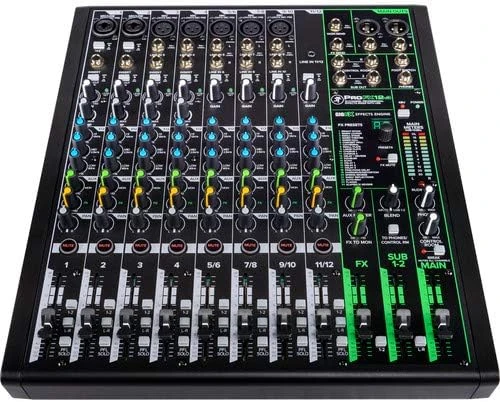
That's the exact situation the Mackie ProFX12v3 was built for. It's a 12-channel analogue mixer with Onyx mic preamps, onboard effects, a couple of handy compressors and a USB interface bolted on the side. On paper it looks like a hundred other compact mixers. In practice, the way it's laid out and the jobs it quietly does well make it one of the most sensible purchases in the sub-$700 bracket for Australian buyers.
This guide isn't a spec sheet recital. It's about how this mixer actually behaves in the rooms you'll be using it in — the pub, the church hall, the school assembly, the spare bedroom studio — and who should (and shouldn't) be buying one.
Quick orientation: what you're actually getting
Before we get into scenarios, here's the shape of the thing so the rest makes sense.
- Six mono channels with Onyx mic preamps — XLR inputs with 60dB of gain, 3-band EQ, a low-cut filter, and phantom power available across the board.
- Three stereo line channel pairs — for keys, backing tracks, laptops, playback devices and anything else arriving on a pair of jacks.
- Single-knob compressors on the first four mono channels — one knob, no threshold/ratio/attack rabbit hole.
- GigFX+ effects engine — 24 reverbs, delays and modulation effects with a dedicated FX send and a tap tempo.
- 2-in/2-out USB audio interface at 24-bit/192kHz — stereo mix out to the computer, stereo playback back in.
- Aux send for monitors, control room out, headphone out, XLR main outs.
- Rugged steel chassis with an external power supply.
The important word in that list is analogue. Signal flow is a straight line you can see. There's no menu diving, no scene recall, no tablet needed. That's simultaneously this mixer's greatest strength and the reason some people should buy something else — we'll get to both.
Use case one: the small band pub and club gig
This is the ProFX12v3's home turf, and it's worth being specific about what "a small band gig" actually needs. A typical Aussie pub four-piece looks something like: two vocal mics, a kick mic, an overhead or snare mic, DI from bass, DI or mic from guitar amp, and a stereo feed from a keyboard or a laptop running backing tracks. Count it up — that's six or seven mono sources and a stereo pair. The ProFX12v3 handles that with a channel or two spare.
Where it earns its keep is the Onyx preamps on the vocal channels. In a loud room with a wedge screaming behind you, cheap preamps go hard and brittle when you push them and you end up fighting the EQ to get intelligibility back. The Onyx circuit stays clean well past where you'd expect it to, which means a dynamic vocal mic on a quiet singer still gets there without hiss creeping into the mix.
The single-knob compressors on channels 1 to 4 are the other thing you'll use every single gig. Put your two lead vocals on channels 1 and 2, bring the compression knob up until the loud bits stop leaping out, and you've solved the most common live-sound problem in the country — the singer who whispers a verse and then belts the chorus. It's not a mastering-grade compressor and it won't do anything subtle, but for glueing a vocal into a pub mix it's genuinely useful.
The onboard reverbs are better than the ProFX's price bracket would suggest. A plate or a short hall on the vocals, tap tempo delay if you've got a singer who wants slapback — done in about fifteen seconds, no outboard rack, no extra cabling. For a pub gig where nobody in the room is listening critically, this is exactly the right amount of effect.
Realistic limitation for this scenario: there's one aux send for monitors. One. If your band works off two different wedge mixes — say, a drummer who wants mostly click and vocals, and a frontperson who wants everything — you cannot do that with this mixer alone. You either run a single shared monitor mix (which is what most pub bands do anyway) or you look at a bigger board.
Check current pricing and stock on the Mackie ProFX12v3 at MusiconStage
Use case two: church, community hall and clubroom
An enormous number of these mixers end up bolted into a cupboard at the back of a church, a scout hall, a surf club or a community centre — and there's a good reason for that. The people operating it on a Sunday morning are volunteers who rotate every few weeks. Some of them are teenagers. Some of them are retirees. Almost none of them will read a manual.
An analogue board with physical knobs is a massive advantage here. You can put strips of gaffer tape under the faders with "LECTERN", "LAPEL", "KEYS", "LAPTOP" written on them, take a photo of the correct settings, laminate it, and hand it to whoever is rostered on. Try doing that with a digital mixer where the wrong scene got loaded and now nothing works.
A typical church setup fits comfortably: two or three wireless handhelds or lapels into the mono channels, an acoustic guitar DI, a keyboard on a stereo pair, and the media laptop on another stereo pair for video and hymn playback. The low-cut filter on the mono channels is worth switching in on every speech mic — it cleans up the low-end mud and handling noise that makes lecterns sound woolly in reverberant halls, which describes about ninety per cent of Australian church buildings.
Watch out for: if your venue needs a separate feed for a hearing loop, a foyer speaker, a crying room and a recording, you're running out of outputs fast. You've got main XLRs, the control room out, the aux and the USB stream. That covers a lot but not everything. Map your outputs before you buy.
Use case three: schools, conferences and corporate AV
For a school hall or a mid-sized conference room, this mixer sits in a pleasant sweet spot. Assembly needs are usually a couple of speech mics, a lectern mic, and playback from a laptop or a phone. The ProFX12v3 does that without breaking a sweat, and the USB interface means the AV coordinator can record the principal's address or a guest speaker straight into a laptop with no extra hardware.
Presentations are where the compressors surprise people again. Speakers wander off-mic. They lean in for emphasis. A little compression on the lectern channel keeps the level consistent for the audience at the back without anyone riding a fader. It also makes the recording usable afterwards rather than a rollercoaster of levels.
The physical build matters in institutional use too. The steel chassis survives being shoved into a storage room, carried across a quadrangle by a Year 11 student, and set up on a wobbly trestle table. Plastic-chassis mixers in this price range do not have the same life expectancy in a school.
Use case four: home studio, podcasting and streaming
Here's where you need to be honest with yourself about what the USB interface does and doesn't do.
The ProFX12v3's USB connection is two channels in, two channels out. Whatever you have set up on the main mix arrives at your computer as a stereo pair. That is fantastic for some jobs and useless for others.
It works brilliantly for:
- Podcasting with two to four hosts. Everyone on their own mic with their own gain, compression and EQ, mixed live, recorded as a finished stereo file. No multitrack editing afterwards. For a weekly show where the value is turnaround speed rather than surgical post-production, this is the fastest workflow going.
- Live streaming and church broadcast. Feed the stream a proper mix rather than whatever a webcam mic picks up. Bring the stream's return audio back in via USB so you can hear callers or playback in your headphones.
- Rehearsal recording. Bang a stereo capture of every band practice into a laptop and actually listen back. Bands that do this improve faster than bands that don't — it's the cheapest form of self-critique available.
- Demo and songwriting sketches. Get an idea down with a real preamp and real EQ in the chain.
It does not work for: multitrack studio recording. If you want the kick, snare, bass, guitar and vocal on separate tracks in your DAW so you can mix them properly later, this is the wrong tool and no amount of clever routing will change that. You need a multi-output interface or a mixer with multitrack USB. Buying the ProFX12v3 and then discovering this is the single most common regret we hear about compact USB mixers.
Use case five: rehearsal rooms and hybrid setups
A slightly less obvious but very common application — the shared rehearsal space or the multi-purpose room. The channel count is generous enough for a full band to plug in and stay plugged in, the layout is obvious enough that four different bands can use it without anyone breaking anything permanently, and the price is low enough that you're not devastated if someone spills a beer on it.
Mobile operators doing wedding-and-function work also gravitate to it as a secondary board. The main system might run digital, but there's always a ceremony out on a lawn somewhere that needs two radio mics, a guitar and an iPad, powered off a single lead. The ProFX12v3 is small enough to be that board.
Where it genuinely struggles
No mixer is right for everything. Being clear about the boundaries saves you money and disappointment.
- Multiple monitor mixes. One aux send. If your gigs demand two or more independent wedge mixes, step up to a larger board or a digital mixer with personal monitoring.
- Multitrack recording. Covered above. Stereo out only.
- No scene recall. Every setup is built from scratch or from a photo of your settings. For a venue with wildly different weekly requirements, digital recall is worth real money.
- No wireless control. You cannot walk into the room and mix from a tablet. If you're a one-person band who needs to check the mix from the audience position, the base v3 model won't do it — that's what the ProFX12v3+ variant with Bluetooth and app control exists for.
- No motorised or recallable EQ. Fine for its purpose, but worth knowing.
None of these are faults. They're the trade-offs that let it be simple, reliable and affordable.
How the alternatives perform in the same rooms
Yamaha MG12XU — the most direct rival and a genuinely excellent mixer. Yamaha's D-PRE preamps have a slightly rounder, warmer character where the Onyx is a touch more forward and open. The MG's SPX effects are legendary and arguably more musical than the GigFX+. Where the Mackie pulls ahead for the scenarios above is the one-knob compressors on four channels rather than Yamaha's single-knob comps on fewer, and the physical control layout, which several engineers find quicker to work under pressure. Honestly, either will serve you well; pick on feel and price.
Allen & Heath ZED-12FX — the choice if audio quality is your top priority and you occasionally record. A&H preamps and EQ are a step up in refinement, and the ZED's EQ is more musical for shaping problem sources. It typically costs more, and the effects section is less deep. For a studio-leaning user, the ZED. For a load-in-and-go gigging user, the Mackie.
Behringer Xenyx X1222USB — significantly cheaper, and it will absolutely make sound. What you give up is preamp headroom, build robustness and long-term reliability under weekly gigging. If the mixer lives in a bedroom, the savings are real. If it's going in a van every weekend for the next five years, spend the extra.
Mackie ProFX12v3+ — the same board with Bluetooth input, expanded USB I/O and wireless app control. If you're a solo performer or duo who needs to mix from the floor, or you want Bluetooth playback between sets without an extra cable, the upgrade is worth costing out before you commit to the standard v3.
Which user are you?
The beginner
If you've never mixed before, this is one of the least intimidating professional-grade boards you can buy. The signal path is visible, the compressors are one knob, and you can't get lost in a menu. Start by learning proper gain structure — set gain with the fader at unity, watch the signal LEDs, don't chase level with the fader — and you'll be ahead of most people using gear twice this price.
The gigging musician
Buy it. Then buy a padded bag or a small case for it, label your leads, and build a repeatable setup you can execute in fifteen minutes. This board's value is that it stops being something you think about.
The semi-pro engineer
It's a solid B-rig and a great utility mixer for small jobs, but if your work regularly involves multiple monitor sends, recorded multitracks or complex routing, treat this as a supplementary board rather than your main console.
The content creator
Excellent for live-mixed podcasts and streams with multiple mics, poor for anything requiring separate tracks in post. Decide which of those you are before purchasing — it's the whole decision.
Practical setup tips that make a real difference
- Engage the low-cut filter on every vocal and speech mic. There is almost never useful information below 80Hz in a vocal, and removing it cleans up the entire mix.
- Set the compressor by ear on the loud parts, not the quiet ones. Push it until the peaks stop jumping, then back off slightly.
- Keep the FX send off your speech channels. Reverb on a lectern mic destroys intelligibility, particularly in halls that are already reflective.
- Use the control room output for a recording feed or a foyer speaker if the aux is already committed to monitors — it's an underused output on this board.
- Photograph your settings before you pack down after a good gig. It's the poor person's scene recall and it works.
- Mind your phantom power. It's global on this board. Mute the mains before switching it, and check that nothing plugged in objects to receiving 48V.
Common mistakes to avoid
- Buying it expecting multitrack USB. Say it three times. Stereo out only.
- Running everything at maximum gain. The Onyx preamps have plenty of headroom, which means you don't need to slam them. Clean gain staging beats loud gain staging every time.
- Underestimating monitor needs. Count your required monitor mixes before you buy, not after.
- Skipping the case. A metal-chassis mixer is tough, but the pots and jacks are the vulnerable parts. Protect it.
- Plugging a speaker-level signal into a line input. It happens more often than you'd think in shared community venues. Label everything.
Frequently asked questions
Can I record each instrument on its own track?
No. The USB interface sends a stereo mix. You'll need a multi-output interface for individual tracks.
Is it powerful enough to run a pub gig on its own?
The mixer handles the channel count comfortably, but it has no built-in power amplification. You'll need powered speakers or a separate amp. Feed your mains from the XLR outputs.
Will it work for a band with two singers who want different monitor mixes?
Not independently — there's a single aux send. One shared wedge mix only.
Does it need drivers on Mac or Windows?
It's class-compliant, so it works plug-and-play on macOS. Windows users generally get the best latency performance by installing Mackie's ASIO driver.
Should I pay more for the ProFX12v3+?
Only if you specifically need Bluetooth playback or wireless mixing from a tablet. If you'll always be standing at the board, the standard v3 saves you money for identical audio performance.
How long will it last with weekly gigging?
Mackie's ProFX line has a strong track record in Australian venues. With reasonable care — a case, clean power, and not storing it somewhere that gets to 45 degrees in a van — many years of weekly use is a fair expectation.
The verdict: who should actually buy this
The Mackie ProFX12v3 is the right mixer if you value reliability and speed over flexibility and recall. It's for the pub band, the community hall, the school, the church with volunteer operators, the podcaster who mixes live, and the musician who wants to set up quickly and stop thinking about the equipment.
It's the wrong mixer if you need multitrack recording, multiple monitor mixes, or wireless control from the room. Those are legitimate needs and there are excellent products that meet them — this just isn't one of them, and knowing that up front is worth more than any feature list.
For the very large group of Australian buyers who fall into the first camp, it remains one of the smartest sub-$700 decisions in live audio. It does the ordinary jobs extremely well, every single time, and never asks you to reboot it at 8:55pm.
View the Mackie ProFX12v3 12-Channel Professional Mixer with USB at MusiconStage
Not sure whether this or a larger board suits your venue? Have a chat with the MusiconStage team about your channel count and monitor requirements before you commit — it's a five-minute conversation that saves a lot of buyer's remorse.