
Mackie Performance Bundle 2026: Real-World Podcast & Streaming Guide
Mackie Performance Bundle 2026: How It Actually Works for Podcasts, Streaming & Small Gigs
If you've ever tried to piece together a recording or streaming setup from scratch, you'll know the pain: a mixer from one shop, mics from another, headphones you're not sure will even match, and a tangle of cables that may or may not connect. The Mackie Performance Bundle takes a different approach. It hands you two microphones, headphones, and a mixer in one box, ready to plug in and use. But the real question isn't "what's in the box" — it's "how will this actually work for what I'm doing?" That's what this guide is about.
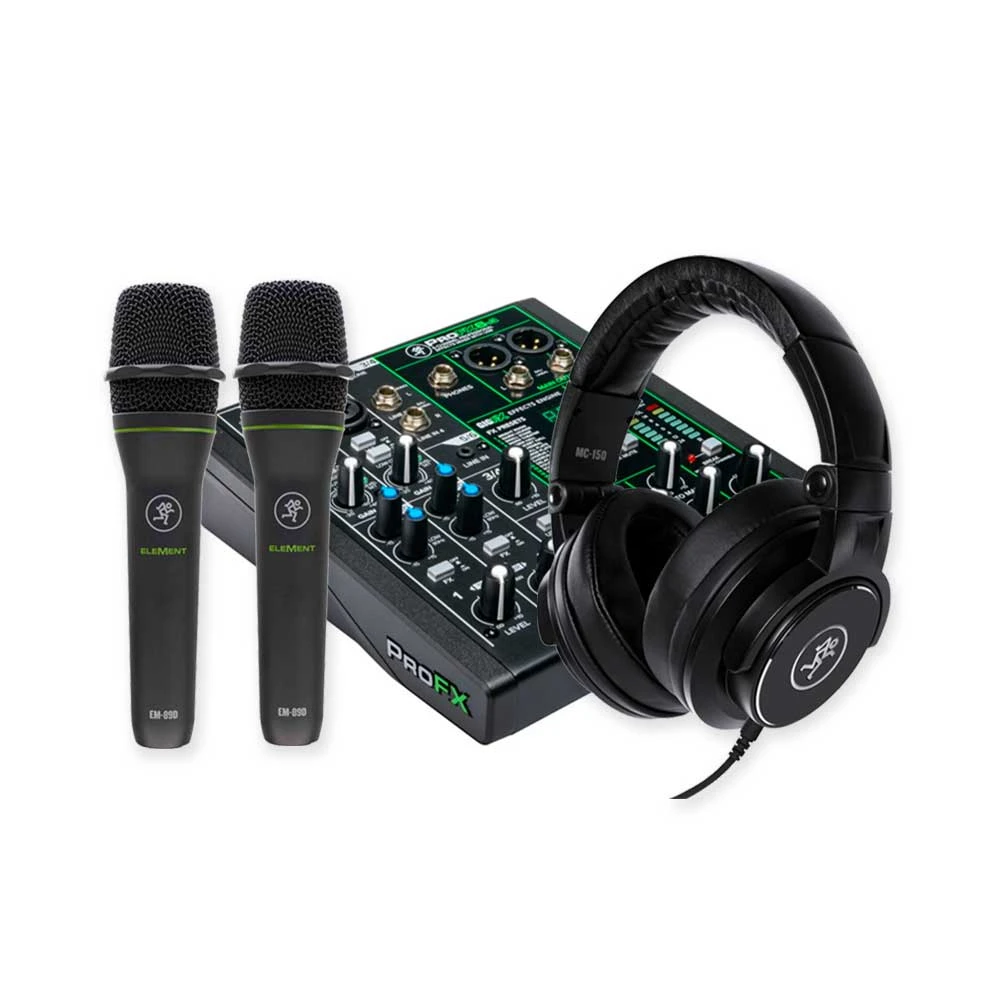
We'll walk through the real-world scenarios where this bundle shines, the situations where it'll start to feel limiting, and who should genuinely be reaching for it. No spec-sheet worship — just practical advice on matching this kit to how you'll actually use it.
Who This Bundle Is Really For
The Mackie Performance Bundle sits in a very specific sweet spot: it's for the person who needs two audio inputs and wants everything to work together out of the box. That sounds simple, but it covers a surprising number of real situations:
- Two-person podcasters — you and a co-host, each with your own mic and headphones, sharing one mixer.
- Streamers who interview guests — gaming, chat, or talk-show style streams where a second person sits in.
- Small acoustic duos — one vocal mic, one for an instrument, into a single PA or recording feed.
- Content creators starting out — YouTubers, course creators, and voiceover beginners who want a complete, no-guesswork starting point.
- Houses of worship and community groups — a presenter plus a single instrument or second speaker for small rooms.
If that describes you, the appeal is obvious. You're not trying to become an audio engineer overnight — you just want clean, reliable sound and you want to start today, not after three more orders arrive.
Real-World Scenario 1: The Two-Person Podcast
This is the application the bundle was practically made for. Picture a typical Aussie home-studio podcast: you and a mate at a kitchen table or in a spare room, recording a weekly show.
With two mics and one mixer, each host gets their own microphone, and the mixer lets you balance both voices before the signal ever hits your recording software. That's a big deal in practice. Setting levels at the mixer means you're not fighting to fix a too-loud co-host in post-production every single episode. One person talks softly, the other booms — you nudge a fader and you're sorted.
The included headphones matter more than people expect here. Monitoring while you record lets you catch problems in the moment: a mic that's been knocked, a hum from a nearby laptop charger, or the dreaded plosive "P" pops. Hearing it live means you re-record one sentence instead of discovering a ruined hour later.
Where it excels: Conversational shows with a consistent two-person format. Plug in, set levels once, and your workflow becomes genuinely repeatable week to week.
Where it struggles: The moment you want a third or fourth regular guest in the room. Two inputs is two inputs. You can pass a mic around, but for a panel format you'll outgrow this bundle quickly.
Check current pricing and availability on the Mackie Performance Bundle here.
Real-World Scenario 2: Streaming With a Guest
Live streaming is where a real mixer earns its keep, and where a lot of beginners get burned by USB-mic-only setups. If you stream solo most of the time but occasionally bring a guest into the room, a single USB mic leaves you stuck. The Performance Bundle solves that neatly.
In a streaming context, the mixer becomes your control centre. You can:
- Run both your mic and your guest's mic into one clean feed.
- Adjust each person's volume on the fly without alt-tabbing out of your stream.
- Monitor everything through the headphones so you hear exactly what your audience hears.
The practical win here is consistency. Once your levels are dialled in, your audio sounds the same every stream. No mystery about why last week sounded great and this week sounds muffled — the physical controls are right in front of you, set where you left them.
One honest note for streamers: check the mixer's connection to your computer for your specific software. Most modern setups are happy with a straightforward audio interface workflow, but if you're routing through OBS or similar, spend ten minutes confirming your input device before going live. It's a five-minute job that saves a very public five-minute disaster.
Real-World Scenario 3: The Small Acoustic Gig
Don't overlook the live-performance side. For an acoustic duo playing a café, a small bar, or a private function, this bundle can act as a compact front-of-house solution feeding into a powered speaker.
Run one mic for vocals and one for an acoustic guitar or a second singer, mix the balance at the desk, and send it out. For intimate Australian venues — think a Sunday session at a local pub or a wedding ceremony in a backyard — that's often all the channel count you need. The portability is a genuine bonus; you're carrying one compact kit instead of a milk crate of mismatched gear.
Where it excels: Low-key, two-source performances in small rooms where simplicity beats power.
Where it struggles: A full band. Drums, bass, multiple vocals, and backing tracks need far more inputs and headroom than a two-channel performance bundle is built to give. Use the right tool for the job.
Matching the Bundle to Your Skill Level
Complete beginners
This is arguably the bundle's strongest argument. Everything is matched and ready, so you remove the single biggest source of beginner frustration: compatibility guesswork. You're not Googling whether mic X works with mixer Y. You learn on a system that's designed to just work, which means you spend your energy on content, not troubleshooting.
Intermediate users
If you've already recorded a bit and understand gain staging, you'll appreciate having physical faders and real monitoring. You may, over time, swap or add a mic as your taste develops — and that's fine. The mixer and headphones remain useful even as your mic locker grows.
Seasoned pros
Let's be honest: if you're running professional sessions daily, this isn't your main rig. But plenty of pros keep a simple, grab-and-go bundle like this for quick remote interviews, a B-room, or lending to clients. It's a practical backup, not a flagship.
How It Compares in the Same Scenarios
The most common alternative people weigh up is a pair of standalone USB microphones. USB mics are dead simple and need no mixer — but the moment you want two people, you hit driver headaches and you lose easy, real-time level control. The Performance Bundle's mixer-based approach scales to two people far more gracefully.
The other alternative is buying everything separately — picking your own mixer, your own mics, your own headphones. Done carefully, this can get you a more tailored result. But it costs more time, often more money, and a real risk of mismatched gear. For someone whose priority is "start creating now," the bundle's all-in-one convenience usually wins.
The trade-off to accept honestly: a bundle optimises for compatibility and value, not for having the single best mic or the single best mixer in each category. You're buying a system that works together well, not four separately class-leading components.
Practical Tips to Get the Most From It
- Set your gain before you record, not during. Speak or play at your loudest realistic level and set levels so you're not clipping. Two minutes here saves hours of editing.
- Use the headphones every session. Monitoring isn't optional — it's how you catch problems while they're still fixable.
- Treat your room before you blame your gear. A blanket on the wall or recording in a soft-furnished space does more for your sound than any spec upgrade.
- Keep mics off the desk surface. Vibrations travel. A small stand or boom arm dramatically cleans up your recordings.
- Label your faders. A strip of tape marking "host" and "guest" makes setup foolproof when you're in a hurry.
Common Application Mistakes to Avoid
- Expecting it to be a band PA. It's a two-source kit. Asking it to mix a five-piece will only disappoint you.
- Skipping the level check. The single most common beginner mistake is recording the whole session before noticing the audio was distorting the entire time.
- Ignoring the room. A great bundle in an echoey, hard-surfaced room still sounds echoey. Sound is half gear, half environment.
- Buying it for solo-only use forever. If you'll genuinely never need a second mic, a single quality USB mic might suit you better. The bundle's value is in that second input.
Frequently Asked Questions
Is the Mackie Performance Bundle good for a first-time podcaster?
Yes — this is one of its best-fit uses. Two mics, headphones, and a mixer that all work together remove the compatibility guesswork that trips up most beginners, so you can focus on recording rather than troubleshooting.
Can I use it for solo recording?
Absolutely. You simply use one channel and keep the second mic for guests, interviews, or future growth. Many buyers like having that spare input ready for the day they need it.
Will it work for live streaming on Twitch or YouTube?
It's well suited to streaming, especially when you sometimes have a guest in the room. Just confirm how the mixer connects to your computer and which input your streaming software should use before your first live session.
Is it enough for a live band?
No — and that's an honest limitation. With two inputs, it's built for solo acts, duos, or a presenter-plus-instrument. A full band needs a larger mixer with more channels and headroom.
Do I need to buy anything else to get started?
The core chain — mics, headphones, mixer — is covered. Depending on your scenario you may want mic stands, a pop filter for spoken-word work, and the right cable to connect to your computer or speaker. Sort those out and you're recording.
The Verdict: Match It to How You'll Actually Use It
The Mackie Performance Bundle isn't trying to be the most powerful kit on the shelf, and it doesn't need to be. Its value is practical and specific: it gets a two-person audio setup running cleanly, reliably, and without the compatibility headaches that derail so many first attempts. For two-host podcasts, guest streams, and small acoustic performances, it hits the brief squarely.
If your real-world need is two inputs, simple control, and a setup you can trust to just work every time, this bundle is a genuinely smart, low-stress choice. If you're heading toward bigger productions with multiple performers, treat it as a stepping stone rather than your final destination — and there's nothing wrong with that.
View the Mackie Performance Bundle at MusiconStage and see if it fits your setup.