
Mackie Mix8 PA Mixer Explained: Beginner's Guide to 8-Channel Mixing 2026
Mackie Mix8 PA Mixer Explained: A Beginner's Guide to 8-Channel Mixing in 2026
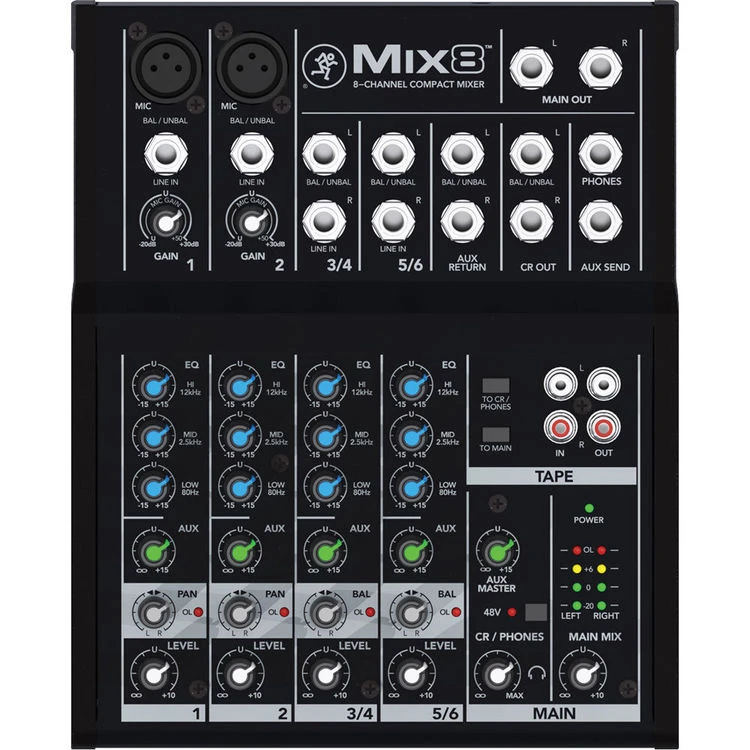
If you've been looking into PA mixers and feeling a little overwhelmed by all the channels, knobs, and jargon — you're not alone. The world of audio mixing can seem complicated when you're starting out, but here's the good news: it doesn't have to be. The Mackie Mix8 is one of those products that exists specifically to make life easier for beginners, and it's a brilliant place to start understanding what mixers actually do and why you might need one.
In this guide, we'll break down everything you need to know about the Mackie Mix8 — what it is, what all those features actually mean in plain English, who it's best suited for, and whether it's the right first mixer for you. No assumed knowledge required.
What Is a PA Mixer, and Why Would You Need One?
Before we dive into the Mackie Mix8 itself, let's quickly cover the basics. A PA mixer (sometimes called a mixing console or soundboard) is the central hub of any sound system. Think of it like the conductor of an orchestra — it takes multiple audio sources (microphones, instruments, music players) and blends them together into one cohesive sound that goes out through your speakers.
Without a mixer, you'd have no way to control how loud each source is relative to the others, adjust the tone of individual inputs, or manage the overall sound. Here are some common scenarios where a mixer becomes essential:
- Small gigs and performances — a singer-guitarist who needs vocals and guitar through speakers
- Community events — speeches, background music, and maybe a couple of microphones at a school or church
- Podcasting or content creation — multiple microphones that need individual level control
- Rehearsal spaces — a band wanting to hear themselves properly through a PA
- Home studios — basic recording and monitoring setups
If any of these sound like your situation, you're in the right place.
What Does "8 Channel" Actually Mean?
You'll see mixers described by their channel count — 4 channel, 8 channel, 16 channel, and so on. But what does that mean in practical terms?
A channel is essentially one input slot on the mixer. Each channel can accept one audio source. So an 8-channel mixer like the Mackie Mix8 lets you plug in and independently control up to eight different audio sources at the same time.
Now here's an important detail that trips up beginners: not all channels on the Mix8 are identical. The Mackie Mix8 actually has:
- 2 mono mic/line channels — these accept microphones (via XLR connectors) or line-level instruments (via 1/4-inch jack). These are your most versatile channels.
- 2 stereo line channels — these are designed for stereo sources like keyboards, laptops, DJ gear, or music players. Each stereo channel uses a left and right input, which counts as two of your eight inputs.
So in real-world terms, you could run two microphones on the mono channels, a keyboard on one stereo channel, and background music from your phone on the other stereo channel — all at once, all independently controlled. That's a surprisingly versatile setup for a compact mixer.
Quick Jargon Buster: Mono vs Stereo
Mono means one audio signal — like a single microphone or a guitar. Stereo means two signals (left and right) that create a wider, more immersive sound — like the music from your phone or a keyboard with stereo outputs. The Mix8 handles both, which is handy.
Understanding the Mackie Mix8's Key Features (Simply Explained)
Let's walk through the features that Mackie highlights for this mixer and explain what each one actually means for you as a user.
High-Headroom Analogue Design
This sounds technical, but it's actually quite straightforward. Headroom refers to how much signal level a mixer can handle before the sound starts distorting. High headroom means you've got a generous safety margin — if someone unexpectedly belts into a microphone or a guitarist cranks their volume, the Mix8 can handle those sudden loud moments without the sound turning harsh or "clipping."
For beginners, this is genuinely valuable because it's more forgiving of the kind of level-setting mistakes you'll inevitably make while learning.
The word analogue means this is a traditional-style mixer that processes sound using electronic circuits rather than digital processing. Analogue mixers are simpler to operate (what you see is what you get — every knob does one thing), and many audio professionals appreciate the warm, natural sound character they provide.
Mackie's Renowned Build Quality
Mackie has been building mixers since 1988, and they've earned a solid reputation for making gear that can take a beating. The Mix8 features a rugged steel chassis — that's the metal casing that protects the internal electronics. This matters more than you might think, especially if you're carting gear to gigs, rehearsals, or events. Cheaper mixers with plastic enclosures can crack or break surprisingly easily during transport.
For Australian users who might be throwing gear in the back of a ute or lugging it between venues in the summer heat, durability is worth paying attention to.
3-Band EQ on Each Channel
EQ stands for equalisation, and it's one of the most useful tools on any mixer. EQ lets you adjust the tonal quality of each input. The Mackie Mix8 gives you a 3-band EQ on every channel, which means three separate knobs controlling:
- High (treble) — controls the bright, crispy frequencies. Turn it up for more clarity and presence; turn it down to reduce harshness or sibilance (those sharp "s" sounds in vocals).
- Mid — controls the middle frequencies where most of the "body" of vocals and instruments live. This is often the most powerful EQ band for shaping sound.
- Low (bass) — controls the deep, warm frequencies. Useful for adding warmth to thin-sounding sources or reducing muddiness and boominess.
A practical example: if a vocalist sounds a bit boomy and muddy through the PA, you'd gently turn down the Low knob on their channel. If an acoustic guitar sounds thin and lifeless, you might nudge the Low and Mid knobs up slightly. It's surprisingly intuitive once you start experimenting.
Pan Control
Pan (short for panorama) lets you place a sound anywhere in the left-to-right stereo field. If you're running two speakers, panning a source to the left means more of that sound comes from the left speaker, and vice versa. For simple setups, you'll usually leave everything centred, but it's there when you need it.
Phantom Power (+48V)
This is one feature that confuses almost every beginner, so let's clear it up. Phantom power is a small electrical charge sent through the microphone cable to power certain types of microphones called condenser microphones. These mics need external power to function (unlike dynamic microphones, which don't).
The Mix8 provides +48V phantom power across the mono mic channels. If you're using a condenser microphone — common for podcasting, recording, or capturing acoustic instruments with fine detail — you'll need to switch this on. If you're using a dynamic microphone (like the classic Shure SM58), you don't need it, but leaving it on won't damage a dynamic mic.
Beginner tip: The one thing to be careful with is ribbon microphones — phantom power can damage some ribbon mics. But if you're a beginner, you're very unlikely to own one, so don't stress.
Aux Send
An aux send (auxiliary send) is an additional output from the mixer that lets you create a separate mix. The most common use is for stage monitors — the speakers that face back toward performers so they can hear themselves. With an aux send, you can create a different mix for the monitors than what the audience hears through the main speakers.
For example, the singer might want their vocals louder in the monitor, while the guitarist wants more guitar. The aux send lets you adjust what each performer hears without changing the main mix. Even with just one aux send on the Mix8, this is a genuinely useful capability for small live setups.
Who Is the Mackie Mix8 Best Suited For?
Let's be honest about who this mixer is designed for and who might need something different.
The Mix8 Is a Great Fit If You're:
- A solo performer or duo needing to run vocals and a couple of instruments through a PA
- Running a small venue, café, or bar that needs basic microphone and music playback capability
- Setting up for community events — school assemblies, church services, local club meetings
- A podcaster or streamer who needs to mix two microphones with music or sound effects
- A beginner who wants to learn the fundamentals of mixing without being overwhelmed
- Someone on a budget who needs reliable, quality gear without spending a fortune
You Might Need Something Bigger If:
- You're mixing a full band (drums alone can eat 4-8 channels)
- You need built-in effects like reverb or delay (the Mix8 doesn't include onboard effects)
- You need USB audio interfacing for recording directly to a computer
- You need more than one aux send for multiple monitor mixes
There's no shame in starting with the Mix8 and upgrading later as your needs grow. In fact, many experienced sound engineers keep a compact mixer like this as a backup or for smaller jobs — it never becomes useless.
Common Beginner Mistakes to Avoid
Here are some pitfalls that catch new mixer owners off guard:
- Turning everything up to maximum. It's tempting, but it's the fastest way to get terrible, distorted sound. Start with all faders and knobs at their centre position (often marked "0" or "U" for unity), then make small adjustments from there.
- Forgetting to turn on phantom power when using a condenser microphone. If your condenser mic isn't producing any sound, this is almost always the reason.
- Using the wrong cable type. Microphones need XLR cables for the mono channels. Line-level instruments typically use 1/4-inch (6.35mm) jack cables. Make sure you've got the right cables before your first gig.
- Not checking gain staging. The gain knob (sometimes called trim) at the top of each channel sets the initial input level. Set this properly before adjusting the channel fader. If the gain is too low, you'll get a noisy signal. Too high, and it'll distort. Most mixers have a clip light — if it's flickering constantly, your gain is too high.
- Ignoring the EQ. The 3-band EQ is your best friend for making things sound good in a room. Even small adjustments can make a big difference — especially cutting low frequencies on vocal channels to reduce boominess.
What You'll Need Alongside the Mix8
A mixer on its own doesn't make sound — it's the brain of your system. Here's what else you'll need for a complete setup:
- Speakers (PA speakers or powered monitors) — the Mix8 has stereo main outputs that connect to powered speakers. If your speakers are passive (not powered), you'll also need a separate power amplifier.
- Microphones — at least one, depending on your application.
- Cables — XLR cables for microphones, 1/4-inch or RCA cables for line sources, and speaker cables to connect to your speakers.
- A microphone stand — if you're using mics for vocals or instruments.
Beginner tip: If you're buying your first complete PA system, it's often worth purchasing a bundle that includes speakers, a mixer, microphone, cables, and stands together. It takes the guesswork out of compatibility.
Setting Up Your Mackie Mix8: What to Expect
One of the best things about an analogue mixer like the Mix8 is the simplicity of setup. There's no software to install, no firmware to update, and no menu screens to navigate. You plug things in, turn knobs, and sound comes out. Here's a basic walkthrough:
- Place the mixer somewhere accessible where you can reach the controls during use.
- Connect your speakers to the main outputs on the back of the mixer using appropriate cables.
- Plug in your sources — microphones into the XLR inputs on channels 1-2, instruments or music players into the stereo channels.
- Turn on phantom power if using condenser microphones.
- Set all channel faders to their lowest position initially.
- Turn on the mixer, then your speakers (always turn speakers on last and off first to protect them from power-on pops).
- Gradually bring up each channel fader while someone speaks into the mic or plays the instrument, adjusting the gain knob until you get a clean, healthy signal level.
- Adjust EQ to taste — start flat and make small corrections based on what you hear.
That's genuinely it. You could be up and running in under ten minutes. The learning curve with analogue mixers is gentle — the physical layout of the controls teaches you as you go.
How Does It Compare to Other Budget Mixers?
At this price point and channel count, you're looking at a competitive space. Here's what sets the Mix8 apart:
- Build quality — the steel chassis puts it ahead of many plastic-bodied competitors in durability.
- Mackie's reputation — decades of professional audio experience means the fundamentals (preamps, EQ design, signal path) are well-engineered.
- Simplicity — no unnecessary features cluttering the workflow. Everything on the Mix8 earns its place.
What it doesn't have that some competitors include: built-in effects (reverb, delay), USB audio interface capability, or Bluetooth connectivity. Whether those matter depends entirely on your specific needs. If you need effects, look at the Mackie Mix series' bigger siblings or consider an external effects unit. If you need USB recording, Mackie's ProFX series might be worth the step up.
Honest Pros and Cons
What We Like
- Genuinely compact and portable — easy to carry to gigs or store away
- Solid steel build that inspires confidence in longevity
- Clean, low-noise signal path from Mackie's proven circuit design
- Simple layout that's perfect for learning
- Phantom power included — a feature sometimes missing at this price point
- Aux send for basic monitor mixing
What to Be Aware Of
- No built-in effects — you'll need external processing for reverb and delay
- No USB connectivity — can't double as a recording interface
- Only 2 mono mic inputs — limits microphone count for larger setups
- Single aux send — only one monitor mix possible
Is the Mackie Mix8 Worth It for Australian Buyers in 2026?
If you're a beginner looking for your first mixer, or you need a simple, reliable compact mixer for small applications, the Mackie Mix8 is an excellent choice. It won't try to be everything to everyone — and that's actually its strength. It does the fundamentals well, it's built to last, and it won't overwhelm you with features you don't understand yet.
For Australian buyers specifically, the Mackie brand has strong local support and availability, which means getting help or replacement parts if needed is straightforward. The compact size also makes it practical for the kinds of small venues, community spaces, and home setups that are common across Australia.
Our recommendation: If your needs fit within what the Mix8 offers (2 mic channels, 2 stereo line channels, basic EQ and monitoring), it's a smart, confidence-building first purchase. You'll learn the fundamentals of mixing on quality gear without spending more than necessary.
View the Mackie Mix8 at MusiconStage
Frequently Asked Questions
Can I record music with the Mackie Mix8?
The Mix8 doesn't have a built-in USB interface, so you can't plug it directly into a computer for recording. However, you can connect the main outputs to a separate audio interface or portable recorder. If recording is a primary need, consider a mixer with USB connectivity like the Mackie ProFX series.
Will this work for a small band?
It depends on the band's needs. With 2 mic inputs and 2 stereo line inputs, you could handle a singer-guitarist duo comfortably, or a trio with some creative routing. A full drum kit plus multiple vocalists would require a larger mixer.
Do I need powered speakers or can I use any speakers?
The Mix8 is a mixer only — it doesn't amplify the signal enough to drive passive speakers on its own. You'll either need powered (active) speakers, which have built-in amplifiers, or passive speakers paired with a separate power amplifier.
Is Mackie a good brand for beginners?
Absolutely. Mackie has been a staple in professional and semi-professional audio for decades. Their gear is known for being reliable, well-built, and straightforward to use. The Mix series specifically is designed with simplicity and accessibility in mind.
Ready to Get Started?
The best way to learn mixing is to start mixing. The Mackie Mix8 gives you everything you need to begin — quality mic preamps, useful EQ, monitoring capability, and the kind of build quality that means it'll still be working when you've outgrown it and passed it on to the next beginner.
Check the current price of the Mackie Mix8 at MusiconStage — Australia's trusted source for audio gear with local support and fast shipping.