
Mackie Mix8 8-Channel Mixer: Technical Deep Dive 2026
Mackie Mix8 8-Channel Mixer: A Technical Deep Dive for Australian Users (2026)
The Mackie Mix8 occupies a deceptively important slot in the audio market: the genuinely compact, genuinely affordable analogue mixer that still gets the fundamentals right. In a world increasingly dominated by digital desks, touchscreens and app control, there remains a substantial group of Australian users — small venues, houses of worship, podcasters, schools, rehearsal rooms and home studios — who simply need clean gain, predictable routing and a console that works the moment it's plugged in. The Mix8 is built for exactly that brief, and it executes it with the no-nonsense engineering Mackie has been refining since the original CR1604 redefined affordable mixing in the early 1990s.
This guide takes a technically rigorous look at the Mix8 — what the specifications actually mean in practice, where its circuit design helps you, where its limitations bite, and how it stacks up against the obvious alternatives. If you want a marketing brochure, look elsewhere. If you want to understand whether eight channels of analogue mixing genuinely suits your application, read on.
Technical Overview: What You're Actually Getting
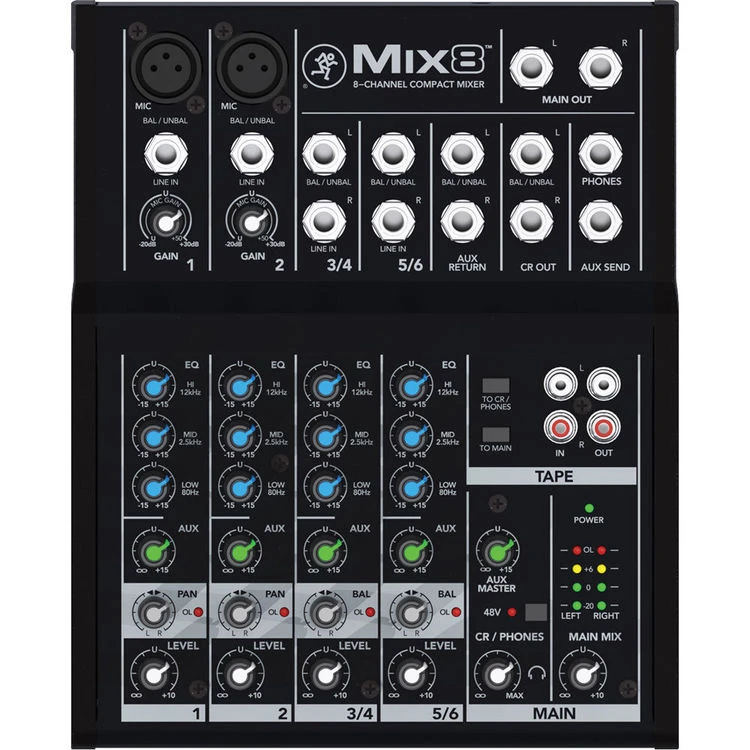
The Mix8 is a low-noise, 8-channel analogue mixer in an ultra-compact desktop chassis. Despite the "8 channel" name, it's important to understand how that channel count breaks down — this is the single most misunderstood point about small Mackie mixers, so let's be precise.
| Specification | Detail |
|---|---|
| Total channels | 8 (2 mono mic/line + 3 stereo line pairs) |
| Mic preamps | 2 x low-noise XLR mic preamps |
| Mono channels | Channels 1–2 (mic/line) |
| Stereo channels | Channels 3/4, 5/6, 7/8 (line level) |
| EQ | 2-band fixed EQ (high & low shelving) per channel |
| Aux send | 1 aux send per channel (mono) |
| Main outputs | Stereo main out (RCA) |
| Phantom power | Global +48V (for condenser mics) |
| Headphone output | Dedicated 1/4" headphone monitor with level |
| Metering | LED output metering |
| Power | External DC power supply |
So the practical reality: you have two channels capable of accepting a microphone or a mono line source, and three stereo pairs for line-level gear — keyboards, media players, drum machines, the stereo output of a laptop interface, or playback devices. This architecture is the key to deciding whether the Mix8 fits your needs. If you need to mic up a five-piece band, this is the wrong mixer. If you need two mics plus several stereo line sources mixed cleanly to a stereo bus, it's close to ideal.
Preamp Design and Signal Integrity
The headline engineering story on any Mackie mixer is the preamp. The Mix8 inherits the company's reputation for low-noise mic preamplification, and in the context of a budget compact mixer this matters more than almost any other single spec. A noisy preamp is an unrecoverable problem — once hiss and self-noise are baked into your signal at the gain stage, no amount of downstream processing removes it cleanly.
The two XLR preamps deliver enough clean gain to drive most dynamic microphones (think a Shure SM58 on vocals or an SM57 on an instrument) to healthy levels without the noise floor becoming intrusive. Pair them with the global +48V phantom power and you can also run small-diaphragm or large-diaphragm condensers — a common choice for podcasters and acoustic performers. One important caveat: phantom power on the Mix8 is global, not per-channel. If you switch on +48V, it's applied to both mic inputs. This is standard at this price point but worth knowing if you ever mix a ribbon microphone (which can be damaged by phantom power) with a condenser — on the Mix8 you can't isolate them, so plan your input choices accordingly.
Across the signal path, Mackie's design philosophy prioritises clean, transparent gain over coloured "character." That's the right call for a utility mixer: you want the Mix8 to faithfully pass what you feed it, leaving tonal shaping to the EQ and your source selection. In real-world use, the audible result is a quiet, neutral console that doesn't editorialise your sound.
EQ: Understanding the 2-Band Limitation
The Mix8 provides a 2-band EQ on each channel — a high shelf and a low shelf, both at fixed frequencies. Understanding what this gives you (and what it withholds) is critical to setting realistic expectations.
A high-shelf control adjusts everything above a set frequency (typically in the upper treble region, around 12 kHz on mixers of this class), letting you add air and presence or tame harshness. A low-shelf control adjusts everything below a set point (commonly around 80 Hz), useful for adding warmth or removing rumble and boom. What you don't get is a sweepable midrange — and the midrange is where the human voice and most instruments live. This is the single biggest functional difference between the Mix8 and a step-up mixer like the ProFX series.
In practice, the 2-band EQ is perfectly serviceable for tonal balancing of well-recorded or well-positioned sources. If your vocal sounds boxy or your acoustic guitar has a problematic 400 Hz buildup, you won't be able to surgically address it on the channel strip — you'll need to fix it at the source (mic choice, mic position) or with outboard processing. For straightforward applications this is rarely a dealbreaker; for problem-solving in difficult rooms it's a genuine constraint. Buy the Mix8 knowing the EQ is for shaping, not for surgery.
Routing, Aux Send and Monitoring
Each channel features a single mono aux send. This is the Mix8's most flexible feature and deserves attention because it defines what the mixer can do beyond simple stereo summing. The aux send can be used two main ways:
- As a monitor/foldback send: Create a separate mix to feed a stage monitor or in-ear system, so performers hear a different balance from the audience. With only one send this is a single mono monitor mix — adequate for a solo performer or a small acoustic act, but not enough for multiple independent monitor mixes.
- As an effects send: Route signal to an external reverb or delay unit, then return the wet signal to a stereo line channel. This is how you add professional-sounding ambience without an onboard effects processor.
The dedicated headphone output with its own level control is more useful than it sounds. For podcasters and home recordists it provides direct, low-latency monitoring of the main mix; for live use it lets an engineer check the mix or pre-fade a source on cans. Combined with the LED output metering, you have enough monitoring feedback to set levels confidently and avoid clipping the main bus.
Build Quality and Physical Design
Mackie's compact mixers have a long-standing reputation for surviving real-world abuse, and the Mix8 continues that lineage. The chassis is built to take the knocks of being thrown in a gig bag, set up and torn down repeatedly, and live on a cramped desk or podium. The control surface uses sealed rotary pots rather than faders — a deliberate engineering choice on a mixer this small, because rotary controls are more compact, more robust against dust ingress, and less prone to the scratchy contact wear that plagues cheap faders over time.
The external power supply is worth a brief note. Some users prefer internal IEC power for tidiness, but an external "line-lump" supply keeps mains transformer hum away from the sensitive audio circuitry and makes the mixer lighter and cooler-running. The trade-off is one more item to keep track of in your gig kit — losing the specific PSU can sideline the unit, so it's wise to label it and carry a known-good spare strategy if the Mix8 is mission-critical for you.
Real-World Performance: Where the Mix8 Shines
Specifications only tell half the story. Here's how the Mix8 behaves across the applications Australian buyers most commonly ask about:
Podcasting and Streaming
This is arguably the Mix8's strongest modern use case. Two clean mic preamps cover a host-and-guest setup, phantom power runs your condensers, the stereo line channels handle music beds and remote-call audio from a laptop, and the headphone out gives you real-time monitoring. The single aux can feed a mix-minus path to a phone or video-call source — a genuinely valuable trick for remote interviews. For a two-person podcast, the Mix8 is hard to beat at its price.
Small Acoustic Acts and Buskers
A vocalist plus an acoustic-guitar DI, with a backing track running into a stereo channel, fits the Mix8 perfectly. The aux send drives a single monitor wedge, and the stereo main out feeds a powered speaker or a small PA. For a duo or solo performer, this is a complete, roadworthy front-of-house solution that disappears into a backpack.
Houses of Worship and Community Spaces
Small congregations, community halls and meeting rooms that need a couple of microphones plus media playback are well served. The simplicity is a feature here — volunteers can operate the Mix8 without training, and there's no software, firmware or app dependency to manage.
Where It Struggles
Be honest about the ceiling. The Mix8 is not for full-band live mixing (only two mic inputs), not for multi-monitor stage setups (one aux), and not for engineers who need parametric or even semi-parametric mid EQ. It also has no onboard effects and no USB audio interface — if you want to record multitrack to a computer or add reverb without external gear, you've outgrown this model before you've bought it.
Technical Comparison: Mix8 vs the Alternatives
The most useful way to position the Mix8 is against its closest siblings and rivals. Here's how the key technical decision points compare.
| Feature | Mackie Mix8 | Step-up (e.g. ProFX-class) | Larger ZED/analogue desks |
|---|---|---|---|
| Mic preamps | 2 | 4–6+ | 8–16+ |
| EQ bands | 2 (fixed) | 3 (often swept mid) | 3–4 (swept/parametric mid) |
| Aux sends | 1 | 1–2 | 2–6 |
| Onboard FX | No | Yes (typical) | Often yes |
| USB recording | No | Often yes | Varies |
| Footprint | Ultra-compact | Compact | Larger desktop |
| Best for | 2 mics + line sources | Small bands, recording | Full live bands |
The interpretation is straightforward. If you genuinely only need two mic channels and several stereo line inputs, the Mix8 gives you Mackie preamp quality in the smallest, cheapest package available — paying for extra channels, mid EQ, effects and USB you won't use is simply waste. The moment your requirements include a third or fourth microphone, swept mid EQ, onboard reverb or computer recording, you should step up to a ProFX-class mixer. The Mix8's value proposition is precisely its restraint: it does a narrow job extremely well rather than a broad job adequately.
Check current pricing and availability on the Mackie Mix8 at MusiconStage.
Which Specifications Actually Matter When You Buy
For buyers evaluating compact analogue mixers, here's where to focus your attention — and where marketing numbers mislead:
- Count the mic preamps, not the channels. "8 channel" mixers in this class frequently mean two mic inputs plus stereo line pairs. The mic-preamp count is the real capacity number for live use.
- Check EQ band count and whether the mid is swept. Two-band EQ shapes tone; three-band-with-swept-mid solves problems. Know which you need.
- Aux send count = independent monitor or FX paths. One aux means one monitor mix or one effects loop, not both simultaneously.
- Phantom power: global vs switchable. Global +48V is fine for most, but matters if you mix ribbon mics or want to avoid phantom on dynamic inputs.
- Output connectors. The Mix8 uses RCA main outs — confirm your powered speakers or amplifier accept this, or budget for adaptor cables (RCA-to-1/4" or RCA-to-XLR).
Future-Proofing Considerations
Analogue mixers like the Mix8 have an interesting durability advantage over digital desks: there is no firmware to go stale, no app to lose compatibility with a future phone OS, and no software ecosystem to be abandoned by the manufacturer. A well-cared-for analogue mixer remains exactly as capable in ten years as the day you bought it. The trade-off is that its capabilities are fixed — you can't unlock new features via an update.
The honest future-proofing question is about your growth, not the mixer's. If you're confident your needs will stay at two mics plus line sources, the Mix8 will serve faithfully for many years. If there's a realistic chance you'll add band members, start multitrack recording, or need effects, factor that into the buying decision now — upgrading later costs more than buying one tier up today.
Technical FAQs
Can I record directly to my computer from the Mix8?
Not via USB — the Mix8 has no onboard audio interface. You can route the stereo main output into a separate USB audio interface, or capture the headphone/main out into a recorder, but for direct computer multitrack recording you'd want a mixer with a built-in interface.
How many microphones can it really handle at once?
Two, via the XLR mic preamps on channels 1 and 2. The remaining channels are stereo line-level pairs and are not designed for microphones.
Does it have built-in effects like reverb?
No. The Mix8 is a pure analogue mixer. To add effects, use the aux send to feed an external processor and return the signal to a spare stereo channel.
Will it drive my powered speakers?
Yes — the stereo main output connects to powered (active) speakers or to a separate power amplifier. Note the RCA output connectors and use the appropriate cables for your speakers' input type.
Is the EQ enough for live vocals?
For tonal shaping in a reasonable room, yes. For correcting problematic midrange resonances or feedback-prone frequencies, the fixed 2-band EQ is limited — good mic technique and placement become more important.
Expert Verdict
The Mackie Mix8 is a focused tool that rewards buyers who understand exactly what they need. Its strengths — clean Mackie preamps, genuine portability, bulletproof simplicity, and a price that undercuts almost everything with comparable audio quality — make it an outstanding choice for podcasters, solo and duo performers, small community spaces and anyone summing two mics and a handful of line sources to a clean stereo mix.
Its limitations are real and predictable: two mic channels, one aux send, fixed 2-band EQ, no onboard effects and no USB. None of these are flaws — they're the deliberate consequences of building the smallest, most affordable mixer that still sounds genuinely good. The mistake buyers make is expecting it to do a job it was never designed for. Match the Mix8 to its intended use, and it delivers exceptional value; ask it to mix a band and you'll be frustrated.
For Australian users who want trusted Mackie audio quality in the most compact and cost-effective format available, the Mix8 remains a smart, well-engineered purchase in 2026. View the Mackie Mix8 8-Channel Mixer at MusiconStage to check current stock and Australian pricing.