
Mackie Mix12FX Technical Review: 12-Channel Analogue Mixer for Australia 2026
Mackie Mix12FX Technical Review: 12-Channel Analogue Mixer Built for Aussie Gigging Musicians
There's a particular sweet spot in the mixer market that doesn't get enough attention. It sits between the ultra-compact four-channel units that run out of inputs halfway through soundcheck, and the full-sized consoles that need their own road case and a degree in audio engineering to operate. The Mackie Mix12FX plants itself firmly in that sweet spot — and it's been quietly earning its reputation as one of the most dependable compact mixers you can buy in Australia.
Having worked with Mackie gear across countless venues and rehearsal spaces, I can tell you that the Mix series represents something specific: Mackie's commitment to making genuinely usable gear at price points that won't make your accountant weep. But does the Mix12FX actually deliver where it counts? Let's pull apart the specifications and find out.
Understanding the Mix12FX Channel Architecture
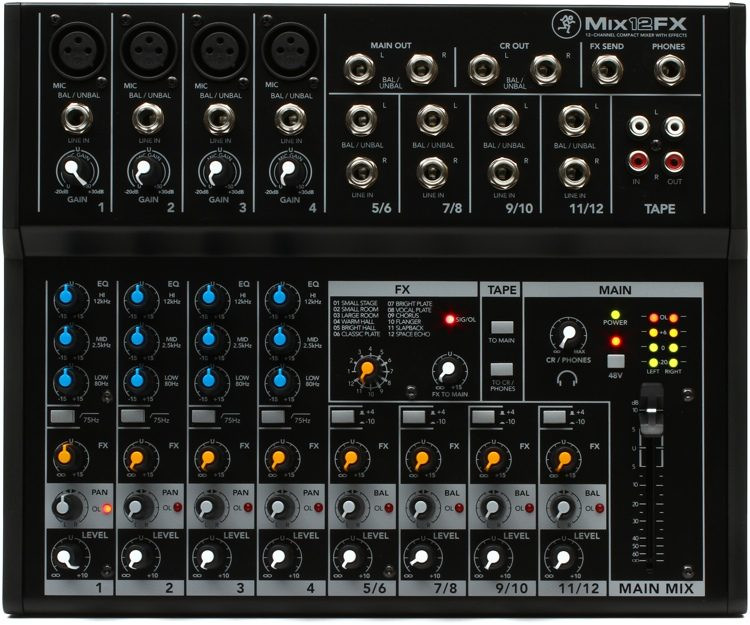
The "12-channel" designation deserves some unpacking, because channel counts in compact mixers can be misleading. Here's what you're actually getting with the Mix12FX:
- 4 mono mic/line channels — each with a dedicated Mackie high-headroom mic preamp and XLR/TRS combo jack
- 4 stereo line-level channels (channels 5/6, 7/8, 9/10, and 11/12) — accepting 1/4" TRS inputs
So you've got four proper microphone inputs and eight additional line-level inputs configured as stereo pairs. For a small pub gig, community event, or rehearsal room, that's a genuinely practical layout. You can run four vocal mics, a stereo keyboard, a laptop backing track, and still have inputs spare for a DJ deck or additional instrument.
What matters here is the preamp quality on those four mic channels. Mackie rates them with a frequency response of 20Hz to 30kHz (±1dB), which is broader than you'd expect at this price point. The signal-to-noise ratio sits at a respectable level for the category, and importantly, the preamps handle high-SPL sources without the brittle distortion you'll find in cheaper alternatives.
Complete Technical Specifications
| Specification | Detail |
|---|---|
| Channel Count | 4 mono mic/line + 4 stereo line (12 inputs total) |
| Mic Inputs | 4x XLR/TRS combo jacks with high-headroom preamps |
| Phantom Power | +48V (global, all mic channels) |
| EQ (Mono Channels) | 3-band (High, Mid, Low) |
| EQ (Stereo Channels) | 3-band (High, Mid, Low) |
| Built-in Effects | 12 effects presets (reverbs, delays, chorus) |
| Aux Sends | 1 aux send (post-fader FX send) |
| Main Output | Stereo L/R (1/4" TRS) |
| Headphone Output | 1x 1/4" stereo with dedicated level control |
| Frequency Response | 20Hz – 30kHz (±1dB) |
| Construction | Rugged steel chassis, sealed rotary controls |
| Power | External power adapter (included) |
| Weight | Approx. 1.8 kg |
The Built-In Effects Processor: What You Actually Get
The "FX" suffix on this model is significant — it's the key differentiator between the Mix12FX and the standard Mix12. Mackie has included 12 effect presets that cover the essentials: multiple reverb types (room, hall, plate), delays, and chorus variations.
Let's be straight about this: these aren't Lexicon-quality effects. They're not designed to be. What they are is genuinely usable vocal reverbs and delays that eliminate the need to carry a separate effects unit to small gigs. The reverbs, in particular, are where the FX engine earns its keep. A touch of hall reverb on vocals at a pub gig transforms a dry, clinical vocal into something that sits naturally in the room — and you can dial it in with a single knob per channel.
Each channel has its own FX send level, so you've got independent control over how much effect gets applied to each input. The master FX return controls overall effect level in the mix. It's simple, and that simplicity is the entire point.
One technical consideration worth noting: the effects are applied via an internal send/return loop. This means the dry signal path remains clean regardless of effects processing. If the effects engine were to introduce noise (it doesn't noticeably, but theoretically), your dry signal stays unaffected.
EQ Section: Three Bands Done Right
All channels — both mono and stereo — get a 3-band EQ with high, mid, and low controls. On the mono mic/line channels, these are particularly useful for managing vocal proximity effect (roll off some low end when your singer eats the microphone) and adding presence in the mid-high range.
The EQ points are voiced sensibly for live sound applications. The low band handles the muddiness zone without turning everything to mush, the mid control covers the critical vocal presence and instrument body range, and the high band adds air and sizzle without introducing harsh sibilance at reasonable boost levels.
Is it parametric? No. Do you get sweepable mids? No. But for a mixer at this price point and size, fixed three-band EQ with well-chosen frequency centres is arguably more practical than a poorly implemented parametric. You turn the knob, and useful things happen. That's exactly what you want at a gig when you've got thirty seconds to sort out a feedback issue.
Build Quality and Reliability Assessment
This is where Mackie's reputation genuinely matters. The Mix12FX uses a rugged steel chassis — not the lightweight plastic housings you'll find on some competing models. Pick it up, and you can feel the difference immediately. The knobs have a solid, dampened feel, and the faders (60mm) move smoothly without the scratchiness that plagues cheaper alternatives after a few months of use.
The sealed rotary controls are a detail that matters enormously in Australian conditions. Dust, humidity, the occasional spilled beer at a pub gig — sealed pots resist contamination far better than open designs. Anyone who's dealt with a scratchy, crackling volume knob mid-performance knows exactly why this matters.
Mackie's "Built-Like-A-Tank" tagline has been around for decades, and while marketing slogans deserve healthy scepticism, the Mix series does bear it out in practice. These units survive in backpacks, in car boots during summer heat, and in dusty community halls across the country. The external power supply is the one physical weak point — it's the component most likely to fail or get lost, so treat it with care and consider keeping a compatible spare.
Real-World Performance Scenarios
Small Venue and Pub Gigs
This is the Mix12FX's natural habitat. A solo performer or duo running vocals and instruments through a small PA system will find the channel count perfectly adequate. Four mic preamps handle vocals and acoustic instruments, while the stereo line channels accommodate backing tracks, keyboards, or electronic instruments. The built-in effects mean one less piece of gear to carry, set up, and troubleshoot.
Rehearsal Rooms
For band rehearsals where you need a quick, reliable way to get everyone through a PA or monitor system, the Mix12FX excels. It's small enough to throw in a gig bag, sets up in minutes, and provides enough inputs for a typical four-piece band's vocal monitoring needs with room for additional sources.
Podcasting and Content Creation
While not specifically designed for recording, the Mix12FX can serve as a front-end for simple multi-mic podcast setups. Four mic preamps with phantom power mean you can run condenser microphones directly. The main stereo output feeds into your audio interface or recorder. It's not a replacement for a proper recording interface, but for straightforward capture of multiple sources, it works.
House of Worship and Community Events
Smaller churches and community organisations often need a mixer that volunteers can operate without extensive training. The Mix12FX's straightforward layout — no menus, no pages, every control visible and labelled — makes it ideal for environments where the person running sound changes from week to week.
Technical Comparison: Mix12FX vs Key Competitors
Understanding where the Mix12FX sits in the competitive landscape helps clarify its value proposition.
| Feature | Mackie Mix12FX | Yamaha MG10XU | Behringer Xenyx 1202FX |
|---|---|---|---|
| Mic Preamps | 4 (high-headroom) | 4 (D-PRE) | 4 (Xenyx) |
| Total Inputs | 12 | 10 | 12 |
| Built-in Effects | 12 presets | 24 SPX presets | 24 presets |
| USB Audio Interface | No | Yes (2-in/2-out) | No |
| EQ Bands | 3-band all channels | 3-band (mono), 2-band (stereo) | 3-band (mono), 2-band (stereo) |
| Chassis | Steel | Steel/ABS | Steel |
| Compressor | No | 1-knob (mono ch) | No |
| Price Bracket (AUD) | Budget | Mid-range | Budget |
The Yamaha MG10XU is the more feature-rich competitor, offering USB audio, SPX effects, and one-knob compressors — but it costs noticeably more and has fewer total inputs. The Behringer Xenyx 1202FX competes directly on price and features, though Mackie's build quality and preamp character give the Mix12FX an edge in long-term reliability.
The critical takeaway: if you need USB audio connectivity for recording, the Mix12FX isn't your mixer — look at the Yamaha or step up to Mackie's ProFX series. If you need a pure analogue mixer for live sound with solid effects, the Mix12FX represents excellent value.
What the Specifications Don't Tell You
Numbers on a spec sheet only tell part of the story. Here are the practical details that matter in real use:
Headroom is generous. Mackie's preamp design has always prioritised headroom — the ability to handle unexpected volume peaks without distortion. When a vocalist suddenly belts out a chorus or a guitarist stomps on a boost pedal, the Mix12FX handles those transients cleanly. This is one of those differences you notice most when it's absent; cheap mixers clip and distort on peaks, and you spend the whole gig riding faders nervously.
The noise floor is low for the category. At typical operating levels, the self-noise of the Mix12FX is not something you'll notice through a PA system. Push the gain past sensible levels and you'll find noise, as with any analogue mixer, but within its designed operating range, it's quiet.
Channel layout is intuitive. Every control is where you'd expect it. There's no quirky routing, no hidden functions behind button combinations. Plug in, set levels, adjust EQ, add effects. It sounds obvious, but some competing products at this price point introduce confusing signal flow that trips up operators in live situations.
Limitations Worth Knowing About
No product review is complete without honest discussion of limitations, and the Mix12FX has several you should understand before buying:
- No USB audio interface — if you need to record directly to a computer, you'll need an external interface or a different mixer entirely. This is the most common reason buyers end up returning compact mixers, so be clear about your requirements.
- Global phantom power only — the +48V phantom power switch affects all four mic channels simultaneously. If you're running a combination of dynamic and condenser mics, this is generally fine (modern dynamic mics handle phantom power without issue), but ribbon microphones are a different story. Never apply phantom power to ribbon mics unless they're specifically designed for it.
- Single aux send — you get one effects send, not a flexible auxiliary bus system. There's no independent monitor mix capability. For performers who need a different mix in their monitors versus the main PA, you'll need a mixer with dedicated aux sends.
- No direct outputs or inserts — individual channel recording or external processing isn't possible. The main stereo output is your only signal path out of the mixer.
- 60mm faders — functional but short. Fine motor control at low volumes requires a gentle touch. Longer-throw faders (100mm) on larger mixers provide more precise control, but that's a size trade-off inherent to compact designs.
Who Should Buy the Mackie Mix12FX?
This mixer makes the most sense for:
- Solo performers and duos who need a reliable, compact mixer with enough inputs and built-in effects for small venue work
- Bands needing a dedicated rehearsal mixer that's small, tough, and doesn't require a manual to operate
- Community organisations, schools, and small churches where simplicity and reliability matter more than feature count
- DJs and presenters who need to combine multiple stereo sources with one or two microphones
- Anyone building a portable PA system where size and weight are primary concerns
It's not the right choice if you need USB recording, multiple monitor mixes, extensive routing options, or digital recall of settings. For those requirements, look at the Mackie ProFX series or step into the digital domain with something like the Allen & Heath CQ series.
Australian Buying Considerations
A few points specific to purchasing in Australia:
The Mix12FX ships with an appropriate power adapter for Australian mains voltage. Mackie provides local warranty support through their Australian distributor, which matters if you ever need service — grey imports from overseas retailers may save a few dollars but void local warranty coverage.
For gigging musicians working across varied Australian venues — from air-conditioned city bars to outdoor regional events — the Mix12FX's sealed controls and steel chassis handle temperature and humidity variations well. It's the kind of gear that survives in the back of a ute during a summer country tour.
If you're ready to pick one up, the Mackie Mix12FX is available at MusiconStage with Australian warranty and local shipping.
Technical FAQs
Can I use the Mix12FX as a recording interface?
Not directly. The Mix12FX has no USB or digital audio output. You'd need to connect the main stereo output to a separate audio interface. For recording purposes, consider the Mackie ProFXv3 series, which includes built-in USB interfaces with multi-track capability.
Will phantom power damage my dynamic microphones?
No. Modern dynamic microphones (Shure SM58, Sennheiser e835, etc.) are unaffected by +48V phantom power. The concern applies specifically to unbalanced dynamic mics (rare in professional use) and most ribbon microphones. If you're running standard dynamic and condenser mics together, the global phantom power on the Mix12FX is perfectly safe.
How does it compare to the non-FX version (Mix12)?
The Mix12 (without FX) is identical in every way except it lacks the built-in effects processor. Given the modest price difference, the FX version is almost always the smarter buy — even if you don't plan to use the effects immediately, having them available costs you nothing in terms of size or audio quality.
Can I connect powered speakers directly?
Yes. The main stereo outputs connect directly to powered/active speakers via standard 1/4" TRS cables. This is the most common configuration for small PA setups — the Mix12FX into a pair of powered speakers gives you a complete, compact sound system.
Is there a way to get a monitor mix?
The headphone output mirrors the main mix and can be used as a rough monitor send in a pinch, but there's no dedicated auxiliary output for an independent monitor mix. If monitor mixing is essential to your workflow, you'll need a mixer with dedicated aux sends.
Final Technical Assessment
The Mackie Mix12FX does exactly what it promises and nothing more — and that's genuinely meant as a compliment. In a market flooded with compact mixers trying to be everything to everyone, the Mix12FX focuses on doing the fundamentals well: clean preamps, solid build, usable EQ, and practical effects in a compact, reliable package.
It won't replace a digital console. It won't record your podcast. It won't send sixteen channels of audio over Dante. But if you need a dependable analogue mixer that sounds clean, survives the rigours of Australian gigging, and lets you add a touch of reverb to your vocals without carrying extra gear — it's genuinely hard to beat at this price point.
The technical fundamentals are sound: adequate headroom, low noise, well-voiced EQ, and a build quality that justifies the Mackie name. For the right application, it's an excellent investment.
Check the current price on the Mackie Mix12FX at MusiconStage — Australian stock with local warranty support.