
Mackie Mix12FX Decoded: 12-Channel Analogue Mixer Specs 2026
Mackie Mix12FX Decoded: 12-Channel Analogue Mixer Specs 2026
The Mackie Mix12FX sits in an interesting part of the market. It's a compact analogue mixer aimed at people who want clean preamps and usable onboard effects without paying for digital processing, motorised faders or an app they'll never fully learn. For a lot of Australian users — small venues, houses of worship, schools, mobile DJs, podcasters and rehearsal rooms — that trade-off is exactly right. But "simple" doesn't mean "don't read the spec sheet." The detail in how this mixer routes audio, where it puts its four mic preamps, and what its single aux send can and can't do will determine whether it fits your rig.
This guide breaks the Mix12FX down from a technical perspective: signal path, channel architecture, the 16 onboard effects, real-world I/O, and how it stacks up against Mackie's own ProFX series and the smaller Mix8. The goal is to help you decide whether 12 channels of clean analogue mixing is the right tool — or whether you should be looking at something with USB recording or more aux sends.
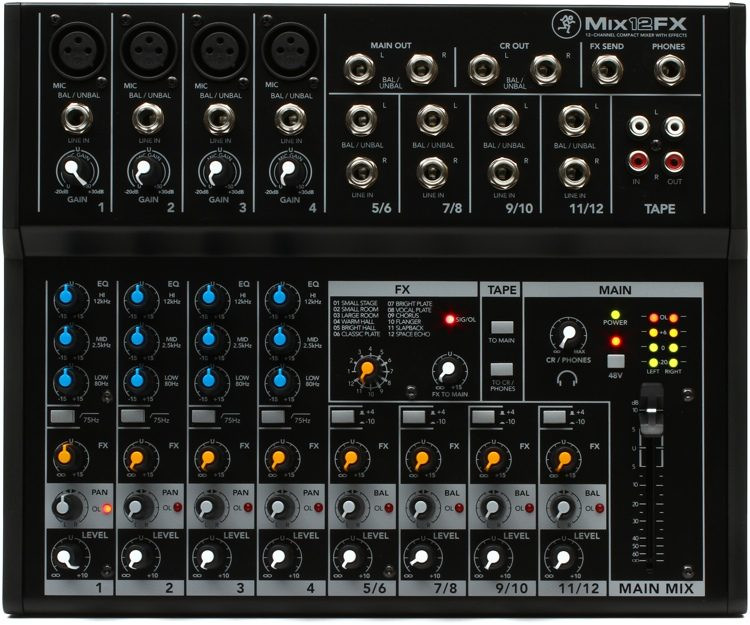
Technical Overview: What You're Actually Buying
The Mix12FX is a fixed-architecture analogue mixer. There's no DSP scene recall, no channel compression and no USB audio interface — and that's deliberate. Every control is a physical knob doing exactly one thing, which keeps latency at analogue (effectively zero) and the learning curve close to flat. Here are the headline specifications and what each one means in practice.
| Specification | Detail | Why It Matters |
|---|---|---|
| Total channels | 12 | Mix of mono mic/line and stereo line inputs — read the channel breakdown below |
| Mic preamps | 4 x Mackie low-noise preamps | Determines how many microphones you can run at once |
| Onboard FX | 16 selectable presets | Reverbs, delays and modulation without an external rack |
| EQ | 2-band (high & low) per channel | Quick tonal shaping; no sweepable mid |
| Aux sends | 1 aux per channel | One monitor mix OR external FX send — not both |
| Phantom power | Global 48V switch | Powers condenser mics on all four preamp channels at once |
| Tape I/O | Stereo RCA in/out | Background music playback and quick stereo recording |
| Headphone output | Dedicated level control | Monitoring and cueing |
| Construction | Rugged moulded chassis, metal control surface | Built for mobile and install use |
| Audio interface | None (analogue only) | Key distinction from the ProFX range |
The single most important line in that table is the last one. If you need to record multitrack into a DAW or stream into a computer over USB, the Mix12FX is the wrong mixer — you want the ProFX series instead. The Mix12FX is a pure live and front-of-house tool.
The Four Mackie Mic Preamps: Where the Real Value Sits
Mackie built its reputation on preamps, and the four onboard in the Mix12FX are the part of this mixer that genuinely punches above its price. A microphone preamp's job is to take a tiny signal — typically a few millivolts from a dynamic mic — and lift it to line level (around 50,000 times the gain) without adding audible hiss or colouring the tone. The numbers that matter here are equivalent input noise (EIN), headroom and gain range.
- Low noise floor: Mackie's preamps are designed to keep self-noise well below the point where it intrudes on quiet passages. In practice this means you can crank gain for a soft-spoken presenter or a quiet acoustic source without a wash of hiss arriving with it.
- Headroom: Generous headroom means transient-heavy sources — a snappy snare, a percussive vocal consonant — don't clip the front end before they reach the fader. This is what keeps audio clean rather than crunchy at higher levels.
- Wide gain range: The same preamp needs to handle a screaming SM58 up close and a distant condenser. A broad gain sweep covers both without you reaching for a separate DI or pad.
Four preamps is the practical ceiling for live sources here. A typical small-band setup — two vocal mics, an acoustic guitar via DI and a backing track — fits comfortably. A full drum kit does not. If you're miking more than four individual sources, you've outgrown this mixer regardless of the total channel count.
Channel Architecture: Reading the 12 Channels Correctly
This is where buyers most often misread compact mixers. "12 channels" does not mean 12 microphone inputs. On the Mix12FX, the channel count is split between mono mic/line channels and stereo line channels, and understanding the split tells you exactly what you can plug in.
- Mono mic/line channels carry the four Mackie preamps. These take an XLR microphone or a 1/4" line/instrument source, and they're your only true microphone inputs. Each has gain (trim), 2-band EQ, an aux send, an FX send and a level fader/knob.
- Stereo line channels handle line-level stereo sources — keyboards, a media player, a DJ controller, a laptop output. They're designed for devices that arrive at line level already, so they don't include mic preamps. Running a microphone into a stereo line channel will be quiet and weak; that's expected, not a fault.
So a realistic input picture is: four mics or instruments on the mono channels, plus several stereo line devices across the remaining channels. That's a genuinely useful spread for a small live act, a presentation rig with multiple playback sources, or a worship setup with a couple of vocalists and a keyboard.
The 16 Onboard Effects: What They Cover
The "FX" in the name is a 16-preset digital effects engine built into the analogue desk. You select an effect, dial in how much of each channel feeds it via the FX send, and blend the wet signal back into the main mix. The library spans the three categories you actually use live:
- Reverbs: Room, hall and plate-style spaces. The most-used effect on any live mixer — a touch of reverb on vocals adds depth and stops a dry voice sounding thin through a PA.
- Delays: Slap-back and longer echo settings, useful for vocal thickening and for that classic lead-vocal repeat without patching in a pedal.
- Modulation: Chorus and similar movement effects to widen keyboards, backing vocals or guitar.
The practical advantage is integration: no pedalboard to power, no patch leads to fail, no separate rack unit to carry. The honest limitation is that these are fixed presets — you control the send amount, but you don't have deep parameter editing (long, granular control over decay times, pre-delay, EQ on the tail, and so on). For 90% of live vocal duties that's a non-issue. If you're an FX-obsessed mixer who tweaks reverb tails per song, you'll eventually want outboard gear, and the aux/FX routing lets you patch one in.
EQ and Routing: Knowing the Trade-offs
Each channel gets 2-band EQ — a high shelf and a low shelf. This is fast, intuitive tone control: add air and presence at the top, add or trim weight at the bottom. What it doesn't give you is a mid control. The midrange is where most of the trouble lives in live sound — boxy vocals, honky guitars, feedback hotspots all sit in the mids — so the absence of a sweepable mid is the single biggest sonic compromise of this tier. You can work around it with good mic technique, smart speaker placement and gain discipline, but if mid-band surgery matters to you, step up to a mixer with 3-band (ideally semi-parametric) EQ.
The other routing point to understand is the single aux send. One aux means you get one independent mix to send somewhere — typically a monitor wedge for the performers, or an external effects unit, but not both at full independence. For a solo performer or a small act on in-ears off a single mix, that's fine. For a band that needs separate monitor mixes for the singer and the drummer, one aux won't cut it, and that's a clear signal to look at a larger desk.
Connectivity and I/O
| Connection | Format | Typical Use |
|---|---|---|
| Mic inputs | XLR (4) | Microphones on the mono channels |
| Line/instrument inputs | 1/4" TRS | DI sources, keyboards, instruments |
| Main outputs | 1/4" | Feed to powered speakers or an amp |
| Aux send | 1/4" | Monitor mix or external FX send |
| Tape in/out | RCA stereo | Background music, simple stereo recording |
| Headphones | 1/4" with level | Monitoring/cueing |
| Phantom power | Global 48V switch | Condenser mics |
The main outputs on 1/4" connectors pair naturally with active PA speakers — a pair of powered tops with 1/4" or combo inputs is the standard partner for this desk. The RCA tape outputs are a quick way to capture a stereo board mix to a recorder for a rough live record, though it's a two-channel print, not a multitrack.
You can browse the full current listing and pricing for the Mackie Mix12FX at MusiconStage if you want to confirm exact connector counts against your existing gear.
Real-World Performance: What to Expect
In use, the Mix12FX behaves like a properly engineered analogue desk should: set your gain with the trim using the mic at performance level, keep faders around unity, and the signal stays clean with plenty of room before clipping. The preamps are quiet enough that you won't fight hiss in a quiet room, and the onboard reverb is genuinely usable on vocals straight out of the box rather than the harsh, metallic afterthought you sometimes find at this price.
The build is the other quiet strength. Mackie's compact mixers are known for surviving the realities of mobile use — gig bags, car boots, repeated setups — better than the flimsier competition. The control surface feels solid and the knobs have enough resistance that they don't drift if the desk gets knocked.
Where it shows its limits is exactly where the spec sheet says it will: the missing mid EQ in a difficult, reflective room; the single aux when a band wants two monitor mixes; and the lack of USB the moment someone asks you to "just record it into the laptop." None of these are faults — they're the boundaries of the category. Knowing them before you buy is the whole point of reading the specs.
Mix12FX vs ProFX12v3 vs Mix8: Choosing Within Mackie
Mackie deliberately overlaps these models, and the right choice comes down to two questions: do you need USB recording, and how many sources are you mixing?
| Feature | Mix8 | Mix12FX | ProFX12v3 |
|---|---|---|---|
| Channels | 8 | 12 | 12 |
| Onboard FX | No | Yes (16) | Yes (GigFX engine) |
| EQ bands | 2-band | 2-band | 3-band |
| USB audio interface | No | No | Yes (multi-channel) |
| Best for | Smallest setups | Live FX, no recording | Live + recording/streaming |
The decision tree is clean. If you'll never plug into a computer and you want effects, the Mix12FX is the value pick. If you record, stream or podcast, pay the difference for the ProFX12v3 — the USB interface and 3-band EQ are worth it. If you only ever mix a handful of sources and don't need effects, the smaller Mix8 saves money and desk space.
What Specs Actually Matter for This Buyer
- Count your microphones, not your channels. Four preamps is the real constraint. If you need five or more mics live, this isn't your mixer.
- Decide on recording up front. No USB is a hard line. Adding a computer interface later means buying a separate box — often cheaper to buy the ProFX from the start.
- Think about monitor mixes. One aux = one monitor mix. Bands needing separate wedge mixes should size up.
- Mid EQ for tricky rooms. If you regularly fight feedback or boomy rooms, the 2-band EQ will frustrate you; the ProFX's 3-band helps.
- Build quality for mobile use. If the mixer lives in a car and gets set up nightly, Mackie's rugged chassis is a genuine long-term saving.
Who the Mix12FX Is Genuinely Right For
This mixer is at its best for: small live acts (solo, duo, trio) wanting clean vocals with built-in reverb; houses of worship with a couple of mics and a keyboard; schools and community halls needing a reliable, idiot-proof desk; presenters and conference rooms juggling mics plus playback; and rehearsal spaces. It's not the right tool for multitrack recording, full-band drum miking, or anyone who needs more than one independent monitor mix.
Technical FAQs
Can the Mix12FX record to a computer?
No. It has no USB audio interface. You can take a stereo board mix off the RCA tape outputs into a recorder, but there's no multitrack USB capture. For computer recording or streaming, choose the ProFX12v3.
How many microphones can I use at once?
Four. The four mono channels carry the Mackie mic preamps. The stereo channels are line-level only and aren't designed for microphones.
Are the built-in effects editable?
You select from 16 presets and control how much of each channel feeds the effect via the FX send. There's no deep per-parameter editing — it's designed for fast, reliable live use rather than studio sound design.
Does it have phantom power for condenser mics?
Yes, via a global 48V switch. It applies to all four preamp channels at once, so use it when at least one channel needs a condenser and check that nothing connected objects to phantom power.
What speakers should I pair with it?
Active (powered) PA speakers with 1/4" or combo inputs are the natural match for the 1/4" main outputs. A pair of powered tops gives you a complete, self-contained small PA.
Is there a sweepable mid EQ?
No. The Mix12FX has 2-band EQ (high and low shelf) only. If you need midrange control for difficult rooms, step up to the 3-band ProFX12v3.
The Verdict
The Mackie Mix12FX is a focused, honest tool: four genuinely good mic preamps, a usable onboard reverb-and-delay engine, simple 2-band tone control and rugged build, all in a desk you can teach someone to run in ten minutes. Its compromises — no USB, one aux, no mid EQ — are exactly the ones you'd expect at this tier, and none of them matter for the small live, worship, education and presentation jobs it's built for. Buy it if you want clean analogue mixing with effects and you'll never plug into a laptop. If recording or streaming is anywhere on your horizon, spend the extra on the ProFX12v3 instead.
For current Australian pricing, stock and full specifications, view the Mackie Mix12FX at MusiconStage and match the I/O against your existing rig before you commit.