
Mackie DL16S Wireless Digital Mixer: Worth It for Aussie Sound Techs?
Mackie DL16S Wireless Digital Mixer: Worth It for Aussie Sound Techs?
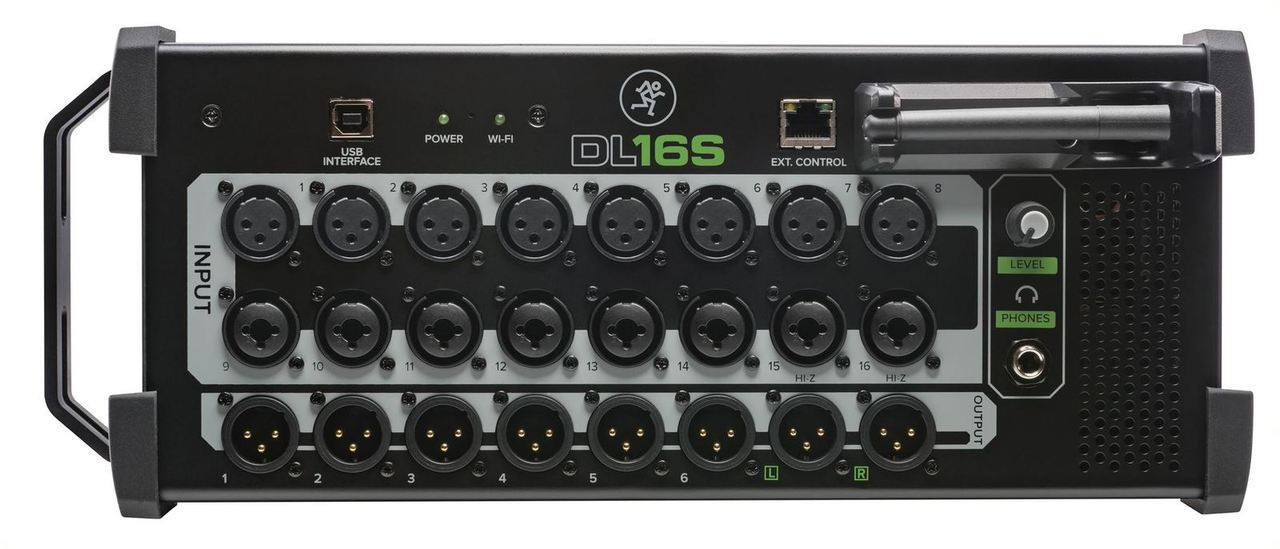
So you're after a digital mixer that won't chain you to the stage? The Mackie DL16S might be exactly what you need. And honestly? It's a bit of a game-changer for small to mid-sized venues.
Here's the thing. Traditional mixers keep you stuck in one spot. But what if you could walk the room during soundcheck, tweak the mix from the back of the venue, and actually hear what your audience hears? That's where wireless control changes everything.
What Makes the DL16S Different?
Mackie's taken a pretty bold approach here. There's no physical faders. None. The entire mixer runs through their Master Fader app on your iPad, iPhone, or Android device. Sounds risky? It's actually heaps intuitive once you get the hang of it.
You get 16 Onyx+ preamps—the same ones Mackie's been refining for years. They're clean, they're quiet, and they handle everything from whisper-quiet acoustic sets to full-throttle rock bands without breaking a sweat.
Key specs at a glance:
- 16 recallable Onyx+ mic preamps
- Built-in Wi-Fi (2.4GHz and 5GHz)
- 24-bit/48kHz audio quality
- 4-band EQ per channel plus HPF
- Gate, compressor, and limiter on every input
- 6 aux sends for monitors
- USB recording direct to your computer
Real-World Performance: How Does It Actually Sound?
Pretty bloody impressive, honestly. The Onyx+ preamps deliver that warmth Mackie's known for, but with modern clarity. I reckon they punch well above their weight class compared to other mixers at this price point.
The built-in DSP handles channel processing without latency issues. And the noise floor? Dead quiet. Even when you're pushing gain on quieter sources, there's no hiss creeping in.
But here's what really matters—the wireless stability. Mackie's dual-band Wi-Fi means you're not competing with everyone's phones on the 2.4GHz band. Switch to 5GHz and you've got a rock-solid connection. No dropouts mid-show. No worries.
Who Should Actually Buy This Mixer?
The DL16S fits a specific niche really well:
Perfect for:
- Solo operators running sound for small venues
- Cover bands wanting control from stage
- Churches and community halls
- Corporate AV techs doing mobile events
- Podcasters needing multi-input recording
Maybe not ideal if:
- You need physical faders (some folks just do)
- You're mixing 30+ channels regularly
- Your venue has severe Wi-Fi interference
Look, if you're running a 500-seat theatre with a dedicated sound booth, you probably want something with tactile control. But for mobile gigs? Clubs? Function rooms? This thing's a ripper.
Ready to upgrade your live sound setup? Check out the Mackie DL16S at Music on Stage with fast shipping Australia-wide.
The App Experience: Master Fader Control
Can't lie—the Master Fader app is where Mackie really nailed it. The interface is clean. Logical. You're not hunting through menus for basic functions.
Channel strips look familiar if you've used any DAW. Pinch to zoom, swipe between channels, and drag faders with your thumb. After about an hour? You'll be faster than with physical knobs.
Multi-platform support means your Android tablet works just as well as an iPad. And you can connect multiple devices simultaneously—so your monitor engineer can dial in wedge mixes while you handle front-of-house.
Comparing to Other Options
| Feature | Mackie DL16S | Allen & Heath Qu-16 | Behringer X32 Rack |
|---|---|---|---|
| Channels | 16 mic/line | 16 mic/line | 16 mic/line |
| Built-in Wi-Fi | Yes (dual-band) | No (adapter needed) | No (adapter needed) |
| Physical Faders | No | Yes (17) | No |
| Weight | 4.5kg | 11kg | 5.6kg |
The DL16S wins on portability and wireless integration. But if you absolutely need physical faders, the Qu-16's worth considering despite the extra weight.
Buying in Australia: What You Need to Know
Mackie gear's well-supported down here with local warranty through authorised dealers. You're looking at full Australian warranty coverage, which matters when you're gigging every weekend.
Price-wise, the DL16S sits in that sweet spot—professional features without the premium price tag of high-end digital consoles. For what you get, it's genuinely good value.
Want to experience wireless mixing yourself? Order your Mackie DL16S from Music on Stage with express delivery to Sydney, Melbourne, Brisbane, Perth, and beyond.
Frequently Asked Questions
Can I use it without the app?
Nope. The DL16S requires the Master Fader app for all mixing functions. No app, no mixing. So keep your device charged.
What happens if Wi-Fi drops mid-show?
The mixer maintains its last settings—audio keeps flowing. You just can't adjust anything until you reconnect. In practice, the dual-band Wi-Fi makes dropouts rare.
Does it work with Windows or Mac computers?
For recording, absolutely. USB connectivity gives you multi-track recording straight into your DAW. But mixing control is tablet/phone only.
How many devices can connect at once?
Up to three simultaneously. Great for splitting duties between FOH and monitors.
The Verdict: Should You Buy It?
If wireless control sounds appealing and you're working venues under 500 capacity, the Mackie DL16S is hands-down one of the best options in its class. The sound quality's there. The reliability's there. And the freedom to mix from anywhere in the room? That's genuinely transformative.
Sure, you're giving up physical faders. But what you gain in flexibility and portability more than makes up for it. I reckon most sound techs who try wireless mixing don't go back.
Don't wait—upgrade your live sound game today. Get the Mackie DL16S from Music on Stage with authorised dealer support and fast Australia-wide shipping.