
Mackie DL16S Wireless Digital Mixer: Full Technical Breakdown 2026
Mackie DL16S Wireless Digital Mixer: Full Technical Breakdown for Australian Sound Engineers 2026
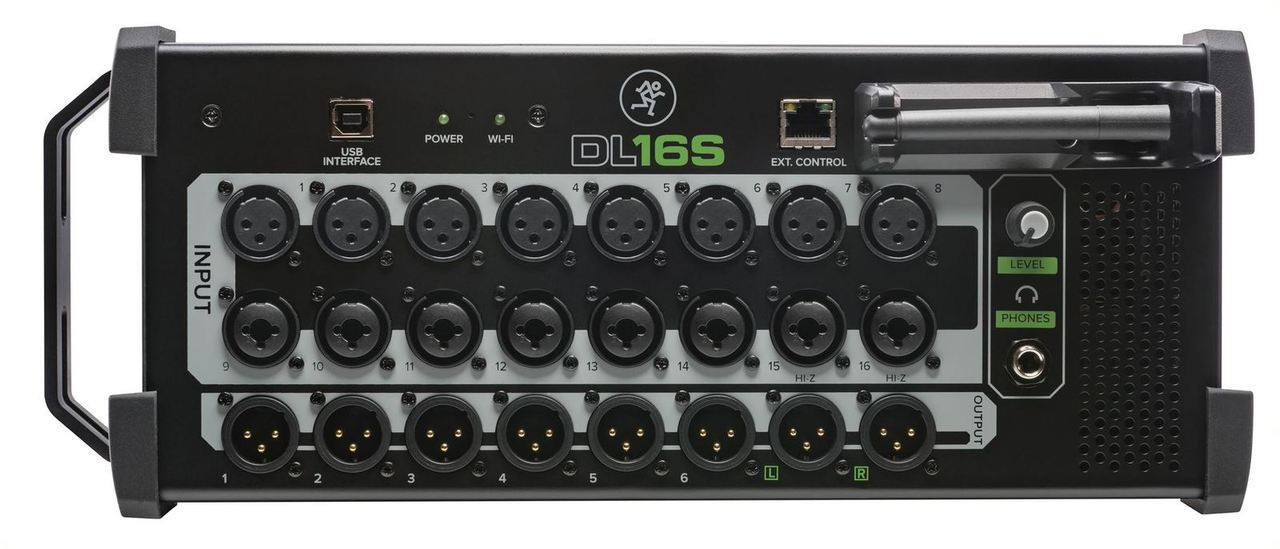
The Mackie DL16S represents a genuinely different approach to live sound mixing. Instead of building a traditional console with a surface and bolting on wireless control as an afterthought, Mackie stripped the faders and knobs entirely and built a stage box that doubles as a fully-featured digital mixer — controlled entirely via Wi-Fi from your tablet or phone. It's a concept that either excites you or makes you deeply nervous, and both reactions are completely valid.
Having spent considerable time evaluating this mixer's architecture and capabilities against the current Australian live sound landscape, I can tell you this: the DL16S isn't trying to replace your X32 or SQ-5 on a festival stage. It's solving a very specific set of problems for a very specific type of user — and it does so remarkably well. Let's get into the technical detail.
Core Architecture: What Makes the DL16S Different
The DL16S is built around Mackie's proprietary DSP platform running inside a compact, rack-mountable steel chassis (2U). There's no physical mixing surface whatsoever. All control happens through the Mackie Master Fader app, available on iOS, Android, Mac, and Windows. This isn't a companion app — it is the mixer interface.
The built-in Wi-Fi module operates on both 2.4 GHz and 5 GHz bands simultaneously. This dual-band capability is critical in Australian venue environments where 2.4 GHz congestion from patron devices can be brutal, particularly in pubs and clubs in metro areas. The 5 GHz band gives you a cleaner, lower-latency control path, while the 2.4 GHz band provides fallback range for those moments you need to wander further from the stage.
Importantly, the DL16S creates its own wireless access point — you're not relying on the venue's network. This is a design decision that shows Mackie understands real-world deployment. Anyone who's tried to run a mixer app through a dodgy pub router at 11 PM on a Saturday knows exactly why this matters.
Input and Output Specifications
| Specification | Detail |
|---|---|
| Mic/Line Inputs | 16 x Onyx+ mic preamps (XLR/TRS combo jacks) |
| Phantom Power | +48V individually switchable per channel |
| Main Outputs | 2 x XLR (L/R) |
| Aux Outputs | 6 x XLR |
| Headphone Output | 1 x 6.35mm TRS |
| A/D Conversion | 24-bit / 96 kHz |
| Dynamic Range | 108 dB (A-weighted) |
| Preamp Gain Range | 0 dB to +60 dB |
| EIN (Equivalent Input Noise) | -128 dBu (150Ω, max gain) |
| Wi-Fi | Dual-band 2.4 GHz / 5 GHz (built-in AP) |
| Ethernet | 1 x RJ45 (for external router connection) |
| Dimensions | 483 x 279 x 89 mm (2U rack) |
| Weight | 4.2 kg |
The Onyx+ Preamps: Why They Matter More Than You'd Think
Mackie's Onyx preamp lineage is one of the genuinely respected aspects of their product range, and the Onyx+ preamps in the DL16S are the latest iteration. With an EIN of -128 dBu and a gain range spanning 0 to +60 dB, these preamps sit comfortably in professional territory.
To put that EIN figure in context: you're looking at noise performance that's competitive with standalone preamps costing several hundred dollars each. For ribbon microphones, quiet acoustic sources, and distant-miking scenarios common in Australian worship spaces and acoustic venues, that low noise floor is genuinely useful — not just a spec sheet number.
The 24-bit/96 kHz conversion is worth discussing honestly. In a live sound context, the practical difference between 48 kHz and 96 kHz operation is debatable — most engineers run at 48 kHz for the additional processing headroom and reduced latency. But the 96 kHz capability means the DL16S can pull double duty as a recording front-end with higher sample rates when used with the built-in multitrack recording features, which is a genuine workflow advantage for bands capturing live recordings.
DSP and Processing: What You Get Per Channel
Each of the 16 input channels carries a full processing chain:
- 4-band parametric EQ — fully parametric with adjustable Q, frequency, and gain on all four bands. High and low bands switchable between shelf and bell curves.
- High-pass filter — variable from 40 Hz to 400 Hz, 12 dB/octave slope. Essential for managing stage rumble and proximity effect.
- Compressor — with threshold, ratio, attack, release, and makeup gain. Offers both hard and soft knee options.
- Gate/Expander — threshold, range, attack, hold, and release controls. Genuinely useful for drum channels and managing stage bleed.
- Phase reverse and polarity
- Input delay — per-channel, useful for time-aligning sources
On the output side, each of the six aux buses and the main L/R output get their own 4-band parametric EQ and dynamics processing. The main bus also gets access to a 31-band graphic EQ, which is standard fare for system tuning but welcome nonetheless.
The DL16S also includes Mackie's built-in effects processors, offering reverbs, delays, chorus, and other time-based effects. These won't replace a dedicated Lexicon or TC Electronic unit, but they're genuinely serviceable for small-to-medium gigs. The reverbs in particular are surprisingly usable — not metallic or obviously digital in the way budget effects sometimes are.
The Master Fader App: Where It Shines and Where It Doesn't
Let's be direct about this: the Master Fader app is the entire user interface of the DL16S. If the app is poor, the mixer is poor. So how does it stack up?
Where it shines:
- Multi-platform support — iOS, Android, Windows, macOS. This is a significant advantage over competitors that lock you into iPad-only control.
- Multi-device simultaneous control — multiple engineers can connect simultaneously. Your monitor engineer can run mixes from one tablet while you handle FOH from another. In Australian venue contexts where you're often working with limited crew, this is powerful.
- Visual metering and overview — the app provides clear, real-time metering across all channels. On a 12.9-inch iPad, you get a genuinely useful overview of your entire mix.
- Preset and scene management — save complete mixer states, channel presets, and show files. Walk into a regular venue, load your scene, and you're ready.
- Walk-around mixing — stand in the room where the audience is. Walk to the monitor position. Check what it sounds like at the bar. This is the killer feature, and it's impossible to overstate how transformative it is for single-operator gigs.
Where it requires honest assessment:
- Tactile feedback is gone. There's no substitute for physical faders when you need to make quick, instinctive adjustments during a high-pressure moment. Experienced engineers who've spent decades reaching for knobs will find the transition period real.
- Screen size matters enormously. On a phone, the interface is cramped. On a small tablet, it's workable. On a large tablet, it's excellent. Budget for the right control device.
- Wi-Fi reliability concerns are legitimate, though Mackie's implementation with the dedicated AP mitigates the worst scenarios. In extremely RF-hostile environments (large festivals with hundreds of wireless devices), consider using the Ethernet port with an external router for more robust connectivity.
Six Aux Outputs: Monitor Mixing Flexibility
The six auxiliary outputs on XLR are pre/post switchable and give you genuine flexibility for monitor mixing. For typical Australian pub and club gigs with a 4-5 piece band, six monitor sends cover:
- Vocalist monitor
- Guitar monitor
- Bass/keys monitor
- Drum fill
- Side fill or additional vocalist
- Spare / effects send / additional zone
The ability to hand a tablet or phone to a musician and let them adjust their own monitor mix — while you retain master control — is a workflow that genuinely reduces the "more me" tap-on-the-shoulder interruptions that plague single-operator gigs. Each musician connects to the same DL16S Wi-Fi network, opens the Master Fader app, and you assign them access to their specific aux bus. They get their own mix; you keep overall control.
Build Quality and Practical Considerations
At 4.2 kg in a 2U steel chassis, the DL16S is built for transport. Compare that to a typical 16-channel digital console at 8-15 kg with a much larger footprint. For solo operators loading into venues without a loading dock — which describes about 80% of the small-to-medium Australian live music scene — the size and weight advantage is enormous.
The unit can sit in a rack case, sit on stage, or mount in a permanent installation. All connections are on the rear panel, which is standard for rack equipment but worth noting: you'll want clear rear access if it's going in a rack.
Power consumption is modest at around 40W, and it uses a standard IEC power connection — no wall wart power supply to lose or damage. A small detail, but anyone who's scrambled for a replacement power adapter before a gig will appreciate it.
How the DL16S Compares: Technical Alternatives
| Feature | Mackie DL16S | Allen & Heath CQ-18T | Behringer XR16 |
|---|---|---|---|
| Input Channels | 16 (all XLR/TRS combo) | 16 mic + 2 stereo line | 16 (8 XLR + 8 combo) |
| Aux Outputs | 6 XLR | 6 (configurable) | 6 XLR |
| Built-in Wi-Fi | Yes (dual-band) | Yes (dual-band) | No (router required) |
| Physical Surface | None | 7" touchscreen | None |
| Multi-platform App | iOS, Android, Mac, Win | iOS, Android, Mac, Win | iOS, Android, Win, Mac, Linux |
| Sample Rate | Up to 96 kHz | 96 kHz | 48 kHz |
| Preamp Quality | Onyx+ (-128 dBu EIN) | XCVI core | MIDAS (-131 dBu EIN) |
| Weight | 4.2 kg | 5.1 kg | 2.9 kg |
| Approx. AU Price | Mid-range | Higher | Budget |
Against the Behringer XR16: The XR16 is the obvious budget alternative. It shares the headless stage-box concept and offers comparable channel counts. However, the DL16S has two critical advantages: built-in Wi-Fi (the XR16 requires an external router, adding another point of failure and setup time) and the superior Onyx+ preamps. The Behringer's MIDAS preamps actually measure slightly better on paper, but the DL16S's overall signal path and conversion quality edge it ahead in real-world listening. The XR16's reliance on an external router is its biggest practical weakness for mobile operators.
Against the Allen & Heath CQ-18T: The CQ-18T is arguably the most direct competitor in terms of market positioning. It adds a 7-inch touchscreen, giving you a physical fallback if your tablet dies — a significant advantage for mission-critical applications. Allen & Heath's processing algorithms, particularly their compressors and EQ curves, are generally considered more refined. However, the CQ-18T commands a higher price. If you're comparing purely on features-per-dollar, the DL16S is compelling. If you value A&H's processing quality and the security of an onboard screen, the CQ-18T justifies its premium.
Real-World Deployment Scenarios in Australia
Solo musician or duo with tracks: The DL16S is arguably overkill here, but if you're running backing tracks, multiple vocal mics, acoustic instruments, and need separate monitor mixes, it handles the job while sitting unobtrusively on stage. No FOH position needed.
Pub and club gigs (4-6 piece bands): This is the DL16S's sweet spot. Sixteen inputs cover a typical rock or covers band with room to spare. Six monitor sends handle the band. You mix from the room on your tablet, walking between the dance floor and the bar to check coverage. This workflow is genuinely superior to being stuck behind a console in a corner.
Corporate events and conferences: Multiple wireless and wired microphones, background music playback, and zone outputs for different areas. The compact form factor means it fits behind a lectern or in a small rack without dominating the space. The walk-around control lets you monitor audio quality throughout the room during the event.
Installed systems (churches, small venues): The DL16S works well as a permanent install where you want trained volunteers to mix from a simple tablet interface rather than facing a daunting console. Scene recall means your experienced operator can set up configurations that less experienced volunteers can load and use with confidence.
Check current Australian pricing for the Mackie DL16S at MusiconStage
What Specifications Actually Matter When Choosing
If you're evaluating the DL16S against alternatives, here's what to focus on — and what to ignore:
Matters most:
- Wi-Fi implementation quality — built-in dual-band AP versus requiring an external router is a massive practical difference. Fewer components, fewer failure points, faster setup.
- Preamp quality and gain range — the 60 dB gain range and low EIN mean you can handle everything from hot line-level synths to quiet condenser mics without external preamps.
- App stability and multi-platform support — your mixing interface must work reliably on the device you own. Mackie's cross-platform support reduces lock-in.
- Output count and routing flexibility — six aux sends plus mains covers most small-to-medium applications. If you regularly need more, look at the DL32S.
Matters less than you'd think:
- 96 kHz vs 48 kHz — for live sound, 48 kHz is standard and sufficient. The 96 kHz capability is nice for recording but won't improve your live mix.
- Dynamic range figures — at 108 dB, the DL16S exceeds the practical dynamic range of any live performance environment. Anything above ~100 dB is diminishing returns in real venues.
- Effects quality — if you need premium reverbs and delays, you'll likely use dedicated outboard or plugin hosts regardless of which mixer you buy.
Potential Limitations to Consider
Honest assessment requires acknowledging where the DL16S may not be the right choice:
- No physical fallback. If your tablet fails, you have no way to mix. Carry a backup device. This isn't optional — it's essential. A cheap second-hand Android tablet running the Master Fader app is cheap insurance.
- Sixteen inputs is the ceiling. Unlike modular systems, you can't expand. If your needs grow beyond 16 channels, you're looking at the DL32S or a different platform entirely.
- No Dante, AVB, or AES50 networking. The DL16S is a standalone unit. If you need to integrate into a larger networked audio system, look elsewhere. This is a self-contained solution, not a network node.
- Learning curve for analogue veterans. Engineers transitioning from analogue consoles will need time to develop muscle memory with a touchscreen interface. Allow yourself a few rehearsals before taking it to a paying gig.
- Wi-Fi range limitations in large or complex spaces. For venues with thick walls, multiple rooms, or large outdoor areas, the built-in Wi-Fi may not provide adequate range. The Ethernet port allows connection to an external router with better antennas for these scenarios.
Technical FAQs
Can I use the DL16S without Wi-Fi at all?
You can connect via Ethernet using a wired connection from your laptop, which eliminates wireless reliability concerns entirely. However, some form of network connection is required — there are no physical controls on the unit itself.
What happens to the audio if the Wi-Fi connection drops?
The DSP processing continues running with whatever settings were last active. Audio does not cut out — you simply lose control until the connection is re-established. This is a critical design feature and one of the first questions every engineer asks.
Can multiple people control the mixer simultaneously?
Yes. Multiple devices can connect and control different aspects of the mix simultaneously. You can assign specific bus access to band members for their own monitor mixing while retaining full control on your own device.
Is 16 channels enough for most Australian pub and club gigs?
For 4-6 piece bands, comfortably yes. A typical channel list: kick, snare, hi-hat/overhead, two toms, bass DI, two guitar mics/DIs, keys L/R, two vocals — that's 12 channels with four to spare for additional sources. If you regularly exceed this, consider the 32-channel DL32S.
How does latency compare to a physical console?
Audio processing latency through the DSP is sub-millisecond — comparable to any modern digital mixer. The control latency (the time between moving a fader on screen and the change taking effect) is typically 5-15 ms over Wi-Fi, which is imperceptible in practice.
Who Should Buy the Mackie DL16S
The DL16S is built for a specific type of Australian audio operator, and it excels for them:
- Solo operators running small-to-medium live sound who need to mix from the audience position without a dedicated FOH location
- Mobile DJs and entertainers who value compact, lightweight gear that sets up quickly
- House of worship tech teams wanting an approachable system that volunteers can operate via a familiar tablet interface
- Corporate AV providers needing a compact, discreet mixer for events where visible equipment is unwelcome
- Working musicians who mix their own sound and want to do it from stage without a dedicated sound engineer
If you fall into one of these categories and your channel count stays within 16, the DL16S deserves serious consideration. It's not the cheapest option, and it's not the most feature-rich — but it occupies a well-judged middle ground of quality, capability, and portability that's hard to match at its price point.
Order the Mackie DL16S from MusiconStage — Australian stock with local support