
Mackie DL16S Wireless Digital Mixer: Aussie Buyer's Guide 2026
Mackie DL16S Wireless Digital Mixer: The Complete Australian Buyer's Guide for 2026
If you've ever stood at front-of-house wishing you could walk the room and tweak the mix from where the audience actually hears it, the Mackie DL16S was built with exactly that frustration in mind. This 16-channel rackmount digital mixer ditches the traditional control surface entirely, putting your entire mix in the palm of your hand via Wi-Fi and a tablet or phone. For Australian musicians, houses of worship, function bands and small-to-medium venues, it represents one of the more compelling value propositions in the wireless mixing space right now.
But a mixer without faders isn't for everyone, and there are genuine trade-offs to understand before you commit. In this guide we'll walk through what the DL16S actually does, who it suits, where it shines, where it falls short, and how it stacks up for the way sound gets run in Australia. The goal here is simple: help you decide whether this is the right desk for your situation, not to sell you on something that doesn't fit.
What Is the Mackie DL16S?
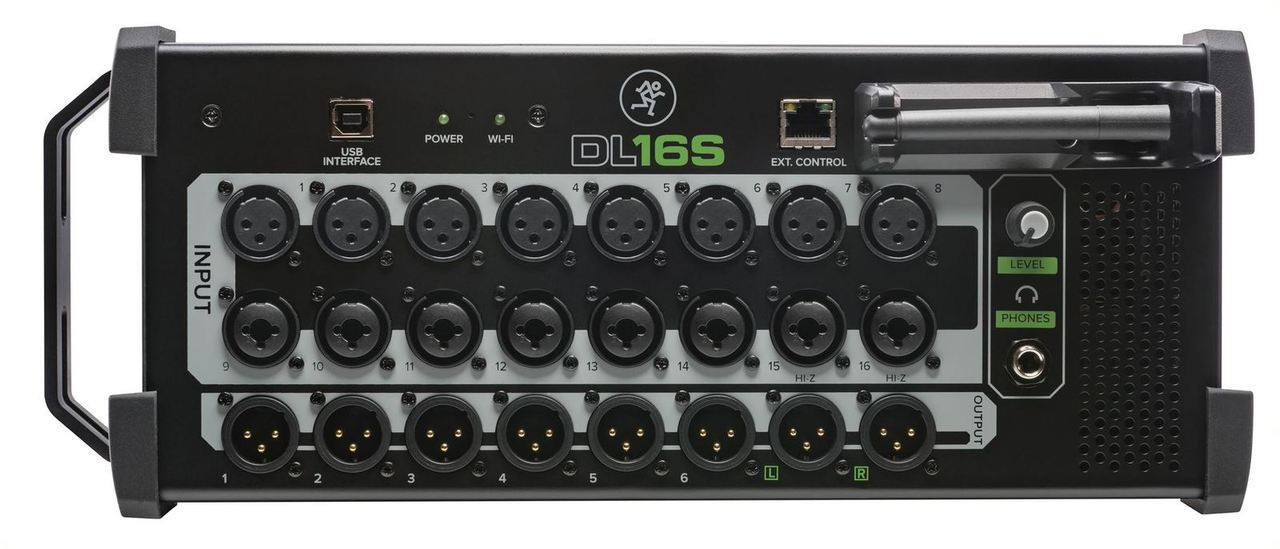
The Mackie DL16S is a rackmount digital mixer that you control wirelessly. Instead of a panel covered in knobs and faders, the unit itself is a compact 3U rack box packed with inputs, outputs and processing power. All the actual mixing happens through Mackie's Master Fader app, which runs on iOS and Android devices, as well as Windows and macOS computers. That multi-platform control is one of its headline features and a real point of difference from rivals that lock you into a single ecosystem.
Crucially, the DL16S has Wi-Fi built directly into the unit. Earlier generations of Mackie's DL series needed an external router, which meant more cables, more setup and another point of failure. With the onboard Wi-Fi, you can power up the mixer and connect a tablet straight to it, no extra hardware required. For mobile engineers and bands setting up in unfamiliar rooms, that simplicity genuinely matters.
Under the hood you get 16 Onyx+ microphone preamps, the same preamp lineage Mackie has refined across its analogue and digital ranges for years. These are clean, quiet and have plenty of headroom for everything from dynamic vocal mics to condenser instrument mics. The DL16S handles 16 channels of input, which is enough for a full band with drum kit, multiple vocals, guitars, keys and a couple of spare channels for backing tracks or guest performers.
Key Specifications at a Glance
| Feature | Detail |
|---|---|
| Input channels | 16 (with Onyx+ mic preamps) |
| Control | Wireless via Master Fader app (iOS, Android, Windows, macOS) |
| Wi-Fi | Built-in (no external router required) |
| Form factor | Rackmountable digital mixer |
| Aux/output sends | 6 aux sends for monitor mixes |
| Effects | Onboard reverb, delay and built-in processing per channel |
| Recording | Multitrack recording to USB and DAW connectivity |
| Processing per channel | 4-band parametric EQ, gate, compressor |
Interested? View the Mackie DL16S specifications and pricing with shipping across Australia.
Who Is the DL16S Actually For?
This mixer suits a specific kind of user, and being honest about that helps you avoid buyer's remorse. The DL16S is ideal for solo engineers and small crews who want to mix from the floor, bands who self-mix and need to dial in monitors from on stage, and venues or churches where a permanent install benefits from a rack-mounted brain with tablet control at multiple positions.
It's particularly strong for anyone who values portability. The whole system collapses to a single rack unit and an iPad, which fits in a backpack. For a function band loading in and out of Sydney pubs, Melbourne reception venues or regional halls four nights a week, that reduction in gear is a meaningful quality-of-life improvement.
Where it's less ideal is for engineers who simply prefer tactile control. If you mix instinctively with your hands on faders during a fast-moving show, a screen-only workflow can feel slower in high-pressure moments. We'll come back to this in the pros and cons, because it's the single biggest consideration with this style of mixer.
The Wireless Workflow: Freedom and Its Caveats
The appeal of wireless control is easy to undersell until you've used it. Being able to stand mid-room and adjust the vocal level exactly where punters are hearing it is genuinely better than guessing from a fixed FOH position tucked behind a pillar. For monitor mixing it's even more useful, because the performer themselves can stand at their spot on stage and tweak their own wedge or in-ear mix to taste.
Multiple devices can connect simultaneously, so the band's lead singer can adjust their own monitor on one tablet while the engineer runs front-of-house on another. For worship teams and bands without a dedicated sound tech, this distributed control is a quiet revolution.
The honest caveat is that wireless reliability depends on your environment. In RF-congested venues with dozens of phones and competing networks, a 2.4GHz connection can get crowded. The built-in Wi-Fi is convenient, but for critical shows many experienced engineers still recommend connecting a dedicated higher-quality router via the unit's network port to maximise range and stability. It's worth knowing that going in, rather than discovering it at a gig.
Sound Quality and Processing
Mackie's Onyx+ preamps are the foundation here, and they punch above the price point. They're clean and transparent with enough gain for quieter ribbon and dynamic mics. The conversion is solid, and in real-world live use the DL16S delivers a clear, full-bodied sound that holds up well across genres.
Each channel gives you a proper toolkit: a 4-band parametric EQ, a gate and a compressor, so you can shape every source without outboard gear. The onboard effects engine covers reverbs and delays that are perfectly serviceable for live vocals and instruments. You won't mistake them for a high-end studio plug-in suite, but they do the job convincingly in a live context, which is exactly what they're there for.
The six aux sends are a highlight for monitor-heavy setups. Whether you're feeding stage wedges or in-ear systems, having six independent mixes gives a small band plenty of flexibility before you'd ever feel constrained.
Ready to upgrade your live rig? Shop the Mackie DL16S with genuine Australian stock and warranty support.
Recording and Connectivity
The DL16S isn't just a live tool. It offers multitrack recording, letting you capture your gigs for later mixing or use the recordings to build your live mix during rehearsal (a technique sometimes called virtual soundcheck). For bands who want to review performances or release live material, this turns the mixer into a capable capture device without extra interfaces.
DAW connectivity means you can integrate the unit into a computer-based recording setup, bridging the gap between live sound and the studio. For a small operation that does both gigs and demo recording, that dual-purpose value adds up.
Honest Pros and Cons
What We Like
- Built-in Wi-Fi removes the external router hassle of older models
- Genuine multi-platform control across iOS, Android, Windows and macOS, so you're not locked to one device type
- Mix from anywhere in the room, plus performers can control their own monitors
- Quality Onyx+ preamps that sound clean and have ample headroom
- Compact, rackmountable and extremely portable for mobile work
- Multitrack recording built in for live capture and virtual soundcheck
- Strong value for the channel count and feature set
What to Consider
- No physical control surface, which won't suit engineers who prefer hands-on faders
- Reliance on a device: if your tablet fails or battery dies mid-show, you need a backup plan
- Wireless reliability can vary in RF-heavy venues; a dedicated router is wise for critical events
- 16 channels may be limiting for larger productions; consider the DL32S if you regularly need more inputs
How It Compares to Alternatives
Within Mackie's own range, the obvious step up is the DL32S, which doubles the input count to 32 channels for bigger bands and more complex productions. If you frequently mic full drum kits plus horns, choirs or multiple vocalists, the DL32S earns its extra cost. For most small bands and venues, though, 16 channels on the DL16S is the sweet spot.
Against competitors, the DL16S differentiates itself with that true cross-platform app support. Some rival wireless mixers favour one operating system or deliver a more polished experience on iOS than Android. If your team runs a mix of devices, the DL16S's even-handed approach is a practical advantage. Traditional digital mixers with physical surfaces, meanwhile, offer tactile control but sacrifice the portability and floor-mixing freedom that define the DL16S. It's a genuine choice of philosophy, not just price.
Australian Buying Considerations
When buying in Australia, always purchase from an authorised dealer to ensure you get genuine local warranty support rather than grey-import stock. Mackie products are well supported here, and buying locally means firmware, service and warranty claims are handled without shipping gear overseas. Power compatibility is a non-issue with genuine Australian stock, and you'll have proper local backing if anything goes wrong.
For mobile engineers covering regional gigs, the compact rack format also keeps freight and transport costs down, which is a real consideration given the distances involved across Australia. Factor in a quality protective rack case and a reliable backup tablet, and you've got a tour-ready system that fits in a car boot.
Frequently Asked Questions
Do I need a separate router to use the DL16S?
No. The DL16S has Wi-Fi built in, so you can connect a tablet directly to the mixer out of the box. That said, for large or RF-congested venues, adding a dedicated router via the network port can improve range and stability for critical shows.
Can multiple people control the mixer at once?
Yes. Multiple devices can connect simultaneously, so an engineer can run front-of-house while performers adjust their own monitor mixes from their positions on stage.
Does it work with both iPhone/iPad and Android?
It does. Mackie's Master Fader app supports iOS, Android, Windows and macOS, which is one of the DL16S's strongest selling points compared with single-platform rivals.
Is 16 channels enough for my band?
For most small-to-medium bands, 16 inputs comfortably cover drums, vocals, guitars, keys and a couple of extras. If you regularly run larger setups, the 32-channel DL32S is the better fit.
Can I record my gigs with it?
Yes. The DL16S supports multitrack recording and DAW connectivity, so you can capture live performances and even use them for virtual soundcheck during rehearsals.
The Verdict
The Mackie DL16S is a smart, modern take on live mixing that trades the traditional control surface for genuine freedom and portability. If you value mixing from the floor, want performers to control their own monitors, and appreciate a system that collapses into a backpack, it's hard to beat at this level. The built-in Wi-Fi and true multi-platform support fix the main annoyances of earlier wireless mixers, and the Onyx+ preamps deliver sound quality that belies the price.
It won't suit everyone. Engineers wedded to physical faders, or anyone uncomfortable relying on a tablet for critical shows, should weigh that carefully and always carry a backup device. But for the gigging musician, the function band, the worship team and the small venue, the DL16S offers a rare combination of capability, simplicity and value that makes it one of the most sensible wireless mixers you can buy in Australia in 2026.
Browse the Mackie DL16S at MusiconStage — authorised dealer with genuine products, local warranty and reliable delivery across Australia.