
Mackie 1642VLZ4: Who Actually Needs a 16-Channel Analogue Mixer in 2026?
Mackie 1642VLZ4: Who Actually Needs a 16-Channel Analogue Mixer in 2026?
Digital mixers dominate the conversation in 2026. Scene recall, wireless control, built-in processing — the feature lists are genuinely impressive. So when someone tells you they're buying a 16-channel analogue mixer, the natural question is: why?
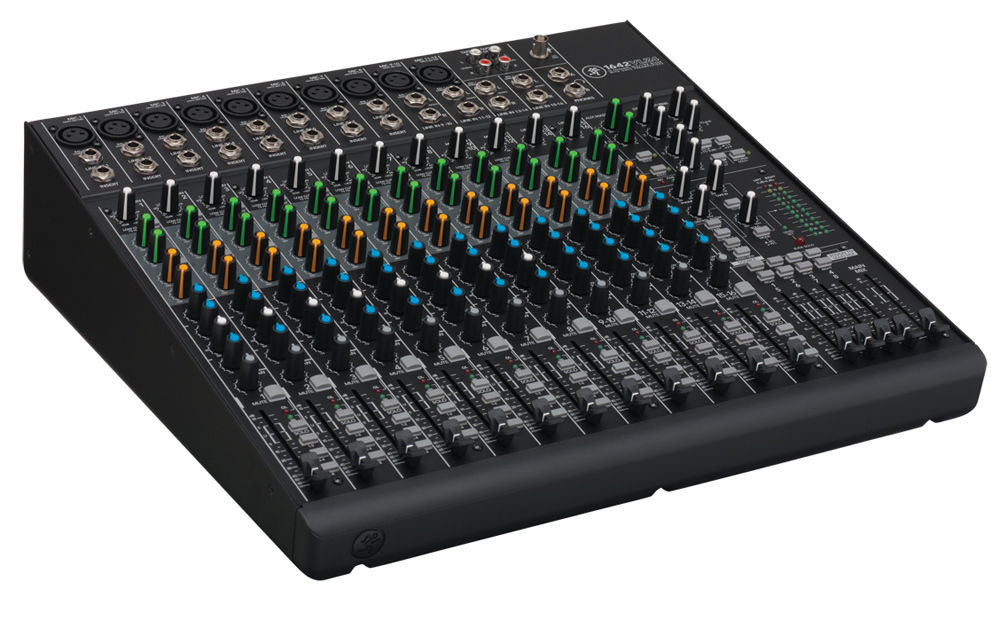
The Mackie 1642VLZ4 isn't trying to compete with digital. It's doing something different entirely. This is a mixer built around Mackie's fourth-generation Onyx preamps, a genuinely transparent signal path, and the kind of hands-on workflow that some operators simply refuse to give up. Whether that makes sense for your situation depends entirely on how you work and what you need.
Let's break down exactly who this mixer is for, where it excels, and where you'd be better off looking elsewhere.
What You're Actually Getting
Before we get into use cases, here's what's under the hood. The 1642VLZ4 gives you 16 line-level inputs, with 12 of those featuring Mackie's Onyx mic preamps. You get four stereo line channels, six auxiliary sends (four pre-fader, two post-fader), four subgroups, and a main stereo bus. There's a built-in USB interface for basic two-track recording.
The Onyx preamps are the real talking point. Mackie rates them with an equivalent input noise of -129.5 dBEIN, which puts them firmly in the territory of standalone preamps costing several hundred dollars each. That's not marketing fluff — these preamps genuinely sound open and detailed, with plenty of headroom before things get ugly.
Build quality is classic Mackie: steel chassis, sealed rotary pots, and that signature solid feel. At around 7.7kg, it's not featherweight, but it's manageable for one person to carry to a gig.
Use Case #1: Small to Mid-Size Live Sound
The Pub Gig and Function Band Scenario
This is arguably where the 1642VLZ4 makes the most sense in Australia. You're mixing a four or five-piece band at an RSL club, a pub, or a small function centre. The channel count is right in the sweet spot — enough inputs for drums (kick, snare, overhead), bass DI, a couple of guitars, keys, and three or four vocal mics.
Why it works here: There's no boot-up time. No firmware updates mid-soundcheck. No tablet dropping its Wi-Fi connection while the bride's walking down the aisle. You walk in, plug in, push faders up, and you're mixing. For a working muso running their own PA every weekend, that reliability is worth more than any feature list.
The six aux sends are genuinely useful in this context. You can run four independent monitor mixes from the pre-fader sends and still have two post-fader sends for effects — typically a reverb and a delay unit. That's enough to keep most small bands happy without needing a separate monitor desk.
Where it struggles: If you're doing outdoor events where you need to recall settings between bands at a festival, you'll miss scene recall badly. Every fader, every EQ knob, every aux send needs to be reset manually between acts. For a single-band scenario, this isn't an issue. For multi-act events, it becomes a real bottleneck.
The Corporate Presentation
Small corporate events — think boardroom presentations, AGMs, product launches for 50-100 people — are another sweet spot. You need a couple of wireless lapel mics, a lectern mic, maybe a playback source for video, and background music. The 1642VLZ4 handles this without breaking a sweat.
The stereo line channels are perfect for laptop playback and background music sources. The main mix goes to the PA, and you can use an aux send to feed a separate recording device or a hearing loop system. Simple, predictable, and rock-solid.
Use Case #2: Home and Project Studios
The Tracking Hub
Here's a scenario that surprises some people: the 1642VLZ4 as the centrepiece of a home recording setup. The built-in USB interface only captures a stereo mix, which limits its usefulness for multitrack recording. But if you're tracking live performances, recording rehearsals, or creating rough demos of full band arrangements, a high-quality stereo mix is exactly what you need.
The Onyx preamps genuinely shine in this role. Plug in a couple of decent condenser mics for a drum overhead pair, run the rest of the band through the remaining channels, and the stereo mix you capture will be surprisingly good. For bands wanting to document their sound without the complexity of a full DAW workflow, this is a legitimate approach.
Practical tip: Use the subgroups to your advantage here. Group your drums to subgroup 1-2, vocals to 3-4, and you've got rough stem control over your mix. It's not the same as full multitrack, but it gives you more flexibility than a straight stereo capture.
The Analogue Summing Hub
Some producers who work primarily in the box still swear by running stems back through analogue hardware for the final mix. The 1642VLZ4's clean signal path and quality preamps make it a surprisingly capable summing mixer. Send your DAW stems out through a multi-output interface, through the Mackie's channels, and back into the DAW via the USB return. The subtle harmonic character of the analogue signal path can add a sense of cohesion that's hard to replicate with plugins.
Is this for everyone? Absolutely not. But for the producer who's chasing that last few percent of analogue warmth without spending five figures on a dedicated summing box, it's a genuinely practical solution.
Use Case #3: Houses of Worship
Churches across Australia are one of the biggest markets for mixers in this class, and for good reason. A typical worship band — keys, acoustic guitar, electric guitar, bass, drums, and four to six vocal mics — fits neatly into the 1642VLZ4's channel count.
Why churches love analogue for this: Volunteer operators. This is the crucial factor. Most church sound teams are run by dedicated volunteers who might mix once a week or once a fortnight. Hand someone a digital mixer with layers, banks, and menu-driven processing, and you'll spend months training them. Hand them a 1642VLZ4 and say "this knob controls that mic" and they're mixing within minutes.
The visual feedback of physical faders is invaluable here. A new volunteer can glance at the mixer and immediately see the state of every channel. Nothing's hidden in a menu. Nothing's on a different layer. What you see is genuinely what you get.
The four pre-fader aux sends handle the typical worship monitor setup well: a foldback mix for the band leader, one for the drummer, one for backing vocalists, and a spare for the pastor's confidence monitor or an in-ear mix.
The honest limitation: If your worship team is running more than about 12 input sources, you'll start feeling the squeeze. And if you need to run recording, streaming, and live sound simultaneously with different mixes, a digital console with multiple bus outputs will serve you much better.
Use Case #4: Podcasting and Streaming with Multiple Hosts
This is a use case that's grown significantly in Australia. Podcast studios and streaming setups with four or more presenters need reliable, low-latency mixing with individual channel control. The 1642VLZ4 provides clean gain, per-channel EQ for taming different voices, and the USB output for direct capture.
The per-channel low-cut filter at 75Hz is genuinely useful here — it removes desk bumps, air conditioning rumble, and proximity effect buildup without needing any outboard processing. For a podcast with multiple hosts around a table, engaging the low-cut on every channel is practically mandatory.
The mute buttons with solo capability let you manage who's live without fumbling through a digital interface, which matters during live broadcasts where a sneeze needs to be muted in a split second.
Who Should Look Elsewhere
Honesty matters more than a sale, so let's be direct about when the 1642VLZ4 isn't your best option:
- You need more than 16 inputs: If you're regularly exceeding 16 channels, you need either the larger Mackie models or a move to digital where channel counts are more flexible.
- You need scene recall: If you're mixing multiple acts at festivals or switching between services with completely different band configurations, digital recall will save you enormous time and stress.
- You need multitrack recording: The onboard USB is stereo only. For multitrack capture, you'll need either a digital mixer with built-in multitrack USB or a separate audio interface alongside the mixer.
- You need extensive onboard effects: There's no built-in effects processor. You'll need external reverb and delay units, which adds cost and complexity.
- Remote mixing is essential: If controlling the mix from an iPad while walking the room is part of your workflow, analogue simply can't do this.
How It Stacks Up Against the Competition
Mackie 1642VLZ4 vs Yamaha MG16XU
The Yamaha MG16XU is the most obvious competitor. It includes built-in SPX effects and a USB interface, often at a similar or slightly lower price point. The Yamaha's D-PRE preamps are clean and capable, but side by side, the Onyx preamps in the Mackie have a slightly more open, detailed quality — particularly noticeable on vocals and acoustic instruments. If you need onboard effects and don't want to carry external units, the Yamaha makes strong practical sense. If preamp quality and build feel are your priorities, the Mackie wins.
Mackie 1642VLZ4 vs Allen & Heath ZED-16FX
Allen & Heath's ZED series has a loyal following in Australia, and deservedly so. The ZED-16FX offers built-in effects, a USB interface, and A&H's characteristically warm EQ. The EQ on the ZED is arguably more musical — it's more forgiving when you push it hard. The Mackie's EQ is precise but can sound harsh if you're heavy-handed. For live sound where you're making quick, broad adjustments, the A&H might be easier to work with. For studio or controlled environments where precision matters, the Mackie's transparency is an advantage.
Mackie 1642VLZ4 vs Going Digital
The elephant in the room. A similarly priced digital mixer — something like the Behringer XR16 or even a used Allen & Heath Qu-16 — will give you scene recall, built-in effects, multitrack recording, and remote control. On paper, there's no contest. But paper doesn't account for workflow preference, the tactile experience of physical controls, or the zero-latency confidence of a purely analogue signal path. For operators who value simplicity, reliability, and a known-quantity sound, the 1642VLZ4 remains a genuinely valid choice.
Getting the Most Out of Your 1642VLZ4
If you do go with this mixer, here are some practical tips from real-world use:
- Gain staging is everything. With analogue, your signal-to-noise ratio depends entirely on proper gain structure. Use the solo bus and meters to set each channel's gain before you touch a fader. Aim for peaks hitting around 0 on the channel meters, then mix with faders around unity.
- Use the subgroups for mix bus compression. Patch a stereo compressor across subgroups 1-2, route your drums through it, and you've got parallel drum compression without any plugins. Same trick works for vocal subgroups.
- Label everything. Seriously. Grab a roll of console tape and label every channel, every aux send destination, every subgroup assignment. Six months from now, you'll thank yourself.
- Invest in a quality effects unit. Since there's no onboard processing, a good reverb unit (even something affordable like a TC Electronic M-One) will transform your live mixes. Budget for this alongside the mixer purchase.
- The ALT 3-4 bus is your friend for recording. Use it to create a separate recording mix that's independent of your main house output. Route the channels you want recorded to ALT 3-4, and you can optimise your live mix and recording mix independently.
The Australian Buying Perspective
Availability in Australia is generally good through specialist music retailers. The 1642VLZ4 has been a consistent part of Mackie's lineup, which means parts, service, and institutional knowledge are readily available. Mackie's Australian distribution network means warranty support isn't the drama it can be with grey imports.
For the current Australian price, you're getting a mixer that will likely outlast two or three generations of digital equivalents. The sealed pots and steel construction mean this thing can take years of gigging abuse. There are original VLZ mixers from the 1990s still working perfectly in venues around the country — that kind of longevity is genuinely unusual in pro audio.
Check the current Australian price for the Mackie 1642VLZ4 at MusiconStage
Frequently Asked Questions
Can the Mackie 1642VLZ4 do multitrack recording?
Not directly. The built-in USB interface captures a stereo mix only. For multitrack recording, you'd need to pair it with a separate multi-channel audio interface connected to the direct outputs or insert points, which adds complexity and cost. If multitrack is essential, consider a digital mixer with built-in multitrack USB.
Is this mixer suitable for a band that's grown to 20+ inputs?
You'll be stretching it. With 12 mic preamps and four stereo line inputs, you could potentially squeeze 20 mono sources in if you use adaptors on the stereo channels, but you'll lose stereo capability on those channels and the ergonomics become cramped. Realistically, if you regularly need more than 16 channels, look at the Mackie 2404VLZ4 or consider stepping into digital.
How does the Mackie 1642VLZ4 compare to the older VLZ3 version?
The VLZ4 series introduced the redesigned Onyx preamps, which are a noticeable step up in clarity and headroom compared to the VLZ3's XDR2 preamps. The build quality is similar, but the VLZ4 also features improved EQ circuits and better RF rejection. If you're choosing between a used VLZ3 and a new VLZ4, the VLZ4 is worth the premium for the preamp upgrade alone.
Do I need a separate power supply or does it run on phantom power?
The 1642VLZ4 runs on mains power via an internal power supply — no wall wart or external brick. It provides 48V phantom power to all mic channels simultaneously via a global switch. This is worth noting: you can't selectively engage phantom power on individual channels, so if you're using ribbon mics alongside condensers, you'll need to be careful with your routing.
Is it worth buying analogue in 2026?
That depends entirely on your workflow and priorities. If you value tactile control, zero-latency operation, simplicity for volunteers or less-technical operators, and a transparent signal path with excellent preamps, then yes — absolutely. If you need recall, remote operation, built-in effects, and multitrack recording, digital is the smarter choice. Neither is inherently better; they solve different problems.
The Bottom Line
The Mackie 1642VLZ4 isn't for everyone, and that's precisely the point. It's for the operator who wants exceptional preamps and a transparent signal path without digital complexity. It's for the church volunteer who needs to mix confidently on Sunday morning. It's for the gigging muso who wants a mixer that turns on instantly and just works, every single time.
In a market increasingly dominated by digital, there's something refreshingly honest about a mixer that does exactly what it says on the tin — amplifies your signal cleanly, gives you solid EQ and routing, and gets out of the way. If that's what you need, the 1642VLZ4 delivers it with Mackie's characteristic build quality and genuinely excellent Onyx preamps.
View the Mackie 1642VLZ4 and order with Australian delivery at MusiconStage