
Mackie 1402VLZ4 Mixer: Real-World Use Cases for Aussies 2026
Mackie 1402VLZ4 Mixer: Real-World Use Cases for Aussies 2026
If you've spent any time around Australian gig venues, community halls, podcast desks or church AV rooms, you've almost certainly seen a Mackie compact mixer doing the heavy lifting. The Mackie 1402VLZ4 is one of those quietly dependable bits of kit that ends up outliving the gear around it. But specs only tell you half the story. What actually matters is how it performs in your situation — whether that's a Friday-night pub gig in Newcastle, a home studio in the back room, or a multi-purpose community centre that needs sound for everything from weddings to school assemblies.
This guide skips the marketing fluff and focuses on the real-world scenarios where this 14-channel analog mixer earns its keep — and the handful of situations where you'd be better off looking elsewhere. By the end, you'll know exactly whether the 1402VLZ4 suits how you'll actually use it.
What You're Actually Working With
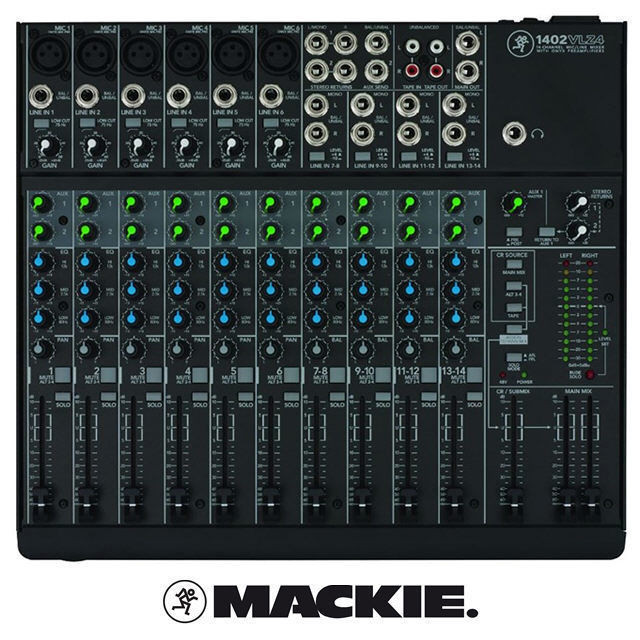
Before we get into scenarios, here's the practical shape of the thing. The 1402VLZ4 is a 14-channel compact analog mixer built around Mackie's Onyx mic preamps. You get six mono channels with combo XLR/line inputs and dedicated Onyx preamps, plus stereo channels for line-level sources like keyboards, playback devices and media players. There's three-band EQ on the mono channels, two aux sends (one pre-fade for monitors, one post-fade for effects), and the kind of solid metal chassis Mackie has been known for since the '90s.
Crucially, this is a pure analog desk — no USB audio interface, no onboard effects, no recording over a single cable. That's not a flaw; it's a design decision that matters enormously depending on what you're doing. We'll come back to that.
Use Case 1: Small-to-Medium Live Gigs
This is the 1402VLZ4's natural home. Picture a four-piece covers band playing a suburban Aussie pub: two vocals, an acoustic-electric guitar going DI, a keyboard, and a stereo backing track for the odd song. That's a perfect channel count for this desk.
The six Onyx preamps give you genuinely clean, low-noise gain for vocal mics — which matters when you're pushing a SM58 hard over a loud stage. The pre-fade aux send lets you build a separate monitor mix so the singer can actually hear themselves without the front-of-house sound suffering. The post-fade aux feeds an outboard reverb unit if you want some polish on the vocals.
Where it excels:
- Acoustic duos and solo performers who need two or three mics plus a backing source
- Small bands with a manageable input count (think 6–8 sources)
- Mobile setups where you need to load in, sound check fast, and trust the gear
- Venues with a resident desk that just needs to work, night after night
Where it struggles: If your band has a full drum kit miked up with five or six microphones, you'll burn through the mono channels fast and have nothing left for vocals and guitars. A drummer alone can eat the entire input count. For full-band live work with miked drums, you've outgrown this desk before you've started.
A practical tip from the field: the 1402VLZ4 has no onboard effects, so if your gig relies on vocal reverb or delay, budget for a small outboard effects unit and run it through that post-fade aux. Plenty of Aussie engineers pair it with a cheap multi-FX box and never look back.
Use Case 2: Home and Project Recording
Here's where you need to be honest with yourself about workflow. The 1402VLZ4 is a brilliant front end for recording — those Onyx preamps are genuinely studio-grade and will flatter a vocal or acoustic guitar. But it is not a USB interface. You can't plug one cable into your laptop and capture every channel separately.
So how does it actually fit a home studio? Two realistic scenarios:
- As a preamp and monitoring hub: You run your mics through the Mackie's preamps and EQ, then feed the main or aux outputs into a separate audio interface for capture. Engineers who already own a quality interface but want more clean preamps and hands-on control love this approach.
- Stereo live-to-two-track: If you're recording a rehearsal, a live band performance, or a podcast as a finished stereo mix, you take the main outs into a recorder or interface and capture the blend in real time. No editing individual tracks afterwards — you mix as you go.
Reality check: If your dream is multitrack recording where you fix each instrument separately in your DAW, the 1402VLZ4 alone won't get you there. For that workflow, a USB mixer or a dedicated multi-channel interface is the right tool. Buying this desk expecting one-cable computer recording is the single most common mistake people make with it.
Use Case 3: Houses of Worship and Community Halls
This is arguably where the 1402VLZ4 shines brightest in Australia. Churches, community centres, RSL clubs and school halls need audio gear that volunteers — not trained engineers — can operate without disaster. An analog desk with clearly labelled knobs, one function per control, and no menu diving is a genuine asset here.
A typical setup: a couple of lectern and lapel mics, a wireless handheld for announcements, a media player for music and video playback through the stereo channels, and a feed out to a foldback speaker. The 1402VLZ4 handles all of that comfortably and reliably.
Why it works so well in this scenario:
- Anyone can learn it. A new volunteer can be shown the ropes in ten minutes — there's no software, no scenes, no recall to get wrong.
- It's built to last. The rugged steel chassis survives being knocked, moved and stored in a cupboard between events.
- Set-and-forget reliability. Once levels are dialled in for the room, they stay put. No firmware updates, no app that stops connecting.
The honest limitation: if your congregation grows and you start adding a full worship band, in-ear monitors and recording for streaming, you'll eventually want a digital console with recallable scenes. But for the bread-and-butter speech-and-playback duties most halls need, this desk is hard to beat on value and simplicity.
Use Case 4: AV, Conferences and Corporate Events
For AV techs running conferences, panel sessions and corporate functions, predictability is everything — you can't have gear surprising you in front of a paying client. The 1402VLZ4 is a reliable workhorse for mixing multiple presenter mics, a laptop audio feed for slides, and playback for walk-in and walk-out music.
The clean preamps keep speech intelligible, the simple EQ helps tame a boomy room or a harsh lectern mic, and the compact footprint slides neatly into a flight case or sits discreetly on a side table. For a single-room conference or a hybrid event where you're feeding a clean stereo mix to a streaming encoder, it covers the basics without fuss.
Watch out for: larger multi-room events or anything needing matrix routing, multiple independent zone outputs, or digital recall between sessions. That's beyond an analog compact's remit — you'd move up to a digital desk. But for self-contained single-space AV, the 1402VLZ4 is a dependable choice that won't let you down mid-keynote.
Matching the Mixer to Your Skill Level
One of the underrated strengths of an analog desk like this is how it suits different experience levels:
- Beginners: Because every knob does exactly one thing, the 1402VLZ4 is a fantastic learning tool. You develop a real, physical understanding of gain staging, EQ and aux sends — skills that transfer to any console you touch later. Nothing is hidden behind a screen.
- Working musicians: If you just want to turn up, plug in and play without fighting software, this is liberating. Set it, trust it, perform.
- Experienced engineers: Many seasoned techs keep a 1402VLZ4 around precisely because it's quick, transparent and never fails them on a small job. It's the desk you grab when overkill isn't the answer.
How It Compares in the Same Scenarios
Plenty of buyers cross-shop this against USB-equipped compact mixers and small digital desks. The practical decision comes down to one question: do you need a computer connection and recall, or do you need rock-solid analog simplicity?
- vs. a USB compact mixer: A USB model wins if multitrack recording into a DAW is part of your plan. The 1402VLZ4 wins on preamp quality at its tier and on the sheer reliability of having fewer things that can glitch. If you'll never record to a computer through the desk, the USB feature is just cost you won't use.
- vs. a small digital mixer: A digital desk gives you onboard effects, scene recall and app control — brilliant for a growing worship band or a touring setup. But it asks more of the operator and can intimidate volunteers. For speech, playback and simple live mixes run by non-specialists, analog is often the smarter, calmer choice.
- vs. cheaper budget mixers: The gap shows up over time. The Onyx preamps are quieter, and the build quality means it survives gigging life where flimsier desks develop crackly faders within a year.
Getting the Most Out of It: Practical Tips
- Set your gain properly. Use the gain knob and the channel solo/level to get a healthy signal before touching the fader. Good gain staging is where the clean Onyx preamps actually pay off.
- Reserve aux 1 for monitors. Keep the pre-fade send purely for foldback so your monitor mix stays independent of front-of-house changes.
- Add an outboard FX unit for live vocals if you want reverb — feed it from the post-fade aux and return it to a stereo channel.
- Pair it with an interface for recording rather than expecting it to be one. Main outs into your interface gets you a clean stereo capture.
- Label your channels. A strip of tape across the bottom saves confusion when a volunteer or a guest engineer steps in.
Ready to see how it fits your rig? You can check current pricing and availability on the Mackie 1402VLZ4 at MusiconStage.
Application-Focused FAQs
Can I record straight to my laptop with the 1402VLZ4?
Not directly — it's a pure analog mixer with no USB output. To record, you take the main outputs into a separate audio interface or recorder. It captures a stereo mix beautifully, but it won't give you separate tracks for each instrument in your DAW.
Is it enough for a full band with a drum kit?
For most full bands with miked drums, no. A drum kit alone can use up most of the mono channels. It's ideal for acoustic acts, duos, and small bands with a modest input count — not large stages with extensive mic'ing.
Will a volunteer with no experience be able to run it?
Yes, and that's a big part of its appeal for churches and community halls. One control does one job, there's no software, and once levels are set they stay put. A short walkthrough is usually all a new operator needs.
Does it have onboard reverb or effects?
No. If you want vocal reverb or delay for live work, add a small outboard effects unit and feed it through the post-fade aux send. Many Aussie engineers do exactly this.
Is it worth it over a cheaper mixer?
If you gig regularly or need it to run reliably night after night, yes. The cleaner Onyx preamps and durable build justify the step up over budget desks that tend to develop noise and fader issues with heavy use.
The Bottom Line: Who Should Buy It
The Mackie 1402VLZ4 is the right call when you want clean, reliable analog mixing for a manageable channel count and you value simplicity over computer integration. It's an outstanding fit for acoustic and small live acts, houses of worship, community halls, single-room AV, and anyone who wants a quality preamp front-end for their existing recording rig.
It's the wrong call if you need one-cable multitrack recording to a laptop, onboard effects and scene recall, or enough inputs for a fully miked band. Match it to those realities and you'll get a mixer that quietly does its job for years — the kind of gear you stop thinking about because it simply never lets you down.
If your use case lines up with the scenarios above, view the Mackie 1402VLZ4 at MusiconStage to get the full specs and order with Australian support and shipping.