
In-Ear Monitor Systems Explained: Sennheiser EW 300 G3 IEM Guide 2026
In-Ear Monitor Systems Explained: Your Beginner's Guide to the Sennheiser EW 300 G3 IEM
If you've ever watched musicians on stage and noticed they're wearing small earpieces instead of standing in front of giant wedge speakers, you've seen in-ear monitors (IEMs) in action. But what exactly are they, why do performers swear by them, and is a system like the Sennheiser EW 300 G3 the right choice for you?
Whether you're a gigging musician tired of fighting stage volume, a worship team leader looking for cleaner sound, or a sound tech exploring wireless monitoring for the first time, this guide breaks it all down — no jargon, no assumptions. Let's start from the very beginning.
What Is an In-Ear Monitor System?
Let's start with the basics. An in-ear monitor (IEM) system is a wireless audio setup that lets performers hear a personalised mix of music, vocals, and other sounds directly through earpieces — similar to earphones — while they're on stage.
Think of it like this: imagine you're at a busy café trying to have a conversation. There's music playing, dishes clattering, and people chatting at every table. Now imagine you could put in earpieces that let you hear only the person you're talking to, at exactly the volume you want. That's essentially what an IEM system does for musicians on stage.
How Does an IEM System Work?
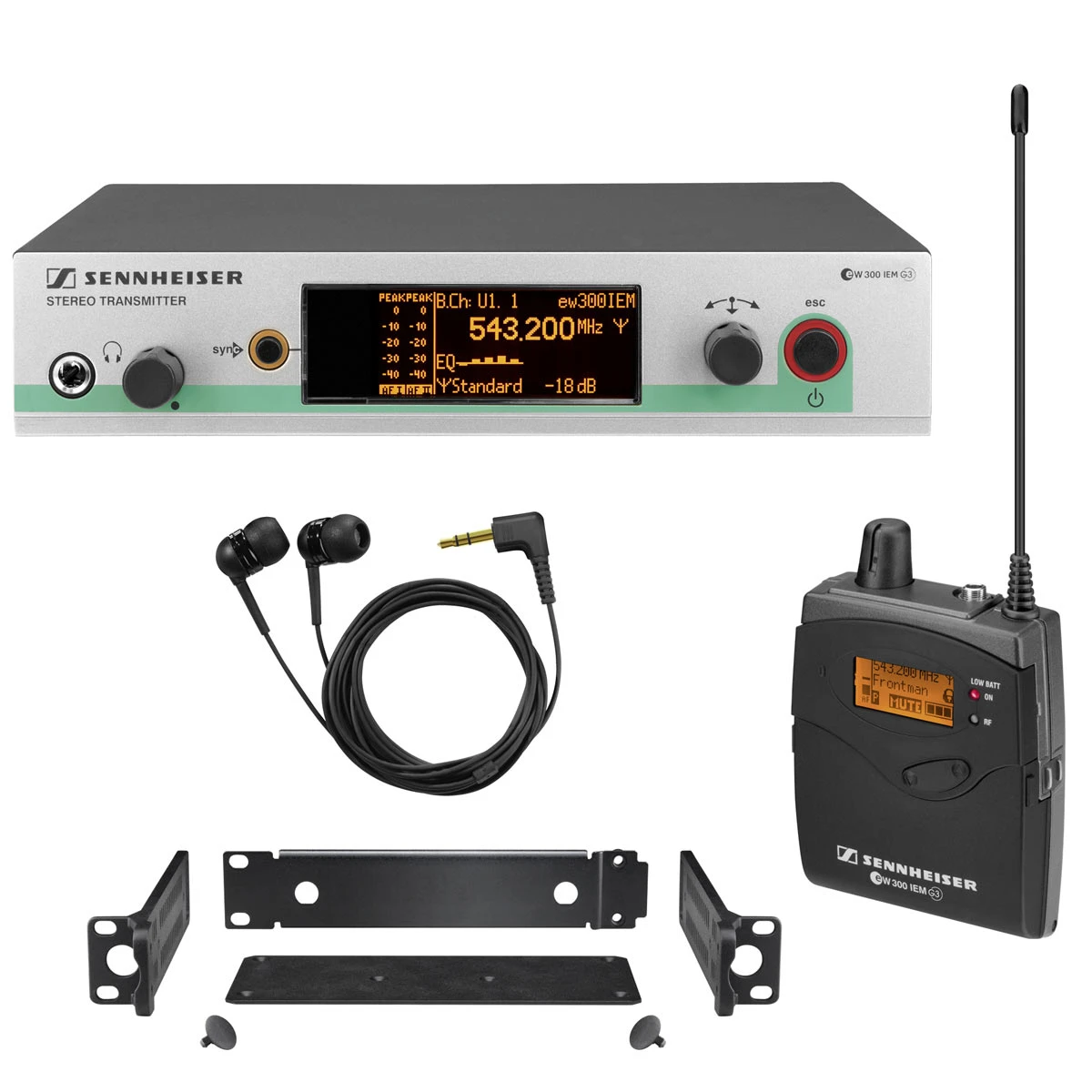
An IEM system has three main parts, and understanding these makes everything else click:
- The Transmitter — This is the stationary unit that sits with your mixing desk or rack gear. It takes the audio mix (your vocals, instruments, click track, or whatever you need to hear) and sends it wirelessly to the stage.
- The Bodypack Receiver — This is the small unit the performer clips to their belt or strap. It receives the wireless signal from the transmitter and converts it back into audio.
- The Earpieces — These plug into the bodypack receiver and sit in the performer's ears. They can be generic universal-fit buds or custom-moulded earpieces shaped specifically to your ears.
The audio travels from the mixing desk → to the transmitter → wirelessly to the bodypack → through the earpieces → and into the performer's ears. Simple as that.
Why Do Musicians Use In-Ear Monitors Instead of Wedge Speakers?
If you've been performing with traditional floor wedge monitors (those angled speakers that sit on the stage floor pointing up at you), you probably know the frustrations. Here's why so many performers are switching to IEMs:
- Hearing protection: Stage volume is a real concern. Wedge monitors can push 110+ dB right at your feet, which genuinely damages hearing over time. IEMs let you hear everything clearly at much safer volumes — typically 85-95 dB, which is significantly kinder to your ears.
- Consistent sound everywhere on stage: With wedges, your mix changes every time you move. Step away from your wedge and you lose your vocals. Walk to the drummer's side and suddenly it's all cymbals. IEMs give you the same mix no matter where you stand.
- Cleaner stage sound: Fewer wedge monitors on stage means less sound bouncing around, less feedback risk, and a cleaner front-of-house mix for the audience. Your sound engineer will genuinely thank you.
- Personal mix control: Many IEM systems let you adjust your own volume and mix balance, so you're not constantly asking the sound tech to turn you up.
- Freedom of movement: Wireless IEMs mean you can move anywhere on stage without losing your monitor sound. Roam freely, engage with the audience, move to different positions — your mix follows you.
Understanding the Sennheiser EW 300 G3 IEM System
Now that you understand what IEM systems are and why they matter, let's look at the specific system you're researching: the Sennheiser EW 300 G3 A IEM System.
Sennheiser's EW (Evolution Wireless) series has been a workhorse in professional audio for years. The G3 generation, while not the newest in the lineup, earned a strong reputation for reliability and sound quality that keeps it relevant and widely used across Australia.
Key Specifications Explained Simply
Let's break down the important specs without the tech-speak overwhelm:
- B Band: 566–608 MHz — This is the radio frequency range the system uses to transmit audio wirelessly. Think of it like a radio station — the system needs a clear "channel" to send sound without interference. The B band operates between 566 and 608 MHz, which gives you a specific slice of the radio spectrum to work within. Important for Australian users: always check that your operating frequency complies with current ACMA (Australian Communications and Media Authority) regulations, as frequency allocations can change.
- Up to 1680 tuneable frequencies: Within that B band, you can fine-tune to 1,680 different specific frequencies. This matters when you're running multiple wireless systems simultaneously (multiple IEM packs, wireless microphones, etc.) — you need each one on a clear, non-interfering frequency.
- Adaptive diversity reception: The bodypack receiver uses two internal antennas and automatically switches between them to maintain the strongest signal. This means fewer dropouts when you're moving around on stage.
- HDX compander: This is Sennheiser's audio processing technology that keeps the sound quality high and natural. Without getting too technical, companders help manage the dynamic range of wireless audio transmission so quiet sounds stay clear and loud sounds don't distort.
What's in the Box?
The Sennheiser EW 300 G3 IEM system typically includes:
- SR 300 IEM G3 transmitter — The rack-mountable unit that sends the signal
- EK 300 IEM G3 bodypack receiver — The belt-clip unit the performer wears
- IE 4 earphones — Sennheiser's included universal-fit earbuds
- Accessories — Antenna, power supply, rack mount kit, cables
One honest note here: while the included IE 4 earphones are perfectly functional for getting started, most users eventually upgrade to better earphones or custom moulds. The IE 4s will get you up and running, but they're not where the EW 300 G3 truly shines. The magic is in the wireless transmission quality.
Who Is This System Actually For?
The EW 300 G3 sits in what we'd call the professional entry-level to mid-range category. Here's who it suits best:
- Gigging bands who perform regularly at pubs, clubs, and small-to-medium venues across Australia
- Houses of worship looking for reliable wireless monitoring for their music teams
- Theatre productions where performers need consistent monitoring while moving across the stage
- Working musicians who need dependable gear that can handle the rigours of regular use and transport
- Sound technicians building out wireless monitoring for venues or hire companies
If you're a bedroom musician or only perform a handful of times per year, this system might be more than you need. But if you're regularly on stage and serious about your monitoring, it's a solid investment.
Beginner's Buying Guide: What to Consider Before You Purchase
1. Frequency Compliance in Australia
This is genuinely important and often overlooked by beginners. Wireless audio equipment operates on radio frequencies regulated by the ACMA. The B band (566–608 MHz) on this unit needs to be checked against current Australian frequency allocations. Regulations have shifted in recent years due to digital TV spectrum changes, so always verify compliance before purchasing. Your retailer should be able to confirm this for you.
2. Single vs. Multiple Systems
One EW 300 G3 system gives you one transmitter and one bodypack — meaning one person gets a monitor mix. If your whole band wants IEMs, you'll need a separate system (or at minimum a separate bodypack and earphones) for each member. Budget accordingly.
The good news: the EW 300 G3's wide tuning range means you can run multiple systems side by side with minimal interference, provided you coordinate your frequencies properly.
3. Mono vs. Stereo Monitoring
The EW 300 G3 transmits a stereo signal, which is a genuine advantage over cheaper systems that only do mono. Stereo monitoring means instruments and vocals can be panned left and right in your earpieces, creating a more natural and spacious listening experience — much closer to how you'd hear music normally. This makes a real difference during long sets, as stereo is significantly less fatiguing on your ears than mono.
4. Earphone Quality Matters — A Lot
Here's something beginners often don't realise: the earphones you use with your IEM system have an enormous impact on your experience. The included Sennheiser IE 4 earphones are decent starter buds, but upgrading to quality aftermarket earphones or custom-moulded IEMs will transform the system.
Think of it like buying a quality amplifier and plugging in cheap speakers — the amp is doing its job, but you're not hearing what it's truly capable of. Budget an additional $150–$400 for good universal-fit earphones, or $400–$800+ for custom moulds from an audiologist.
5. The Learning Curve Is Real (But Manageable)
If you've never used in-ear monitors before, expect an adjustment period. Most musicians need 3–5 gigs before IEMs feel completely natural. Common initial reactions include:
- Feeling "disconnected" from the room and audience
- Finding it strange not to feel the bass physically
- Needing time to get your mix dialled in properly
- Adjusting to hearing your own voice so clearly and directly
Beginner tip: Many performers start by using just one earpiece in and one out, letting some ambient room sound in. While this isn't ideal for hearing protection, it can ease the transition. Some IEM earphones also have ambient ports that let controlled room sound through, which is worth exploring.
Common Beginner Mistakes to Avoid
After years of seeing musicians adopt IEM systems, these are the pitfalls that trip up newcomers most often:
- Running the volume too high: One of the main benefits of IEMs is hearing protection. Don't defeat the purpose by cranking the volume. If you need it louder to hear clearly, the issue is usually your mix, not the volume.
- Neglecting the mix: A bad IEM mix is worse than no IEM mix. Spend time getting your monitor mix right at soundcheck. Ask for what you need — more vocal, less guitar, add some reverb to your voice. A good mix makes all the difference.
- Forgetting spare batteries: The bodypack receiver runs on AA batteries. Always carry spares. There's nothing worse than your monitors dying mid-set. Rechargeable AAs are a smart, cost-effective choice for regular performers.
- Not using a limiter: The EW 300 G3 has a built-in limiter on the bodypack. Use it. This protects your ears from sudden loud spikes — a dropped microphone, feedback, or a sound tech's accidental fader push. This feature alone can save your hearing.
- Skimping on earphone fit: Poorly fitting earphones leak sound, reduce bass response, and need higher volume to compensate. Get the right ear tips (foam tips often seal better than silicone) or invest in custom moulds.
How the Sennheiser EW 300 G3 Compares to Other Options
To help you understand where this system sits in the market:
- Below it (budget options): Systems like the Sennheiser XSW IEM or budget alternatives from other brands. These work for occasional use but typically offer fewer frequencies, mono transmission, and less robust build quality.
- The EW 300 G3 (mid-range professional): Stereo transmission, wide frequency tuning, solid build quality, proven reliability. This is where most working musicians find their sweet spot between cost and performance.
- Above it (premium tier): Sennheiser's own EW IEM G4 series and the flagship 2000 series, plus options from Shure (PSM 300, PSM 900/1000). These offer enhanced features, better audio quality, and more advanced frequency management — at significantly higher price points.
For most Australian performers stepping into wireless IEM for the first time, the EW 300 G3 represents excellent value — you're getting genuinely professional-grade wireless technology without the price tag of flagship systems.
Setting Up Your EW 300 G3: What to Expect
Getting started is more straightforward than you might think:
- Mount the transmitter in your rack or place it on a stable surface near your mixing desk
- Connect your audio source — run a cable from your mixer's auxiliary send to the transmitter's audio input
- Power up both units and sync the bodypack receiver to the transmitter's frequency (the system has an easy infrared sync feature — point the bodypack at the transmitter and press sync)
- Plug in your earphones to the bodypack
- Set your levels — start with the bodypack volume low and gradually increase to a comfortable level
- Dial in your mix — work with your sound tech to get the right balance in your ears
The infrared sync feature deserves special mention for beginners — it makes frequency pairing between the transmitter and bodypack genuinely foolproof. No manual frequency matching needed. Point, press, done.
Frequently Asked Questions from Beginners
Can I use my own earphones with this system?
Yes, absolutely. The bodypack receiver has a standard 3.5mm headphone output. You can use any earphones you prefer, and as mentioned earlier, upgrading your earphones is one of the best improvements you can make.
How far can I go from the transmitter?
The EW 300 G3 has a typical operating range of up to 100 metres in ideal line-of-sight conditions. In real-world venue environments with walls, bodies, and other equipment, expect reliable performance at 30–50 metres, which is more than sufficient for virtually any stage.
How long do the bodypack batteries last?
Expect approximately 6–8 hours on a set of quality AA batteries. For a typical gig, that's more than enough. The bodypack displays remaining battery life, so you'll always know where you stand.
Can multiple people listen to the same mix?
Yes. You can pair multiple bodypack receivers to a single transmitter. Everyone will hear the same mix, but each person can control their own volume on their bodypack. This is a cost-effective way to get started with IEMs for a full band — buy additional EK 300 bodypack receivers rather than complete systems for each member.
Will this work at outdoor gigs?
Absolutely. In fact, IEMs are arguably more valuable outdoors where traditional wedge monitors struggle against wind, open-air sound dispersion, and variable acoustic conditions. Your in-ear mix stays consistent regardless of the environment.
Ready to Make the Switch to In-Ear Monitors?
The Sennheiser EW 300 G3 IEM system represents a genuine step up for any musician or performer serious about their stage monitoring. It's professional-grade equipment that's proven itself on stages around the world, and it's accessible enough for beginners to set up and use without a sound engineering degree.
If you're ready to explore in-ear monitoring, check out the Sennheiser EW 300 G3 IEM System at MusiconStage — an Australian retailer who can help answer your specific questions about frequency compliance and system configuration for your needs.
Remember: the best monitoring system is the one you'll actually use consistently. The EW 300 G3 strikes that balance of quality, reliability, and usability that turns first-time IEM users into lifelong converts. Your ears — and your sound engineer — will thank you.
View the Sennheiser EW 300 G3 IEM System pricing and availability at MusiconStage