
Dynacord CMS 600-3 Specs Decoded: Analogue Mixing 2026
Dynacord CMS 600-3 Mixer with FX: Technical Deep Dive for Australian Live Sound in 2026
There is a particular category of mixing console that gets overlooked in an era of touchscreens and app control: the small-format German analogue desk built to survive a decade of load-ins. The Dynacord CMS 600-3 sits squarely in that category. It is the entry point to Dynacord's CMS (Compact Mixing System) 3 range, and it is engineered with a very different set of priorities to the sub-$800 analogue mixers it shares shelf space with.
This guide breaks down what is actually inside the CMS 600-3, what the specifications mean in practice, and where the desk earns — or does not earn — its price premium over cheaper compact mixers. If you are weighing it against an Allen & Heath ZED, a Soundcraft Signature or a small digital desk, the technical detail below should make the decision considerably easier.
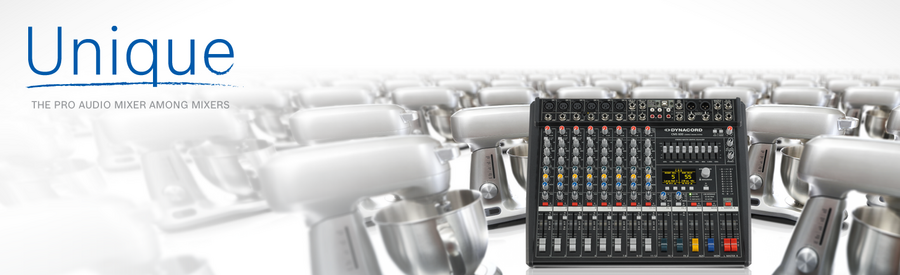
Where the CMS 600-3 Sits in the Dynacord Range
Dynacord is a German manufacturer, based in Straubing, that has been building amplifiers and mixing systems since the late 1940s. It now sits alongside Electro-Voice under the same professional audio group, which matters practically: the CMS desks are voiced and specified with EV loudspeaker systems in mind, and the two product lines are routinely deployed together in Australian install and hire work.
Two distinctions worth clearing up before you buy:
- CMS vs PowerMate. The CMS series is an unpowered mixing console. Dynacord's PowerMate series is the powered-mixer equivalent with onboard amplification. If you need a single box that drives passive speakers, the CMS 600-3 is not it — you will be pairing it with active speakers or a separate power amplifier.
- The "-3" suffix. This denotes the third-generation CMS platform, which introduced the onboard USB audio interface and the current dual 24-bit effects engines. Second-generation CMS desks still turn up on the used market and lack these features. Check the suffix carefully when comparing prices.
Within the 3 series, the CMS 600-3 is the smallest frame. Its larger siblings — the 1000-3, 1600-3 and 2200-3 — scale up the mono channel count and master section rather than changing the fundamental circuit design. That is genuinely useful information: the preamp topology, effects engines and build approach you get on the 600-3 are the same ones deployed on Dynacord's larger consoles.
Core Specifications at a Glance
| Specification | Detail | What It Means in Practice |
|---|---|---|
| Configuration | 6 mono mic/line channels + 2 stereo channels | Ten inputs total; comfortable for a 4–5 piece band or a corporate AV rig |
| Mic inputs | Balanced XLR with switchable 48V phantom power | Handles condensers, ribbons (phantom off) and dynamics without an external preamp |
| Channel inserts | Insert points on mono channels | Patch outboard compression on vocals — a feature routinely cut from budget desks |
| Effects | 2 x 24-bit stereo effects processors, 100 presets each | Independent reverb on vocals and delay on a solo instrument, simultaneously |
| Auxiliary sends | 2 x AUX plus 2 x FX sends | Two monitor mixes and two independent effects buses from a compact frame |
| Master EQ | Stereo graphic equaliser in the master section | Room correction and feedback control without a separate rack EQ |
| Digital I/O | Onboard USB audio interface (stereo record and playback) | Two-track recording of the gig and playback of backing tracks with no extra hardware |
| Outputs | Main L/R, master B output, mono output, headphones | Feed a main PA, a delay zone or foldback amp, and a mono sub or overflow feed |
| Footswitch control | Effects mute / tap tempo via footswitch input | Kill reverb between songs without reaching the desk |
| Construction | Steel chassis, German design and manufacture | Weight in the 5–6 kg region — heavier than plastic-framed rivals, and deliberately so |
Because Dynacord occasionally revises minor details across production runs, it is worth confirming the current graphic EQ band count and exact dimensions against the live listing before you order. You can check the current CMS 600-3 specification and Australian pricing here.
The Preamp Section: Where the Money Actually Goes
The single biggest technical differentiator on a Dynacord CMS is the microphone preamplifier. This is the part of a mixer that costs real money to do well, and it is the first place manufacturers economise when they need to hit a price point.
Three specifications describe a preamp's quality, and it is worth understanding all three:
Equivalent Input Noise (EIN)
EIN measures the noise the preamp itself adds, referenced back to its input. It is quoted in dBu, and more negative is better. The theoretical floor for a 150Ω source at room temperature is roughly −131 dBu; any real preamp lands above that. Well-executed analogue front ends of this class sit in the −128 dBu region, and budget designs typically land several decibels worse.
Why this matters practically: the difference only becomes audible when you are running high gain — a quiet acoustic source, a distant lectern microphone, or a ribbon mic. On a loud rock vocal with an SM58 you will not hear it. On a solo violin or a corporate presenter three metres from a boundary mic, you absolutely will. If your work involves low-output sources, preamp noise is the specification to prioritise.
Headroom and Gain Range
Headroom describes how much signal the preamp can accept before clipping. A common failure mode on cheap desks is a preamp that runs out of headroom when you put a condenser mic in front of a kick drum or a close-miked snare — you turn the gain down and it still distorts, because the clipping is happening before the gain stage. Dynacord's CMS preamps are specified with generous input headroom precisely for this scenario. In practice it means the pad switch becomes optional rather than mandatory on loud sources.
Common-Mode Rejection Ratio (CMRR)
CMRR describes how effectively a balanced input cancels noise picked up on the cable run. It is the specification that determines whether a 20-metre XLR run down the side of a stage arrives clean or with a hum riding on it. This becomes disproportionately important in Australian venues with older electrical infrastructure, marquee events running off generators, or any situation where you are sharing power with lighting dimmers.
Channel EQ: Voicing, Not Just Correction
Each mono channel on the CMS 600-3 provides a full equaliser section with a sweepable midrange control, plus a switchable low-cut filter. The low-cut is the most underrated control on the desk — engaging it on every channel except kick drum and bass removes stage rumble, handling noise and low-frequency energy that eats amplifier headroom without contributing anything musical.
The sweepable mid is the section that separates this desk from fixed-mid budget mixers. Vocal problems — boxiness around 300–500 Hz, honk around 800 Hz–1 kHz, harshness around 2–4 kHz — do not sit at a single fixed frequency. Being able to sweep to the offending band and cut it narrowly is the difference between a vocal that sits in the mix and one you are constantly fighting.
Dynacord also includes a voicing filter in the master section — a preset tonal curve applied across the mains. Used sparingly it compensates for the typical response of a compact PA in a reflective room. Used heavily it will mask problems you should be solving with the graphic EQ and speaker placement. Treat it as a starting point, not a solution.
Dual 24-Bit Effects Engines: The Genuine Standout
Most compact analogue mixers in this price bracket give you one effects processor. The CMS 600-3 gives you two, each with 100 presets, and each with its own send bus.
The practical impact is significant. Running a single FX engine forces a compromise: you either put a plate reverb on everything and accept a washy snare, or you run a tight room reverb and lose vocal depth. With two independent engines you can run a medium hall on vocals from FX1 and a short slap delay or tight room on instruments from FX2, mixed independently to the mains and — importantly — sent independently to monitors.
The 24-bit converters are the relevant technical figure here. Older onboard effects processors commonly used 16-bit or 18-bit conversion, which produced audible artefacts in reverb tails as they decayed toward the noise floor. At 24 bits the tail decays into silence rather than into quantisation grain. On a quiet ballad in a listening room, this is genuinely audible.
Tap tempo via footswitch is the other detail worth flagging. Delay effects that are not tempo-matched to the song actively hurt a mix. Being able to tap the tempo from the stage — or from front of house without diving into menus — is a workflow advantage that no amount of preset quality substitutes for.
Routing and Connectivity: Reading the Signal Flow
The routing architecture is where compact desks either enable or frustrate real-world work. Key points on the CMS 600-3:
- Two aux sends plus two FX sends. The auxes give you two independent monitor mixes — enough for a vocalist wedge and a drummer/keys wedge, or one wedge plus one in-ear feed. The FX sends are separate, so effects do not consume your monitor buses.
- Master A/B outputs. This is a legitimately useful architecture. Master A drives the main PA; Master B can feed a delay speaker at the back of a long room, a foyer or bar zone, a recording feed, or a broadcast/streaming console. On desks without a B master you end up using an aux send and losing a monitor mix.
- Mono output with level control. Ideal for feeding a subwoofer, a mono fill, or a hearing-augmentation loop — a compliance consideration in many Australian public venues.
- Channel inserts. The presence of inserts on the mono channels means you can patch a hardware compressor onto the lead vocal. That single insert point does more for a live mix than most other features on the desk.
- USB audio interface. Two-channel in and out. This handles two useful jobs: capturing a stereo board mix of the gig for review, and playing backing tracks or interval music from a laptop without an additional DI or interface. It is not a multitrack solution — see limitations below.
Master Graphic EQ and Feedback Management
The stereo graphic equaliser in the master section replaces a piece of outboard gear that would otherwise occupy a rack space and require its own cabling. Its primary jobs are room correction and gain-before-feedback.
The methodology that actually works: set the graphic flat, bring the system up to working level with a familiar reference track, and only then correct broad tonal imbalances — typically a low-mid buildup in reverberant rooms with hard surfaces, which is most Australian community halls, RSL function rooms and school gymnasiums. For feedback, ring out the system before doors: bring the monitor sends up slowly until the first feedback frequency appears, identify the band, cut it by 3–4 dB, and repeat. Two or three narrow cuts typically buy you 4–6 dB of additional gain before feedback, which is the difference between a vocalist hearing themselves and not.
Resist the temptation to carve a smiley-face curve into the graphic. Boosting the top and bottom while cutting the mids destroys vocal intelligibility, which is the one thing a live PA must deliver.
How the CMS 600-3 Compares Technically
| Consideration | Dynacord CMS 600-3 | Typical budget analogue rival | Compact digital mixer |
|---|---|---|---|
| Preamp quality | Professional-grade, high headroom | Adequate; noisier at high gain | Varies; generally good |
| Effects engines | Two independent, 24-bit | Usually one | Multiple, plus channel dynamics |
| Channel processing | EQ with swept mid, insert points | Often fixed mid, no inserts | Full EQ, gate and compressor per channel |
| Recall of settings | None — analogue, set by hand | None | Full scene recall |
| Learning curve | Immediate; one control per function | Immediate | Steeper; menu navigation required |
| Failure mode | Degrades gracefully; no boot time | Variable | Software-dependent; boots on power-up |
| Build longevity | Steel chassis, German build, 10+ year service life typical | Often plastic frame, lighter duty | Depends on model tier |
The honest summary: a compact digital mixer at similar money offers more features — per-channel compression, scene recall, wireless control. The CMS 600-3 offers better components and instant tactile access. If you run varied one-off events where every gig is a fresh setup and you need to grab a control mid-song without navigating a menu, the analogue argument is strong. If you run the same setup weekly and want to recall it in three seconds, digital wins.
Which Specifications Actually Matter for Your Application
If you are mixing a band
Prioritise the swept mid EQ, channel inserts and dual effects. Six mono channels is the real constraint — a full kit alone can consume four. Count your inputs honestly before committing, and consider stepping up to the CMS 1000-3 if you are close to the limit.
If you are doing corporate AV and presentations
Prioritise preamp EIN and CMRR. Lectern and lapel microphones are low-output sources on long cable runs — exactly the conditions where preamp quality is audible. The master B output for an overflow room and the USB playback for presentation audio are both directly useful here.
If you are a house of worship or community venue
Prioritise the master graphic EQ, mono output and long-term reliability. A desk installed in a venue needs to work reliably for volunteers with minimal training, and one-knob-per-function analogue is markedly easier to hand over than a menu-driven digital console.
Honest Limitations
- Six mono channels is genuinely limiting for full bands. Kick, snare, two overheads, bass and one vocal fills the desk. Anything more requires submixing or a larger console.
- No per-channel dynamics. There is no built-in compressor or gate on each channel. You will use the insert points and outboard gear, or accept a wider dynamic range in the mix.
- No scene recall. Every setup starts from wherever you left the knobs. Photograph the desk at the end of a good soundcheck — it is the analogue engineer's save function.
- USB is stereo, not multitrack. You can record a two-track board mix, not individual channels for later remixing. If multitrack capture is a requirement, this is a hard limitation and you should be looking at a digital desk instead.
- Unpowered. Budget for active speakers or an amplifier alongside it.
- Price premium. It costs meaningfully more than a comparably-sized budget analogue mixer. That premium buys components and build quality, not a longer feature list — which is a fair trade for some buyers and not for others.
Technical FAQs
Does the CMS 600-3 have a built-in power amplifier?
No. The CMS series is unpowered. Dynacord's PowerMate range is the powered equivalent. Pair the CMS 600-3 with active speakers or an external amplifier.
Can I run condenser microphones on all channels?
Yes — phantom power is available on the mono microphone inputs. As with any desk, mute the mains before switching phantom on or off, and be aware that phantom is generally switched globally on compact consoles, so plan your input list accordingly if you are using vintage ribbon microphones.
Will it work as a USB audio interface for my laptop?
Yes, for two channels in and two out. It is class-compliant in typical use with modern operating systems, and it is well suited to capturing a board mix and playing back backing tracks. It is not a substitute for a multitrack interface.
Can I rack-mount it?
The CMS 600-3 is designed primarily as a tabletop desk, and Dynacord has historically offered rack-mounting hardware for the CMS frames. Confirm bracket availability for the current revision before planning a rack build.
How does it hold up in hire and touring use?
The steel chassis and German build are the reason this desk turns up in Australian hire inventories with a decade of gigs on it. The trade-off is weight — it is noticeably heavier than plastic-framed alternatives of the same channel count. That weight is structural, not incidental.
The Technical Verdict
The Dynacord CMS 600-3 is not the mixer to buy if you want the longest feature list per dollar. It is the mixer to buy if you want the best signal path per dollar in a compact analogue frame, and if the specific things it does well — preamp quality, dual independent effects, master A/B routing, insert points, and a chassis that survives transport — map onto how you actually work.
The buyers it suits best: corporate AV operators running speech-critical work, venues and houses of worship needing a reliable console that volunteers can operate, and small-format live engineers who want tactile control and are not chasing scene recall. The buyers it does not suit: anyone needing more than ten inputs, anyone who needs multitrack recording, and anyone whose workflow depends on saving and recalling configurations.
If that first description fits your work, this is a console you will still be using in 2036. View the Dynacord CMS 600-3 with FX at MusiconStage for current Australian stock and pricing, and if you are uncertain whether six mono channels covers your input list, talk it through before you order — stepping up to a CMS 1000-3 at purchase is far cheaper than replacing the desk in twelve months.