
dbx DriveRack PA2 Specs Decoded: Complete System Processing 2026
dbx DriveRack PA2 Specs Decoded: Complete System Processing 2026
There's a specific moment every sound tech knows. The band's soundcheck is done, the room's filling up, and the front-of-house mix that sounded fine at 3pm has turned into a boomy, feedback-prone mess by 8pm. The room changed. The PA didn't.
The dbx DriveRack PA2 exists to close that gap. It's a single rack unit sitting between your mixer's main outputs and your amplifiers or powered speakers, handling everything the signal needs on the way through: equalisation, crossover duties, limiting, delay, feedback suppression and subharmonic enhancement. dbx has been building this category since the original DriveRack PA landed in 1999, and the PA2 is the fourth-generation refinement of that idea — now with a proper 32-bit floating-point DSP core, a colour LCD, and wireless control from a phone or tablet.
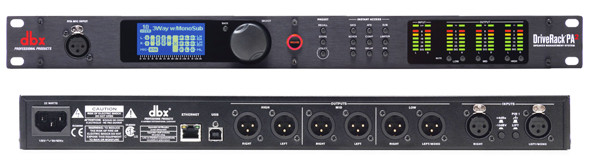
This guide goes deep on what the specifications actually mean in a working PA rig, where the PA2's processing genuinely outperforms doing it by hand, and — just as importantly — where it doesn't. If you want the short version: it's the most capable sub-$1,000 loudspeaker management processor on the Australian market, and its value depends almost entirely on whether you're running passive multi-way systems or self-powered boxes.
Technical Overview: What's Actually Inside
Before the feature-by-feature breakdown, here's the full specification picture. The numbers below are the ones worth caring about when you're comparing processors.
| Specification | dbx DriveRack PA2 | What It Means in Practice |
|---|---|---|
| Configuration | 2-in / 6-out | Stereo input, up to 3-way stereo or complex mono outputs |
| DSP | 32-bit floating point | Enormous internal headroom — no internal clipping between processing blocks |
| Sample Rate | 96 kHz | Doubled Nyquist ceiling; gentler anti-alias filtering, less HF phase smear |
| A/D–D/A Conversion | 24-bit | Standard pro converter depth; ~110 dB usable dynamic range |
| Dynamic Range | >110 dB (A-weighted) | Noise floor stays well below the room floor in any live venue |
| THD+N | <0.003% | Effectively transparent — an order of magnitude below speaker distortion |
| Frequency Response | 20 Hz – 20 kHz, ±0.5 dB | Flat through the audible band; no baked-in colouration |
| Inputs | 2 × XLR balanced, +20 dBu max | Handles hot console outputs without pad gymnastics |
| Outputs | 6 × XLR balanced, +20 dBu max | Direct to amps or powered tops/subs |
| Input Impedance | >50 kΩ balanced | Won't load down any console output stage |
| Output Impedance | 120 Ω balanced | Drives long XLR runs to amp racks without HF loss |
| Latency | ~1.0 ms (typical processing path) | Below the threshold where comb filtering with stage wash matters |
| Control | Wi-Fi (iOS/Android/PC/Mac), USB, front-panel colour LCD | Tune from the room, not from behind the rack |
| Format | 1U rack, ~2.1 kg | Fits any amp rack or FOH case |
Why 32-bit Floating Point Actually Matters Here
This is the single most under-explained spec on processors in this class, so it's worth unpacking properly.
A fixed-point DSP has a hard ceiling. Every processing block — EQ, compressor, crossover — has to stay inside a defined numerical range, and if you boost an EQ band hard enough, you can clip internally even though your input and output meters look fine. Cheaper processors manage this by conservatively attenuating between stages, which quietly costs you signal-to-noise ratio.
Floating point sidesteps the whole problem. The 32-bit float format carries a separate exponent, giving an internal dynamic range measured in the hundreds of dB. In practice: you can stack a 12 dB low-shelf boost, a parametric notch, a crossover and a limiter in series without a single internal overflow. The gain structure inside the box stops being something you have to manage.
Does it change the sound in a way you'd pick in a blind test? Under normal settings, no. Where it shows up is at the extremes — heavy corrective EQ on a difficult room, or aggressive subharmonic processing — where a fixed-point unit starts sounding brittle and the PA2 just does what you asked.
The 96 kHz Question
Be sceptical of anyone claiming 96 kHz sounds obviously better than 48 kHz for live PA. It doesn't, and the marketing around sample rates is generally overblown.
What 96 kHz genuinely buys you in a processor like this is filter behaviour near the top of the audible band. At 48 kHz, your Nyquist limit is 24 kHz, so anti-aliasing filters have to be steep and they start affecting phase from roughly 15 kHz upward. At 96 kHz, that transition band moves out to 48 kHz, so the filters can be gentle and the audible band stays phase-clean. Combined with the PA2's crossover filters — which are also computed at 96 kHz — the practical benefit is better-behaved phase response through the crossover region. That's audible, particularly on a 3-way system where you've got two crossover points in the vocal range's neighbourhood.
Advanced Feedback Suppression: How It Actually Works
AFS is the feature most people buy the PA2 for, and it's the one most often misunderstood. Here's the real mechanism.
The PA2 runs 12 independent AFS filters, and they split into two categories:
- Fixed filters — set during the pre-show ringing-out wizard. These lock in and don't move. They handle the room's inherent resonances: the modes that will feed back regardless of what happens during the show.
- Live filters — active during performance. These deploy dynamically when new feedback emerges, then recycle on a first-in-first-out basis so you never run out mid-set.
The detection algorithm doesn't just look for a loud frequency. It looks for a narrow-band signal with a steady, rising amplitude envelope and a stable frequency — the signature of an acoustic feedback loop building up, which is distinct from a sustained vocal note or a held guitar chord. That distinction is why AFS doesn't chew holes in a singer's sustained notes the way crude auto-notchers do.
The filters themselves are very narrow — typically 1/10th octave or tighter — and dbx calls this approach Precision Filtering. A 1/10-octave notch at 2.5 kHz removes roughly 170 Hz of bandwidth. Your ear largely doesn't register that as tonal change, but it's enough to break the feedback loop.
Realistic Expectations: The Gain-Before-Feedback Numbers
Here's the honest technical assessment, because the marketing tends to imply miracles.
In a typical small-to-medium venue with a reasonably sane microphone position, a properly rung-out AFS setup will get you roughly 4–6 dB of additional gain before feedback. Occasionally more in a problem room with a couple of dominant modes; sometimes as little as 3 dB in a well-behaved space that didn't have much to fix.
Four to six dB doesn't sound like much written down. In a live context it's the difference between a vocalist being buried and being clearly on top of the band. It's roughly equivalent to doubling your effective acoustic power for the vocal channel.
What it won't fix:
- A wedge pointed at the back of a cardioid mic. Physics beats DSP.
- An omnidirectional lavalier under a chin, 3 metres in front of the mains.
- Broadband feedback across many frequencies simultaneously — that's a gain structure or coverage problem, not a notch problem.
- Sustained howl in a highly reverberant space (church halls with hard surfaces are the classic case) where the feedback path is diffuse rather than a distinct mode.
The correct mental model: AFS is an optimiser, not a rescue system. Fix your mic placement and gain structure first, then let AFS harvest the last few dB.
Check current pricing and availability on the dbx DriveRack PA2 at MusiconStage — it's a standard fit in most Australian hire and install racks.
AutoEQ and the Wizard: Automated Room Tuning Assessed
The PA2 includes a measurement microphone (the RTA-M reference mic) in the complete package, and runs a guided setup wizard that handles speaker selection, amplifier matching, crossover configuration, and then an automated room EQ pass.
The AutoEQ process works like this: the unit generates pink noise through the system, the RTA-M captures the room response at your listening position, and the DSP computes corrective EQ to align the measured response against a target curve. You can then choose from several target curves depending on programme material.
How Good Is Automated EQ, Really?
This deserves a straight answer rather than a sales pitch.
Where AutoEQ is genuinely strong: broadband tonal balance. If your system is 6 dB hot in the 200–400 Hz region because of a low stage and a nearby back wall, AutoEQ will identify and correct that reliably. It's very good at getting you from "wrong" to "reasonable" in three minutes.
Where it's limited: single-point measurement. One microphone at one location captures one position's response, including that position's specific comb filtering and modal nulls. Correcting a deep null at one seat can make the rest of the room worse, because nulls are position-dependent cancellations, not system deficiencies. Serious system tuning uses spatial averaging across multiple positions for exactly this reason.
The practical workflow that works best: run AutoEQ from a position about two-thirds back in the room, on-axis, at head height. Then review the resulting curve and manually pull back any correction deeper than about 6 dB — those are almost always position-specific nulls that shouldn't be boosted or notched aggressively. Then trust your ears with music you know.
Treated as a fast, intelligent starting point rather than a final answer, AutoEQ earns its place. Treated as gospel, it'll occasionally make things worse.
Crossover Architecture: Where the PA2 Earns Its Money
This is the section that determines whether the PA2 is a smart purchase or an expensive EQ for your rig.
The 6-output configuration supports several routing topologies:
| Configuration | Output Use | Typical Application |
|---|---|---|
| 2-way stereo + mono sub | L-hi, L-lo, R-hi, R-lo, sub, spare | Most common — passive 2-way tops with subs |
| 3-way stereo | L/R × hi, mid, lo | Larger passive systems, tri-amped tops |
| 2-way stereo + 2 aux | Mains bi-amped, plus zone/fill feeds | Install work with delay zones |
| Full-range + subs | Powered tops fed full-range, subs crossed | Self-powered rigs |
Crossover filters are selectable per output: Butterworth, Bessel and Linkwitz-Riley, with slopes from 6 dB/octave to 48 dB/octave.
The filter choice matters more than most people realise:
- Linkwitz-Riley 24 dB/oct — the default for good reason. Both drivers are 6 dB down at the crossover point and sum flat with in-phase drivers. This is the standard for main system crossovers.
- Butterworth 24 dB/oct — 3 dB down at crossover, which sums to a +3 dB bump unless one driver is polarity-inverted. Useful in specific situations, wrong as a default.
- Bessel — best phase linearity, gentler amplitude behaviour. Occasionally the right call on sub-to-top crossovers where transient integrity matters more than isolation.
- 48 dB/oct — steep protection for drivers being pushed hard, at the cost of more phase rotation through the crossover region.
Combined with per-output alignment delay (adjustable in milliseconds, feet or metres) and independent limiters, this is genuinely capable system processing. You can time-align a sub array behind a line of tops, protect each driver band with its own limiter threshold, and shape each band independently.
The Critical Buying Consideration
Here's the thing worth being blunt about: if you run modern self-powered speakers, you're paying for crossover and limiting capability that's already built into your boxes.
An RCF ART, a QSC K.2, a JBL EON700, a dB Technologies B-Hype — every one of these has its own DSP, its own factory-optimised crossover, and its own driver protection tuned to that specific cabinet by the people who designed it. Putting a PA2 in front and adding a second crossover doesn't help; it duplicates the function.
For those rigs, you're buying the PA2 for AFS, AutoEQ, delay and subharmonic synthesis — real value, but a narrower proposition. Budget accordingly.
Where the PA2 is unambiguously the right tool: passive systems driven by dumb power amps. A pair of passive 15-inch tops and a couple of passive subs on Crown or QSC amps — the PA2 is doing the crossover, the driver protection, the time alignment and the room correction. Nothing else in the signal chain does that job.
Signal Chain Order and the Processing Blocks
The internal chain runs in a fixed order, and understanding it explains a lot of behaviour:
- Input Gain — level trim per input
- Graphic EQ — 31-band, per input
- AFS — 12 filters, feedback suppression
- Subharmonic Synthesiser — bass extension
- Compressor — programme-level dynamics control
- Crossover — band splitting to outputs
- Parametric EQ — 8 bands per output
- Alignment Delay — per output
- Limiter — per output, driver protection
Two things follow from this ordering that catch people out.
The compressor sits before the crossover. That means it's a full-bandwidth programme compressor — a kick drum will duck your vocals, because they share the compressor. It's for gentle overall control (2:1, a few dB of reduction), not for surgical dynamics work. Do that at the console.
Limiters sit last, per output. This is correct and important: your limiter threshold protects a specific driver on a specific amp, and it needs to be the final thing before the signal leaves. Set these based on your amplifier's output voltage and your driver's power handling — not by ear.
Setting Limiter Thresholds Properly
Most PA2 users leave limiters at defaults, which is a missed opportunity and a genuine risk to drivers.
The calculation: take your driver's continuous power handling and your amplifier's rated output into the driver's impedance. Work out the voltage that corresponds to the driver's safe continuous power (V = √(P × R)), then set your limiter so the amp never exceeds it. For a 400 W continuous driver at 8 Ω, that's √(400 × 8) ≈ 56.6 V RMS. If your amp puts out 100 V RMS at full tilt, you need roughly 5 dB of limiting headroom below clip.
The PA2's limiters are peak-style with adjustable threshold and an OverEasy option for a softer knee. For driver protection, hard-knee is the right choice — you want the ceiling to be a ceiling.
Subharmonic Synthesiser: Useful or Gimmick?
The subharmonic synth generates content an octave below a selected input band, adding low-frequency weight that isn't in the source material.
Honest assessment: it's genuinely useful for DJ and electronic playback, and a bad idea for most live bands.
For a DJ set through a modest sub, adding synthesised content at 40–50 Hz can add real perceived weight. For a live band, you already have a kick drum and a bass guitar producing genuine low end — synthesising more just muddies the region and eats amplifier headroom on content nobody asked for.
If you use it, keep it subtle and watch your sub limiters. Synthesised subharmonics are power-hungry, and it's an easy way to send a sub driver into excursion limits without the meters looking alarming.
Technical Comparison: The PA2 Against Its Alternatives
| Consideration | dbx DriveRack PA2 | Behringer DCX2496 | Speaker-Built-In DSP | Console-Based Processing |
|---|---|---|---|---|
| Config | 2-in / 6-out | 3-in / 6-out | Per-cabinet only | Varies by desk |
| Feedback suppression | 12-filter AFS, adaptive | None | None | Sometimes, varies |
| Automated room EQ | Yes, with RTA mic included | No | No | Rare |
| Crossover quality | Excellent, 96 kHz, all filter types | Very good, 96 kHz | Factory-optimised for that box | Usually none |
| Wireless control | Wi-Fi app, full parameter access | No | Some models | Yes, on digital desks |
| Setup difficulty | Wizard-guided, beginner-friendly | Manual, expert-oriented | Zero | Moderate |
| Best fit | Passive systems, mixed skill crews | Experienced techs, install | Powered rigs | Digital-desk rigs |
PA2 vs Behringer DCX2496
The DCX2496 is the perennial value comparison, and it's a legitimately good crossover — arguably a more flexible pure crossover than the PA2, with three inputs and a well-regarded filter implementation.
What it doesn't have: AFS, AutoEQ, the measurement mic, the wizard, or wireless control. The DCX2496 assumes you know exactly what you're doing and gives you the tools. The PA2 assumes you might not, and walks you through it — while still letting you override everything manually.
If you're an experienced system tech who tunes with Smaart and already knows your crossover points, the DCX2496 does the core job for less. If you're a band running your own PA, a hire company where different crew members set up the rig, or a venue where the person patching things isn't necessarily a specialist, the PA2's guided approach and feedback protection are worth the difference.
PA2 vs Doing It on a Digital Console
A modern digital desk gives you output EQ, delay and limiting on the mains bus. That covers some of the PA2's territory — but almost none of them do genuine multi-way crossover duty with per-band limiting, and very few do adaptive feedback suppression on the main output.
The other argument for a dedicated processor: the tuning stays with the PA, not the desk. Your system tuning, crossover points, driver limiters and delay alignment belong to the speakers and amps. Keeping them in a rack unit that travels with the amp rack means swapping consoles doesn't cost you your system setup. That's an operational advantage that matters more than it first appears, particularly for hire stock.
Real-World Setup: What Actually Works
A workflow that gets good results consistently:
- Run the wizard first, honestly. Select your actual speaker model if it's in the library, or the closest generic match by driver size. The library entries carry manufacturer-supplied crossover and limiter data — that's genuinely valuable and hard to derive yourself.
- Verify polarity before anything else. Play pink noise, walk the crossover region, listen for the characteristic thinness of an inverted driver. AutoEQ cannot fix a polarity error; it'll just try to EQ around a cancellation.
- Set gain structure before AutoEQ. Console output at a healthy operating level, PA2 input meters showing signal without approaching clip, amps set to a sensible sensitivity. Room tuning on top of bad gain structure is polishing the wrong thing.
- AutoEQ from two-thirds back, on-axis, head height. Then review the curve and moderate anything over 6 dB.
- Ring out AFS with the actual microphones, at the actual positions, with the stage set. Doing it with a different mic or before the wedges are placed produces filters that address the wrong resonances.
- Save the preset with a descriptive name. The PA2 holds 25 user presets. For a hire company or a band playing a circuit of regular venues, having per-venue presets is the single biggest time saver the unit offers.
- Set output limiters from the driver and amp specs, not by ear.
Technical FAQs
Does the PA2 add latency I need to worry about?
Roughly 1 ms through the typical processing path — about the same as moving a speaker 34 cm further away. It's irrelevant for FOH. The one place to think about it: if you run wedges direct from the console and mains through the PA2, there's a 1 ms offset between them. In practice that's inaudible, but it's worth knowing if you're chasing a comb-filtering issue and running out of explanations.
Can I use it with powered speakers?
Yes, and plenty of people do. Feed powered tops full-range and use the PA2 for AFS, room EQ and delay. Just don't add a second crossover in front of a cabinet that already has one internally — you'll get overlapping filters and a phase mess through the crossover region. Set the output to full-range for those feeds.
How reliable is the Wi-Fi control in a live venue?
The onboard Wi-Fi works fine in a quiet RF environment. In a crowded 2.4 GHz venue — a pub with a dozen access points and 200 phones — expect intermittent drops. It's a tuning tool, not a live mixing surface, and every parameter is available on the front panel, so a dropout is an inconvenience rather than a failure. If reliability matters, run the unit off a dedicated router via Ethernet rather than its own hotspot.
Is the RTA-M microphone any good?
It's a competent measurement mic — reasonably flat, adequately consistent, and calibrated well enough for the corrections the PA2 applies. It's not a Earthworks or an NTi reference mic, and if you're doing serious multi-point analysis in Smaart you'd want something better. For the PA2's own AutoEQ routine, it's entirely fit for purpose.
Does it store settings if power is lost?
Yes — presets are stored in non-volatile memory and the unit reloads its last active preset on power-up. Standard behaviour for the category, but worth confirming for anyone running an unattended install.
How does it handle 240 V Australian mains?
Australian-supplied units ship with the correct mains configuration and an IEC inlet. If you're considering a grey import, check the voltage rating before you plug it in — and note that grey stock generally won't carry local warranty support.
Honest Limitations
Things worth knowing before you buy:
- Two inputs only. No matrix mixing, no independent zone sources. It's a main-system processor, not an install matrix.
- Analogue I/O only. No AES, no Dante. In a digital-networked rig, you're converting to analogue and back.
- Front-panel editing is workable but slow. The colour screen is a big improvement over the old PA+, but deep parameter work really wants the app or the computer software.
- Single-point AutoEQ. Covered above — it's a starting point, not a substitute for proper spatial-average measurement.
- The compressor is pre-crossover and full-band. Limited usefulness for anything beyond gentle programme control.
- Redundant for fully self-powered rigs. The crossover and limiting sections — the majority of the DSP — go unused.
Who Should Buy This
| You Are | Verdict | Reasoning |
|---|---|---|
| Running passive tops + passive subs on power amps | Buy it | Core use case — crossover, protection, alignment, room EQ in one box |
| Band running your own PA, no dedicated tech | Strong buy | The wizard and AFS do the work an absent engineer would do |
| Hire company with mixed-skill crew | Strong buy | Per-venue presets and guided setup make results repeatable |
| Church or community hall install | Buy it | AFS on lapel and lectern mics in a reverberant space is the killer feature |
| All-powered rig, digital console | Consider carefully | You'd be buying AFS and AutoEQ only — real value, but a narrower one |
| Experienced tech with Smaart and a tuning workflow | Look at alternatives | You don't need the automation; a pure crossover may serve better |
| Home studio use | Skip it | Wrong tool entirely — this is live-sound system processing |
The Technical Verdict
The DriveRack PA2 is a well-engineered piece of DSP with specifications that hold up under scrutiny — 32-bit floating point processing, 96 kHz throughout, genuinely transparent conversion, and a crossover section with the filter options and slope range you'd want in far more expensive gear. The measurement microphone in the box and the guided wizard mean the capability is actually reachable, not just present on a spec sheet.
Its real achievement is compressing decisions that normally require a trained system tech — crossover points, filter alignment, limiter thresholds, room correction — into a workflow that a competent musician can follow and get a defensible result from. That's a meaningful piece of engineering, and it's why the DriveRack line has stayed the category default for over two decades.
The caveat remains the one worth repeating: match it to your system topology. On a passive multi-way rig it's close to essential. On an all-powered rig it's a good feedback suppressor and room EQ with a lot of unused capability. Know which purchase you're making.
View the dbx DriveRack PA2 Complete Sound Management system at MusiconStage for current Australian pricing, stock and warranty details — and get in touch if you want a hand working out whether it suits your specific speaker and amplifier combination.