
DBX DriveRack PA2: Real-World Sound Setups for Aussie Gigs 2026
DBX DriveRack PA2: How It Actually Performs in Real Australian Sound Setups (2026)
If you've ever set up a PA in a dodgy-sounding function room, watched a wedge feedback squeal during soundcheck, or blown a driver because someone pushed the amps too hard, you already understand why a loudspeaker management processor earns its rack space. The DBX DriveRack PA2 is one of those bits of gear that quietly solves half a dozen headaches at once — and once you've run a system with one, going back feels like driving without power steering.
This isn't a spec-sheet recital. Instead, let's walk through how the DriveRack PA2 actually gets used in the field: the venues, the gigs, the hire jobs, and the situations where it genuinely earns its keep versus where it's overkill.
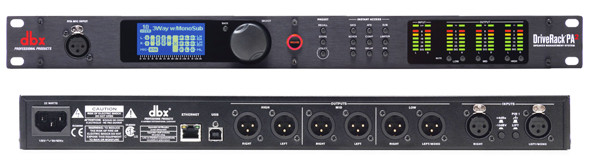
What the DriveRack PA2 Actually Does (in Plain English)
Sitting between your mixer and your amplifiers (or powered speakers), the PA2 is a complete signal-processing hub. In one 1U box you get a graphic and parametric EQ, crossovers, compression/limiting, feedback suppression, a real-time analyser with automatic room tuning, and speaker/amp presets for a huge range of gear. The idea is simple: everything that happens to your sound after the mix and before the speakers lives here, in one tidy place you control from the front panel, a laptop, or a phone.
The headline feature most people buy it for is the Auto EQ and Auto Level (Advanced Feedback Suppression) wizard. You plug in the included RTA measurement mic, run the setup routine, and the PA2 measures the room and automatically tames the problem frequencies that make a space sound boomy, harsh, or prone to feedback. For anyone who isn't a full-time system engineer, that's a game-changer.
Real-World Scenario 1: The Small-to-Medium Venue Install
Picture a suburban RSL, a community hall, or a mid-sized pub that hosts live bands and functions. The room sounds different every night depending on whether it's packed or half-empty, and the staff running sound often aren't trained engineers — they're bar managers who drew the short straw.
This is arguably the PA2's sweet spot. Once it's installed and the system's been tuned, you can lock the settings behind a security PIN so nobody "helpfully" cranks the sub or resets the EQ. The limiters protect the speakers from an over-enthusiastic band pushing the mains into distortion, which in a fixed install directly translates to fewer blown drivers and fewer expensive callouts.
- Set and forget reliability — tune it once, lock it, walk away.
- Speaker protection — limiters stop amateur operators frying the rig.
- Consistent sound — the room tuning smooths out that boxy hall sound most community spaces suffer from.
Where it struggles: if your install has genuinely complex zoning needs — multiple rooms, delay lines down a long space, or a dozen output zones — you'll outgrow the PA2's 2-in/6-out architecture and want something bigger. For a single-room live space, though, it's ideal.
Real-World Scenario 2: Mobile DJs and Hire Companies
If you're a mobile operator, every gig is a different room and you rarely get more than an hour to set up. One week it's a marble-floored reception centre that rings like a bell; the next it's a carpeted function room that swallows all your top end.
The PA2 rides in your rack and adapts to each of them. Roll in, patch it up, run the Auto EQ wizard while you're taping down cables, and by the time you're testing the mic the system already sounds tuned to that space. For Australian hire operators bouncing between wineries, surf clubs, marquees and hotel ballrooms, that repeatability is worth real money — it makes you sound like you know what you're doing even when you're solo and rushed.
The Wi-Fi control is genuinely useful here too. You can walk out to where the guests will actually be standing, phone in hand, and tweak the EQ from the dance floor rather than guessing from behind the booth. Tuning from the listening position instead of the desk is one of those small changes that makes a big audible difference.
Check current pricing and availability on the DBX DriveRack PA2 here.
Real-World Scenario 3: The Gigging Band Running Their Own Sound
Plenty of pub and covers bands around Australia carry their own PA because the venues don't provide one, and there's rarely a dedicated sound tech — the bass player or the drummer's mate mixes from the side of stage between songs.
For these bands, the two features that pay off immediately are feedback suppression and limiting. The AFS catches those ringing frequencies before they take off into a howl during a vocal-heavy number, and the limiters mean you can trust the system won't self-destruct when the energy ramps up in the last set. You get a cleaner, louder, more reliable front-of-house without needing a trained engineer riding the faders all night.
Honest limitation: the PA2 is not a monitor-mix or in-ear solution, and it won't fix a bad mix. It processes the whole system, not individual channels. If your vocals are buried because the gain structure on the desk is wrong, no amount of room tuning saves you — sort the mixer first, then let the PA2 polish the result.
Real-World Scenario 4: Houses of Worship and Speech-Heavy Spaces
Churches, meeting halls and conference rooms live and die on speech intelligibility, and these buildings are often acoustic nightmares — hard surfaces, high ceilings, lots of reflections. Roving lapel and handheld mics make feedback a constant threat.
The PA2's combination of parametric EQ (to notch out the exact ringing frequencies) and Advanced Feedback Suppression is tailor-made for this. Volunteers running the desk each week don't need to understand acoustics — the system's already been tuned to hold gain-before-feedback, so a wireless mic can be walked right up to the speakers with far less risk of that dreaded squeal mid-sermon.
Setting It Up: What to Expect on the Day
Here's a realistic walk-through of a first setup rather than a marketing promise:
- Patch it in — mixer output into the PA2 inputs, PA2 outputs to your amps or powered speakers.
- Load your speaker preset — the PA2 has a big library of tunings for popular speaker and amp brands. Load the closest match to your rig as a starting point.
- Run Auto EQ with the RTA mic — place the included mic at the listening position, run the wizard, and let it measure and correct the room.
- Run the AFS wizard — this identifies and sets feedback filters so you get maximum clean volume.
- Trust your ears for the final tweak — the auto tuning gets you 90% there; a small manual EQ nudge to taste finishes the job.
Most people are up and running in well under half an hour once they've done it a couple of times. The learning curve is gentle for the basics and deeper if you want to hand-tune crossovers and parametric bands.
How It Compares in the Same Job
The obvious question is whether you need it at all when many modern powered speakers have onboard DSP. The difference is system-wide, centralised control. Onboard speaker DSP handles that one box; the PA2 tunes and protects your entire rig — mains, subs and all — as one coordinated system, with room correction those onboard presets simply don't offer.
Against bigger, pricier processors, the PA2 trades expandability for approachability and value. Higher-end units give you more inputs, outputs and zones, but they also assume you know what you're doing and cost considerably more. For the single-room live-sound, hire and worship jobs described above, the PA2 hits the practical sweet spot — enough power to matter, simple enough that non-specialists get great results.
- Choose the PA2 over onboard DSP when you want room tuning and unified control of a whole system.
- Choose the PA2 over a bigger processor when you're running one main zone and value the auto-setup wizards and price.
- Look higher up the range only if you genuinely need multi-zone routing or complex delay setups.
Practical Tips to Get the Most From It
- Always tune from where people actually listen, not from behind the console — use the Wi-Fi app and walk the room.
- Re-run the room tune once the venue fills up if you can; bodies absorb high frequencies and change the sound.
- Set your limiters properly to your amp/speaker rating — this is your insurance policy against blown drivers, so don't skip it.
- Lock the settings on installs so the tuning survives contact with the public.
- Load the correct speaker preset first — starting from the right tuning saves you a lot of manual EQ work.
Common Mistakes to Avoid
The biggest one is treating the PA2 as a magic fix for a broken mix — it processes the system, so your gain structure and desk mix need to be right first. The second is skipping the limiter setup because it's boring; that's precisely the safety net that saves your speakers on the loud nights. And third, don't run the Auto EQ once in an empty room and assume it's perfect forever — the best operators re-check once the crowd's in.
Frequently Asked Questions
Is the DriveRack PA2 hard to use for a beginner?
The guided wizards make the core setup genuinely beginner-friendly — you can get a great-sounding, protected system without deep audio training. The advanced manual controls are there when you're ready to grow into them.
Does it work with powered (active) speakers?
Yes. You can run its outputs into powered speakers, though you'll bypass some crossover functions since the speakers handle that internally. You still get the room tuning, EQ, feedback suppression and limiting across the system.
Can I control it wirelessly?
Yes — it has built-in Wi-Fi so you can tune from a phone or tablet out in the room, which is one of its most practical everyday features.
Will it stop feedback completely?
It dramatically reduces it and buys you more clean volume before feedback, but no processor makes a badly placed mic pointed at a speaker immune. Think of it as a strong safety margin, not a force field.
The Verdict: Who Should Buy It
The DBX DriveRack PA2 is the right call if you run a single-room live system and want it to sound tuned, protected and consistent without hiring a full-time engineer — mobile DJs, hire companies, gigging bands, small venues and worship spaces all fall squarely in its wheelhouse. It's not the tool for complex multi-zone installs, and it won't rescue a bad mix, but for the everyday reality of Australian live sound it delivers professional results with a refreshingly gentle learning curve.
If your rig currently sounds different every night and you're tired of chasing feedback and blown drivers, this is the box that fixes it.
View the DBX DriveRack PA2 and secure yours at MusiconStage today.