
DBX DriveRack PA2 Explained: Beginner's Guide to Sound Management 2026
DBX DriveRack PA2 Explained: A Beginner's Guide to Complete Sound Management in 2026
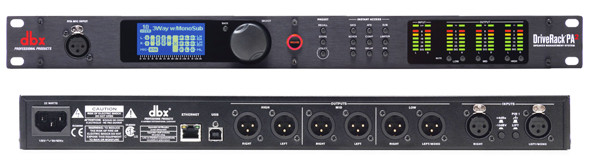
If you've ever set up a PA system and thought, "There has to be something that makes all this sound better without me needing an audio engineering degree," — you've just described exactly why the DBX DriveRack PA2 exists.
Whether you're running sound for a local pub, a community hall, a church, or your own band, this guide will walk you through everything you need to know about speaker management systems, what the DriveRack PA2 actually does, and why so many Australian sound operators consider it essential gear. No jargon overload. No assumptions about what you already know. Let's start from scratch.
What Is a Speaker Management System? (And Why Should You Care?)
Before we talk about the DriveRack PA2 specifically, let's tackle the bigger question: what is a speaker management system, and why would anyone need one?
Think of your PA system like a car. Your mixer is the steering wheel — it controls where the sound goes and how loud each element is. Your amplifiers are the engine — they provide the power. Your speakers are the wheels — they deliver the sound to the audience.
But here's the thing most beginners don't realise: between your mixer and your amplifiers, there's a critical gap. Without something in that gap, you're essentially driving without a transmission, without suspension, and without any safety systems. The car will move, sure — but the ride will be rough, inefficient, and potentially damaging.
A speaker management system sits in that gap. It processes, optimises, and protects your audio signal before it reaches your amplifiers and speakers. It's the part that makes everything work properly rather than just work.
What Does It Actually Do?
A speaker management system like the DriveRack PA2 handles several jobs simultaneously:
- Crossover: Splits your audio signal so the right frequencies go to the right speakers (lows to subwoofers, highs to tweeters)
- Equalisation (EQ): Adjusts the tonal balance so your system sounds natural in the room you're in
- Limiting: Prevents your speakers and amplifiers from being damaged by sudden volume spikes
- Delay alignment: Ensures all your speakers work together in time, so the sound doesn't arrive at odd intervals
- Feedback suppression: Helps eliminate that horrible screeching sound when microphones pick up their own output
Without a speaker management system, you'd need separate pieces of equipment for each of these jobs — or you'd simply go without them, which means worse sound and a higher risk of blowing your gear.
Enter the DBX DriveRack PA2: What Makes It Special
The DBX DriveRack PA2 is what's known as a complete loudspeaker management system. It takes all those functions listed above and puts them into a single, rack-mountable unit. DBX (a brand owned by Harman Professional, the same group behind JBL, AKG, and Crown) has been making signal processors since the 1970s, so this isn't some newcomer having a crack — they genuinely wrote the book on audio processing.
The PA2 is the successor to the hugely popular original DriveRack PA, and it's been designed specifically for live sound applications — bands, DJs, venues, houses of worship, corporate events, and portable PA setups.
Key Features Explained Simply
Let's break down the PA2's main features in plain English:
1. Setup Wizard with Auto-EQ
This is probably the PA2's biggest selling point for beginners, and honestly, it's brilliant. The unit walks you through setting up your entire system step by step. You tell it what speakers and amplifiers you're using (it has a massive built-in database of common brands and models), and it automatically configures the crossover points, limiters, and EQ settings to match your specific gear.
But it goes further. Using an included measurement microphone, the PA2 can "listen" to your room and automatically adjust the EQ to compensate for the acoustic quirks of whatever space you're in. A concrete warehouse sounds completely different to a carpeted function room — the PA2 handles that for you.
Why this matters for beginners: You don't need to know what a crossover frequency is or how to set limiter thresholds. The wizard does the heavy lifting. You can always tweak things manually later as you learn, but out of the gate, you'll get sound that's dramatically better than running without processing.
2. Advanced Feedback Suppression (AFS)
Feedback — that ear-piercing screech when a microphone picks up its own amplified sound — is the single most common problem beginners face with PA systems. The PA2's Advanced Feedback Suppression system uses intelligent filters to identify and eliminate feedback frequencies before they become a problem.
It works in two modes:
- Fixed filters: Set during soundcheck to lock in known problem frequencies
- Live filters: Operate during your event, catching feedback in real time as conditions change (someone moves a mic, the room fills with people, etc.)
Why this matters: Feedback doesn't just sound terrible — it can damage speakers and hearing. Having a reliable feedback suppression system is like having a safety net. It won't replace good microphone technique, but it's there when things go sideways.
3. Crossover and Speaker Tuning
If you're running a system with separate subwoofers and top speakers (which most proper PA setups do), you need a crossover. This splits the audio signal so low frequencies go to your subs and mid/high frequencies go to your tops.
The PA2 handles this with precision, and because it knows your specific speaker models (from the setup wizard), it sets the crossover point exactly where your manufacturer intended. Get this wrong, and your speakers will sound muddy, thin, or strained. Get it right, and everything just clicks into place.
4. Limiters and Speaker Protection
Here's something that saves beginners a lot of money in the long run: the PA2 protects your speakers and amplifiers from being overdriven. Push too much power into a speaker and you'll blow it — that's an expensive mistake. The PA2's limiters act like a safety valve, keeping levels in check even when the drummer's mate decides to crank the vocal mic.
When configured with your specific speaker models, it knows exactly how much those speakers can handle and sets the limits accordingly.
5. Smartphone and Tablet Control
The PA2 connects to your iOS or Android device via Bluetooth, giving you wireless control from anywhere in the venue. This is genuinely useful — you can walk around the room, listen to how things sound in different spots, and make adjustments without running back to the rack.
The companion app provides access to the setup wizard, EQ adjustments, level controls, and more. It's well-designed and makes the whole experience much more approachable for someone who's not used to staring at a rack of equipment.
6. Professional-Grade Processing
Under the hood, the PA2 uses the same DSP (Digital Signal Processing) technology found in gear costing significantly more. You're getting:
- Parametric EQ: Precise tonal control across the frequency spectrum
- Graphic EQ: Visual, intuitive equalisation
- Compressor/Limiter: Dynamic control for consistent levels
- Alignment delay: Time-align speakers for coherent sound
- Subharmonic synthesis: Adds perceived low-end depth to smaller subs
Who Actually Needs a DriveRack PA2?
Let's be honest about who benefits most from this unit:
You Definitely Need This If:
- You run a portable PA system for gigs, events, or functions — the room-correction alone justifies the investment
- You're a band running your own sound without a dedicated sound engineer — the setup wizard is a game-changer
- You manage a venue with a permanently installed system — set it up once, and it protects your investment every single night
- You handle sound for a church or community group where volunteers (not audio professionals) are running the desk
- You're a DJ who brings their own speaker system to events
You Might Not Need This If:
- You're using a small, single all-in-one powered speaker for background music — the PA2 is designed for more complex systems
- Your powered speakers already have built-in DSP with crossover and limiting (though the PA2's room correction and feedback suppression still add value)
- You're using a high-end digital mixer that already includes speaker processing outputs
Common Beginner Mistakes the PA2 Helps You Avoid
Here are real-world problems that beginners run into — and how the PA2 addresses them:
- Blowing speakers by running them too hard: The PA2's limiters prevent this. Properly configured, they'll keep your speakers safe even when someone goes too heavy on the volume.
- Terrible sound in difficult rooms: Concrete walls, low ceilings, glass windows — these all create acoustic nightmares. The auto-EQ measures and compensates for the room, giving you a dramatically better starting point.
- Feedback during events: Instead of frantically pulling faders down when feedback starts, the AFS system catches it automatically. You still need to manage your gain structure properly, but you've got backup.
- Mismatched crossover settings: Running full-range audio into your subwoofers wastes power and muddies the sound. The PA2 sets precise crossover points based on your actual speakers.
- Inconsistent sound from gig to gig: Because the PA2 stores presets, you can recall your settings instantly. And because it re-measures each room, you get consistency where it matters.
Setting Up the DriveRack PA2: What to Expect
If you're new to rack gear, here's what the setup process actually looks like:
Physical Setup
The PA2 is a standard single rack-space unit (1U), meaning it fits in any standard 19-inch equipment rack. It sits in your signal chain after your mixer and before your amplifiers. The connections are straightforward:
- Run your mixer's main output into the PA2's input (XLR connectors)
- Run the PA2's outputs to your amplifiers (or directly to powered speakers)
- That's essentially it for the physical connection
Software Setup
This is where the magic happens. Fire up the PA2 (either from the front panel or the smartphone app), and the Setup Wizard guides you through:
- Selecting your speakers: Choose your exact models from the database, or enter custom settings
- Selecting your amplifiers: Same process — it tailors the limiters to your specific amp/speaker combination
- Running Auto-EQ: Place the included measurement microphone where the audience will be, and the system plays test tones and measures the room response
- Feedback suppression setup: With all your microphones on, slowly raise the gain until feedback begins — the AFS locks in the problem frequencies
Realistic time expectation: First-time setup takes about 20-30 minutes. Once you've done it a couple of times and saved presets for your common setups, you can be ready in under 10 minutes at a new venue.
Where Does the PA2 Fit in Your Budget?
The DriveRack PA2 sits in the mid-range price bracket for speaker management systems. It's not the cheapest option available, but it represents genuine value when you consider what it replaces. Without it, you'd potentially need:
- A separate crossover unit
- A graphic EQ
- A feedback suppressor
- Speaker limiters
- A measurement system
Buying all of those separately would cost significantly more than a single PA2, take up more rack space, and require far more technical knowledge to configure.
For beginners building their first proper PA system, the PA2 is one of those investments that pays for itself — both in better sound quality and in speaker protection. Blowing even one driver because you didn't have proper limiting can cost more than the PA2 itself.
Frequently Asked Questions from Beginners
"Can I use this with powered speakers?"
Yes. Even though powered speakers have built-in amplifiers (and sometimes basic DSP), the PA2 still adds significant value through its room correction, feedback suppression, and more precise crossover management. You simply run the PA2's outputs directly into the inputs of your powered speakers.
"Do I need the measurement microphone?"
The PA2 comes with an RTA-M measurement microphone included. You don't need to use the auto-EQ feature, but it's one of the most valuable things this unit does. Use it.
"Will this work with any brand of speakers?"
Absolutely. While the built-in database includes hundreds of popular speaker models from brands like JBL, Yamaha, QSC, EV, and many others, you can also configure it manually for any speakers. The database just makes setup faster.
"Is this hard to learn?"
Honestly, the setup wizard makes it remarkably approachable. If you can follow on-screen prompts on your phone, you can configure the PA2. Understanding why it's doing what it does takes more time and learning, but getting great results doesn't require that deeper knowledge straight away.
"What's the difference between the PA2 and the more expensive DriveRack models?"
DBX makes several DriveRack models. The PA2 is designed specifically for live PA applications with its setup wizard and smartphone control. Higher-end models like the DriveRack VENU360 offer more outputs, more advanced processing, and networking features aimed at installed sound and touring professionals. For most bands, DJs, venues, and event operators, the PA2 hits the sweet spot.
Tips for Getting the Best Results
Once you've got your PA2, here are some practical tips to get the most out of it:
- Always run the Auto-EQ in a new room. It takes five minutes and makes an enormous difference. Don't skip it.
- Save presets for your common setups. If you have different speaker configurations for different sized gigs, save a preset for each.
- Don't over-EQ after the auto-correction. Beginners often hear something they don't like and start boosting frequencies wildly. Trust the measurement first, then make small, careful adjustments.
- Run the feedback suppression setup properly. Take the time during soundcheck to set the fixed filters. Your live performance will be much smoother.
- Update the firmware. DBX occasionally releases updates that improve performance and add speaker models to the database.
- Learn one feature at a time. You don't need to understand everything on day one. Start with the setup wizard, and explore the manual adjustments gradually as your confidence grows.
Ready to Transform Your PA Sound?
The DBX DriveRack PA2 is one of those rare pieces of gear that genuinely makes everyone sound better — beginners and professionals alike. It takes the guesswork out of speaker management, protects your equipment, and gives you tools that would otherwise require years of audio training to use effectively.
If you're running any kind of PA system in Australia and you don't have a speaker management system, the PA2 should be very near the top of your shopping list. It's the single addition that will make the biggest improvement to your overall sound quality.
Check the current price on the DBX DriveRack PA2 at MusiconStage — Australia's source for professional audio gear with local support and warranty.
Got questions about whether the PA2 is right for your specific setup? Get in touch with the team at MusiconStage — they're happy to help you work out exactly what you need.
Whether you're just starting out in live sound or you've been running gigs for years without proper processing, the DriveRack PA2 is the upgrade that makes everything else in your system sound the way it was designed to.