
DBX DriveRack PA2: Complete Sound Management for Aussie PA Systems
DBX DriveRack PA2: Complete Sound Management for Aussie PA Systems
If you've ever run a PA system and struggled with feedback, uneven room response, or simply getting your speakers to sound their best, you already know the frustration. The DBX DriveRack PA2 exists to solve exactly those problems — and it does so with a level of sophistication that was once reserved for touring-grade rigs costing tens of thousands of dollars.
The DriveRack PA2 is a complete loudspeaker management system that sits between your mixer and your amplifiers (or powered speakers). It handles crossover duties, EQ, limiting, delay alignment, feedback suppression, and automatic system optimisation — all in a single rack unit. For bands, DJs, houses of worship, corporate AV setups, and venue installers across Australia, it's become something of an industry standard, and for good reason.
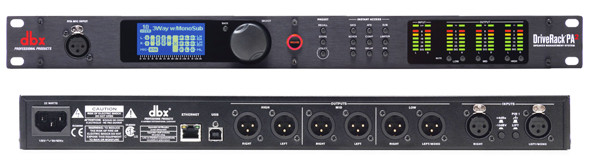
Want to see full specs and current pricing? Check out the DBX DriveRack PA2 at MusiconStage with free shipping across Australia.
What the DriveRack PA2 Actually Does (And Why It Matters)
Let's cut through the marketing speak. The PA2 is a loudspeaker management processor — essentially a Swiss Army knife of DSP tools designed to make any PA system sound dramatically better with minimal effort. Here's what's packed into this 1RU box:
- Crossover network — Splits your audio signal into frequency bands for multi-way speaker systems (subs, tops, monitors). Supports up to stereo 2x6 configurations with Butterworth, Bessel, and Linkwitz-Riley filter types up to 48dB/octave.
- Graphic and parametric EQ — 31-band graphic EQ plus multi-band parametric EQ on every output, letting you shape the sound precisely for your room and speakers.
- AutoEQ with onboard RTA — Uses an included measurement microphone to analyse your room acoustics and automatically apply corrective EQ. This alone can save you an hour of manual tuning at every gig.
- Advanced Feedback Suppression (AFS) — DBX's proprietary feedback elimination technology with up to 12 filters. It identifies and notches out feedback frequencies in real time without audibly affecting your overall sound.
- Compressor/limiter on every output — Protects your speakers from damage while maintaining dynamic range. You can set limiters based on your amplifier and speaker specifications.
- Alignment delay — Up to 100ms of delay per output for time-aligning speakers at different distances. Essential for distributed systems or when your subs are stacked separately from your tops.
- Subharmonic synthesiser — Adds low-frequency content below your sub's natural range. Use sparingly, but it can genuinely extend the perceived bass response of modest subwoofer systems.
The key differentiator here is that all of these tools work together as an integrated system. Rather than patching together separate EQ units, crossovers, limiters, and feedback suppressors, the PA2 handles everything in the correct signal chain order with matched processing quality throughout.
Setup and the Wizard System: Genuinely Useful, Not Just a Gimmick
One of the PA2's strongest features is its Setup Wizard, which walks you through system configuration step by step. This isn't dumbed-down automation — it's genuinely intelligent system design that asks the right questions and makes informed decisions.
How the Wizard Works
- Speaker selection — Choose your speaker brand and model from an extensive onboard library. The PA2 includes tunings from major manufacturers like JBL, QSC, EV, Yamaha, RCF, and dozens more. These aren't generic presets; they're manufacturer-approved crossover points, EQ curves, and limiter settings optimised for each specific cabinet.
- Amplifier configuration — Tell the wizard what amps you're using and their power ratings. The PA2 sets appropriate limiter thresholds to protect your speakers from over-excursion and thermal damage.
- System topology — Configure mono, stereo, or multi-zone setups. The wizard handles routing automatically.
- AutoEQ room correction — Place the included measurement mic at the listening position, and the PA2 plays pink noise through your system, analyses the room response, and applies corrective EQ. The results are displayed on the front panel so you can see exactly what it's doing.
- AFS feedback training — With your microphones open, the PA2 gradually raises gain while identifying and locking out feedback frequencies. You get both fixed filters (set during soundcheck) and live filters (that respond in real time during performance).
For experienced engineers, you can skip the wizard entirely and configure everything manually. But honestly, even seasoned pros often use the wizard as a starting point and then fine-tune from there. It's genuinely well-designed.
Mobile Control via Bluetooth
The PA2 features Bluetooth connectivity with a dedicated iOS and Android app. This is a significant upgrade over the original DriveRack PA, which required front-panel-only control. Being able to walk around the venue while adjusting EQ, checking levels, and tweaking the crossover from your phone or tablet is a genuine workflow improvement. The app mirrors the front panel controls and adds visual feedback that's easier to read than the unit's small LCD.
That said, Bluetooth range can be limited in RF-heavy environments (festivals, large venues with lots of wireless gear). For critical adjustments, having the physical unit accessible is still advisable.
Real-World Applications: Who Actually Needs a DriveRack PA2?
Gigging Bands and Solo Performers
If you're running your own PA without a dedicated sound engineer, the PA2 is arguably the single most impactful piece of gear you can add to your rig. The AutoEQ and AFS features alone can transform a mediocre-sounding room into something genuinely listenable. Many Australian cover bands and solo artists running small to medium PA systems (say, a pair of 12" or 15" tops with subs) consider the PA2 essential kit.
The speaker tuning library is particularly valuable here. If you're running popular cabinets like QSC K-series, JBL PRX, or EV ELX, you can load manufacturer-approved tunings and know that your crossover points and limiters are set correctly without needing to understand the engineering behind those decisions.
Houses of Worship
Churches and worship spaces are notoriously difficult acoustically — hard surfaces, parallel walls, long reverb times. The PA2's room correction and feedback suppression are tailor-made for these environments. Many Australian churches running volunteer-operated sound systems rely on the PA2 to maintain consistent quality regardless of who's behind the desk on any given Sunday.
DJs and Mobile Entertainment
For mobile DJs who set up in different venues every weekend, the PA2 provides consistent system management across wildly varying acoustic environments. Run the AutoEQ at each new venue and you've got a corrected system in minutes rather than spending your setup time trying to manually EQ a room you've never worked in before.
Fixed Installations and Venues
Pubs, clubs, restaurants, and function centres benefit from the PA2's set-and-forget reliability. Once configured for a permanent speaker installation, the PA2 provides ongoing speaker protection, room correction, and consistent sound quality. The front-panel security lockout prevents unauthorised tampering — handy when staff or patrons might be tempted to adjust settings.
Corporate and Conference AV
The feedback suppression alone justifies the PA2 in conference settings where lapel mics and podium microphones are prone to feedback. Combined with the limiter protection (preventing that moment when someone taps the mic and blows the tweeters), it's a reliable insurance policy for your system.
Key Specifications at a Glance
| Feature | Specification |
|---|---|
| Inputs | 2 x XLR balanced (stereo) |
| Outputs | 6 x XLR balanced |
| A/D Conversion | 24-bit, up to 48kHz |
| Dynamic Range | >110dB |
| Crossover Types | Butterworth, Bessel, Linkwitz-Riley (6-48dB/oct) |
| EQ | 31-band graphic + parametric per output |
| AFS Filters | Up to 12 (configurable fixed/live split) |
| Delay | Up to 100ms per output |
| Connectivity | Bluetooth, USB (firmware updates) |
| Rack Size | 1RU |
| Included | RTA measurement microphone, power cable |
The 2-in, 6-out configuration is versatile enough for most applications. A typical stereo setup might use two outputs for tops and two for subs, leaving two additional outputs for monitors, delay speakers, or a dedicated sub zone.
What Makes the PA2 Better Than Its Predecessor
If you've used the original DriveRack PA (or the PA+), the PA2 represents a meaningful upgrade across several areas:
- Bluetooth control — The original required front-panel-only operation. Being able to control everything from your phone while walking the room is transformative for system tuning.
- Expanded speaker tuning library — Significantly more manufacturer presets, and the ability to update via USB as new models are added.
- Improved AutoEQ algorithm — More accurate room analysis with better visual feedback on the corrective curve being applied.
- Better AFS performance — The feedback suppression is notably more transparent (less audible filter artefacts) compared to the original.
- Updated DSP platform — Lower latency, cleaner processing, and improved dynamic range.
- Full-colour LCD — Easier to read and navigate than the original's basic display.
If you're still running an original DriveRack PA, the upgrade to the PA2 is well worth considering. The Bluetooth control and improved AFS alone justify the switch.
Honest Pros and Cons
What the PA2 Does Well
- All-in-one simplicity — Replaces multiple separate processors, reducing rack space, cabling, and points of failure.
- Wizard-guided setup — Makes professional-grade system optimisation accessible to non-engineers. You don't need a degree in acoustics to get great results.
- Excellent feedback suppression — DBX's AFS technology is genuinely among the best in the industry at this price point. The filters are narrow enough to eliminate feedback without noticeably affecting your mix.
- Speaker protection — Properly configured limiters can save you thousands in driver replacements. For gigging musicians running their own gear, this is genuine insurance.
- Extensive speaker tuning library — Manufacturer-approved presets take the guesswork out of crossover and limiter configuration.
- Included measurement microphone — No need to purchase a separate RTA mic for AutoEQ. It's a basic condenser, but perfectly adequate for room correction purposes.
- Bluetooth app control — Walk the room while tuning. This is how system optimisation should work.
- Reliable build quality — DBX (Harman) gear is built for the road. The PA2 uses a steel chassis that handles touring abuse well.
Where It Falls Short
- No network audio (Dante/AES67) — In 2026, the lack of network audio connectivity feels dated. For digital-first setups, you'll still need analogue connections.
- Limited to 48kHz processing — Not a practical concern for live sound, but worth noting if you're particular about sample rates.
- Bluetooth can be unreliable — In RF-congested environments, the Bluetooth connection can drop or lag. Not ideal when you need to make quick adjustments during a show.
- Small front-panel display — While improved over the original, the LCD is still compact. For detailed work, the mobile app is far easier to use.
- No Wi-Fi or Ethernet — Bluetooth-only wireless control means range is limited to roughly 10-15 metres in practice, sometimes less in busy RF environments.
- AutoEQ is a starting point, not a final answer — The automatic room correction is good, but experienced engineers will want to refine the results manually. It tends to over-correct in some frequency ranges, particularly the low end.
- Learning curve for manual operation — While the wizard is straightforward, diving into manual configuration of crossover slopes, parametric EQ, and compressor settings requires genuine audio engineering knowledge.
DriveRack PA2 vs the Alternatives
The PA2 occupies a specific niche in the loudspeaker management market. Here's how it compares to common alternatives:
vs. Built-in DSP in Powered Speakers
Many modern powered speakers (QSC K.2 series, JBL PRX900, EV EKX) include onboard DSP with factory tunings, EQ, and limiting. If you're running a simple stereo tops-and-subs setup with matched powered cabinets, the built-in DSP may be sufficient. The PA2 adds value when you need crossover control between passive components, feedback suppression, room correction, or when you're mixing brands/models in the same system.
vs. DBX DriveRack VENU360
The VENU360 is DBX's step-up model with 3 inputs, 6 outputs, Ethernet control, and more sophisticated processing. It's aimed at installers and larger systems. If you need network control, more I/O, or advanced routing, the VENU360 is the better choice. The PA2 wins on value and ease of use for straightforward applications.
vs. Behringer DCX2496
The Behringer is significantly cheaper and offers basic crossover and EQ functionality. However, it lacks the PA2's AutoEQ, AFS feedback suppression, speaker tuning library, and Bluetooth control. The PA2 justifies its higher price through these integrated features and generally better build quality.
vs. Going Without Processing
Running your system without any loudspeaker management means no speaker protection, no room correction, and no feedback suppression. The PA2 doesn't just improve your sound — it actively protects your investment in speakers and amplifiers. For any system worth more than a couple of thousand dollars, proper management processing is a smart investment.
Considering the PA2 for your setup? View current pricing and availability at MusiconStage with free delivery Australia-wide.
Practical Tips for Getting the Most from Your PA2
Having worked with the DriveRack PA2 across various setups, here are some practical tips that aren't always obvious from the manual:
AutoEQ Best Practices
- Measure from multiple positions — Don't just place the mic at one spot. Take measurements from 3-4 positions across the listening area and average the results for more accurate room correction.
- Run AutoEQ with the room empty — An empty room has more reflections than a full one. Bodies absorb sound, particularly in the mid and high frequencies. If you EQ for an empty room, a full room will sound dull. Consider a compromise setting.
- Don't blindly trust the AutoEQ curve — Review what it's doing, particularly below 200Hz. Room modes can cause the AutoEQ to make aggressive cuts or boosts that don't translate to a natural sound. Manual refinement in the low end usually improves results.
- Re-run AutoEQ for each venue — This seems obvious, but many users set it once and forget. Every room is different, and the PA2's greatest strength is adapting to each space.
AFS Configuration Tips
- Split your filters wisely — A common starting point is 6 fixed filters (set during soundcheck) and 6 live filters (active during performance). Adjust based on your situation — more problematic rooms may need more fixed filters.
- Train fixed filters at performance volume — Run the AFS training at the gain level you'll actually use during the show. Training at lower levels won't catch the feedback frequencies that emerge at performance volume.
- Position matters — AFS is powerful, but it can't overcome fundamentally poor microphone placement relative to speakers. Get your physical setup right first, then let AFS handle the remaining problem frequencies.
General System Tips
- Save your presets — If you play the same venues regularly, save a preset for each one. This eliminates the need to re-run the wizard every time.
- Update the firmware — DBX periodically releases firmware updates via USB that add speaker tunings and fix bugs. Check the Harman website periodically.
- Use proper gain structure — The PA2 sits after your mixer and before your amps. Set your mixer output to nominal level (0dB on the meters), then adjust the PA2's input gain for optimal signal-to-noise ratio. Don't use the PA2 as a volume control.
- Invest in quality XLR cables — You've got up to 8 analogue connections to and from the PA2. Cheap cables introduce noise and can cause intermittent issues. Quality balanced cables make a genuine difference at this point in the signal chain.
Who Should (and Shouldn't) Buy the DriveRack PA2
The PA2 Is a Great Fit If You:
- Run a PA system without a dedicated sound engineer
- Play in different venues regularly and need consistent results
- Want speaker protection and limiter management
- Struggle with feedback in your current setup
- Use passive speakers with external amplifiers and need crossover management
- Want professional-grade processing without a steep learning curve
- Operate a fixed installation that needs set-and-forget reliability
You Might Want to Look Elsewhere If You:
- Already run high-end powered speakers with comprehensive onboard DSP
- Need network audio (Dante/AES67) integration
- Require more than 2 input channels or 6 outputs
- Want advanced matrix mixing or complex multi-zone routing
- Need Wi-Fi or Ethernet control for larger venue management
Australian Buying Considerations
A few things specific to buying and using the PA2 in Australia:
- Power supply — The PA2 uses a universal switch-mode power supply (100-240V), so it works natively with Australian 240V mains. No voltage conversion needed.
- Warranty — As a Harman product, the PA2 is covered by the standard manufacturer warranty when purchased from an authorised Australian dealer. Buying from an authorised retailer like MusiconStage ensures you're covered if anything goes wrong.
- Speaker tuning library — The library includes tunings for brands commonly used in Australia, including popular models from QSC, JBL, EV, Yamaha, RCF, and others widely available through Australian distributors.
- Support — Harman's Australian distributor (Jands) handles local warranty and support, so you're not dealing with international shipping for repairs.
Frequently Asked Questions
Can I use the PA2 with powered speakers?
Yes. Connect the PA2's outputs to your powered speakers' line inputs. You'll still benefit from EQ, feedback suppression, delay, and limiter functions. However, you won't need the crossover function if your powered speakers already have built-in crossovers — unless you're running separate powered subs and tops.
Does the PA2 replace my mixer's EQ?
No. Your mixer's channel EQ shapes individual sources (vocals, guitar, etc.), while the PA2's EQ shapes the overall system output for room correction. They serve different purposes and work together in the signal chain.
How does the included measurement microphone compare to a dedicated RTA mic?
The included mic is perfectly adequate for the PA2's AutoEQ function. It's a basic omnidirectional condenser calibrated for flat response. For serious acoustic analysis work, you'd want a calibrated measurement mic like a Behringer ECM8000 or Dayton Audio EMM-6, but for the PA2's intended use, the included mic does the job well.
Can I use the PA2 for monitor mixes?
You can route outputs to monitor speakers, yes. The feedback suppression is particularly useful for floor monitors. However, the PA2 only has 2 inputs, so you can't run separate monitor mixes — you'd be sending the same stereo mix to both FOH and monitors. For independent monitor mixes, you'd need a separate aux send from your mixer to a different processor.
Is it difficult to set up for someone with no audio engineering background?
The wizard-guided setup is specifically designed for users without deep technical knowledge. If you can follow step-by-step instructions and know which speakers and amps you're using, you can get a properly configured system running in 15-20 minutes. The mobile app makes ongoing adjustments intuitive.
Final Verdict
The DBX DriveRack PA2 remains one of the most practical and cost-effective upgrades you can make to a live sound system. It's not the most cutting-edge processor on the market — the lack of network audio and Wi-Fi control are legitimate limitations in 2026 — but for its intended purpose, it delivers exceptional value.
Where the PA2 truly shines is in making professional-grade system management accessible. The wizard setup, AutoEQ, and AFS feedback suppression take tasks that once required an experienced engineer and put them within reach of any musician or operator willing to spend 20 minutes on initial configuration. Meanwhile, the manual controls offer enough depth to satisfy engineers who want fine-grained control.
For Australian musicians, DJs, worship teams, and venue operators running PA systems in the small to medium range, the DriveRack PA2 is a genuinely worthwhile investment. It'll make your system sound better, protect your speakers, eliminate feedback headaches, and give you consistent results across different rooms. That's a compelling package.
Ready to upgrade your PA system? Shop the DBX DriveRack PA2 at MusiconStage — authorised Australian dealer with free shipping and genuine warranty support.