
DBX DriveRack PA2: Complete Loudspeaker Management for Aussie Sound Pros
DBX DriveRack PA2: Complete Loudspeaker Management for Aussie Sound Pros
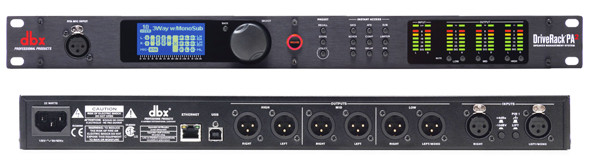
If you've ever spent an hour wrestling with feedback at a gig, or watched a beautifully mixed front-of-house signal turn to mush the moment it hits mismatched speakers, you already understand the problem the DBX DriveRack PA2 was built to solve. It sits between your mixer and your amplifiers, and its entire job is to make your PA system sound like it was professionally tuned — because after running through the PA2's processing chain, it genuinely has been.
The DriveRack PA2 is the successor to DBX's massively popular DriveRack PA+ (which itself replaced the original DriveRack PA), and it represents a significant leap in both processing power and usability. For bands, DJs, houses of worship, corporate AV teams, and venue installers across Australia, it's become something of a standard tool. But is it the right choice for your setup? Let's dig into what this unit actually does, who it's best suited for, and where it falls short.
Looking to grab one now? Check the DBX DriveRack PA2 at MusiconStage with delivery available across Australia.
What Exactly Is a Loudspeaker Management System?
Before diving into the PA2's specifics, it's worth clarifying what a loudspeaker management system (sometimes called a speaker processor or drive rack) actually does. If you're already familiar with the concept, feel free to skip ahead.
A loudspeaker management system processes your audio signal after the mixing console and before the power amplifiers. It handles critical functions that your mixer typically can't: crossover filtering to split frequencies between mains and subwoofers, time alignment to ensure all your speakers arrive at the listener's ears at the same moment, limiting to protect your drivers from damage, and system EQ to compensate for room acoustics and speaker characteristics.
Without proper loudspeaker management, even expensive PA systems can sound mediocre. With it, even modest systems can punch well above their weight. That's the value proposition of the DriveRack PA2 — it's a comprehensive processing toolkit in a single rack unit.
Key Features That Actually Matter
AutoEQ with Included RTA Microphone
This is arguably the PA2's headline feature and the one that makes it accessible to operators who aren't seasoned system engineers. The AutoEQ function uses an included measurement microphone to analyse your room's acoustic response, then automatically applies corrective EQ to flatten out the worst peaks and dips.
Here's how it works in practice: you place the included DBX RTA-M measurement mic at your mix position (or average several positions), press start, and the PA2 sweeps pink noise through your system. It measures what comes back, compares it to a target curve, and applies a 28-band graphic EQ correction. The whole process takes about 30 seconds per measurement point.
Is it perfect? No — no automated system is. But it gets you roughly 80% of the way to a properly tuned system in under two minutes, and for many applications that's more than enough. Experienced engineers will want to tweak the results manually, and the PA2 gives you full access to do exactly that. For less experienced operators, it's genuinely transformative. I've seen it rescue shows in problematic rooms where the operator wouldn't have known where to start with manual EQ.
Advanced Feedback Suppression (AFS)
DBX's AFS algorithm is one of the best feedback suppression systems available at any price point. It uses a combination of fixed and live filters — you set up the fixed filters during soundcheck by intentionally pushing the system toward feedback, and the live filters engage dynamically during the performance.
The PA2 offers up to 12 filters that can be split between fixed and live operation however you prefer. The default split of 6 fixed and 6 live works well for most scenarios. The filters are narrow enough (1/80th octave at their tightest) that they remove the feedback frequency without audibly affecting the programme material.
This feature alone justifies the PA2's price for many users, particularly in houses of worship and corporate presentation environments where feedback is a constant battle and the operator may not have years of experience at the desk.
Crossover Network
The PA2 provides a fully configurable stereo 2-way crossover (or mono 3-way, depending on your configuration), with a choice of crossover types including Butterworth, Bessel, and Linkwitz-Riley at various slopes from 6 dB/octave up to 48 dB/octave. Linkwitz-Riley 24 dB/octave is the industry standard for most live applications, and it's the default — but having the flexibility to change is valuable for unusual speaker combinations or specific manufacturer recommendations.
You can set independent crossover points for each output, adjust levels, invert polarity, and apply individual parametric EQ per output band. This level of control lets you properly integrate subwoofers with your tops, which is one of the most common pain points in live sound reinforcement.
Alignment Delay
Speaker alignment delay is critical when your subwoofers and tops aren't physically co-located (which is most of the time). The PA2 provides up to 100ms of delay per output, adjustable in 10-microsecond increments. You can set delay in milliseconds, feet, or metres — a nice touch that eliminates mental arithmetic when you know the physical distance between speaker stacks.
This feature is also essential for delay speaker stacks in longer throw venues. If you're running front fills, delay towers, or any distributed system, proper alignment delay is the difference between a coherent sound image and a muddy mess.
Dynamics Processing and Limiting
Each output of the PA2 includes a compressor/limiter that protects your amplifiers and speakers from damage. The limiters feature adjustable threshold, ratio, attack, and release parameters, plus an OverEasy knee option that provides a more musical, gradual onset of compression compared to hard-knee limiting.
The peak limiters are particularly important for protecting tweeters and compression drivers, which can be destroyed in milliseconds by an unchecked transient. Having proper limiting in the signal chain means you can push your system harder with confidence, knowing the PA2 will catch dangerous peaks before they reach your drivers.
Subharmonic Synthesis
This is a feature borrowed from DBX's dedicated subharmonic synthesiser units. It generates frequencies one octave below the original content, adding perceived bass weight to systems with limited low-frequency extension. It's most useful for smaller subwoofer systems that don't naturally reach down to the lowest octaves.
Use it sparingly — a little goes a long way, and too much will make your subs work much harder for artificial content. But when your 15-inch subs need a bit more perceived depth for a DJ set, a subtle touch of subharmonic synthesis can be genuinely effective.
Smartphone and Tablet Control
The PA2 connects to iOS and Android devices via Bluetooth, allowing you to control the entire unit from the free DriveRack PA2 app. The app provides a significantly better user experience than the front panel for most tasks — the full-colour display, touch-friendly interface, and intuitive layout make complex adjustments much faster.
This is a genuine workflow improvement over the original DriveRack PA and PA+, which required navigating through menus on a small LCD screen. Being able to adjust crossover points, EQ, and levels from your phone while walking around the venue is incredibly practical for system tuning.
Technical Specifications
| Specification | Detail |
|---|---|
| Inputs | 2 x XLR balanced analogue (stereo) |
| Outputs | 6 x XLR balanced analogue (3 stereo pairs) |
| A/D Conversion | 24-bit, 48 kHz |
| D/A Conversion | 24-bit, 48 kHz |
| Dynamic Range | >113 dB (A-weighted) |
| Frequency Response | 20 Hz – 20 kHz (+0/−0.5 dB) |
| THD+N | <0.005% (typical at 1 kHz) |
| DSP | Dual SHARC 32-bit floating-point processors |
| Crossover Types | Butterworth, Bessel, Linkwitz-Riley (6–48 dB/oct) |
| Parametric EQ | 8 bands per output |
| Graphic EQ | 28-band on input |
| AFS Filters | Up to 12 (configurable fixed/live split) |
| Delay | Up to 100 ms per output (10 μs resolution) |
| Presets | Extensive JBL, Crown, and user presets |
| Control | Front panel, Bluetooth (iOS/Android app) |
| Form Factor | 1U rackmount |
| Power | 100–240 VAC, 50/60 Hz (universal power supply) |
The universal power supply is worth highlighting for Australian buyers — you don't need a voltage converter or step-down transformer. It'll run happily on our 240V/50Hz mains straight out of the box.
Speaker Tuning Presets: A Massive Time Saver
One of the PA2's most practical features is its library of factory-loaded speaker tuning presets, developed in partnership with major manufacturers. JBL and Crown presets are particularly comprehensive, covering a wide range of speaker and amplifier combinations. These presets configure the crossover, EQ, limiter thresholds, and delay settings specifically for each speaker model.
If you're running JBL PRX, EON, SRX, or VTX series speakers (all popular choices in Australia), you'll find purpose-built presets that were developed by JBL's engineering team. Simply select your speaker model, your amplifier, and your configuration (mains only, mains plus subs, monitors), and the PA2 loads optimised settings as a starting point.
For speakers from other manufacturers, the PA2 includes generic starting-point presets that cover common configurations. You can then fine-tune from there, and save your custom settings as user presets for quick recall at future gigs. The unit stores plenty of user presets, so you can save configurations for different venues, speaker combinations, or event types.
Ready to streamline your PA setup? Order the DBX DriveRack PA2 from MusiconStage and get it delivered to your door.
Real-World Use Cases
Working Bands and Mobile DJs
This is arguably where the PA2 delivers the most value per dollar. If you're a band or DJ who owns your own PA and plays different venues every week, you're constantly dealing with variable room acoustics. The AutoEQ function alone saves you significant time at every setup — run the wizard, fine-tune to taste, and you've got a system that's adapted to the room in minutes rather than the 30+ minutes a manual approach demands.
The crossover and limiter functions also mean you're properly managing your subs-to-tops integration every show, and protecting your investment in speakers and amps from damage. For a working musician who's spent thousands on a PA system, the PA2 is cheap insurance and a genuine sound quality upgrade.
Houses of Worship
Churches and worship venues are one of the PA2's strongest markets, and for good reason. These environments typically feature challenging acoustics (hard parallel walls, high ceilings, lots of reflective surfaces), volunteer operators with varying experience levels, and a constant battle against feedback from wireless microphones.
The combination of AutoEQ to tame the room and AFS to manage feedback is genuinely transformative in these settings. Many worship venues report that installing a PA2 was the single biggest improvement they've made to their sound system, ahead of speaker or mixer upgrades.
Permanent Installations (Pubs, Clubs, Function Venues)
For installed systems, the PA2 serves as a set-and-forget optimisation tool. Once the system is properly tuned during installation, the PA2's settings can be locked and stored, ensuring consistent performance regardless of who's operating the mixer on any given night. The front panel can be security-locked to prevent unauthorised changes — crucial in venues where guest DJs or inexperienced staff have access to the rack.
Corporate AV and Events
In corporate environments, the PA2's ability to quickly adapt to different room configurations is invaluable. Conference rooms, hotel ballrooms, and exhibition halls all present unique acoustic challenges, and the fast setup wizard gets you dialled in quickly. The professional XLR connectivity and balanced I/O keep noise floors low, which matters enormously for spoken-word reinforcement where every decibel of signal-to-noise ratio counts.
How the PA2 Improves on the PA+
If you're upgrading from the older DriveRack PA+, here's what's genuinely different:
- Processing power: The dual SHARC processor platform provides significantly more DSP horsepower, enabling better algorithms and lower latency.
- Bluetooth app control: This is the biggest usability improvement. The PA+ required front-panel navigation or a wired computer connection. The PA2's app control is faster, more intuitive, and lets you adjust settings while walking the room.
- Improved AutoEQ: The algorithm is more refined, producing smoother corrections and better handling of problematic room modes.
- Better converters: The AD/DA conversion is improved, with better dynamic range and lower noise floor.
- Updated preset library: More current speaker models and configurations included.
- Improved AFS: The feedback suppression algorithm is faster to identify and notch feedback frequencies, with tighter filter bandwidth.
If your PA+ is still working well and you're happy with the sound, the upgrade isn't essential. But if you're buying new, the PA2 is unquestionably the better unit.
Honest Assessment: Pros and Cons
What the PA2 Does Well
- AutoEQ genuinely works. It's not a gimmick — it measurably improves system response in real rooms.
- AFS is industry-leading. DBX's feedback suppression is among the best available and it works transparently enough that audiences won't notice the processing.
- The app is excellent. Bluetooth control from your phone makes setup and adjustment dramatically faster than front-panel navigation.
- JBL/Crown presets are well-engineered. If you're running compatible gear, the factory presets are genuinely good starting points.
- Build quality is solid. The all-metal 1U chassis feels professional and roadworthy.
- Universal power supply. Works on Australian mains without any adapters or converters.
- Comprehensive processing chain. EQ, crossover, delay, dynamics, feedback suppression, and subharmonic synthesis in one box eliminates the need for multiple outboard units.
Where It Falls Short
- No network connectivity. In 2026, the lack of Ethernet, Dante, or AES67 connectivity feels like a notable omission. Bluetooth control is convenient but limited in range, and there's no way to integrate the PA2 into a networked audio system.
- Analogue I/O only. With digital mixing consoles now standard in professional and semi-professional audio, having to go through an extra DA/AD conversion stage is suboptimal. A digital input (AES/EBU or Dante) would be a significant improvement.
- Bluetooth range limitations. The Bluetooth connection works well within about 10 metres, but beyond that, you'll experience dropouts. In larger venues, this limits the app's usefulness for walk-around tuning.
- AutoEQ isn't a substitute for knowledge. While it helps enormously, operators who don't understand acoustics may over-rely on it and miss issues the automated process can't address (like speaker placement problems or phase issues).
- Limited to stereo 2-way (or mono 3-way). If you need true stereo 3-way processing, you'll need to look at higher-end units like the DriveRack VENU360.
- Preset library is JBL/Crown-centric. Users of other speaker brands (QSC, Yamaha, RCF, EV) won't find dedicated presets and will need to configure from scratch or use generic starting points.
- The included measurement mic is adequate, not exceptional. For critical tuning work, you'll get better results with a dedicated measurement microphone and proper analysis software.
PA2 vs. the Competition
DBX DriveRack PA2 vs. DBX DriveRack VENU360
The VENU360 is DBX's step-up model, offering 3 inputs and 6 outputs (true stereo 3-way capability), better converters, Ethernet control, and more powerful DSP. If you need stereo 3-way processing, network control, or you're designing a permanently installed system where remote management matters, the VENU360 is worth the premium. For most portable PA applications, the PA2 offers everything you need at a significantly lower price point.
DBX DriveRack PA2 vs. Behringer Ultradrive DCX2496
The Behringer DCX2496 offers similar crossover and EQ functionality at a lower price, but it lacks the PA2's AutoEQ, AFS feedback suppression, and app control. The DCX2496 is a capable crossover and speaker processor, but it requires more manual knowledge to configure and doesn't offer the PA2's automated setup features. For experienced system engineers on a tight budget, the DCX2496 is serviceable. For everyone else, the PA2's automation features justify the price difference many times over.
DBX DriveRack PA2 vs. QSC Touchmix or Digital Mixer Processing
Many modern digital mixers include built-in speaker processing, crossovers, and feedback suppression. If your mixer already handles these functions well, you may not need an external processor. However, the PA2's dedicated processing is typically more sophisticated than what's built into most mixers, particularly the AutoEQ and AFS implementations. For users with analogue mixers or basic digital consoles, the PA2 fills a significant capability gap.
Setup Tips for Getting the Best Results
Having worked with the PA2 in numerous configurations, here are practical tips that make a real difference:
- Run AutoEQ from multiple positions. Don't just measure from the mix position — take measurements from several audience locations and let the PA2 average them. This gives you a correction that works across the room, not just at one sweet spot.
- Set up AFS during a proper soundcheck. Don't rush the fixed filter setup. Open all channels that will be used during the show and gradually bring up gain to find the feedback frequencies. The more fixed filters you set during soundcheck, the fewer live filters the system needs to deploy during the performance.
- Start with factory presets, then customise. Even if you're not running JBL speakers, the generic presets provide sensible starting points. It's faster to tweak from there than to build a configuration from scratch.
- Don't over-correct with AutoEQ. If the correction looks extreme (more than about 6 dB in multiple bands), you probably have a speaker placement or room treatment issue that EQ can't properly fix. Address the physical problem first.
- Use the output limiters properly. Set them based on your amplifier and speaker ratings, not by ear. Consult your speaker manufacturer's specifications for recommended limiter thresholds. This protects your investment and prevents embarrassing (and expensive) driver failures.
- Save venue presets. If you play the same venues regularly, save a preset for each one. You'll have a tuned starting point for every return visit, saving significant setup time.
Signal Chain: Where Does the PA2 Sit?
The PA2 goes between your mixer's main outputs and your power amplifiers (or powered speakers' line inputs). The typical signal chain looks like this:
Mixing Console → Main L/R Outputs → DriveRack PA2 Inputs → PA2 Outputs → Power Amplifiers (or powered speakers)
If you're running a stereo system with separate subwoofer amplifiers, the PA2's outputs would be configured as:
- Outputs 1-2: Mains Left/Right → Main speaker amplifier
- Outputs 3-4: Subs Left/Right → Subwoofer amplifier
- Outputs 5-6: Available for monitors, delays, or a third frequency band
If you're using powered speakers, you bypass the amplifier stage and run the PA2's outputs directly into the speaker's line-level input. Most powered speakers have a line/mic switch — make sure it's set to line level.
Who Should (and Shouldn't) Buy the DriveRack PA2
Ideal Buyers
- Working bands who own a PA and play different venues regularly
- Mobile DJs who need quick, consistent setup in varying rooms
- Houses of worship with volunteer operators and feedback challenges
- Small to mid-size venue owners who want to optimise their installed system
- Corporate AV operators who need reliable, quick-deploy processing
- Anyone upgrading from the older DriveRack PA or PA+
You Might Want Something Else If...
- You need network/Dante integration — look at the DriveRack VENU360 or comparable units from Biamp, Symetrix, or QSC.
- You need stereo 3-way processing — the PA2 maxes out at stereo 2-way or mono 3-way. The VENU360 handles stereo 3-way.
- Your digital mixer already has comprehensive speaker processing — duplicating those functions externally adds unnecessary conversion stages and complexity.
- You're designing a large-scale installed system — purpose-built DSP processors from BSS, Biamp, or Symetrix offer more channels, networking, and integration options.
Frequently Asked Questions
Does the PA2 work with powered speakers?
Absolutely. Connect the PA2's balanced XLR outputs directly to your powered speakers' line-level inputs. This is actually one of the most common configurations, and it works perfectly. Just ensure your powered speakers are set to accept line-level input rather than mic-level.
Can I use it as a crossover only?
Yes. While the PA2 has a comprehensive processing chain, you can use as much or as little of it as you need. If you only want crossover and limiting (because your mixer handles EQ and you don't need feedback suppression), you can bypass the other processing blocks.
Will it work with speakers other than JBL?
Yes, it works with any speakers. The JBL and Crown presets are a convenience for users of those brands, but the PA2's manual configuration options let you optimise it for any speaker system. You'll just need to enter crossover points, limiter settings, and EQ adjustments based on your specific speaker manufacturer's recommendations.
How does it handle latency?
The PA2's processing latency is under 1.3 milliseconds from input to output — essentially inaudible and well below the threshold where it would cause timing issues with live performers. This is significantly better than many competing units.
Can I control it without the app?
Yes, the front panel provides full access to all settings. The app is a convenience, not a requirement. The front panel interface uses a clear LCD display with an encoder knob and navigation buttons. It's more tedious than the app for complex adjustments, but entirely functional.
Is it reliable for touring?
The PA2 has a strong reliability track record. The all-metal chassis, internal universal power supply (no wall wart to lose), and solid XLR connectors are all designed for professional use. It's a common sight in touring racks across Australia and globally.
Final Verdict: Is the DriveRack PA2 Worth It?
For the majority of small to medium-scale live sound applications in Australia, the DBX DriveRack PA2 represents outstanding value. It consolidates multiple processing functions into a single, well-designed unit, and its automated setup features make professional-grade system tuning accessible to operators of all experience levels.
Its limitations are real — the lack of digital I/O and network connectivity mean it won't satisfy everyone, and larger installations will need more capable processing. But for its target market — bands, DJs, worship venues, small to mid-size installations, and corporate AV — it hits an excellent balance of capability, usability, and price.
The AutoEQ and AFS features alone will save you time and improve your sound at every single gig. The crossover, limiting, and delay processing ensure your system is properly managed and protected. And the smartphone app makes it all far more accessible than the older generation units it replaces.
If you're running a PA system without any loudspeaker management, adding the PA2 will likely be the single most impactful upgrade you can make — more noticeable than a mixer upgrade, and often more noticeable than a speaker upgrade. It's the piece of the signal chain that makes everything else work together properly.
Browse the DBX DriveRack PA2 at MusiconStage — authorised Australian dealer with genuine products, free shipping, and local warranty support.