
dbx 1231 in Real Use: Aussie Live Sound EQ Guide 2026
dbx 1231 in Real Use: Aussie Live Sound EQ Guide 2026
There's a fair question floating around every sound crew in the country right now: why would you buy a two-rack-space analogue graphic EQ in 2026 when your digital desk already has a 31-band GEQ on every output? It's a reasonable thing to ask. And yet the dbx 1231 Dual Channel 31 Band Equalizer keeps turning up in hire racks, church equipment cupboards, school halls and pub PA systems from Fremantle to Newcastle — and not out of nostalgia.
This guide isn't a spec sheet rewrite. It's about how you'll actually use this thing: which rooms it saves you in, which jobs it's the wrong tool for, and how it stacks up against the alternatives you're probably also looking at.
What You're Actually Getting
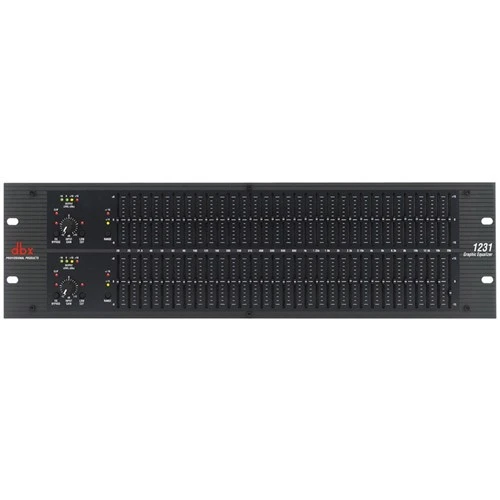
The 1231 is two completely independent 31-band graphic equalisers in one rack box. Each channel gives you a fader for every ISO one-third-octave centre frequency across the audible band — roughly 20Hz up to 20kHz. You also get a switchable cut/boost range (a gentle setting for fine tuning and a wider one for heavier corrective work), a low-cut filter to strip out subsonic rubbish, an input gain control, a hard bypass, and balanced XLR plus 1/4" TRS connections on both ends.
Two channels matters more than it sounds. It means one box covers a stereo FOH system, or two separate mono monitor mixes, or a main system plus a delay fill. That's the practical unit of work in small-to-mid live sound, and it's why the 1231 tends to be bought in pairs rather than singles by hire companies.
The dbx 12-series sits above the budget graphic EQs in build terms — heavier chassis, longer-throw faders you can actually read from a metre away in a dark room, and a noise floor that stays out of the way when you've got a quiet acoustic act on stage. It's a rack-mount unit, so budget the rack spaces and check the depth against shallow flight cases before you commit.
Scenario One: Ringing Out Wedges at the Local Pub
This is the 1231's home ground. You've got two wedges across the front of a small stage, a vocalist who wants "a bit more me", and a room with a low ceiling and a tiled wall behind the bar. Feedback isn't a possibility — it's a schedule.
Here's how it plays out in practice. You patch one 1231 channel across each monitor send, push the wedge gain up until the room starts to ring, find the offending frequency by feel or by ear, and pull that fader down three or four dB. Repeat until you've got the headroom you need. On a good night with a decent mic that's four or five bands pulled and you've bought yourself six to eight dB of gain before feedback — the difference between a singer who can hear themselves and one who's shouting by the second set.
What makes the 1231 genuinely good at this is physical immediacy. You're not scrolling through a menu on a tablet while the room howls. You reach out, grab a fader, and pull. Anyone who has rung out monitors on a touchscreen while the band's already loading in knows exactly why that matters. The dual channels also mean your two most important wedges — lead vocal and whoever's next most likely to cause grief — each get their own treatment rather than sharing a compromise curve.
The honest caveat: if your wedges are on the same aux, one channel does both and you're back to compromise. Sort your monitor sends first, then let the EQ do its job.
Scenario Two: Tuning a Hired Hall for the Night
Community halls, RSL function rooms, school gymnasiums, surf club upstairs rooms — these are the venues that eat good PA systems for breakfast. Parallel hard walls, a polished floor, a stage at one end and a bar at the other. Your speakers are fine. The room isn't.
Patched across your main outputs, the 1231 becomes your room correction layer. A typical Aussie hall curve involves pulling a couple of dB somewhere in the 200–400Hz region where the floor and low ceiling are conspiring to make everything sound boxy, taming a hard spike somewhere between 2kHz and 4kHz that's making vocals harsh, and often a gentle lift up top because carpet, curtains and a room full of people are absorbing more high frequency than you'd like by 9pm.
The workflow that actually works: get the system running with music you know intimately, walk the room, and make small moves. The low-cut filter earns its keep here too — rolling off everything below the point where your boxes stop producing usable output cleans up handling noise, foot thumps on a hollow stage, and air conditioning rumble that's otherwise stealing amplifier headroom.
Because the second channel is independent, a stereo system gets a left and right curve. That sounds like overkill until you play a hall where one side of the room is a glass wall and the other is a curtained stage wing. They are not the same room, and they don't want the same EQ.
Scenario Three: The Hire Rack's Insurance Policy
If you run gear for hire, your buying logic is different: survivability, obviousness, and the ability to hand it to a stranger.
Analogue graphic EQs win on all three. There's no firmware, no boot time, no forgotten Wi-Fi password, no scenario where a customer rings you at 7pm because "the EQ won't connect". The state of the box is visible from across the room — you can see at a glance what the last hirer did, and reset it in five seconds with a flat hand across the faders.
The 1231 also plays nicely as the analogue layer in an otherwise digital rig. Plenty of Aussie hire racks now run a digital processor for crossovers, delay and limiting, with a graphic EQ sitting either in front of it or across the monitor sends where a human needs to make fast decisions. That's not redundancy — it's dividing the work between the thing that's precise and the thing that's fast.
Worth flagging honestly: the 1231 has no memory. There's no recall, no presets, no way to store the curve you spent an hour getting right at a regular venue. For hire that's arguably a feature. For a touring op who plays the same three rooms every month, it's a genuine annoyance — you'll be photographing the front panel with your phone like everyone else.
Scenario Four: Churches, Schools and Community Spaces
This is a huge slice of who actually buys these. A church with a volunteer roster, a school hall used for assemblies and the annual musical, a scout hall that doubles as a function space. The common thread: the person operating the system on any given day may have had twenty minutes of training.
A graphic EQ suits that environment because it's honest about what it's doing. You can set a good curve, mark the important faders with a bit of tape, and tell your volunteers not to touch it. If something does get bumped, the damage is visible and fixable without a manual. Compare that to a digital processor where a wrong tap can misconfigure a crossover and cook a driver — the failure modes here are much friendlier.
For speech-heavy rooms specifically, the 1231's fine adjustment range is more useful than the wide one. Intelligibility problems in halls are usually solved with a few careful cuts in the low-mids, not dramatic shapes.
Where the 1231 Struggles — Honestly
- No recall or memory. Every setup is a fresh setup, or a photo on your phone.
- It's not a loudspeaker management system. No crossover, no delay alignment, no limiting to protect your drivers. If you're building a permanent install with separate tops and subs, you still need proper system processing — the 1231 sits alongside that, not instead of it.
- Graphic EQ bands interact. Pull three adjacent faders and the actual response isn't the sum you drew. It's close enough for live work but it's not surgical — a parametric EQ will fix a narrow resonance more cleanly with less collateral damage.
- It rewards restraint, and tempts the opposite. Thirty-one faders per channel is an invitation to sculpt a smiley face into your system. Doing that is the single fastest way to make a good PA sound worse.
- It doesn't measure anything. You're relying on your ears or a separate analyser. That's fine if you've got the experience; it's a learning curve if you haven't.
- Rack space and cabling. Two channels of EQ means four extra XLR runs in your rack. Not a dealbreaker, just plan for it.
How It Compares in the Same Jobs
Against a budget dual 31-band
Cheaper dual 31-band units — including dbx's own entry-tier models and the various Behringer Ultragraph options — will do the same fundamental job. The differences you'll actually notice in the field are fader feel under pressure, noise floor on quiet material, and how the unit holds up after two years of load-ins. If the EQ lives permanently in one rack in one hall, a budget unit is defensible. If it goes in a van every weekend, the step up to the 1231 pays for itself in not having to replace it.
Against a graphic EQ with built-in compression/limiting
Some units in this family combine the 31-band EQ with dynamics processing. If you need speaker protection in the same box — a hire scenario where you can't trust the operator, say — that's a genuinely better fit. If you already have limiting in your amps or processor, you're paying for a duplicate. The 1231's job is EQ, and it does that job without you paying for features you'll bypass.
Against a digital loudspeaker processor
A digital system processor gives you crossovers, delay, limiting, parametric filters, presets and often auto-EQ with a measurement mic. On paper it wins comprehensively. In practice, for monitor duty and fast room correction it's the wrong ergonomics — you don't want to be tapping a screen when a wedge is feeding back. Many working Aussie rigs run both: digital for system management, the 1231 where a human hand needs to move fast.
Against your digital desk's built-in GEQ
This is the real competitor for most buyers. Modern digital consoles put a 31-band GEQ on every output for free, often with a "fader flip" mode. If you always mix on your own desk and never hand the system to anyone else, you may not need an outboard EQ at all — and I'd rather tell you that than sell you a box you'll leave in the rack.
The 1231 earns its place when the desk isn't yours, when the system needs to work independently of whatever console rocks up, when the venue installs the PA permanently and the desk changes, or when you're running analogue front to back. That's a big chunk of the Australian market — it's just not all of it.
Who Should Buy It
- Hire companies and production crews: Yes. Robust, obvious, console-agnostic, and two channels covers a stereo system or two wedges per box.
- Venues with an installed PA: Yes, particularly where the mixing console changes with the act. The system keeps its correction curve regardless.
- Churches, schools and community halls: Strong fit. Set and forget, and volunteer-proof in a way that touchscreens aren't.
- Bands running their own analogue rig: Yes — this is exactly what it's for. One channel per side of the PA, or split it across your two monitor mixes.
- Solo mixers on a modern digital desk: Probably not, unless you specifically want hands-on monitor control or you're building a rig other people will use.
- Home studio use: Not really the point. Studio correction is better handled in software or with parametric outboard.
Getting the Most Out of It
- Fix the real problem first. Speaker placement, mic technique, gain structure and stage volume beat any EQ curve. Reach for the faders after those, not instead of them.
- Cut before you boost. Cutting costs you nothing in headroom. Boosting eats it and pushes you toward feedback and amplifier clipping.
- Use the narrow cut/boost range for daily work. The wider range is there for genuine corrective jobs. Living in it usually means something upstream is wrong.
- Engage the low-cut filter on speech and vocal systems. Free headroom, less rumble, cleaner mids.
- Use the bypass switch constantly. A/B your curve against flat. If bypassed sounds better, your curve is wrong — that check takes half a second and saves entire gigs.
- Photograph good curves. No recall means your phone is your preset library. Label the shots with the venue name.
- Set input gain properly. An EQ fed too hot has no headroom for the boosts you're about to add.
Common Mistakes Worth Avoiding
- Drawing a smiley face. Boosting the lows and highs while scooping the mids feels great for thirty seconds and destroys vocal intelligibility for the rest of the night.
- Ringing out at the wrong volume. Ring out at, or just above, your expected show level. A monitor rung out quietly will feed back the moment the drummer starts.
- Using it to fix a broken speaker. If a driver is damaged or a cabinet is buzzing, EQ hides the symptom until it doesn't.
- Leaving last week's curve in. Different room, different night, different curve. Flatten and start again.
- Pulling ten faders when two would do. Every cut is a compromise somewhere. Fewer, well-chosen moves nearly always sound better.
Practical FAQs
Can one 1231 handle a stereo PA and monitors?
No — you've got two channels total. Stereo mains uses both. If you also want EQ on monitors you need a second unit, or you run mains mono and put the spare channel on a wedge.
Where does it go in the signal chain?
For mains, between your console's main outputs and your amps or powered speakers — after the desk, before any system processing where possible. For monitors, across the relevant aux send, before the monitor amp or wedge input.
Does it work with powered speakers?
Yes. Console out into the 1231, 1231 out into your powered tops. Balanced XLR throughout and you're done.
Will it stop feedback on its own?
It's a manual tool, not an automatic feedback suppressor. It gives you the means to find and remove problem frequencies — you still have to do the finding. If you want automation, that's a different category of product.
Is analogue EQ a downgrade in 2026?
Different, not worse. You lose recall and precision; you gain speed, reliability and independence from whatever console turns up. For a lot of Australian live work that trade is still the right one.
The Verdict
The dbx 1231 isn't the most feature-dense box you can buy for the money, and it shouldn't pretend to be. What it is, is two channels of fast, tactile, dependable EQ that works the same way in every room, with every console, in front of every operator. In an Aussie live sound landscape full of hired halls, borrowed desks and volunteer crews, that consistency is worth real money.
Buy it if you run monitors by hand, hire out gear, look after an installed system, or mix on an analogue rig. Skip it if you mix exclusively on your own digital desk and nobody else touches the system — you already own this functionality.
If it fits how you actually work, you can check current pricing and availability on the dbx 1231 at MusiconStage — and if you're not certain whether you need one channel, two, or a proper system processor instead, have a chat to the team before you order. Describing your room and your rig usually gets you a better answer than any spec comparison will.