
DBX 1231 Equalizer Explained: Beginner's Guide to 31-Band EQ 2026
DBX 1231 Equalizer Explained: A Beginner's Guide to 31-Band Graphic EQ in 2026
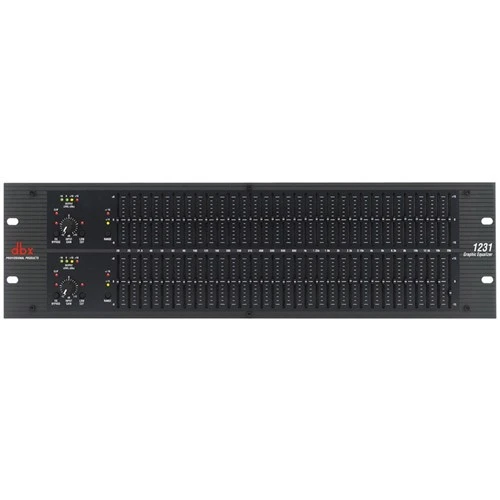
If you've ever walked into a venue and thought the sound was muddy, harsh, or just not quite right, there's a good chance a graphic equaliser could have fixed it. But if you're new to audio gear, the idea of a rack-mounted unit covered in dozens of tiny sliders can feel genuinely intimidating.
Don't worry — that's exactly why we've written this guide. The DBX 1231 Dual Channel 31-Band Graphic Equalizer is one of the most trusted names in sound shaping, and by the time you've finished reading, you'll understand exactly what it does, why it matters, and whether it belongs in your setup.
What Is a Graphic Equaliser? (The Basics)
Before we dive into the DBX 1231 specifically, let's get comfortable with what a graphic equaliser actually is — because understanding the tool matters more than memorising model numbers.
An equaliser (EQ) is a device that lets you adjust the volume of specific frequency ranges in your audio signal. Think of it like a detailed volume control — instead of one knob that makes everything louder or quieter, you get individual control over the bass, midrange, and treble portions of your sound, and everything in between.
A graphic equaliser gets its name from the fact that the physical sliders give you a visual "graph" of your adjustments. When you look at the front panel, you can literally see the shape of your EQ curve. Slider pushed up? That frequency is boosted. Pulled down? It's cut. It's one of the most intuitive audio tools you'll ever use.
What Does "31-Band" Mean?
The "31-band" part tells you how many individual frequency sliders you get. Each slider controls a specific frequency point, and on a 31-band EQ like the DBX 1231, these are spaced at one-third octave intervals across the full audible spectrum — from deep 20Hz bass right up to airy 20kHz treble.
Here's a simple way to think about it: if a 7-band EQ gives you broad brush strokes, a 31-band EQ gives you a fine-tipped pen. You can make much more precise adjustments, targeting problem frequencies without affecting the ones nearby.
What Does "Dual Channel" Mean?
Dual channel simply means the DBX 1231 has two independent equalisers in one unit. This is essential for stereo systems (left and right speakers need separate EQ) or for situations where you're running two different monitor mixes on stage. One rack unit, two complete sets of controls — it's practical and space-efficient.
Why Would You Need a Graphic Equaliser?
This is the question every beginner should ask. After all, most mixers already have EQ built in. So why add another piece of gear?
Room Correction
This is the number one reason most people use a graphic EQ. Every room sounds different. A concrete hall boosts bass frequencies. A room with lots of glass can sound harsh and bright. A graphic EQ lets you compensate for the room's acoustic problems, cutting frequencies that are building up and gently boosting ones that are getting swallowed.
Think of it this way: your mixer's EQ shapes how each individual instrument or microphone sounds. A graphic EQ shapes how the entire mix sounds in that specific room. They solve different problems.
Feedback Control
If you've ever heard that awful screech from a PA system, that's feedback — a frequency that's caught in a loop between the microphone and speaker. A 31-band graphic EQ lets you identify and cut that exact problem frequency without affecting the overall sound. It's one of the most practical tools for live sound operators in Australia, whether you're running sound at a pub in Melbourne or a community hall in regional Queensland.
System Tuning
Professional sound engineers use graphic EQs to "tune" a PA system to a venue. Before the audience arrives, they'll play test signals or music through the system, measure the response, and use the graphic EQ to create a flat, even frequency response. This gives them a clean starting point before the band even starts soundcheck.
Monitor Mix Shaping
On stage, musicians need to hear themselves through monitor speakers or wedges. Each monitor position has different acoustic challenges. A dual-channel EQ like the 1231 lets you independently tune two monitor mixes, keeping vocalists and instrumentalists happy without feedback issues.
The DBX 1231: What Makes It a Solid Choice
Now that you understand what graphic equalisers do, let's look at why the DBX 1231 has been a staple in sound systems across Australia and around the world.
The DBX Reputation
DBX (sometimes written as dbx) has been making professional audio processing gear since the 1970s. They're particularly well-known for their signal processors — compressors, limiters, crossovers, and yes, graphic equalisers. When you see DBX gear in a rack, it signals a certain level of professional seriousness. They're not a boutique brand or a budget option trying to be something they're not. They sit firmly in the professional and semi-professional sweet spot — reliable, well-built, and genuinely useful.
Key Features Explained Simply
Let's walk through the important features of the 1231, and more importantly, explain why each one matters to you.
- 31 Constant-Q Frequency Bands Per Channel: "Constant-Q" is a technical term, but here's what it means in practice — when you adjust one slider, it affects only a narrow, predictable range of frequencies. On cheaper EQs, boosting one slider can cause "smearing" into neighbouring frequencies. Constant-Q design keeps things precise and predictable. This matters enormously when you're trying to surgically remove a feedback frequency without hollowing out the sound around it.
- Dual Channel Design: Two completely independent 31-band equalisers. Perfect for stereo main speakers, or two separate monitor sends. The channels don't interact, so adjustments to one have zero effect on the other.
- Boost/Cut Range of ±6dB or ±12dB (Switchable): This is actually a clever feature for beginners. The ±6dB range gives you finer control — each slider movement makes a smaller change, which makes it harder to overdo things. The ±12dB range gives you more aggressive adjustment when you need it. Start with ±6dB while you're learning. Trust us on this one.
- Switchable 40Hz High-Pass Filter: A high-pass filter removes very low frequencies — the rumble from air conditioning, stage vibration, and traffic noise. Engaging this filter on the 1231 cleans up your low end without touching your musical bass content. It's like removing the dust from a photograph — suddenly everything looks cleaner.
- XLR and 1/4" TRS Inputs and Outputs: This means the 1231 plays nicely with virtually any audio setup. XLR is standard in professional PA systems, while 1/4" TRS connections are common in smaller setups and studio environments. Having both means you won't need adaptors or converters.
- Front Panel Bypass Switch: Each channel has a bypass button that takes the EQ completely out of the signal path. This is incredibly useful for A/B comparison — flick it on and off to hear exactly what your EQ adjustments are doing. If the sound is better with the EQ engaged, you're on the right track. If it sounds worse, reset and start again.
- Standard Rack-Mount Design (2RU): The 1231 fits into a standard 19-inch equipment rack and takes up 2 rack units of height. This matters because it means it integrates neatly into any professional or semi-professional rack setup.
Beginner's Buying Guide: Is the DBX 1231 Right for You?
Here's the honest assessment to help you decide.
The DBX 1231 Is a Great Fit If You:
- Run live sound for bands, churches, community events, or corporate functions in Australia
- Need to tame room acoustics in a venue with problematic sound
- Want a reliable, professional-grade EQ without paying flagship prices
- Are setting up a permanent install in a pub, club, worship space, or school hall
- Need dual-channel EQ for stereo systems or two monitor mixes
You Might Want to Consider Alternatives If You:
- Only work in a home studio — software (plugin) EQs inside your DAW are more flexible and cost-effective for recording
- Need parametric EQ — graphic EQs have fixed frequency points. If you need to dial in exact frequencies between the fixed bands, a parametric EQ or digital processor might suit you better
- Want automatic room correction — some modern digital processors can measure a room and apply EQ automatically. The 1231 is fully manual, which some engineers prefer but others find time-consuming
Common Beginner Mistakes to Avoid
If the DBX 1231 is your first graphic equaliser, keep these tips in mind:
- Don't boost everything. The most common beginner mistake is pushing most sliders up. If your system isn't loud enough, turn up the amplifier — don't boost every frequency on the EQ. Good EQ work involves more cutting than boosting.
- Start with all sliders at zero. Always begin flat. Listen to music through your system first, identify what sounds wrong, and then make small, targeted adjustments.
- Use the bypass button constantly. Flip the EQ in and out of the signal path every few adjustments. Your ears adapt quickly, and what sounds "better" after five minutes of tweaking might actually sound worse than where you started. The bypass button keeps you honest.
- Don't create a "smiley face" curve. Boosting bass and treble while cutting mids is a classic beginner move that sounds impressive for about thirty seconds and terrible for the rest of the night. Trust a flatter response — your audience will thank you.
- Less is more. If you're making huge adjustments (more than 3-4dB), something else in your system probably needs attention first — speaker placement, microphone positioning, or room treatment. The EQ should be fine-tuning, not a rescue mission.
Where the DBX 1231 Fits in Your Signal Chain
If you're new to audio, you might wonder where this thing actually goes. Here's the typical signal chain:
Mixer Output → Graphic Equaliser → Amplifier → Speakers
The EQ sits between your mixer and your amplifiers (or powered speakers). It processes the full mixed signal before it gets amplified and pushed through the speakers. This is why it's so effective for room correction — it's adjusting everything at once, right before the sound enters the room.
For monitor use, it sits between the mixer's auxiliary send and the monitor amplifier or powered monitor wedge.
Getting Started: Your First Session with the 1231
Here's a realistic walkthrough of what to expect when you first set up and use the DBX 1231.
Setup (15-30 Minutes)
- Rack-mount the unit or place it on a stable surface
- Connect your mixer's main output to the 1231's input (XLR or TRS)
- Connect the 1231's output to your amplifier or powered speaker input
- Power on — ensure all sliders are centred (flat position)
- Set the range switch to ±6dB for finer control while learning
Initial Listening (10-15 Minutes)
- Play familiar music through your system at moderate volume
- Walk around the room and listen from different positions
- Note what bothers you — boomy bass? Harsh highs? Muddy vocals?
- This listening phase is the most important step. Resist the urge to start sliding things immediately
Making Adjustments
- Address the most obvious problem first
- Make small cuts (1-2dB) at problem frequencies
- Use the bypass switch to compare
- Move to the next issue only when you're satisfied
- Stop when things sound good — don't keep tweaking for the sake of it
The learning curve is gentle. Within a few sessions, you'll develop an ear for identifying problem frequencies and knowing which sliders to reach for. Within a few months, it'll become second nature.
Frequently Asked Questions from Beginners
Do I need a graphic EQ if my mixer already has EQ?
They serve different purposes. Your mixer's channel EQ shapes individual inputs (each microphone, instrument, etc.). A graphic EQ on the main output shapes the overall mix as it interacts with the room. Think of it as channel EQ being about the music, and graphic EQ being about the space.
Can I use the DBX 1231 for recording?
You can, but most recording engineers prefer software EQ plugins for their flexibility and recall ability. The 1231 shines brightest in live sound and installed systems where hardware reliability matters.
What's the difference between the DBX 1231 and the 2231?
The 2231 adds a limiter circuit on each channel, which provides output protection. The 1231 is the pure equaliser without the limiter. If you already have a separate limiter or processor in your signal chain, the 1231 gives you everything you need.
Is 31-band overkill? Would a 15-band EQ do?
For basic tone shaping, a 15-band EQ works fine. But for feedback control and precise room correction, 31 bands is the professional standard. The narrower frequency bands let you make surgical adjustments that 15-band units simply can't achieve. If you're investing in a quality EQ, 31-band is worth it.
Will this work with powered speakers?
Absolutely. Connect the 1231's output directly to the input of your powered speakers. It works perfectly with popular brands like JBL, QSC, Yamaha, and EV powered speakers commonly used across Australian venues.
Why the DBX 1231 Remains Relevant in 2026
You might wonder why anyone would choose a hardware graphic EQ when digital processors can do so much more. It's a fair question, and the answer comes down to a few practical realities:
- Simplicity: No menus, no screens, no software updates. Every control is right there on the front panel. In a live setting where things need to happen fast, that physical immediacy is genuinely valuable.
- Reliability: Hardware EQs don't crash, don't need rebooting, and don't depend on WiFi connections. For permanent installations and touring rigs, that rock-solid dependability matters.
- Tactile control: Being able to see and feel your EQ curve at a glance is something digital screens still can't fully replicate. Many experienced engineers prefer the physical feedback of sliders.
- Cost-effectiveness: For venues that need reliable EQ without the complexity and cost of a full digital processor, the 1231 delivers professional results at a sensible price point.
Ready to Shape Your Sound?
The DBX 1231 Dual Channel 31-Band Graphic Equalizer is one of those pieces of gear that quietly makes everything sound better. It's not flashy, it doesn't have a touchscreen, and it won't impress people at a glance. But plug it in, make some thoughtful adjustments, and suddenly your PA system sounds like it had a professional upgrade.
For Australian beginners stepping into live sound, venue installation, or worship audio, it's a genuinely smart investment. It teaches you about frequencies and room acoustics in a hands-on way that no software plugin can match, and the skills you develop using it will serve you throughout your entire audio career.
Check out the DBX 1231 Dual Channel 31-Band Equalizer at MusiconStage — available for Australian buyers with local support and shipping.
Got questions about whether a graphic EQ is right for your setup? Get in touch with the MusiconStage team — they're always happy to help newcomers find the right gear for their needs.