
Allen & Heath Qu-6 Digital Mixer: Beginner's First Step into Pro Audio 2025
Allen & Heath Qu-6 Digital Mixer: Your First Step into Professional Digital Mixing
If you've been looking at digital mixers and feeling a bit overwhelmed by all the buttons, screens, and technical specifications, you're not alone. The jump from simple analogue mixers to digital can seem daunting. But here's the thing – the Allen & Heath Qu-6 was designed specifically with accessibility in mind, making it one of the friendliest entry points into professional digital mixing.
In this guide, we'll break down everything you need to know about the Qu-6, explaining concepts in plain English and helping you understand whether this mixer is the right fit for your needs. Whether you're setting up your first small venue, stepping up your band's live sound, or building a home studio that can grow with you, let's explore what digital mixing actually means and how the Qu-6 makes it approachable.
What Is a Digital Mixer? (And Why Should Beginners Care?)
Before we dive into the Qu-6 specifically, let's clarify what we're actually talking about. A digital mixer takes the job of a traditional analogue mixer – combining and adjusting multiple audio sources – but processes everything using digital technology instead of purely electronic circuits.
Think of it like the difference between a film camera and a digital camera. Both capture images, but digital cameras give you more flexibility, features, and the ability to save and recall your settings. Digital mixers work the same way with sound.
Key Advantages of Digital Mixing for Beginners
- Scene Recall: Save your entire mixer setup and recall it instantly. Mixed a great-sounding gig? Save it and load it next time.
- Built-in Effects: No need to buy separate reverb or delay units – they're already inside the mixer.
- Consistent Sound: Digital processing doesn't drift or change with temperature like analogue circuits can.
- Smaller Footprint: A digital mixer can replace a much larger analogue setup with external effects and processing.
- Remote Control: Adjust your mix from anywhere in the room using a tablet or phone.
Understanding the Allen & Heath Qu-6: What You're Actually Getting
The Qu-6 sits at the compact end of Allen & Heath's Qu series, but don't let the word "compact" fool you into thinking it's limited. This is a fully-featured professional digital mixer that happens to come in a manageable size.
The Basics: Inputs and Outputs Explained
When you see specifications like "16 mono inputs" and "3 stereo inputs," it's easy to feel lost. Let's break this down practically:
Mono inputs are for single audio sources – a microphone, a guitar, a keyboard output. The Qu-6 gives you 16 of these, which means you could connect 16 different microphones or instruments simultaneously.
Stereo inputs are for sources that already have left and right channels, like a backing track player, a laptop, or a DJ controller. You get 3 stereo inputs on the Qu-6.
In real-world terms, this means you could run a full band setup with drums (kick, snare, hi-hat, two overheads = 5 inputs), bass (1 input), two guitars (2 inputs), keyboards in stereo (1 stereo input), three vocals (3 inputs), and still have room for backing tracks and additional instruments.
What "24-bit/96kHz" Actually Means
You'll see these numbers on the Qu-6's specifications. Simply put:
24-bit refers to the dynamic range – how much difference there is between the quietest and loudest sounds the mixer can handle. 24-bit gives you professional-quality headroom, meaning you won't clip or distort easily, and quiet sounds remain clean.
96kHz is the sample rate – how many times per second the mixer captures the audio. Higher numbers mean more detail. 96kHz is well above what's needed for excellent sound quality (CD quality is 44.1kHz), giving you room for pristine recordings.
Features That Matter (Explained Simply)
The Touchscreen Interface
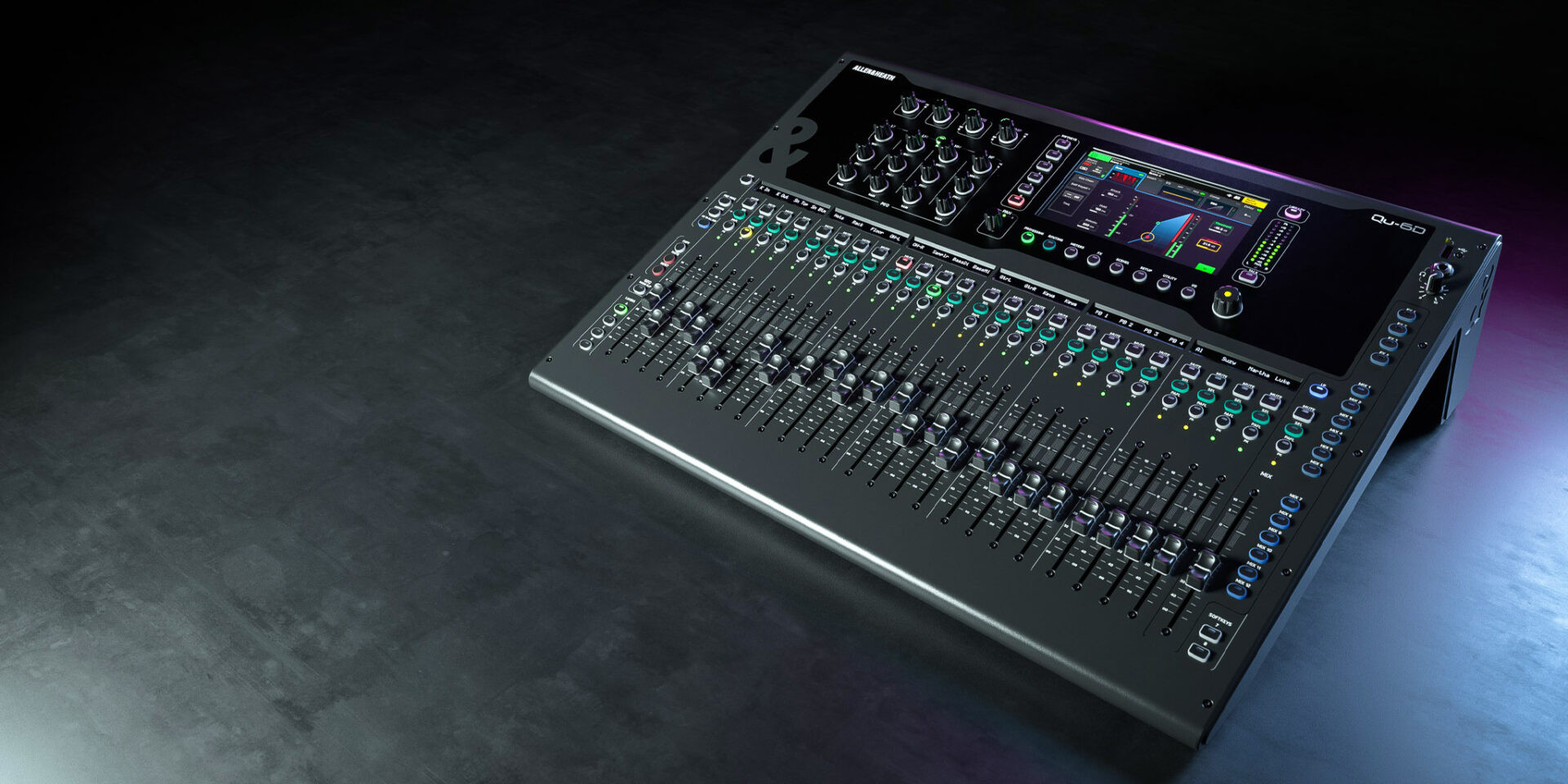
One of the Qu-6's standout features is its 5-inch touchscreen. Rather than hunting through layers of menus using buttons, you tap what you want to adjust. If you've used a smartphone, you already understand the basics of navigating this mixer.
The screen shows you channel settings, effects parameters, routing options, and more. It's contextual too – tap on a channel and the screen shows you everything about that channel. This visual feedback makes learning much faster than staring at cryptic LED displays.
Motorised Faders: Why They're Brilliant for Beginners
Here's a feature that might seem like a luxury but is actually incredibly practical: motorised faders. These are the sliding controls that adjust volume levels, and on the Qu-6, they move by themselves.
Why does this matter? When you recall a saved scene or switch between different layers (more on that shortly), the faders physically move to show you the actual settings. On cheaper digital mixers, you might have a fader sitting at 0dB but the actual level is at -10dB because of a stored scene – confusing, right? Motorised faders eliminate this problem entirely. What you see is what you get.
Understanding "Layers" on a Digital Mixer
The Qu-6 has a compact physical footprint, but it handles many more channels than it has physical faders. It does this through a layer system.
Think of layers like pages in a book. The physical faders on the Qu-6 can control different sets of channels depending on which "page" you're on. Press a button to switch layers, and suddenly those same faders control a different set of inputs or outputs.
For beginners, this means you can start simple – using just the first layer for your main inputs – and gradually explore the additional layers as you become more confident.
Built-in Effects: Your Virtual Rack of Gear
The Qu-6 includes four stereo effects engines with a library of effects including:
- Reverb: Adds space and depth to vocals and instruments – from small room ambience to large hall sounds.
- Delay: Creates echoes and repeats, useful for vocal effects or creating space in a mix.
- Chorus/Flanger/Phaser: Modulation effects that add movement and character to sounds.
- ADT (Automatic Double Tracking): Makes a single vocal sound like two singers.
In the analogue world, you'd need to buy separate effects units (costing hundreds or thousands of dollars) and wire them up correctly. The Qu-6 includes all of this already, with simple on-screen controls to adjust them.
Channel Processing: EQ and Dynamics
Every input channel on the Qu-6 includes:
Parametric EQ: This lets you boost or cut specific frequency ranges. Think of it as tone control on steroids. You can make vocals sound clearer, reduce muddiness in guitars, or add warmth to a thin-sounding keyboard.
Compressor: This evens out the volume of a source. A singer who gets quiet in verses and loud in choruses? A compressor can smooth that out, making your mix more consistent.
Gate: This automatically mutes a channel when the signal drops below a certain level. Useful for keeping drum microphones quiet between hits, reducing bleed and keeping your mix clean.
On analogue mixers, you'd typically only get basic EQ, and compression/gating would require additional outboard equipment. Having this on every channel is a significant advantage.
Wireless Control: Mix from Anywhere
One of the genuinely game-changing features of the Qu series is the Qu-Pad app. Connect the Qu-6 to a wireless router, and you can control the entire mixer from an iPad.
Why is this revolutionary for beginners? Because you can stand where the audience is and actually hear what they hear while making adjustments. No more running back and forth between the mix position and the room to check how things sound.
There's also the Qu-You app for personal monitor mixing. If you're playing in a band, each musician can adjust their own monitor mix on their phone without bothering the main engineer. This alone can save enormous amounts of time during soundchecks.
Recording and Playback Capabilities
The Qu-6 isn't just a live mixer – it's also a capable recording interface.
USB Recording
You can record your main stereo output directly to a USB drive plugged into the mixer. No computer needed. This is perfect for capturing live performances or keeping a record of events.
Multi-track Recording via USB
Connect the Qu-6 to a computer via USB, and it becomes an audio interface capable of recording individual channels. This means you could record a live gig with every instrument on its own track, then mix it properly later in a DAW (Digital Audio Workstation) like Logic, Pro Tools, or Reaper.
For beginners thinking about both live sound and recording, this dual functionality means you don't need to buy a separate audio interface for your studio work.
Who Is the Qu-6 Actually For?
Ideal Use Cases
- Small venues and cafés: Perfect channel count for acoustic acts, solo performers, and small bands.
- Houses of worship: Great for smaller congregations needing quality sound with easy operation.
- Schools and community halls: Robust enough for regular use, simple enough for volunteer operators.
- Rehearsal spaces: High-quality monitoring and the ability to record sessions.
- Home studios: Professional audio interface capabilities with hands-on control.
- Mobile DJs and small production companies: Compact, reliable, with scene recall for quick setup.
When You Might Need Something Different
The Qu-6 might not be the best choice if:
- You regularly mix large bands or complex productions (consider the Qu-16, Qu-24, or Qu-32 for more channels).
- You need a very large number of aux sends for extensive monitor systems.
- Your budget is extremely tight (there are cheaper options, though they sacrifice features and build quality).
Beginner's Buying Guide: What to Consider
Assess Your Actual Needs
Before purchasing, count up the inputs you'll actually use. Be realistic but allow some room for growth. The Qu-6 handles:
- 16 mono inputs (microphones and instruments)
- 3 stereo inputs (music players, laptops, etc.)
- 12 mix outputs (for monitors, recording, and other destinations)
If you regularly exceed these numbers, look at the larger Qu models. If you rarely use more than 8-10 inputs, the Qu-6 gives you professional quality with room to grow.
Consider the Learning Curve
The Qu-6 is genuinely easier to learn than many digital mixers, but it's still a professional tool. Plan for a learning period. Allen & Heath provides:
- Comprehensive PDF manuals
- Tutorial videos on their website and YouTube
- A helpful user community online
Take advantage of these resources. Spend time with the mixer before your first gig, and you'll be rewarded with confidence when it counts.
Budget for Accessories
The Qu-6 itself is the main investment, but consider these additions:
- Wireless router: For iPad control (a basic dedicated router works fine).
- USB drive: For stereo recording and firmware updates.
- Dust cover: If the mixer will be installed permanently.
- Case or bag: For mobile use.
Why Allen & Heath?
Allen & Heath is a British company with over 50 years of experience building mixing consoles. They're known for:
- Build quality: Professional-grade components designed for touring and installation.
- Sound quality: Particularly their preamps, which have an excellent reputation.
- Reliability: These mixers are designed for the real world, not just the spec sheet.
- Support: Regular firmware updates that add features and fix any issues.
- Resale value: A&H gear holds its value well if you ever upgrade.
Common Beginner Questions About the Qu-6
"Can I use this without any digital mixing experience?"
Yes. The Qu-6's interface is logical, and the touchscreen provides visual feedback that helps you understand what's happening. If you have basic understanding of what a mixer does (combining and adjusting audio sources), you can learn the Qu-6. Start simple, use the factory presets, and expand your knowledge gradually.
"Do I need an iPad to use it?"
No. The Qu-6 is fully functional as a standalone mixer using the built-in touchscreen and physical controls. The iPad app is an optional enhancement, not a requirement.
"What about monitor mixes for musicians?"
The Qu-6 can create multiple different monitor mixes, sending each musician exactly what they need to hear. Using the Qu-You app, musicians can even adjust their own monitor mix on their phones – a massive time-saver during soundchecks.
"Is this overkill for my small setup?"
Professional gear isn't overkill – it's an investment. The Qu-6 will grow with you, sounds excellent from day one, and won't need replacing when your needs expand. You're also getting reliability that cheaper alternatives often can't match.
"Can I use it for recording music at home?"
Absolutely. Connect it to your computer via USB and record individual tracks into your DAW. The Qu-6's preamps are high quality, so you're getting a legitimate audio interface as well as a mixer.
Getting Started: What to Expect
First Steps
- Update the firmware: Check Allen & Heath's website for the latest version.
- Read the quick start guide: Get the basics before diving into the full manual.
- Explore the default scenes: These give you sensible starting points.
- Connect a simple source: Start with just a microphone and learn the signal path.
- Experiment with effects: Add reverb to a vocal and adjust the parameters to hear what they do.
Realistic Timeline
- Day 1: Basic operation – getting signal through, adjusting levels.
- Week 1: Understanding channel processing, using scenes.
- Month 1: Comfortable with most features, efficient workflow developing.
- Month 3+: Confident operation, exploring advanced features.
Ready to Take the Next Step?
The Allen & Heath Qu-6 represents a genuine step into professional audio without the intimidation factor that often comes with digital mixers. It's compact enough for small applications, powerful enough to grow with you, and backed by one of the most respected names in audio.
If you're ready to move beyond basic mixers and into a world where you can save and recall your settings, control your mix from anywhere in the room, and have professional effects and processing at your fingertips, the Qu-6 is an excellent starting point.
View the Allen & Heath Qu-6 at MusiconStage to see current pricing and availability for Australian customers. Our team is always happy to answer questions if you need guidance on whether this mixer suits your specific needs.
For those wanting to compare options, we also stock the full range of Allen & Heath Qu series mixers, from the Qu-6 up to the 32-channel Qu-32. Get in touch with our team for personalised recommendations based on your setup.
Final Thoughts for Beginners
Making the jump to digital mixing is easier than you might think, especially with a well-designed product like the Qu-6. Don't be intimidated by the features you don't understand yet – you'll learn them as you need them. Focus on the basics first: getting clean signal in, adjusting levels, and sending audio where it needs to go.
The Qu-6 will reward your investment with years of reliable service and sound quality that makes everything you do sound more professional. And when you're ready for more advanced techniques, the features are there waiting for you.
Welcome to the world of digital mixing. It's a good place to be.