
Allen & Heath ZED-10FX: Your First Analogue Mixer Guide 2026
Allen & Heath ZED-10FX: Your First Analogue Mixer Guide 2026
If you've been researching audio mixers and feeling a bit overwhelmed by all the knobs, channels, and specs — you're not alone. Mixers can seem intimidating when you're starting out, but the truth is, once you understand the basics, they're remarkably logical pieces of gear. And the Allen & Heath ZED-10FX happens to be one of the best places for a beginner to start.
In this guide, we'll walk you through everything you need to know about this compact analogue mixer — what it does, who it's built for, and whether it's the right choice for your first setup. No jargon without explanation, no assumptions about what you already know. Let's get into it.
What Is an Analogue Mixer (And Why Should You Care)?
Before we talk about the ZED-10FX specifically, let's make sure we're on the same page about what a mixer actually does.
Think of a mixer like a traffic controller for sound. You plug in multiple audio sources — a microphone, a guitar, a keyboard, a laptop — and the mixer lets you control each one individually. You can make the vocals louder, turn the guitar down a touch, add some reverb to the singer's voice, and blend everything together into one polished output that goes to your speakers or a recording device.
An analogue mixer means the audio signal travels through physical electronic circuits rather than being converted to digital data. The practical benefit? Analogue mixers tend to feel more immediate and hands-on. Every knob does something you can hear straight away — there's no menu diving or screen tapping. For beginners, this direct, tactile experience is genuinely one of the best ways to learn how sound works.
Analogue vs Digital — Which Is Better for Beginners?
Neither is objectively "better" — they're different tools. But analogue mixers like the ZED-10FX have real advantages when you're learning:
- What you see is what you get — every control is right there on the surface, no hidden menus
- Instant feedback — turn a knob, hear the change immediately
- Simpler setup — plug in and go, no firmware updates or Wi-Fi configuration
- More affordable — you get professional sound quality without the digital premium
- Reliability — fewer things that can go wrong mid-performance
The trade-off is that analogue mixers generally can't save settings, offer fewer effects, and don't have remote control via tablet. But for learning the fundamentals of audio mixing, analogue is brilliant.
Understanding the ZED-10FX: What's Actually Inside
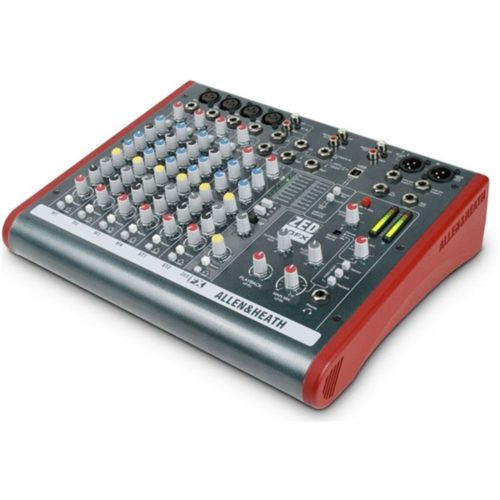
Let's break down the key features of the Allen & Heath ZED-10FX in plain language — what each one means and why it matters to you.
Channels — Your Audio Inputs Explained
The "10" in ZED-10FX refers to the number of inputs. But here's where it gets interesting — not all channels are the same:
- 4 mono channels with microphone preamps (XLR inputs) — These are your premium inputs. Each one has a high-quality "preamp" built in, which is essentially an amplifier that boosts the very quiet signal from a microphone up to a usable level. Allen & Heath's preamps are genuinely respected in the industry — they're clean, detailed, and add a subtle warmth that cheaper mixers simply can't match.
- 2 stereo channels — Perfect for plugging in keyboards, laptops, phones, or any device that outputs a stereo signal (left and right). These use standard 6.35mm jack inputs.
- Guitar DI input on channel 1 — "DI" stands for Direct Input (sometimes called Direct Injection). Normally, plugging an electric guitar directly into a mixer doesn't sound great because the signal types don't match. The DI input on channel 1 is specifically designed to accept a guitar signal and make it sound proper. This is a genuinely useful feature if you play guitar.
In practical terms, you could connect four microphones, a keyboard in stereo, and a laptop playing backing tracks — all at once. That's enough for a small band rehearsal, a podcast with multiple hosts, a small live gig, or a home recording session.
Built-In Effects — The "FX" Part
The "FX" in ZED-10FX stands for effects. This mixer has a built-in digital effects processor, which means you can add things like:
- Reverb — Makes a voice or instrument sound like it's in a room, hall, or cathedral. This is the most commonly used effect and can make a dry vocal sound much more polished and professional.
- Delay — Creates echoes of the sound. Useful for adding depth and interest.
- Chorus — Thickens a sound by layering slightly detuned copies. Popular for vocals and guitars.
Having effects built into the mixer means you don't need to buy separate effects pedals or rack units when you're starting out. Each channel has its own "FX send" knob, so you can choose exactly how much effect goes on each input. Want reverb on the vocals but not on the guitar? Easy — just turn up the FX knob on the vocal channel and leave the guitar's turned down.
EQ — Shaping Your Sound
EQ stands for equalisation, and it's one of the most important tools on any mixer. Think of it like the bass and treble controls on your car stereo, but more precise.
The ZED-10FX gives you 3-band EQ on each mono channel:
- High (treble) — Controls the crisp, bright frequencies. Turn it up for clarity and "air," turn it down if something sounds harsh or sibilant.
- Mid — The middle frequencies where most of the character of voices and instruments lives. This is where experienced engineers spend most of their time making adjustments.
- Low (bass) — Controls the deep, warm frequencies. Useful for adding warmth to a thin-sounding voice or reducing boominess from a microphone that's too close to the speaker.
The mid-range EQ on the mono channels is sweepable, which means you can choose which specific mid frequency you want to boost or cut. This is a feature you'd normally find on more expensive mixers, and it gives you much more precise control over your sound. Don't worry if that sounds complex — you'll pick it up naturally as you experiment.
Auxiliary Sends — Connecting Extra Gear
An auxiliary send (often shortened to "aux send") lets you create a separate mix from the main output. The ZED-10FX has auxiliary sends that you can use for:
- Stage monitors — So performers can hear themselves through a wedge speaker on stage
- External effects units — If you eventually want to add effects beyond the built-in ones
- Recording feeds — Sending a separate mix to a recording device
As a beginner, you might not use aux sends straight away, but they're there when you need them — and you will eventually.
Who Is the ZED-10FX Actually Built For?
This mixer sits in a sweet spot that suits several types of users particularly well:
Singer-Songwriters and Solo Performers
If you perform with a vocal mic and a guitar (acoustic or electric), the ZED-10FX gives you professional-grade sound with built-in effects. You can run backing tracks from your phone or laptop through a stereo channel while singing and playing through the mono channels. The DI input on channel 1 is particularly handy for plugging your guitar straight in.
Small Bands Rehearsing or Gigging
Four mic inputs and two stereo inputs is enough for a three or four-piece band. Vocals, a couple of instrument mics, and keyboards or backing tracks — sorted. The compact size means it's easy to transport, and the build quality means it'll handle being carted around in a gig bag.
Podcasters and Content Creators
Running a podcast with two to four hosts? The four mic preamps handle that perfectly. The EQ lets you shape each voice individually, and you can bring in sound effects or music through the stereo channels.
Home Recording Beginners
While the ZED-10FX doesn't have a USB audio interface built in (that's the Zedi-10FX — note the "i" — which is a different model), it can still feed a clean, mixed signal to an external audio interface for recording. If recording is your primary goal, you might want to look at the Zedi-10FX instead, but the ZED-10FX is perfectly capable as part of a recording chain.
Houses of Worship and Community Venues
Small churches, community halls, and meeting spaces often need something simple and reliable that volunteers can operate without extensive training. The ZED-10FX fits this use case brilliantly.
Common Beginner Mistakes to Avoid
Every mixer beginner makes a few of the same mistakes. Here's how to avoid the most common ones:
1. Turning Everything Up Too High
When something isn't loud enough, the instinct is to crank everything up. But this creates a problem called gain staging issues — essentially, you're overloading the signal at various points, which creates distortion and noise. Instead, start with everything at a moderate level and make small adjustments. If you need more volume, turn up the main output or your speakers — not every individual channel.
2. Ignoring the Gain Knob
The gain knob (sometimes called "trim") at the top of each channel is the most important control on the whole mixer, yet beginners often ignore it. It sets the input level — how much the preamp amplifies the incoming signal. Set this correctly first (using the PFL/solo function and the level meters), and everything else becomes much easier.
3. Adding Too Much Effects
Built-in reverb is exciting when you first discover it, and the temptation is to drench everything in it. Resist. A little reverb goes a long way. Start with the FX send knobs at about 10-15% and only increase if it genuinely sounds better. In most cases, less is more.
4. Not Using the EQ Subtractively
Beginners tend to boost frequencies to make things sound "better." Experienced engineers do the opposite — they cut the frequencies that sound bad. If a vocal sounds boomy, don't boost the highs; cut the lows instead. This approach gives you a cleaner, more natural sound.
5. Buying Too Many Channels
It's tempting to buy a bigger mixer "just in case." But a mixer with too many channels for your needs is harder to transport, takes up more space, and the extra channels often just collect dust. The ZED-10FX's compact channel count is actually a strength for most beginners — it's enough to be useful without being overwhelming.
What Makes Allen & Heath Different?
You might be wondering why the ZED-10FX costs a bit more than some competing mixers with similar specs. The difference is largely in the components and engineering.
Allen & Heath is a British audio company that's been designing mixers since 1969. They're used in professional recording studios, major touring acts, and broadcast facilities worldwide. The ZED series brings that same engineering philosophy to a more affordable price point.
Specifically, the ZED-10FX uses Allen & Heath's proprietary DuoPre preamps, which deliver a level of clarity and warmth that budget mixers simply can't replicate. If you've ever noticed that some recordings sound "thin" or "noisy" — that's often down to cheap preamps. The preamps in this mixer are genuinely excellent for the price bracket.
The build quality is also notably solid. The chassis feels substantial, the knobs have a satisfying resistance, and the faders move smoothly. This might not seem important when you're buying, but after a year of regular use, you'll appreciate gear that still feels tight and responsive.
Setting Up Your ZED-10FX: What to Expect
One of the genuine advantages of an analogue mixer is the simplicity of setup. Here's what getting started looks like:
- Unbox and place on a flat surface — The ZED-10FX is compact enough for a desk but you'll want a bit of space around it for cable routing.
- Connect your speakers — Run cables from the main outputs to your powered speakers or amplifier. You'll need standard XLR or 6.35mm jack cables.
- Plug in your sources — Microphones go into the XLR inputs on channels 1-4. Keyboards, laptops, or phones connect to the stereo channels via jack cables.
- Set your gain levels — With each source making sound, adjust the gain knob until the signal is healthy (the channel LED should flicker green, not red).
- Bring up the faders — Slide the channel faders up to bring each source into the mix.
- Adjust EQ and effects to taste — Fine-tune each channel's tone and add effects as needed.
Realistically, you can go from unboxing to making sound in about 15 to 20 minutes. The learning curve for basic operation is genuinely gentle — it's the nuances of mixing well that take time to develop, and that's the fun part.
What You'll Need Alongside the Mixer
The ZED-10FX doesn't come with everything you need to make sound — it's the central hub, but you'll need a few extras:
- Speakers — Powered (active) speakers are the simplest option as they have built-in amplifiers. Brands like Yamaha, QSC, and Mackie offer good options for beginners.
- Microphones — A dynamic microphone like the Shure SM58 is the classic starting point for vocals. Budget-friendly alternatives from Audio-Technica and Rode work well too.
- Cables — XLR cables for microphones, 6.35mm jack cables for instruments and speakers. Buy decent quality cables — cheap ones are the most common source of mysterious buzzing and dropouts.
- Microphone stands — Often overlooked but essential unless you enjoy holding a mic for hours.
ZED-10FX vs Similar Mixers: Quick Comparison
If you're comparing options, here's how the ZED-10FX stacks up against common alternatives in its class:
- vs Yamaha MG10XU — The Yamaha includes USB audio connectivity, which the ZED-10FX lacks. However, many users find the Allen & Heath preamps sound warmer and more detailed. If USB recording is essential, the Yamaha might suit better; if sound quality is your priority, the Allen & Heath wins.
- vs Mackie Mix12FX — The Mackie is typically cheaper but uses lower-quality components. The ZED-10FX's build quality and preamp performance justify the price difference for most users.
- vs Allen & Heath Zedi-10FX — The Zedi version adds a USB audio interface for direct recording to a computer. If home recording is a major goal, the Zedi is worth the extra investment. If you're mainly doing live sound, the standard ZED-10FX is all you need.
Frequently Asked Questions from Beginners
Can I record music with the ZED-10FX?
You can send the main output to an external audio interface or recording device, yes. However, the ZED-10FX doesn't have a built-in USB interface for direct computer recording. If recording to a computer is a primary need, look at the Zedi-10FX model instead.
Do I need phantom power, and does this mixer have it?
Phantom power (labelled as +48V) is an electrical current sent through the XLR cable to power condenser microphones. Yes, the ZED-10FX provides phantom power. If you're only using dynamic microphones (like an SM58), you won't need it — but it's there when you want to use condenser mics for more detailed recordings.
Is this mixer too basic for gigging?
Not at all. For small to medium acoustic gigs, solo performances, duo acts, and small band setups, the ZED-10FX is a genuinely capable and professional-sounding mixer. Many working musicians use compact ZED mixers regularly for paid gigs.
How long do analogue mixers last?
With reasonable care, a well-built analogue mixer can last 10 to 20 years or more. There's no software to become obsolete and no digital components to fail. Allen & Heath gear in particular has a strong reputation for longevity.
Will I outgrow this mixer quickly?
That depends on your ambitions. If you're mixing events with more than four microphones, you'll eventually need more channels. But for personal use, small gigs, practice, and podcasting, many users find the ZED-10FX serves them well for years.
Is the Allen & Heath ZED-10FX Right for You?
If you're new to mixing and want a reliable, great-sounding analogue mixer that'll teach you the fundamentals without overwhelming you — the ZED-10FX is genuinely hard to beat at its price point. The preamp quality punches well above its weight, the built-in effects save you buying extra gear, and the compact layout means you won't need a degree in audio engineering to get started.
It's not the right choice if you need USB recording built in (look at the Zedi-10FX), or if you need more than four mic inputs (step up to the ZED-14 or ZED-16FX). But for what it is — a compact, professional-quality analogue mixer with effects — it's a cracking bit of gear.
Ready to get started? Check the current price of the Allen & Heath ZED-10FX at MusiconStage and see if it's the right fit for your setup.
If you've got questions about whether this mixer suits your specific needs, the team at MusiconStage can help point you in the right direction. They ship Australia-wide and know their gear inside out.
And remember — the best mixer is the one you actually learn on. Don't overthink it. Grab the ZED-10FX, plug in, and start mixing. That's where the real education begins.