
Allen & Heath ZED-10FX in Real Life: Gigging & Recording Guide 2026
Allen & Heath ZED-10FX in Real Life: A Practical Guide for Aussie Gigging and Recording in 2026
There's a moment every musician, sound tech or content creator hits eventually: you've got a couple of mics, an instrument or two, maybe a backing track, and you need it all to sound good through one box — without taking a uni degree in audio engineering to get there. That's the exact gap the Allen & Heath ZED-10FX fills, and it's why this little mixer keeps showing up at pub gigs, in bedroom studios, on podcast desks and at community events right across Australia.
This guide isn't a spec-sheet recital. It's about how you'll actually use the ZED-10FX day to day — where it shines, where it'll frustrate you, and whether it's the right match for the way you work.
What You're Actually Working With
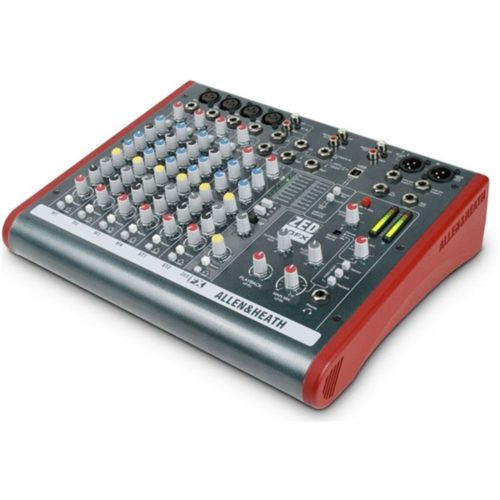
Before we get into scenarios, here's the quick lay of the land so the use cases make sense. The ZED-10FX gives you four mono mic/line channels with Allen & Heath's GSPRE preamps, plus stereo channels for line-level sources like keyboards, media players or a laptop. You get a built-in digital effects engine (that's the "FX" in the name) with reverbs, delays, chorus and more, and a genuinely handy USB connection for two-way audio in and out of a computer.
Translated into plain English: you can plug in vocals and instruments, add a touch of reverb that makes a singer sound at home, and record the whole mix straight into your laptop — or play backing tracks back out of it. That combination is the whole reason this mixer earns its keep.
Use Case 1: The Small Live Gig (Pubs, Cafés, Corners of Function Rooms)
This is the ZED-10FX's natural habitat. Picture a duo — one vocalist with an acoustic guitar, one harmony singer — playing a Friday night at a local pub or a Sunday session at a winery in the Hunter or Barossa.
- Two vocal mics into channels 1 and 2, each with phantom power for condensers if needed.
- Acoustic guitar (via DI or pickup) into channel 3.
- A backing track or click from a phone or laptop into a stereo channel.
The onboard reverb does a lot of quiet heavy lifting here. A vocal that sounds thin and exposed through a bare PA suddenly has body and space once you dial in a plate or hall setting. For a working duo who don't want to lug an outboard FX unit or fiddle with plugins, that built-in processor is the difference between "sounds like a soundcheck" and "sounds like a show."
The swept mid EQ on the mono channels is the unsung hero in live settings. Aussie pub rooms are notoriously boomy or boxy, and being able to sweep to that ugly frequency and pull it down means you can tame feedback and mud without a graphic EQ. It's a feature you'd normally expect on pricier desks.
Where it excels: solo artists, duos, trios, acoustic acts, small spoken-word or presentation events. Where it struggles: a full band with a drum kit. Four mono inputs disappear fast once you're mic'ing toms, so if you're running a five-piece, you'll outgrow this quickly. Be honest with yourself about your line count before you buy.
Check current ZED-10FX availability and pricing at MusiconStage
Use Case 2: The Home Recording Setup
This is where a lot of buyers underestimate the ZED-10FX. The built-in USB audio interface means it doubles as a recording front-end — no separate interface required.
A typical home scenario: a singer-songwriter wants to lay down ideas. Mic on channel 1, guitar on channel 2, headphones plugged in for monitoring, and the stereo USB feed running into a DAW like Reaper, Logic or Ableton. You're tracking with proper Allen & Heath preamps — which is a real step up in clarity and headroom from the budget interfaces a lot of people start on.
A few honest practical notes for the home recordist:
- The USB is a stereo two-in/two-out connection — it sends a mix to the computer, not individual channels separately. That means you can't isolate each instrument to its own DAW track simultaneously. For songwriting demos, live-to-stereo capture and podcasting, that's completely fine. For multitrack production where you want to re-balance every part afterwards, it's a genuine limitation.
- The onboard FX are great for monitoring a vocalist (singers perform better with a bit of reverb in their cans), and you can choose whether to commit that reverb to the recording or keep it dry.
- Latency through the USB path is low enough for comfortable overdubbing in most home setups.
Best match: songwriters capturing demos, anyone tracking one or two sources at a time, hobbyists who want quality preamps without a tangle of gear. Reach for something else if: you need every source on its own DAW track — a multichannel interface or a digital mixer with multitrack USB is the right tool there.
Use Case 3: Podcasting and Spoken-Word Content
Podcasting has exploded across Australia, and the ZED-10FX has quietly become a go-to for two- and three-person shows. The reasons are practical:
- Multiple mic channels with phantom power handle a host and a couple of guests on proper dynamic or condenser mics.
- USB straight to the laptop records the conversation directly into your software — no extra interface, no separate recorder to sync.
- Stereo channels let you fire in intro music, stings and pre-recorded segments live, the old radio-desk way.
- Onboard EQ lets you warm up or brighten each voice so everyone sits well together.
The catch, again, is the stereo USB mixdown: everyone lands on the same recorded track. For most podcasts that's actually a workflow win — you finish recording with a ready-to-edit stereo file. But if your editing style relies on muting and processing each person independently in post, you'll want individual outputs the ZED-10FX doesn't provide. Know which camp you're in.
Use Case 4: AV, Events and the "Just Make It Work" Brief
Schools, churches, community halls, conference rooms and small clubs all need a reliable box that staff and volunteers can operate without much training. The ZED-10FX is brilliant here precisely because it's analogue and obvious — every knob does one thing, and you can see the whole signal path at a glance. There's no menu diving, no app required, nothing to "boot up."
For a Sunday service: two lapel or handheld mics for speakers, a stereo feed from a media laptop for videos and song lyrics, and a clean output to the house PA. A volunteer can be taught to run it in fifteen minutes. That low operator overhead is worth more than any spec in a venue that relies on rostered helpers.
How It Stacks Up Against the Alternatives
You're probably weighing the ZED-10FX against a few obvious rivals. Here's the practical view rather than a feature war.
vs. The Allen & Heath ZED-10 (no FX)
The plain ZED-10 is the same chassis without the effects engine. If you already own a reverb unit or run all your effects in software, save the money. But for live work, the onboard FX on the 10FX usually pays for itself the first night you don't have to cart and patch an external processor.
vs. Mackie ProFX and similar
This is the closest fight in the Aussie market. Mackie's compact mixers are capable and often a touch cheaper. Where Allen & Heath tends to win is preamp character and EQ musicality — the GSPRE pres are clean with generous headroom, and that sweepable mid is a more flexible tool than fixed-frequency EQs. Many users describe the A&H as the one that "sounds more expensive than it is." If raw channel count per dollar is your only metric, compare carefully; if sound quality and feel matter, the ZED earns its premium.
vs. A small digital mixer
Digital mixers add scenes, recallable settings, app control and multitrack recording. They also add complexity, screens and a learning curve. For a fixed, repeatable setup where you want to turn up and play, the analogue simplicity of the ZED-10FX is a feature, not a compromise. Choose the digital path only if you genuinely need recall and multitrack — otherwise you're paying for capability you'll never touch.
Matching the ZED-10FX to Your Situation
- Solo or duo performer: Near-perfect fit. Buy with confidence.
- Songwriter recording demos at home: Excellent, as long as you're happy with stereo capture.
- Two- or three-person podcast: Strong choice, especially if you want a finished stereo file.
- Church, school or community AV: Ideal — simple, robust, volunteer-friendly.
- Full band with drums: You'll run out of inputs. Look at a larger ZED or a higher channel-count desk.
- Producer wanting full multitrack control: Wrong tool — go digital or multichannel interface.
Practical Tips to Get the Most Out of It
- Set your gain properly first. Use the per-channel gain (with the PAFL/metering) before touching faders. Good gain structure is where the clean A&H sound actually comes from.
- Use the swept mid live. When feedback or boxiness creeps in, sweep the mid to find the offending frequency and cut it — far more surgical than just yanking the highs or lows.
- Commit FX deliberately when recording. Decide upfront whether reverb is part of the take or just for the performer's monitoring.
- Treat the USB as a stereo bus. Plan your recordings around a balanced live mix, not post-production isolation.
- Label your stereo inputs. A bit of gaff tape noting "laptop" or "backing track" saves panic mid-event.
Frequently Asked Questions
Can I record each instrument to a separate track with the ZED-10FX?
No — the USB connection is a stereo two-in/two-out interface, so it records a combined mix. It's excellent for live-to-stereo demos, podcasts and capturing a performance, but not for multitrack production where each source needs its own DAW track.
Does it have phantom power for condenser mics?
Yes, it supplies phantom power, so studio condensers and active DI boxes work fine on the mic channels.
Is the ZED-10FX good enough for a full band?
For an acoustic duo or trio, absolutely. For a full band with a mic'd drum kit, you'll likely run short on inputs — a larger format mixer is the smarter long-term buy.
Do I need a separate audio interface to record?
No. The built-in USB audio means you can plug straight into a laptop and record or play back, which is a big part of this mixer's appeal for home and content creators.
Are the built-in effects actually usable live?
Yes. The reverbs and delays are genuinely gig-worthy for vocals and acoustic instruments, and having them onboard means one less piece of gear to carry and patch.
The Verdict: Who Should Buy It
The Allen & Heath ZED-10FX isn't trying to be the biggest or most feature-loaded mixer on the shelf. It's trying to be the one that just works, sounds great and gets out of your way — and at that, it's superb. If your world is solo and duo gigs, acoustic sessions, podcasts, demo recording or community AV, this is one of the most sensible compact mixers you can put on your desk in 2026. If you need high channel counts or full multitrack control, look further up the range. For everyone else, it punches well above its size.