
Allen & Heath Qu-6d Explained: Beginner's Guide to Dante Mixing 2026
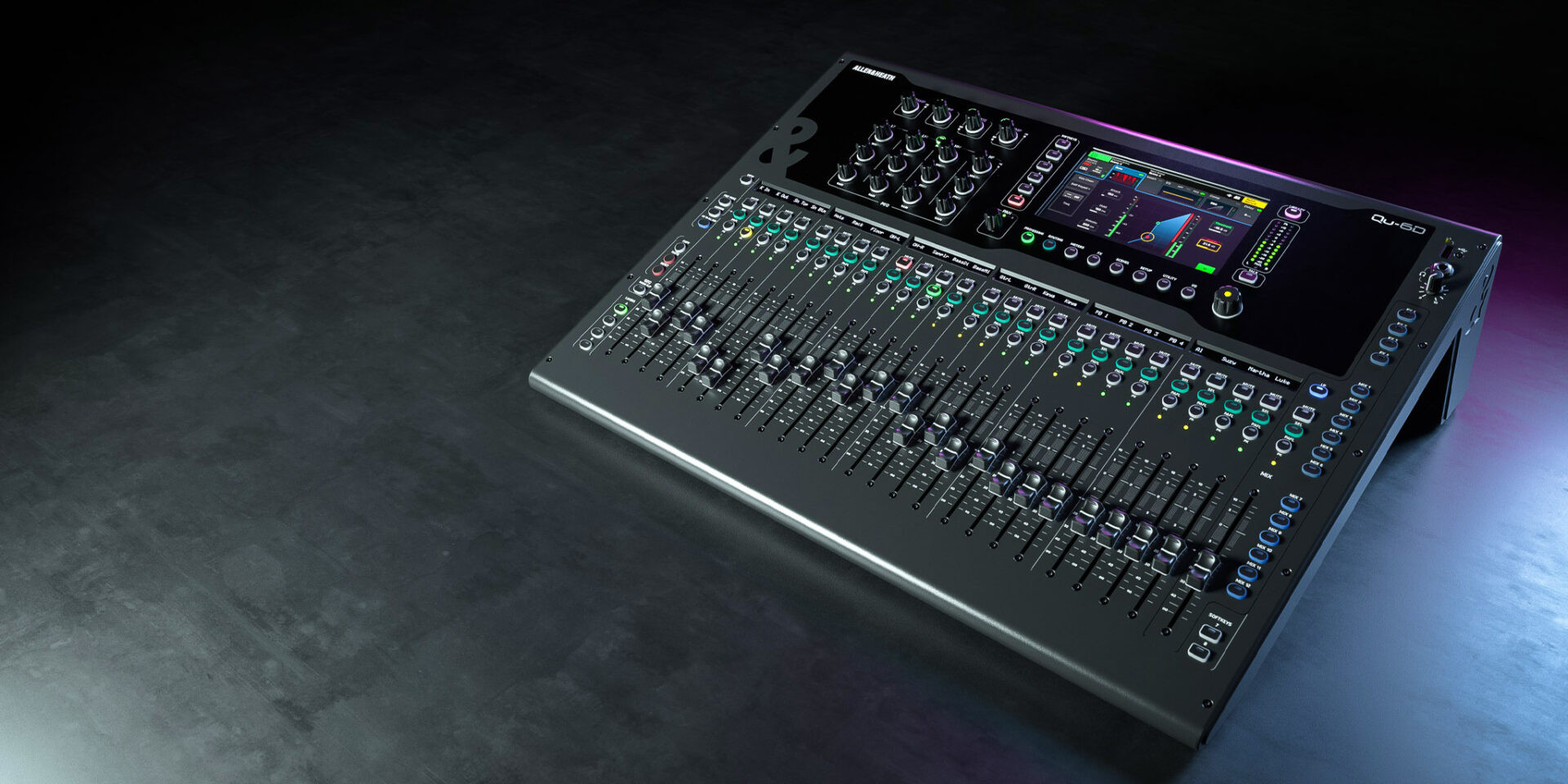
Allen & Heath Qu-6d Explained: Your Complete Beginner's Guide to Dante Digital Mixing in 2026
If you've been researching digital mixers and stumbled across the Allen & Heath Qu-6d, you might be feeling a bit overwhelmed. Terms like "Dante networking," "32-bit processing," and "24 input channels" can make your head spin when you're just starting out. Don't worry—this guide is written specifically for beginners who want to understand what this mixer actually does, why it matters, and whether it's the right choice for your needs.
By the end of this article, you'll understand exactly what makes the Qu-6d special, what all those technical terms actually mean in plain English, and have the confidence to decide if this is the mixer that'll serve you well for years to come.
What Is a Digital Mixer, and Why Does It Matter?
Before we dive into the Qu-6d specifically, let's get clear on what we're actually talking about. A digital mixer is essentially the brain of any sound system. It takes audio signals from microphones, instruments, and other sources, then lets you control how they sound and blend together.
The "digital" part means the mixer converts those audio signals into computer data, processes them using sophisticated software, then converts them back to analogue sound that goes to your speakers. This digital processing offers several advantages over older analogue mixers:
- Scene Recall: Save your entire mixer setup and recall it instantly—no more resetting everything for each gig
- Built-in Effects: Professional-quality reverbs, delays, and compressors without buying separate equipment
- Compact Size: More channels and features in a smaller, lighter package
- Recording Capability: Many digital mixers can record directly to a computer or USB drive
- Remote Control: Adjust settings from a tablet or phone while walking around the room
The Allen & Heath Qu series has become particularly popular in Australia because it strikes an excellent balance between professional features and usability. The Qu-6d takes this further by adding something called Dante networking—but we'll get to that shortly.
Understanding the Allen & Heath Qu-6d: The Basics
The Qu-6d sits in an interesting spot in the Allen & Heath lineup. Despite its compact appearance with just 6 physical faders, this mixer actually handles 24 input channels. How is that possible? Let's break it down.
Physical Inputs vs Processing Channels
When you look at the Qu-6d, you'll see physical connection points on the back for plugging in microphones and instruments. But the mixer can process many more channels than just those physical connections—especially when you connect additional inputs via a digital stagebox or the Dante network.
Think of it like this: a restaurant kitchen might have room for only a few chefs, but through good organisation, they can prepare dozens of different dishes. The Qu-6d works similarly—its compact size doesn't limit its capability.
What Those 6 Faders Actually Control
Those 6 motorised faders on the surface can be assigned to control any of your input channels. Press a layer button, and suddenly those same faders control different channels. It's like having multiple mixer layers stacked on top of each other, accessible at the touch of a button.
Motorised faders are another feature worth understanding. When you recall a saved scene or switch layers, these faders physically move to their correct positions automatically. This means you always know exactly where your levels are—no guessing required.
What Is Dante, and Why Should Beginners Care?
The "d" in Qu-6d stands for Dante—and this is where things get really interesting. Dante is a networking protocol that lets you send audio signals over standard computer network cables (Ethernet cables).
Dante Explained Simply
Imagine if instead of running 16 separate audio cables from your stage to your mixing position, you could run just one network cable that carries all 16 channels plus more. That's essentially what Dante does.
Traditional audio systems require individual cables for each channel—a nightmare of cable management, especially for larger setups. With Dante:
- One cable, many channels: A single Ethernet cable can carry dozens or even hundreds of audio channels
- Longer runs: Network cables can run up to 100 metres without signal loss (compared to analogue cables that degrade over distance)
- Easy expansion: Add more Dante-equipped devices to your network without rewiring
- Flexibility: Route any audio signal anywhere on the network with software
Do You Need Dante Right Now?
Here's some honest advice: if you're just starting out with smaller gigs—pub shows, small worship spaces, or personal projects—you might not need Dante immediately. The Qu-6d works perfectly well using its standard analogue inputs.
However, buying a Dante-equipped mixer now means you're future-proofed. As your needs grow, you can expand into Dante networking without replacing your mixer. Many Australian venues and production companies are moving toward Dante systems, so having this capability makes you more versatile.
Key Features Explained for Beginners
Let's demystify the main features you'll encounter when researching the Qu-6d.
24 Input Channels
An input channel is a path for audio to enter the mixer. Each microphone, direct instrument connection, or audio source uses one channel. Having 24 channels means you could theoretically have 24 different sources all being mixed simultaneously.
For context:
- A solo acoustic performer might use 2-3 channels (vocal mic, guitar, maybe a backing track)
- A small band typically needs 8-12 channels
- A full band with drums, multiple vocalists, and keyboards might use 16-24 channels
Having more channels than you currently need is always wise—it gives you room to grow without replacing equipment.
Built-in Effects (FX)
The Qu-6d includes four stereo effects engines. In plain terms, these are like having four separate professional effects units built into your mixer. You can apply:
- Reverb: Adds a sense of space, making vocals and instruments sound like they're in a room, hall, or cathedral
- Delay: Creates echoes of the original sound
- Chorus and Modulation: Thickens sounds or adds movement
- Compression and Limiting: Controls volume dynamics automatically
These effects are derived from Allen & Heath's more expensive iLive series, meaning you're getting genuinely professional-quality processing.
Channel Processing
Every input channel has its own set of processing tools:
- High-Pass Filter: Removes unwanted low rumble and handling noise
- Parametric EQ: Shapes the tone by boosting or cutting specific frequencies
- Compressor: Automatically controls volume peaks
- Gate: Reduces unwanted noise when the channel isn't being used
Don't be intimidated by these terms—modern digital mixers include presets and visual feedback that make learning much easier than it sounds.
Touchscreen Interface
The Qu-6d features a colour touchscreen display that shows you exactly what's happening with your mix. You can view meters, adjust EQ curves, and navigate settings with familiar touch gestures. It's designed to be intuitive, even for those new to digital mixing.
USB Recording
The mixer can record your main stereo output directly to a USB drive—brilliant for capturing rehearsals, creating archive recordings of services or events, or reviewing gigs later. Some configurations also allow multitrack recording to a computer, capturing each channel separately for later mixing.
iPad/Tablet Control
Using the free Qu-Pad app, you can control the mixer wirelessly from an iPad. This is incredibly useful because you can walk around the venue while adjusting levels, hearing exactly what the audience hears in different positions.
Who Is the Qu-6d Actually For?
Let's be practical about who should consider this mixer.
Ideal Users
- Small to medium venues: Pubs, clubs, small churches, and community halls
- Mobile DJs and entertainers: Those who need professional quality in a portable package
- Bands wanting their own mixer: Carry your perfectly-configured settings from venue to venue
- Growing production companies: Starting out but wanting room to expand
- Schools and educational facilities: Teaching environments that need reliability and versatility
- Corporate AV: Presentations, meetings, and small conferences
Maybe Not Ideal For
- Very large productions: Major concert touring might need more physical faders for quick access
- Absolute beginners with no budget: There are cheaper entry points if you're just experimenting
- Fixed installations requiring minimal physical control: A rack-mount version might suit better
Common Beginner Mistakes to Avoid
If you're new to digital mixers, here are some pitfalls to watch out for:
Mistake 1: Buying More Mixer Than You Need
While having headroom is good, jumping straight to a 32-channel console for a solo acoustic act wastes money and adds unnecessary complexity. The Qu-6d's 24 channels are plenty for most applications you'll encounter as a beginner.
Mistake 2: Ignoring the Learning Curve
Digital mixers require learning time. Block out practice sessions before your first gig. Create and recall scenes. Learn where key functions live in the menu structure. The Qu series is known for being more intuitive than many competitors, but don't expect to master it in an afternoon.
Mistake 3: Forgetting About the Ecosystem
A mixer doesn't exist in isolation. You'll need:
- A wireless router for tablet control (recommended but not essential)
- Quality microphones and cables
- Appropriate speakers (powered or with amplification)
- A road case if you're moving it regularly
Mistake 4: Not Saving Scenes
One of the biggest advantages of digital mixing is scene recall. Get into the habit of saving your work. Save a "show file" for each regular gig. Save a "starting point" scene for quick setup. This habit will save you countless hours over time.
What You'll Need to Get Started
Beyond the mixer itself, here's a realistic shopping list for beginners:
Essential Items
- Power cable: Included with the mixer
- XLR cables: For connecting microphones (buy quality cables—cheap ones cause problems)
- Speakers: Either powered speakers or passive speakers with an amplifier
- Speaker cables: Appropriate for your speaker type
- Microphones: At least a couple of decent vocal mics to start
Recommended Additions
- iPad and wireless router: For remote mixing capability
- USB drive: For recording and storing show files
- Road case or padded bag: Essential if you're gigging with the mixer
- In-ear monitoring system: For performers who need personal mixes
Future Expansion (Dante)
- Allen & Heath DX168 or similar stagebox: Adds more inputs via Dante
- Managed network switch: For complex Dante setups
- Ethernet cables: Quality Cat5e or Cat6 cables
How the Qu-6d Compares: Honest Assessment
No product is perfect for everyone. Here's a balanced view:
What the Qu-6d Does Well
- Sound quality: Allen & Heath preamps and processing are genuinely excellent
- Build quality: Designed for regular use, not just occasional projects
- Intuitive operation: The learning curve is manageable compared to many competitors
- Dante ready: Future expansion without replacing the core mixer
- Reliable: Strong reputation for dependability in Australian conditions
- Support: Good local support through Australian distributors
Considerations
- Price point: More expensive than some entry-level competitors
- Limited faders: Only 6 physical faders means more layer switching for larger shows
- Dante learning curve: Adding Dante components requires additional learning
- Size: Compact but not tiny—consider your transport situation
Frequently Asked Questions from Beginners
Can I use the Qu-6d without knowing anything about Dante?
Absolutely. The Dante functionality is an addition, not a requirement. Use the standard analogue inputs and outputs exactly like any other mixer. Dante is there when you're ready for it.
Is this mixer suitable for recording a band?
Yes. You can record the main stereo output to USB for quick recordings, or connect to a computer via USB for multitrack recording. Many home studios and project studios use Qu series mixers as their primary interface.
How long does it take to learn?
Basic operation—getting sound through the system—can be learned in an hour or two. Becoming proficient with scenes, effects, and advanced features typically takes several weeks of regular use. Mastering the mixer might take months, but you'll be functional much sooner.
Do I need an iPad to use this mixer?
No. The mixer is fully functional from its surface and touchscreen. The iPad app is a convenience for remote mixing, not a requirement.
Is Allen & Heath a good brand for beginners?
Allen & Heath has been making mixers since 1969 and has an excellent reputation for quality and reliability. The Qu series specifically was designed to bring professional features to a wider audience, making it a sensible choice for serious beginners who want gear they won't outgrow quickly.
Making Your Decision
The Allen & Heath Qu-6d represents a significant investment, but it's the kind of investment that pays off over years of reliable service. If you're serious about live sound—whether for your own performances, a venue you manage, or a production business you're building—this mixer provides a solid foundation.
The Dante capability particularly makes sense for Australian users. As our industry continues moving toward networked audio, having that capability built in means you're ready for whatever comes next without starting over.
For beginners specifically, the Qu-6d offers enough capability to handle genuinely professional applications while remaining learnable. You won't outgrow it in six months like you might with cheaper alternatives.
Ready to take the next step? View the Allen & Heath Qu-6d at Music on Stage to check current Australian pricing and availability.
Getting Started After Purchase
If you decide the Qu-6d is right for you, here's a suggested path for your first few weeks:
- Week 1: Unbox, update firmware, and get familiar with the physical layout. Route a single channel and get sound through your system.
- Week 2: Add more channels. Experiment with EQ on each channel. Learn to navigate between layers.
- Week 3: Start using effects. Try applying reverb to vocals. Save your first scene.
- Week 4: Set up iPad control. Create scenes for different applications. Practice recalling scenes quickly.
- Ongoing: Gradually explore advanced features as you need them. Watch tutorial videos. Join online communities of Qu users.
Final Thoughts
Digital mixing might seem intimidating at first, but modern mixers like the Qu-6d are designed with usability in mind. The key is to start simple, build your skills progressively, and not try to master everything at once.
The Qu-6d gives you genuine professional capability in a format that won't overwhelm you on day one but will still be serving you well years from now. That combination of approachability and longevity makes it a particularly smart choice for Australians investing in their first serious digital mixer.
Have questions about whether this is the right mixer for your specific situation? Contact the team at Music on Stage—they're always happy to help you find the right solution for your needs.