
Allen & Heath CQ-20B Setup Guide: From Unboxing to First Mix in 2026
Allen & Heath CQ-20B Setup Guide: From Unboxing to First Mix in 2026
If you've been eyeing the Allen & Heath CQ-20B as your next digital mixer, you're probably wondering what the day-to-day experience is actually like. Specs are one thing — living with a mixer week after week is something else entirely. This guide walks you through what to expect from the CQ-20B, from the moment you pull it out of the box through to running confident mixes at your venue, rehearsal space, or weekend gig.
The CQ-20B sits in an interesting spot in Allen & Heath's lineup. It's not trying to be an SQ-5 or a dLive — it's designed for musicians, small venue operators, houses of worship, and working bands who need genuinely professional sound without needing a dedicated sound engineer on staff. And in that role, it's remarkably good at what it does.
Want to jump straight to purchasing? View the Allen & Heath CQ-20B at MusiconStage with shipping across Australia.
What Exactly Is the CQ-20B?
The CQ-20B is a 20-channel digital mixer built around Allen & Heath's XCVI FPGA engine — the same core processing architecture found in their flagship dLive and Avantis consoles. That's not marketing fluff; it means the algorithms handling your EQ, dynamics, and effects are derived from consoles costing ten times the price. The "B" designation means this is the faderless variant, designed primarily for app-based control via Wi-Fi or wired connection.
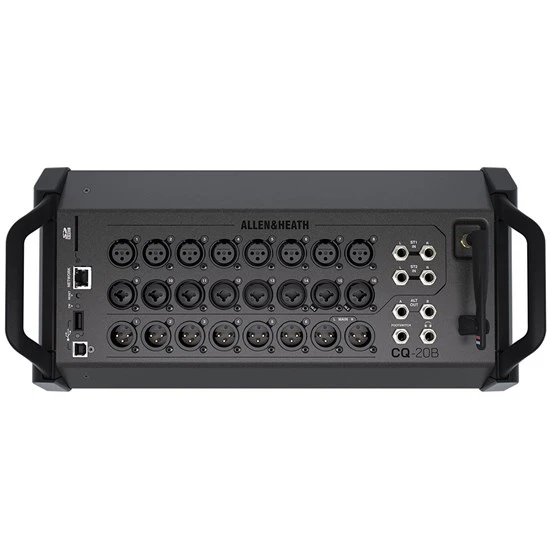
Here's the channel breakdown: you get 16 mono mic/line inputs (with recallable Allen & Heath preamps on all channels), a stereo input on channels 17-18, and a dedicated Bluetooth stereo input on channels 19-20. On the output side, there are 6 configurable mix outputs plus the main stereo LR bus. That gives you enough sends for monitor mixes, aux feeds, or zone outputs in a small venue.
Processing-wise, each input channel gets a 4-band parametric EQ, high-pass filter, gate, compressor, and delay. The output buses get the same treatment. On top of that, you have 4 stereo FX engines with dedicated return channels — reverbs, delays, chorus, and more drawn from the XCVI library. For a mixer at this price point, that's an extraordinary amount of processing power.
Who Is the CQ-20B Actually For?
This is worth addressing honestly, because the CQ-20B isn't for everyone — and that's by design.
It's Ideal For:
- Self-mixing bands — The app-based workflow means your guitarist or keys player can mix from their phone during rehearsal, and you can dial in a solid starting point with scenes that recall instantly at the gig
- Small to mid-sized churches and community venues — Volunteer operators who aren't audio professionals can learn the CQ-MixPad app quickly, and scene recall means consistent results week after week
- Solo performers and DJs — Bluetooth input for backing tracks, enough channels for multiple instruments and vocals, and compact enough to fit on a small stage or booth
- Rehearsal studios and small recording setups — Multi-track USB recording to a computer or stereo recording direct to SD card makes it genuinely useful as a recording front-end
- Corporate AV and presentation rooms — Set it up once, save a scene, and anyone can recall it. The automatic mixer feature handles multi-mic panels without constant fader riding
It's Probably Not For:
- Touring engineers who need physical faders — If you're mixing monitors on a festival stage, you need tactile control. Look at the CQ-18T or CQ-12T with their touchscreens, or step up to the Qu or SQ series
- Large-format productions exceeding 16 mic inputs — If you regularly need more than 16 microphone sources, you'll outgrow this mixer quickly
- Anyone who doesn't want to use a tablet or phone to mix — The CQ-20B has no physical faders or screen. If you're not comfortable mixing on an iPad or phone, this is the wrong choice
The XCVI Engine: Why It Matters at This Price
Allen & Heath's decision to put the XCVI FPGA processing engine into the CQ series deserves proper explanation, because it's genuinely significant. FPGA (Field-Programmable Gate Array) processing means the audio algorithms run on dedicated hardware rather than a general-purpose CPU. The practical result is ultra-low latency and processing headroom that software-based mixers simply can't match.
What does this mean for your mix? The preamp emulations, EQ curves, and dynamics processing sound noticeably more refined than competing digital mixers in this bracket. The compressors respond musically rather than clamping down harshly. The EQ has a character to it — smooth, with a natural resonance that doesn't get brittle when you push it. If you've ever used a Qu-series mixer and thought the processing sounded good, the CQ takes it a clear step further.
The FX engines deserve special mention. You get four dedicated stereo FX processors, and the reverb algorithms in particular are excellent. The "Ambience" and "Hall" presets are immediately usable for vocal reverb in a live setting, with none of the metallic artifacting you hear from cheaper digital mixers. For a worship team or acoustic act, this alone might justify the purchase.
Wi-Fi Mixing: How It Actually Works in Practice
The CQ-20B has a built-in dual-band Wi-Fi access point, which is both its greatest feature and the thing that causes the most questions. Here's what you need to know.
The Built-In Wi-Fi
The onboard Wi-Fi works on both 2.4GHz and 5GHz bands. For most small to medium rooms — think a rehearsal space, a 100-seat church, a bar stage — the built-in Wi-Fi is perfectly adequate. Allen & Heath have done solid work on the wireless reliability, and in a typical Australian pub or community hall, you'll get stable control from anywhere in the room.
When to Use an External Router
In larger spaces, RF-congested environments (like a multi-stage festival or a venue surrounded by other businesses broadcasting on 2.4GHz), or when you need multiple devices controlling the mixer simultaneously, you'll want to connect via the rear-panel Ethernet port to a dedicated router. This isn't a limitation of the CQ-20B specifically — it's true of any Wi-Fi-controlled mixer. The Ethernet option means you always have a reliable fallback.
The CQ-MixPad App
This is where you'll spend most of your time with the CQ-20B, and it's genuinely well-designed. Available for iOS, Android, Mac, Windows, and Linux (via Chrome browser), the app gives you full control over every parameter. The interface is intuitive — channels run along the bottom, tap one to access its full processing chain, and everything responds quickly with minimal latency.
Particularly useful features in the app include:
- Quick Channels — Preset channel configurations for common sources (kick drum, snare, acoustic guitar, speech, etc.) that set sensible starting points for EQ, dynamics, and gain
- Scene management — Save and recall complete mixer states. This is transformative for venues running different events
- Personal monitor mixing — Band members can control their own monitor sends from their phones without affecting the main mix
- Meters and RTA — Real-time metering and a frequency analyser help you make informed decisions, even if you're not an experienced engineer
Bluetooth Audio: More Useful Than You'd Think
Bluetooth on a professional mixer often gets dismissed as a gimmick, but Allen & Heath have implemented it thoughtfully on the CQ-20B. The Bluetooth input appears on channels 19-20 as a dedicated stereo pair, meaning it doesn't consume any of your 16 mic/line inputs.
Practical uses that come up regularly:
- Break music between sets — connect a phone and stream from Spotify or Apple Music without running cables
- Backing tracks for solo performers or small acts
- Background music during corporate events or presentations
- Quick soundcheck — play a reference track through the system to check room EQ before the band arrives
The Bluetooth codec is aptX-compatible, so audio quality is genuinely decent for these applications. It's not going to replace a wired connection for critical listening, but for the use cases above, it's a genuine convenience feature that you'll use more often than expected.
Recording: SD Card and USB Multi-Track
The CQ-20B offers two recording paths, and both are genuinely useful rather than afterthoughts.
SD Card Recording
Pop in an SD card and you can record a stereo mix directly from the mixer — no computer required. This is perfect for capturing rehearsals, recording live sets for later review, or providing a basic recording of a church service or corporate event. The recording quality is CD-standard (16-bit/48kHz WAV), and operation is simple: press record in the app, and you're capturing.
USB Multi-Track Recording
Connect the CQ-20B to a computer via USB-C, and you can record all 20 input channels individually into your DAW (Logic Pro, Ableton, Reaper, Pro Tools — any DAW that accepts a multi-channel USB audio interface). This transforms the CQ-20B into a serious recording tool. Record your entire live show multi-track, then mix it properly in the studio later. Or use it as a 16-preamp audio interface for studio recording sessions.
The USB connection also works for playback, so you can route tracks from your DAW back through the mixer for virtual soundcheck — replaying last week's recording through the mixer to dial in your mix before the band even arrives.
Build Quality and Physical Layout
The CQ-20B uses a steel chassis that feels solid without being excessively heavy. At roughly 4.5kg, it's light enough to carry in one hand, and compact enough to fit into a backpack-style mixer bag. The rear panel is cleanly laid out: 16 combo XLR/TRS inputs across the top, outputs along the bottom, and the Ethernet, USB-C, and SD card slot easily accessible.
One thing worth noting: because this is the faderless "B" model, the top panel is essentially just the Allen & Heath logo and status LEDs. There's an input level LED ladder for each channel, a Wi-Fi status indicator, and a power switch. That's it. All actual mixing happens on your device. If you find that unsettling — and some people genuinely do — consider the CQ-18T or CQ-12T with their built-in touchscreens instead.
The preamps deserve specific mention. Allen & Heath's recallable preamps have been a strong point across their digital range, and the CQ-20B inherits that quality. They're clean, with plenty of gain for dynamic microphones (including ribbon mics, which some cheaper preamps struggle with), and the recall function means your gain settings save with your scenes. Set it once, recall it every week — the preamps return to exactly the same gain setting.
Key Specifications at a Glance
| Specification | Detail |
|---|---|
| Input Channels | 16 mono mic/line + stereo line + stereo Bluetooth (20 total) |
| Mic Preamps | 16 recallable Allen & Heath preamps |
| Mix Outputs | 6 configurable + LR main |
| Processing Engine | XCVI FPGA (same core as dLive/Avantis) |
| Channel Processing | 4-band PEQ, HPF, gate, compressor, delay per channel |
| FX Engines | 4 stereo FX (reverb, delay, chorus, etc.) |
| Wi-Fi | Built-in dual-band (2.4GHz + 5GHz) |
| Bluetooth | aptX-compatible audio streaming |
| Recording | SD card (stereo) + USB multi-track (20 channels) |
| USB Audio | 20-in/20-out USB-C audio interface |
| Sample Rate | 48kHz |
| Weight | Approx. 4.5kg |
| Phantom Power | +48V switchable per channel |
Setting Up the CQ-20B: A Practical Walkthrough
Here's what the setup process actually looks like, step by step. This is where the CQ-20B's design philosophy really shines — it's genuinely quick to get running.
- Power up and connect to Wi-Fi — The mixer broadcasts its own Wi-Fi network on startup. Connect your tablet or phone to it, open the CQ-MixPad app, and you'll see the mixer appear automatically. The whole process takes under 60 seconds.
- Set your output configuration — Decide how you want to use your 6 mix outputs. Common configurations: 4 monitor sends + 2 spare, or 2 monitors + 2 for a recording feed + 2 for zone speakers. This is configured in the app's setup screen.
- Patch your inputs — Connect your microphones and instruments. Use the Quick Channel feature to select source types (vocal, acoustic guitar, kick drum, etc.) for sensible default processing on each channel.
- Set gain — The app shows clear input metering. Set each preamp so peaks sit around -12dB to -6dB on the meter. The recallable preamps mean you only need to do this once if your setup stays consistent.
- Build your mix — Start with vocals in the centre, bring instruments in one at a time. The channel strip gives you everything you need — EQ, compression, and FX sends are all accessible with a single tap on each channel.
- Save a scene — Once you're happy, save the complete mixer state as a scene. Next time, you recall it and you're ready to go in seconds.
The entire first-time setup, from unboxing to a usable mix, typically takes 15-20 minutes for someone familiar with basic mixing concepts. For complete beginners, Allen & Heath's YouTube tutorials and the built-in Quick Channel presets flatten the learning curve significantly.
Honest Pros and Cons
What the CQ-20B Gets Right
- Sound quality genuinely punches above its price — The XCVI processing and quality preamps deliver results that compete with mixers costing significantly more
- The app is excellent — Responsive, well-designed, and available on every platform. Personal monitoring for band members is a standout feature
- Scene recall is transformative — For venues running multiple events or bands with consistent setups, this saves enormous time
- Multi-track USB recording — Having a full 20-channel audio interface built into your mixer is exceptional value
- Compact and lightweight — Easy to transport, fits in tight spaces, doesn't dominate a small stage
- Built-in Wi-Fi actually works — In typical small-to-medium rooms, the dual-band Wi-Fi is stable and reliable
- Bluetooth input on dedicated channels — Doesn't waste mic inputs, genuinely useful for break music and backing tracks
Where It Falls Short
- No physical controls whatsoever — If your phone dies or Wi-Fi drops mid-show, you have no way to adjust anything on the unit itself. This is the biggest risk with the "B" model
- 16 mic inputs may not be enough — A full drum kit (8 mics), bass, two guitars, keys, and three vocals already puts you at 16. Larger bands will run out of inputs
- No built-in screen for basic diagnostics — Even a small LCD showing signal levels and Wi-Fi status would be helpful. The status LEDs are functional but minimal
- Bluetooth latency — Fine for playback, but don't try to use it for anything timing-critical. This is a Bluetooth limitation, not an Allen & Heath issue
- Learning curve for non-technical users — While the app is well-designed, digital mixing concepts (routing, bus sends, scene management) still require some learning
CQ-20B vs. the Competition
The CQ-20B sits in a competitive bracket, so let's address the obvious comparisons honestly.
vs. Behringer XR18/X Air: The Behringer costs significantly less, and on paper the specs look similar. In practice, the CQ-20B's XCVI processing, preamp quality, and app experience are noticeably superior. The Allen & Heath also has Bluetooth and SD card recording built in. If budget is your primary concern, the XR18 is functional. If sound quality and workflow matter, the CQ-20B justifies the premium.
vs. Yamaha TF1: The TF1 offers physical faders and a touchscreen, but it's considerably larger, heavier, and more expensive. If you need physical controls, the TF series makes sense. If portability and app-based workflow suit you, the CQ-20B delivers comparable sound quality in a fraction of the footprint.
vs. Allen & Heath CQ-18T: Same processing engine, but the 18T adds a 7-inch touchscreen and loses 2 mic inputs (14 vs 16). If you want a safety net of on-board control, the 18T is worth considering. If you're committed to tablet mixing and need every input, stick with the 20B.
Australian Buying Considerations
A few things specifically relevant for Australian buyers:
- Warranty: Allen & Heath products sold through authorised Australian dealers come with a local warranty supported by their Australian distributor, Technical Audio Group (TAG). Buying from an authorised dealer like MusiconStage means you get proper local support rather than having to ship a unit overseas
- Power: The CQ-20B ships with an external power supply. Units sold in Australia come with the correct Australian plug — no adaptor needed
- Wi-Fi regulations: The built-in Wi-Fi is compliant with Australian communications standards, so no concerns there
- Climate considerations: If you're using this outdoors in Australian summer conditions, keep it shaded. Like all electronics, sustained temperatures above 40°C aren't ideal. The unit has passive cooling (no fan), which means no fan noise but also no active heat dissipation
Ready to add the CQ-20B to your setup? Shop the Allen & Heath CQ-20B at MusiconStage — authorised Australian dealer with genuine products and local warranty support.
Tips for Getting the Most Out of Your CQ-20B
After spending time with this mixer, here are practical tips that make a real difference:
- Use Quick Channels religiously at first. Allen & Heath's presets for common sources (vocals, guitars, drums) are genuinely good starting points. Tweak from there rather than starting from scratch.
- Save scenes for every recurring event. Sunday service, Thursday open mic, Saturday covers band — each gets its own scene. Your setup time drops from 20 minutes to 30 seconds.
- Let band members use personal monitoring. Each musician connects to the mixer's Wi-Fi and adjusts their own monitor mix through the app. This alone eliminates half the soundcheck arguments.
- Record everything multi-track at first. Connect a laptop via USB and capture the multi-track. Listen back to identify problems in your mix that you missed in the room. It's the fastest way to improve.
- Keep a dedicated tablet for mixing. A used iPad is perfect. Having a larger screen makes mixing significantly easier than using a phone, and dedicating a device means it's always charged and ready.
- Update the firmware regularly. Allen & Heath actively develop the CQ platform and push meaningful updates — new features, stability improvements, and additional FX.
Frequently Asked Questions
Can I use the CQ-20B without Wi-Fi?
Yes — you can connect a computer or tablet directly via the USB-C port, or use a wired Ethernet connection to a router. The built-in Wi-Fi is convenient but not the only control option.
How many people can control the mixer simultaneously?
Multiple devices can connect at once. This is ideal for personal monitor mixing — each band member connects on their own phone and controls only their monitor send. Admin access can be restricted so musicians can't accidentally change the main mix.
Is the CQ-20B suitable for recording a full band?
Absolutely. The 20-channel USB audio interface capability means you can record every input individually into your DAW. For a typical band setup, 16 mic inputs is sufficient. The quality of the preamps makes it a genuinely capable recording interface.
What happens if Wi-Fi drops during a show?
The mixer continues processing audio at whatever settings were last applied. You won't lose sound — you just temporarily lose the ability to make adjustments until the connection re-establishes. This typically takes a few seconds. For mission-critical applications, use the wired Ethernet connection instead.
Can I use the CQ-20B as a standalone audio interface?
Yes. Connected via USB-C to a Mac or PC, it functions as a class-compliant 20x20 audio interface. No drivers needed on Mac; Windows requires the Allen & Heath USB driver (free download).
The Bottom Line
The Allen & Heath CQ-20B occupies a sweet spot that very few mixers manage to hit. It delivers processing quality derived from professional touring consoles in a compact, affordable, app-controlled package. It's not trying to be everything to everyone — it's specifically designed for self-mixing bands, small venues, worship teams, and working musicians who want professional sound without professional complexity.
The lack of any physical controls is a deliberate choice, not a compromise. If you're comfortable mixing on a tablet (and most users adapt quickly), the CQ-20B rewards you with a fast, flexible workflow, excellent sound quality, and features like multi-track recording and Bluetooth input that add genuine daily value.
For Australian musicians and venue operators looking for a digital mixer that sounds great, travels easily, and doesn't require a degree in audio engineering to operate, the CQ-20B is one of the strongest options available in 2026.
Browse the Allen & Heath CQ-20B at MusiconStage — authorised dealer with genuine Allen & Heath products, local warranty, and shipping across Australia.