
Allen & Heath CQ-12T Explained: Your First Digital Mixer Guide 2026
Allen & Heath CQ-12T Explained: Your First Digital Mixer Guide 2026
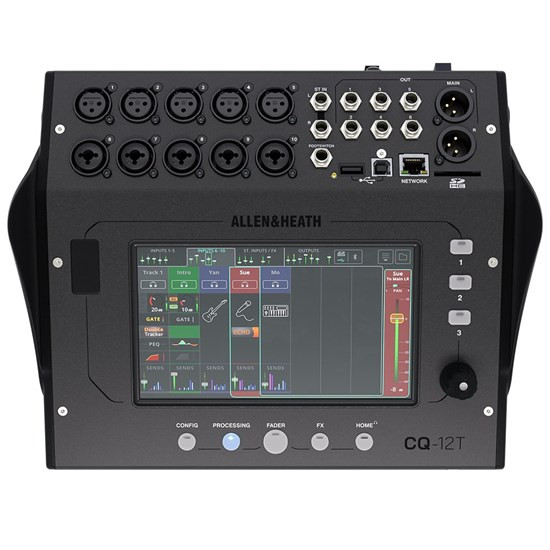
If you've been looking into digital mixers and feeling a bit overwhelmed, you're not alone. The jump from analogue to digital can feel like learning a new language — suddenly there's talk of scenes, layers, presets, and wireless control. It's a lot.
The Allen & Heath CQ-12T is one of those products that keeps coming up in conversations about making that leap easier. It's a 12-channel digital mixer with a built-in touchscreen, Bluetooth audio streaming, and SD/USB recording — all packed into a surprisingly compact unit. But what does all of that actually mean for someone just getting started?
This guide breaks down everything a newcomer needs to know: what a digital mixer does, why the CQ-12T is worth paying attention to, and how to decide if it's the right fit for your situation.
What Is a Digital Mixer (And Why Should You Care)?
Let's start at the very beginning. A mixer — sometimes called a mixing desk or mixing console — takes multiple audio sources (microphones, instruments, laptops) and combines them into one or more outputs. Think of it like a traffic controller for sound. It decides what goes where, how loud each source is, and what processing gets applied along the way.
An analogue mixer does all of this using physical circuits. Every knob and fader directly controls an electrical signal. Simple, tactile, and proven — but limited in flexibility.
A digital mixer converts those audio signals into digital data and processes them using onboard computing power. This opens up a world of possibilities:
- Recall: Save your entire setup and load it instantly next time. No more photographing your knob positions before packing down.
- Built-in effects: Reverb, delay, compression, and EQ that would cost thousands in outboard analogue gear — included for free.
- Remote control: Adjust everything from a tablet or phone while standing in the audience, hearing exactly what they hear.
- Compact size: Digital processing means fewer physical controls needed, so these mixers tend to be smaller and lighter.
The trade-off? Digital mixers can have a steeper learning curve. That's exactly why the CQ-12T exists — Allen & Heath designed it to make digital mixing accessible without dumbing it down.
Who Is Allen & Heath?
Before we go further, a quick word on the brand. Allen & Heath is a British audio company that's been building mixers since 1969. They're not a budget brand trying to undercut the competition — they're a professional audio manufacturer whose gear gets used in major venues, touring rigs, and broadcast facilities worldwide.
Why does that matter for a beginner? Because the CQ series represents Allen & Heath's deliberate effort to bring their professional-grade audio quality to a more accessible price point and user experience. You're getting genuine pro audio engineering, not a toy with a fancy screen.
Understanding the CQ-12T: What Do the Specs Actually Mean?
Product specs can read like alphabet soup if you're new to this. Let's translate the CQ-12T's key specifications into plain English.
"12 Channel" — Your Input Capacity
A channel is essentially one audio input slot. The CQ-12T gives you 12 input channels, which breaks down as:
- 6 mono channels with combo XLR/TRS jacks — these handle individual microphones or single instruments like guitars and bass
- 3 stereo channels — these handle sources that have both a left and right signal, like keyboards, backing tracks from a laptop, or Bluetooth audio
For context, 12 channels is enough to mic up a small to medium band (vocals, drums kick and snare, guitar, bass, keys), run background music, and still have a channel or two spare. It's an excellent starting point that won't leave you short for most small venue and function gigs.
"Touchscreen" — Your Control Centre
This is arguably the CQ-12T's defining feature. Instead of rows upon rows of knobs and faders, you get a 7-inch colour touchscreen built right into the top of the mixer. It works much like a tablet — swipe, tap, and drag to control your mix.
Why is this significant? Most digital mixers in this price range either rely entirely on a connected tablet or phone for control, or they use small screens with physical buttons that require menu diving. The CQ-12T gives you both: a fully functional built-in screen and the option to control wirelessly from your device.
For beginners, this is genuinely helpful. You can set up and run your entire mix from the mixer itself — no need to worry about tablet batteries dying, Wi-Fi connections dropping, or remembering to bring your iPad. The touchscreen provides a complete, self-contained mixing experience.
"Bluetooth" — Wireless Audio Streaming
Bluetooth audio on the CQ-12T lets you stream music wirelessly from your phone or tablet directly into the mixer. This is brilliant for:
- Playing background music during breaks at gigs
- Running backing tracks at functions
- Sound-checking with reference music
- Playing walk-in music before events start
No cables, no adapters, no fuss. Just pair your phone and play. It's one of those features that sounds minor until you realise how often you need it.
"SD/USB" — Built-in Recording
The CQ-12T can record your mix directly to an SD card or USB drive. This means you can capture a live recording of your gig, rehearsal, or service without any extra equipment. Pop in an SD card, hit record, and you've got a stereo WAV file of your mix when you're done.
For beginners, this is incredibly useful for reviewing your mixes and improving over time. It's also handy for bands who want a quick live recording without the complexity of a full multitrack setup.
Features That Actually Matter for Beginners
Beyond the headline specs, the CQ-12T has several features specifically designed to make life easier if you're new to digital mixing. These are the ones worth understanding.
QuickStart Presets
Allen & Heath includes ready-made presets for common scenarios — small band, solo artist, speech/presentation, and more. Load one up and you've got a sensible starting point with appropriate EQ, compression, and effects already dialled in. You can then tweak from there rather than starting from a blank slate. This alone can save hours of frustration when you're learning.
Built-in Effects Processing
The CQ-12T includes four dedicated effects engines (reverb, delay, chorus, and more) plus channel processing on every input — that's EQ, compression, gating, and high-pass filtering on each channel. In the analogue world, you'd need a separate rack of gear costing well over a thousand dollars to achieve this. Here, it's all built in and ready to go.
For beginners, the key takeaway is: you don't need to buy any additional processing equipment. Everything you need for a polished, professional sound is already inside the mixer.
Wi-Fi Connectivity
The CQ-12T has a built-in dual-band Wi-Fi access point. This means you can connect your phone or tablet directly to the mixer without needing an external router. Download the free CQ-MixPad app (available for iOS, Android, Windows, Mac, and even Linux), connect to the mixer's Wi-Fi, and you can control everything wirelessly.
This is genuinely transformative for live sound. Instead of being stuck behind the mixer at the back of the room, you can walk out into the audience and adjust the mix while hearing exactly what everyone else hears. It's not a gimmick — it's how professional sound engineers have been working for years, and the CQ-12T makes it accessible from day one.
Automatic Mic Mixing (AMM)
Here's a feature beginners might not even know they need: Automatic Mic Mixing. In situations with multiple open microphones (think panel discussions, church services, or conferences), AMM automatically adjusts levels based on who's speaking. It reduces the level of mics that aren't being used, cutting down on feedback and background noise without you having to ride the faders constantly.
If you're doing any kind of speech or presentation work, this feature is worth its weight in gold.
What Makes the CQ-12T Different from Other Digital Mixers?
There are plenty of digital mixers on the market. Here's what genuinely sets the CQ-12T apart:
- Self-contained operation: Many competitors require a tablet to access full functionality. The CQ-12T works completely independently with its built-in touchscreen.
- Allen & Heath sound quality: The preamps (the circuits that boost microphone signals) are the same quality you'd find in their more expensive professional consoles. You're not getting a watered-down version.
- Genuinely intuitive interface: The touchscreen UI was designed from scratch for this product. It's not a professional console interface crammed onto a small screen — it's purpose-built to be clear and navigable.
- Robust build quality: Metal chassis, solid connectors, and the kind of build quality that survives life on the road. This isn't a plastic toy that'll fall apart after six months of gigging.
Common Beginner Mistakes to Avoid
If you're new to digital mixers, here are the pitfalls worth knowing about before you start:
- Not saving your scenes: One of the biggest advantages of digital is the ability to save and recall your settings. Get into the habit of saving a "scene" every time you get a good mix. Future you will be grateful.
- Over-processing: Just because you have EQ, compression, reverb, and delay on every channel doesn't mean you should use them all. Start with everything flat and only add processing when you hear a problem that needs solving.
- Ignoring the presets: There's no shame in starting with a preset. Professional engineers use templates and starting points all the time. Load a preset, listen critically, and adjust from there.
- Forgetting to update firmware: Allen & Heath regularly releases firmware updates that add features and fix bugs. Check for updates when you first get the mixer and periodically after that.
- Skipping the tutorials: Allen & Heath provides excellent video tutorials for the CQ series. Spend an evening watching them before your first gig. Seriously.
Is the CQ-12T Right for You? A Beginner's Checklist
The CQ-12T is an excellent choice if you tick several of these boxes:
- You're moving from analogue to digital for the first time
- You need 12 or fewer input channels
- You want a mixer that works independently without requiring a tablet
- You value sound quality and build quality over rock-bottom pricing
- You do small venue gigs, functions, corporate events, or house of worship sound
- You want built-in recording capability
- You like the idea of wireless control but don't want to depend on it
It might not be the best fit if:
- You need more than 12 input channels (look at the CQ-18T or CQ-20B instead)
- You need physical motorised faders for tactile control (consider Allen & Heath's SQ series)
- You're on a very tight budget (there are more affordable options, though they come with compromises in sound quality and build)
- You need advanced routing like Dante networking (that's territory for the Qu or SQ range)
What to Expect When You First Set Up
If you do go ahead with the CQ-12T, here's a realistic picture of what the first few sessions look like:
Unboxing and physical setup (15 minutes): Plug in power, connect your speakers to the main outputs, and plug in a microphone or two. The physical connections are straightforward — if you've used any mixer before, this part will feel familiar.
First power-on and navigation (30 minutes): The touchscreen interface is intuitive, but give yourself time to explore. Swipe through the different pages, find where the EQ lives, locate the effects sends, and familiarise yourself with the layout. Load a QuickStart preset to get sound flowing quickly.
Connecting wirelessly (10 minutes): Download the CQ-MixPad app, connect to the mixer's Wi-Fi network, and pair. The app mirrors what's on the touchscreen, giving you remote control. Try adjusting levels from across the room — it's quite satisfying the first time.
Learning curve (a few weeks): You'll be making sound come out of speakers within minutes. Getting comfortable with all the features — saving scenes, using effects confidently, setting up monitor mixes — takes a few sessions. This is completely normal. By your third or fourth gig, you'll wonder how you ever managed without a digital mixer.
Accessories Worth Considering
The CQ-12T works brilliantly on its own, but a few additions can enhance your experience:
- A quality SD card: For recording your mixes. Get a decent branded one (SanDisk, Samsung) — don't cheap out here, as dodgy cards can cause recording dropouts.
- A padded carry case or bag: The CQ-12T is compact and portable, but that touchscreen deserves protection during transport.
- A tablet stand or mount: If you plan to use the app alongside the touchscreen, having your tablet mounted at a comfortable angle helps.
- Decent headphones: The mixer has a dedicated headphone output for monitoring. A pair of closed-back headphones lets you solo channels and check your mix in detail.
Frequently Asked Questions from Beginners
Do I need a tablet to use the CQ-12T?
No. The built-in 7-inch touchscreen gives you full control of every function. A tablet is optional — it provides a larger screen and wireless control, but the mixer is fully functional on its own.
Can I use it for recording music at home?
Yes. The CQ-12T can function as a USB audio interface, sending audio to and from your computer for recording in a DAW (Digital Audio Workstation) like GarageBand, Logic, or Reaper. You can also record a stereo mix directly to an SD card.
Is it hard to learn if I've only used analogue mixers?
The transition is easier than you might think. The core concepts — gain, EQ, faders, aux sends — are identical. The difference is that controls are on a screen instead of physical knobs. Most analogue users feel comfortable within a couple of sessions.
How does it handle in a live setting?
Very well. The CQ series was designed specifically for live use. The built-in Wi-Fi means you can mix from anywhere in the venue, and the quick scene recall means you can switch between bands or segments in seconds.
What about reliability? Can I trust it at a gig?
Allen & Heath has a strong reputation for reliability. The CQ-12T uses a robust metal chassis, quality components, and has been designed for the rigours of regular gigging. That said, always carry a backup plan for critical gigs — that's good practice regardless of what equipment you use.
Ready to Make the Move?
The Allen & Heath CQ-12T sits in a sweet spot that's hard to argue with: genuine professional audio quality, an interface designed for real humans (not just engineers with decades of experience), and a feature set that covers the vast majority of small to medium applications.
If you're an Australian musician, venue operator, church tech volunteer, or corporate AV person looking to step into the world of digital mixing without drowning in complexity, the CQ-12T deserves serious consideration. It's not the cheapest option available, but it's one where the quality and usability genuinely justify the investment.
You can check the current price and availability of the Allen & Heath CQ-12T at MusiconStage, where you'll also find local Australian support and shipping.
And remember — every professional sound engineer started as a beginner. The best mixer is the one you'll actually learn on and use. The CQ-12T makes that learning process genuinely enjoyable.
Browse the Allen & Heath CQ-12T and start your digital mixing journey today →